
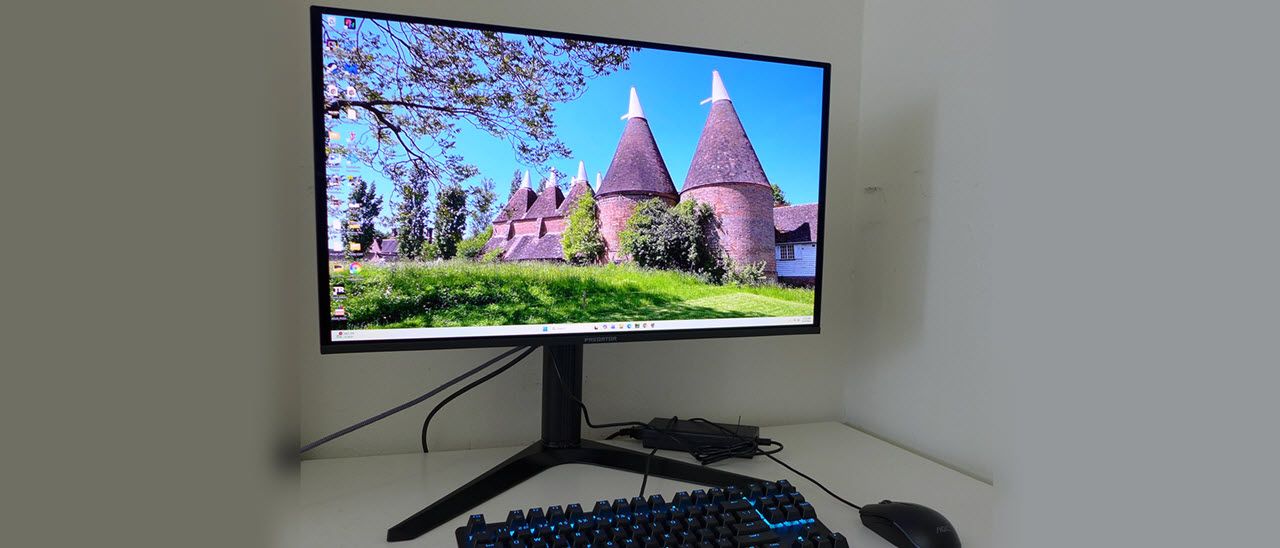
(Image credit: Acer) (Image credit: Acer) (Image credit: Acer) The X27 X1’s styling clearly marks it as an OLED monitor. The panel has a metal backing, and around its perimeter is only 3mm thick. It flares out a bit at the bottom, and a component bulge is attached to the back, bringing the total depth to 1.5 inches. It’s one of the slimmest monitors I’ve seen in a while. The backing is all metal while the bulge is enrobed in hard plastic with a matte finish. The screen is shiny and rejects light reasonably well, but it won’t hold up to bright sunny windows or harsh desk lamps. Keep the light controlled, and you’ll be rewarded with a crystal-clear image that’s colorful and contrasty. There are no artifacts or grain here.
The back photo above shows a white ring around the panel’s attachment point. It does not have a backlight, but it glows a bit when light hits it. The louvered vents on the sides do the same thing. The stand is very solid and makes liberal use of metal in the wide footprint base and for chunky bits like the headphone hook up top and the cable manager on the bottom. Ergonomics include a 4.7-inch height adjustment plus 5/20 degrees tilt, 20 degrees swivel and a 90-degree portrait mode. Movements are firm and befit a premium display. The base is very large and will ensure the X27 X1 stays put.
The input panel faces backward, making it super easy to access. It contains two DisplayPort 1.4 and two HDMI 2.1 inputs, plus a USB-C (DP Alt) port with 65 watts of power. There’s a 3.5mm headphone jack to supplement the two five-watt internal speakers. And USB ports are version 3.2 with one upstream and two downstream.
The X27 X1’s color and gamma are nearly spot-on out of the box, but I noticed a slight purple tint in grayscale step patterns. I was able to correct this, but gamma became too light in the brighter parts of the image. Switching back and forth between calibrated and uncalibrated modes, I found I preferred the calibration even with its skewed gamma. Some highlights were less vibrant, but the overall image looked better to my eyes. My settings are below.
I noted that there was no option for variable brightness in SDR mode. Window and full field patterns measured the same. But variable brightness is active for HDR content, which increases perceived contrast and gives that material more impact with small highlights nearing the 1,000-nit level.
It bears mentioning in any 4K monitor review that you will want the fastest video card you can afford to run at 240 Hz. The X27 X1 is a decent value, but it’s still expensive, and you don’t want to play below its potential. To see perfect motion resolution, you’ll want at least 150fps and preferably, 200fps. I accomplish this with a GeForce RTX 4090, and it does break a sweat in the process. I’d say that I enjoy the sound of fans at full honk and a swirl of warm air around my legs coming from the PC tower on the floor. But I live in Florida, and it’s hot here.
Climate control aside, the X27 X1 is a superb gaming monitor in every respect. The panel is incredibly fast, fast enough that I could dial the frame rate down to 144 Hz and still see perfect motion resolution. By this, I mean that fine detail remains clear whether objects are moving or stationary. I also enjoyed super low input lag. In testing, which you can read about on the next page, it was one of the fastest 4K OLEDs I’ve reviewed, pipped only by an Asus ROG Strix display.
Smooth motion and low lag mean precise aiming, easy avoidance of incoming fire, and the ability to stay a step ahead of the enemy. I could time movements and shooting to make them occur exactly where and when I wanted. The X27 X1 is a true extension of the hand and eye. Competition gamers will want to add one of these to their systems. And that would be true for PC or console. The HDMI inputs support full bandwidth signals at 3840×2160 with VRR and HDR at 240 Hz.
The picture is gorgeous as well. You’ll want to add more leisurely games to the library so you can enjoy the rich color, deep contrast, and fine detail. Though I don’t usually rate resolution above contrast, a 27-inch 4K monitor like the X27 X1 delivers compelling pixel density. You can sit as close as you like and never see a dot or a jagged line. 163ppi is a significant and visible upgrade from a QHD 27-inch screen’s 109ppi, and a 32-inch UHD’s 138ppi.
During calibration, I noted that a compromise was necessary. Out of the box, the X27 X1 has nearly perfect gamma but slightly warm grayscale tracking. After tweaking, grayscale is perfect, but gamma became skewed with slightly elevated highlights. I preferred the latter state, but some users may want to leave the RGB sliders alone.
The X27 X1 includes a large variety of gamut options that cover everything except Adobe RGB. This makes it more versatile for color-critical use. It can easily serve as a post-production monitor or a photographer’s tool. It’s great for the more mundane spreadsheet or word processor, too, with crystal-clear rendering of tiny fonts and thin lines.
I appreciated the inclusion of internal speakers. They played with good volume and low distortion. They’re great in a pinch when you don’t have a pair of headphones handy, and for system sounds. The stand includes a sexy metal hook for your cans so you can always have them within reach. I also noted the extra DisplayPort input as well as the USB-C, making a total of five video jacks. There are plenty of USB ports for peripherals too, but sadly, no KVM.
Takeaway: The X27 X1 is a supremely useful everyday monitor that happens also to be a gaming weapon. It’s super-fast and smooth with everything an enthusiast might want. It’s built well with liberal use of metal and a slick headphone hook. It’s flexible with lots of USBs and video inputs, and it has a decent pair of internal speakers. The only thing you don’t get is LED lighting, but that doesn’t affect its extreme performance or gaming capabilities.
Current page: Features and Specifications
Key considerations
- Investor positioning can change fast
- Volatility remains possible near catalysts
- Macro rates and liquidity can dominate flows
Reference reading
- https://www.tomshardware.com/monitors/gaming-monitors/SPONSORED_LINK_URL
- https://www.tomshardware.com/monitors/gaming-monitors/acer-predator-x27-x1-27-inch-240-hz-oled-gaming-monitor-review#main
- https://www.tomshardware.com
- Embattled streamer goes viral after playing Red Dead Redemption 2 at 4 FPS — ‘i5-8300H and a 1050ti with 4GB’ setup takes 12 hours to play through the first cha
- Build a $5,000 AM5 gaming PC for just $2,771 with this Newegg combo deal — 9800X3D and RTX 5070 also come with 128GB of DDR5 RAM, 4TB SSD, X870E motherboard, an
- 10 petabytes of sensitive data stolen from China's National Supercomputing Center, hackers claim — daring heist would be largest ever China hack, covering 6,000
- After jumping 2,200% over the last twelve months, DDR4 spot prices fall 5%, the first decline in nearly a year — DDR5 pricing sees some relief in China channel
- Asus ROG Xbox Ally review: The cheapest Windows handheld gets points for showing up
Informational only. No financial advice. Do your own research.