
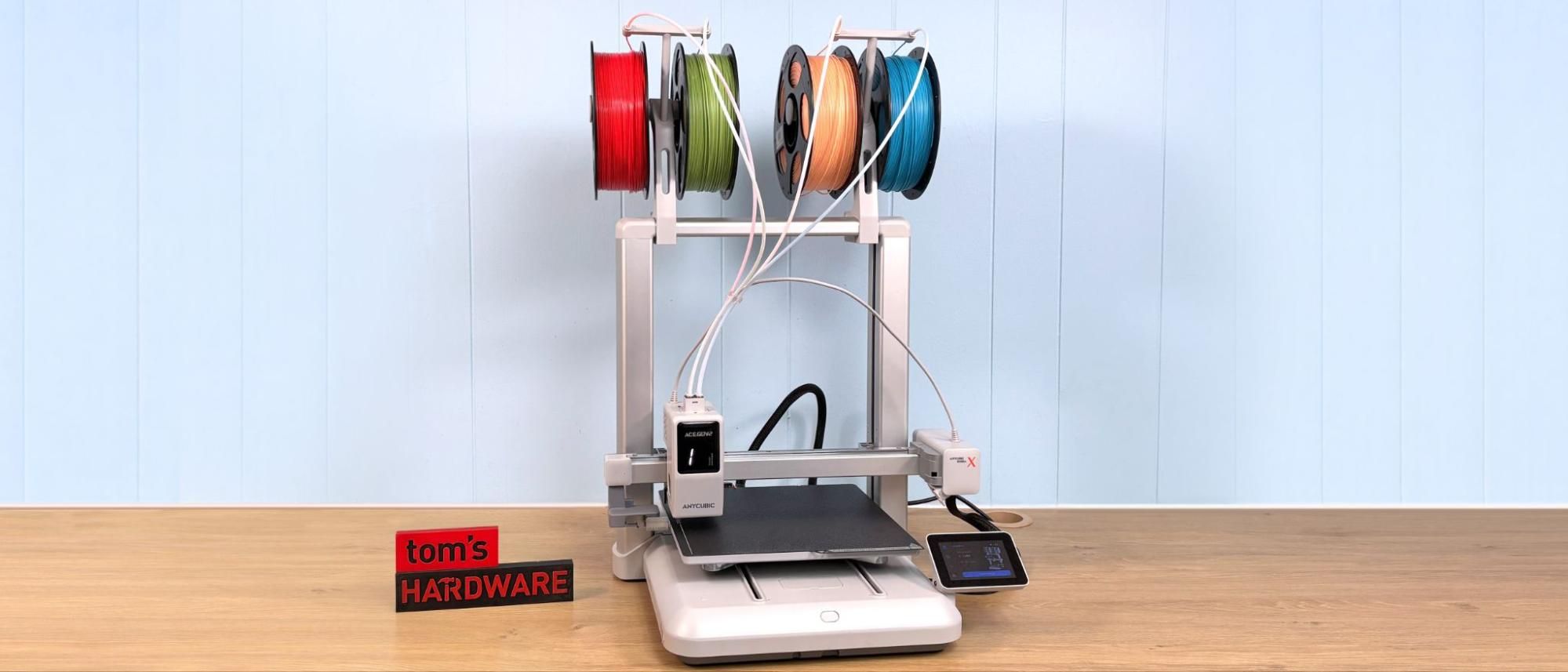
The Anycubic Kobra X looks suspiciously like a Bambu Lab A1, with a brushed aluminum gantry, left side X-axis purge wiper, and a fully enclosed motion system.
Under the hood, it’s a very different beast. The ACE (Anycubic Color Engine) Gen 2 has been miniaturized and stuffed right into the toolhead. The active filament is chosen by a motor driven camshaft, which will allow the feed gears to only grip the correct filament. A large display on the front of the tool head shows which filament is active.
(Image credit: Tom's Hardware) (Image credit: Tom's Hardware) If four colors isn’t enough for you, the system can be expanded up to 19 colors by adding up to four of Anycubic’s ACE 2 Pro boxes. This would involve 16 tubes being connected to the printer via hubs, a spectacle Anycubic has yet to show off in the marketing materials.
During testing, the Kobra X’s ACE Gen 2 worked flawlessly. I tried everything from PLA to PETG to 95A and 85A TPU. The only jam I had was running an old spool of extremely brittle Light Weight PLA. Removing the hub on top of the toolhead was all that was required to clear it. I do not fancy disassembling the extruder, as it is a fairly complicated process.
The hotend and nozzle of the Kobra X look a lot like a Bambu knockoff until you start to disassemble it. This was designed to cut the filament as close to the melt zone as possible. As a result, most of the finned heat sink is now a permanent part of the hotend, including a part that swings out of the way, to access the nozzle. The nozzle included with the printer is made of durable hardened steel.
(Image credit: Tom's Hardware) (Image credit: Tom's Hardware) The motion system of the Kobra X is mostly enclosed, with the top mounted X-axis linear rail being the only part visible. Dual Z-axis rods are enclosed inside the gantry and driven by a single stepper motor and belted at the top. The bed runs on metal rails with metal guide wheels and is enclosed in the base, with access ports to verify belt tightness.
Running in standard mode, the printer is fairly quiet, especially with very little filament retraction needed. The main noise is from the cooling fans, and our review unit did have a somewhat annoying squeak coming from the motion system.
After cutting a few zip ties and removing some foam, the Anycubic Kobra X is easy to assemble with the parts nicely labeled and the hardware separated into bags. The gantry is held on with eight M5 screws into the base, four into either side. Once you switch on the machine, the interface will ask you to double check that all shipping brackets have been removed, which is a nice reminder, especially for beginners.
The cables are well labeled and plugged into the base once the gantry is secured.
The spool holders clamp into place on the top of the gantry without tools. These should be spaced as far apart as possible, as getting full sized spools of filament into the inner two holders is a tight fit. Four guide tubes from the spool holders must be attached in the correct order to know which spool is feeding each slot.
The purge wiper attaches to the left side of the X-axis with one screw and there are covers for the exposed hardware on top and for the wiring on the bottom giving the printer a very polished appearance once assembly is complete.
The Anycubic Kobra X levels the bed and automatically sets Z offset as part of its initial calibration and then rechecks it at the start of every print. Anycubic’s LeviQ 3.0 system works flawlessly.
Loading filament into the Anycubic Kobra X is simple but is a little awkward if the spool is full. The short distance between the guide tube and the edge of the spool makes it tough to push more than an inch or two of filament at a time. The spool holders do not have any mechanical retraction, so the spools can get a little messy when the filament unloads between swaps and when machine vibration causes the spool to unwind.
The simple spool holder design allows you to use any brand of filament, no matter what the spool is made of or how big the diameter of the hole. You can also easily use quarter sized spools and sample coils without problem.
The workbench tab of Anycubic SlicerNext offers a number of control options for the printer, although fine tuning beyond temperature, parts cooling fan speed, and three broad speed modes is not available. The camera view is visible but unfortunately it cannot be expanded to full screen. The workbench tab is also where you can easily update the printer’s firmware over the air and find statistics on total print time and filament used.
The Anycubic Kobra X printed perfectly out of the box with the Anycubic PLA they supplied for the review. You’ll definitely want to check out our list of the best filaments for 3D printing to load up the spool holders for the ACE Gen 2.
Any 3D printer that uses one nozzle for multicolor is going to have a problem with filament waste. Once filament is melted inside the hot end it can only be pushed out, resulting in printer “poop”.
Anycubic was able to decrease this waste on the Kobra X by reducing the distance between the cutter and the nozzle to 10 mm, which greatly reduces how much filament needs to be retracted or flushed when you change colors or materials. Reducing the purge amount also reduces the time required to change colors. During our testing, the Kobra X was nearly twice as fast as its rival, the Bambu Lab A1, and wasted much less filament when using equal settings.
For the first print I ran the Clearance Castle from Makers Muse in the Anycubic Basic PLA . This four color print took 13 hours and 10 minutes, using a .2 mm layer height and default settings. It purged 150grams of filament and created a 42gram purge tower. This number could definitely be reduced by fine tuning the purge amounts in the slicer.
By comparison, the Bambu Lab A1 ran the same print, using the same default settings, and took 23 hours and 8 minutes to print, and created 229 grams of purge poop with a 34 gram purge tower. That’s 10 hours longer and with 71 grams more waste. In each case, the model itself only weighs 31.74 grams.
The Kobra X printed the castle with very good quality, though the bridging (on the draw bridge) was a little rough. All the colors were exceptionally clean.
A good test for bed adhesion and levelling is the Articulated bone dragon from kh4rj0 on Printables. The 150 link dragon is over 5 feet long and fits the build plate to the edge. It printed just beautifully in the blue and black PLA Anycubic provided. The print took 17 hours and 22 minutes with a .2 mm layer height and running at an average speed of 140 mm/s.
For PETG I used some old oddball partial spools that fit great on the Kobra X’s spoolholders but never work in a box style AMS. Using clear filament in a multicolor print can be challenging but the result was free of color bleeding using the default settings in the slicer. A plate of six Cinderwing3D Classic Dragon Hatchlings took 5 hours and 44 minutes to print using a .2 mm layer height at an average speed of 140 mm/s. The prints had a few wisps of stringing but are otherwise very nice.
Many multicolor systems struggle to push 95A and softer TPU. The ACE Gen 2 did both 95A and 85A TPU just fine. The most impressive print I did was an old file from Thingiverse of a scanned paper lunch bag in white Inland TPU . Using a .2 mm layer height in vase mode with a full 1 mm layer width, the print took 10 hours 48 minutes at an average speed of 35 mm/s. The print came out really good considering the height and the flexibility of the filament.
Anycubic’s Kobra X is an excellent addition to the company’s bedslinger lineup. Although it skips the spool-drying feature of the ACE Pro, the integrated ACE Gen 2 more than makes up for it with faster swaps and excellent filament compatibility, feeding everything from odd-sized spools to soft TPU without fuss.
More importantly, the Kobra X proves that multicolor printing doesn’t have to be expensive or complicated. By building the entire system into the toolhead, Anycubic avoided the bulky external AMS boxes and long filament paths that slow down swaps and create waste. The result is a printer that feels faster, simpler, and less fussy than its rivals. If you want affordable, reliable multicolor printing without jumping to a pricier CoreXY machine, the Kobra X is an easy recommendation.
If you want fast, affordable multicolor printing without a complicated external AMS or premium price tag, the Kobra X is an easy pick. If you prefer a more mature ecosystem, you may still lean toward Bambu Lab’s A1 , which is currently on sale for $399. If you need more build space, but still want affordable color, the Anycubic Kobra 3 Max has a 420 x 420 mm build plate and is currently on sale for $599.
Denise Bertacchi is a Contributing Writer for Tom\u2019s Hardware US, covering 3D printing. Denise has been crafting with PCs since she discovered Print Shop had clip art on her Apple IIe. She loves reviewing 3D printers because she can mix all her passions: printing, photography, and writing. ","collapsible":{"enabled":true,"maxHeight":250,"readMoreText":"Read more","readLessText":"Read less"}}), "https://slice.vanilla.futurecdn.net/13-4-13/js/authorBio.js"); } else { console.error('%c FTE ','background: #9306F9; color: #ffffff','no lazy slice hydration function available'); } Denise Bertacchi Social Links Navigation Freelance Reviewer Denise Bertacchi is a Contributing Writer for Tom’s Hardware US, covering 3D printing. Denise has been crafting with PCs since she discovered Print Shop had clip art on her Apple IIe. She loves reviewing 3D printers because she can mix all her passions: printing, photography, and writing.
LaminarFlow I have pre-ordered with the $20 off voucher. This would be my first dabble into thermal-plastic 3D printing, as funny enough my everyday job has a lot to do with laser powder-bed fusion metal 3D printing. My daughter has been bugging me for one for a while, and at $259 it seems too good to pass up. I don't need anything super sophisticated; just hoping it works nice and smoothly. I've heard of tales of Anycubic bad software and questionable customer service. Hopefully it all works out at the end, and with this review, it's certainly more encouraging. Reply
Key considerations
- Investor positioning can change fast
- Volatility remains possible near catalysts
- Macro rates and liquidity can dominate flows
Reference reading
- https://www.tomshardware.com/3d-printing/SPONSORED_LINK_URL
- https://www.tomshardware.com/3d-printing/anycubic-kobra-x-review#main
- https://www.tomshardware.com
- [Daily Due Diligence] NVDA NVDA
- Mercedes-Benz Unveils New S-Class Built on NVIDIA DRIVE AV, Which Enables an L4-Ready Architecture
- Gamer scores Nvidia’s $999 powerhouse RTX 5080 for a jaw-dropping $562 — the Walmart clearance aisle is the secret weapon to beat the AI-driven GPU shortage (Up
- Cornell research shows that underwater 3D printing can be used to build or repair ocean structures in place — DARPA-funded project aims to make underwater const
- Grab this 360Hz 27-inch Samsung Odyssey OLED gaming monitor for its lowest ever price of just $564.99 — save a massive $335 off the retail price of the G60SD in
Informational only. No financial advice. Do your own research.