
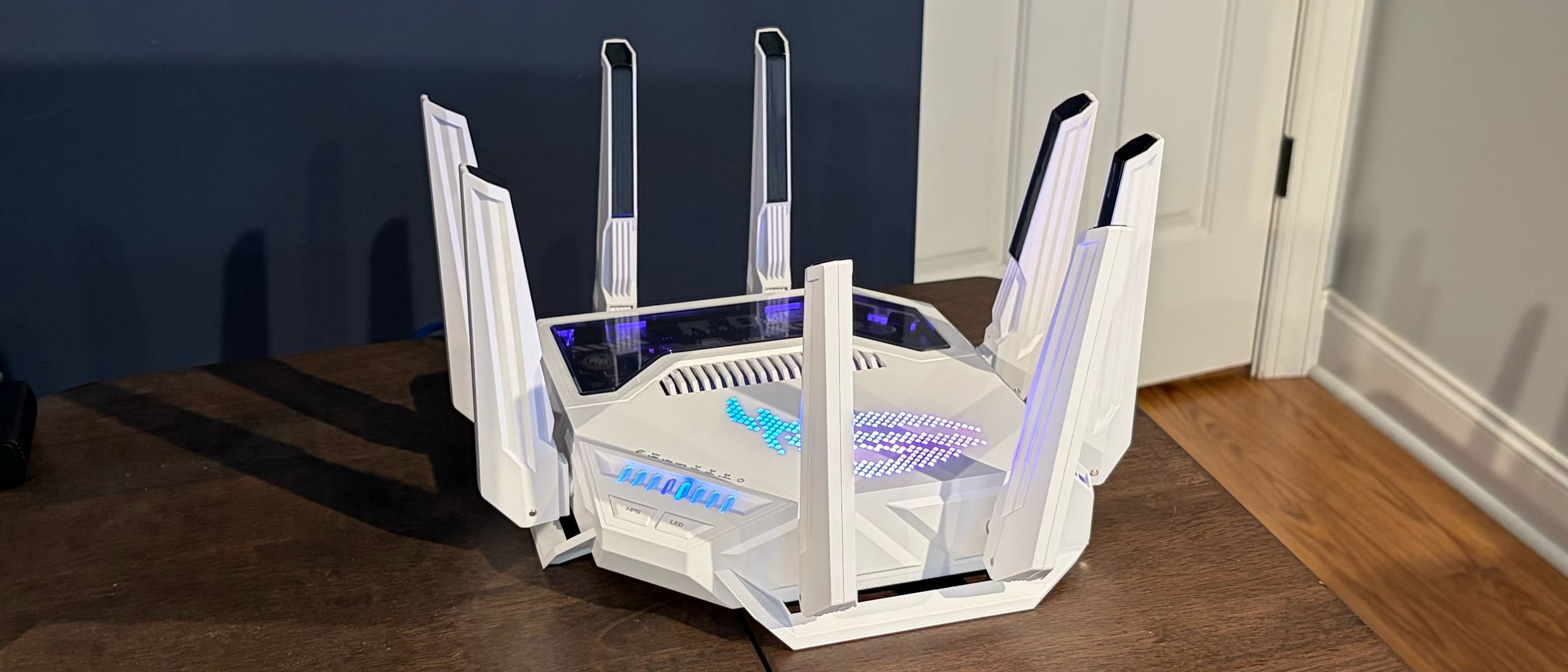
The initial setup of the ROG Rapture GT-BE19000Ai is made simply using the Asus Router smartphone app. After installing the app on your smartphone, you can scan the QR code on the bottom of the router to kick off the process. The setup program will prompt you to connect to the default/factory SSID, then start the configuration process. If you already have an Asus account and a previous Asus router that had its settings backed up to the cloud, you can transfer those settings to your new router and save quite a few steps.
If you don’t have a previous save file, you’ll go through the typical configuration options, such as setting an admin password, naming your SSIDs, creating a password for each SSID, and checking for firmware updates. A firmware update was available for our review unit, so I applied it right away before I began performance testing.
The setup process took less than 10 minutes (including the time it took to perform the firmware update).
After the initial setup was complete, I used the Router app to enable Automated Frequency Coordination (AFC) on the ROG Rapture GT-BE19000Ai, which increases power levels on the 6 GHz band. By switching from the default Low Power Indoor profile to the Standard Power Profile (depending on regional restrictions), AFC increases the range of the 6 GHz band, allowing you to, in theory, enjoy higher performance at distances comparable to those of the 5 GHz band. I enabled AFC on the ROG Rapture GT-BE19000Ai for all 6 GHz tests.
Although the Asus Router app is easy to use and feature-packed, I opted to use the standard Web GUI for further interactions with the ROG Rapture GT-BE19000Ai. This is the first router we’ve tested using ASUSWRT 6.0 (version 3.0.0.6.102_40425). The default page for the router is the Dashboard, and you’ll notice the white theme, which is a departure from the black we’re used to for other ROG networking products. The Dashboard provides a lot of information at a glance, including internet connection details, the number of connected devices per wireless band, occupied Ethernet ports, the traffic monitor, and CPU/RAM utilization. You also have quick access to RGB controls, allowing you to change the color and pattern of the effects.
Asus is really playing up the “AI” aspect of the ROG Rapture GT-BE19000Ai, but it needs to justify using the onboard NPU. To that end, the NPU powers Asus’ free AiProtection suite to protect all of your network devices. The primary vectors for protection include malicious site/infected device blocking and isolation, automatic ad blocking for your web browsers, tracker blocking, and a two-way intrusion protection system (IPS) for guarding against DDoS attacks.
(Image credit: Tom's Hardware) (Image credit: Tom's Hardware) (Image credit: Tom's Hardware) Going even further, the ROG Rapture GT-BE19000Ai can automatically detect gaming devices that connect to the network, prioritize their traffic, and give top billing to ROG motherboards, desktops, and laptops. You can also leverage the Game Boost feature with Adaptive QoS and use GTNet to optimize your network route when gaming online.
(Image credit: Tom's Hardware) (Image credit: Tom's Hardware) Asus also has a Router Assistant that lets you ask questions about the router and its features. I asked, “What is MLO?” and it replied with the correct definition. You can also ask things like “How many devices are connected to the network?” All of your queries to the Router Assistant are processed locally.
The NPU firmware is separate from the router’s firmware and can be updated from the AI Board section in the WebGUI. Unlike our router, there were no available firmware updates for the NPU.
Our iPerf3 throughput tests are conducted at six feet and 25 feet, with and without network traffic. In the congested traffic tests, we add six wireless clients streaming 4K YouTube videos across multiple wireless bands.
Generally speaking, the router's close-range performance on the 6 GHz and 5 GHz bands was excellent. Even more impressive is that with AFC enabled, the performance drop-off at long range and with congested traffic on the 6 GHz band was minimal.
Testing iPerf3 on the 6 GHz band at short range (6 feet), the ROG Rapture GT-BE19000Ai cracked the 3 Gbps mark, putting it on even footing with the previous Asus flagship: the RT-BE96U.
Performance was well above what we saw recently with the ROG Strix GS-BE18000, which barely crested the 2 Gbps mark and was comfortably ahead of the TP-Link Archer GE800. Even at 25 feet, the ROG Rapture GT-BE19000Ai still topped 2.1 Gbps, putting it ahead of the other assembled Asus routers, but well off the pace of the Archer GE800.
(Image credit: Tom's Hardware) (Image credit: Tom's Hardware) (Image credit: Tom's Hardware) (Image credit: Tom's Hardware) (Image credit: Tom's Hardware) (Image credit: Tom's Hardware) The ROG Rapture GT-BE19000Ai also performed well on the 5 GHz test, nearly equaling the ROG Strix GS-BE18000 at 6 feet, but coming out comfortably ahead at 25 feet (714 Mbps versus 497 Mbps). However, the ROG Rapture GT-BE19000Ai was no match for the Archer GE800, which hit 1.8 Gbps at 6 feet and 1.3 Gbps at 25 feet.
The ROG Rapture GT-BE19000Ai performed in line with the ROG Strix GS-BE18000 at 6 feet, and vastly outperformed its sibling at 25 feet. However, both the RT-BE96U and the Archer GE800 delivered 50 Mbps+ higher performance at close range, and up to twice the performance at 25 feet.
With congested traffic, the ROG Rapture GT-BE19000Ai generally performed on par or better than the other two Asus routers at close range, and surpassed them at long range across all bands. The Archer GE800 remained the stronger performer across the board (except in the 6 GHz band at close range).
I also tested the 2.5 GbE and 10 GbE LAN ports to see how wired traffic fares. Using iPerf3, speeds were consistently at 2.37 Gbps and 9.49 Mbps, respectively.
The Asus ROG Rapture GT-BE19000Ai is an interesting entry to the Wi-Fi 7 gaming router segment. The router definitely has impressive hardware specs, including multiple 10 GbE and 2.5 GbE ports. You’ll also find two USB-A ports and plenty of RGB lighting to spruce up your desk or bookshelf.
The biggest addition, however, is the AI functionality afforded by the NPU. You get dedicated hardware to support its onboard AI-powered software features (game acceleration, ad blocking, device protection, etc.). However, Asus’ routers without dedicated AI hardware also have the features; they just rely on the main CPU. The use of the NPU should technically free up hardware resources, ensuring your router’s CPU is unencumbered by AI requests. The NPU also powers the onboard Docker and Edge AI support. If you need greater expandability and control over your network without relying on cloud-based solutions, and don’t find the already versatile ASUSWRT 6.0 interface powerful enough, there’s not much else available on the consumer market to match the ROG Rapture GT-BE19000Ai.
Overall performance was excellent, although it couldn’t quite touch the TP-Link Archer GE800 on the 5 GHz and 2.4 GHz bands. But where the Archer GE800 might have the advantage with 5 GHz and 2.4 GHz traffic, Asus runs the tables on software. You get Asus’ full AiProtection suite, parental controls, and ad blocking at no additional cost—TP-Link forces you to pay monthly or yearly for that privilege.
Even so, the $899 price tag of the ROG Rapture GT-BE19000Ai is hard to ignore as a significant barrier to entry. Unless the Docker support and onboard Router Assistant are must-haves for you, it’s hard to stomach the $500 price difference between the two (the Archer GE800 currently has a street price of $399 ). We understand that being on the bleeding edge can sometimes lead to a higher price of entry, but that $500 is better spent on one of the best gaming monitors or on securing some DDR5 in today’s climate .
Brandon Hill is a senior editor at Tom's Hardware. He has written about PC and Mac tech since the late 1990s with bylines at AnandTech, DailyTech, and Hot Hardware. When he is not consuming copious amounts of tech news, he can be found enjoying the NC mountains or the beach with his wife and two sons. ","collapsible":{"enabled":true,"maxHeight":250,"readMoreText":"Read more","readLessText":"Read less"}}), "https://slice.vanilla.futurecdn.net/13-4-17/js/authorBio.js"); } else { console.error('%c FTE ','background: #9306F9; color: #ffffff','no lazy slice hydration function available'); } Brandon Hill Social Links Navigation Brandon Hill is a senior editor at Tom's Hardware. He has written about PC and Mac tech since the late 1990s with bylines at AnandTech, DailyTech, and Hot Hardware. When he is not consuming copious amounts of tech news, he can be found enjoying the NC mountains or the beach with his wife and two sons.
cknobman AI in my router? They may as well put a huge DO NOT BUY label on it for people like me. Reply
Hortos How much longer until the people who made scam money post-covid weirdos run out of money so they can stop being catered to by consumer electronics. If you've got a grand for a router you're probably doing something more purposeful with it. Also the only way this AI is useful is if it can configure port forwarding for me. Reply
vinay2070 Still how many years before companies stop putting AI label in front of every product? I would absolutely not want to buy anything that has AI label on it. Reply
Notton As much as I hate the AI stuff being shoved into my face, the use case in this router seems beneficial to the user. The main question I have is, does it have to run on an NPU? I could have sworn these plugins/apps, like Pi-Hole and AdNauseam-like features only required a regular ARM or x86 CPU, and a RasPi4 could fulfill. What does it do differently from something that runs on a RasPi? Reply
Ogotai or just get the GT- BE98 pro, which looks like the same chassis with the same ports, but looks like no AI stuff…. Reply
razor512 The main issue with super expensive consumer routers that advertise gaming and AI, is that they never put it to good use, or do something useful with "AI". One area where AI could be useful, is in detecting signs of WAN congestion/ saturation leading to increased latency. Currently what they still tend to do is benchmark the throughput of the connection, and then do things like cap overall uploads and downloads to around 80% of the benchmarked speeds when it detects traffic from a multiplayer game. And if your connection is really consistent, e.g., a solid 940Mbps upload and download at a all times, then you can really finetune it to give you around 98-99% of your throughput while gaming. The issue is that most consumer internet connections will have speeds that fluctuate throughout the day, thus they cap speeds by a large margin to take into account potential worse case scenarios. One interesting use of AI would be to try and see if it can detect signs of saturation and buffer bloat, and dynamically adjust how much it caps overall throughput to ease those symptoms. Thus having QOS that can provide expected results on cable and satellite connections where throughput is rarely ever consistent throughout the day. Reply
MoxNix AI in a router spying on my internet traffic and reporting everything to whoever the company that makes it wants it to? No thanks! Reply
dotpoz $899 ??? It's a joke ? For $558 you can buy an Ubiquiti Cloud Gateway Fiber ($279) and a U7 Pro XG Wall WiFi 7 AP ($279) Reply
Key considerations
- Investor positioning can change fast
- Volatility remains possible near catalysts
- Macro rates and liquidity can dominate flows
Reference reading
- https://www.tomshardware.com/networking/routers/SPONSORED_LINK_URL
- https://www.tomshardware.com/networking/routers/asus-rog-rapture-gt-be19000ai-wi-fi-7-gaming-router-review#main
- https://www.tomshardware.com
- Asus ROG Ally receives timely GPU driver update despite rumors of AMD Ryzen Z1 Extreme deprecation — new release follows recent speculation that driver support
- NVIDIA Brings AI-Powered Cybersecurity to World’s Critical Infrastructure
- RayNeo Air 4 Pro AR glasses review: Now enhanced with HDR10 and enhanced audio
- Survey Reveals AI Advances in Telecom: Networks and Automation in Driver’s Seat as Return on Investment Climbs
- Klevv Cras V RGB DDR5-9600 C46 2x48GB review: Binned for pure speed, not your wallet
Informational only. No financial advice. Do your own research.