
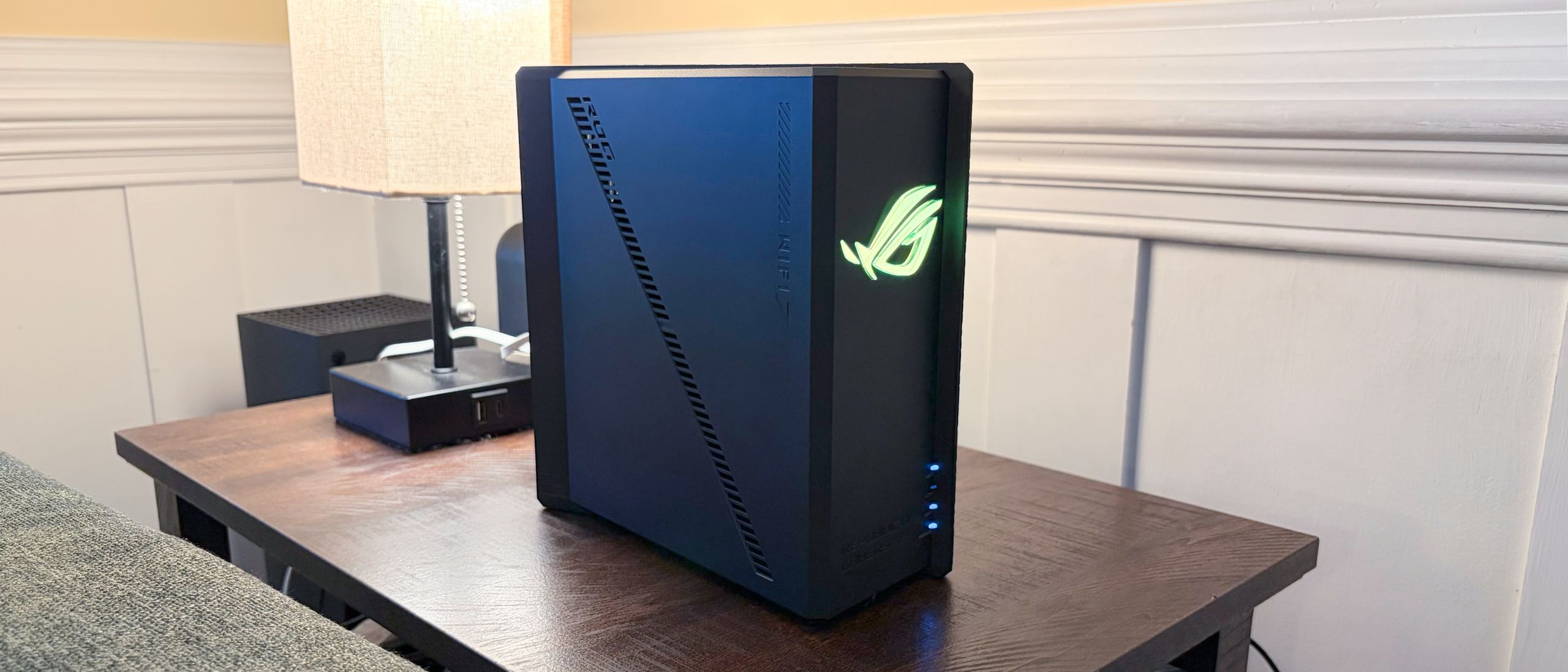
The ROG Strix GS-BE18000 also supports Automated Frequency Coordination (AFC), allowing for boosted power levels on the 6 GHz band. Instead of using the default Low Power Indoor profile, if your local region allows it, AFC can enable the Standard Power Profile, which increases the range of the 6 GHz band. I was able to use the Asus Router app to verify my location and enable AFC.
The ROG Strix GS-BE18000 uses the AsusWRT 5.0 platform with a gaming-oriented focus. While the interface may appear familiar to people who have used previous Asus routers, the version used on the ROG Strix GS-BE18000 makes heavy use of black and shades of red. You'll also find the Republic of Gamers branding in the top right corner of every page.
The first page you'll see when visiting the desktop Web GUI is the Dashboard, which provides at-a-glance information such as the number of connected clients, internet connection status, wireless band status, network traffic, ping times, and quick controls for the RGB logo on the front of the router.
(Image credit: Tom's Hardware) (Image credit: Tom's Hardware) (Image credit: Tom's Hardware) (Image credit: Tom's Hardware) (Image credit: Tom's Hardware) There are comprehensive parental controls that can be implemented on a per-MAC basis, Game Boost (prioritized network traffic, mobile gaming acceleration, Open NAT for port forwarding), Adaptive QoS, Amazon Alexa integration, and much more. Asus even goes above and beyond with how it allows you to utilize the USB port.
Not only can you use it for network storage, but you can set up a network printer server by connecting your USB printer directly to the port, add internet connectivity to your network via a USB cellular modem or smartphone, and even create a Time Machine backup server for Macs.
Like most modern routers, the ROG Strix GS-BE18000 also features an integrated Speed Test utility. Using a MacBook Air connected via the 6 GHz band, I witnessed 1,600 Mbps down and 1,300 Mbps up from my 2 Gbps fiber connection.
Our iPerf3 throughput tests are conducted at six-foot and 25-foot distances, with and without network traffic. In the congested traffic tests, we add six wireless clients streaming 4K YouTube videos across multiple wireless bands.
I’ll preface the performance results by mentioning that the ROG Strix GS-BE18000 was running the latest public firmware (we do not test beta firmware on routers). With that said, overall performance was good, albeit a step or two behind the pricier RT-BE96U in 6 GHz and 2.4 GHz performance.
(Image credit: Tom's Hardware) (Image credit: Tom's Hardware) (Image credit: Tom's Hardware) (Image credit: Tom's Hardware) (Image credit: Tom's Hardware) (Image credit: Tom's Hardware) Testing iPerf3 on the 6 GHz band at short range (6 feet), the ROG Strix GS-BE18000 just barely squeaked past the 2 Gbps mark, although that was roughly a third less than the RT-BE96U (3,040 Mbps) and the TP-Link Archer GE800 (2,830). When moving out to our long-range test (25 feet), the ROG Strix GS-BE18000 lost about a quarter of its performance, falling to 1,467 Mbps compared to 1,980 Mbps for the RT-BE96U. The Archer GE800 barely gave up any ground at 25 feet, registering a still-impressive 2,730 Mbps.
The 5 GHz test was interesting, as we saw much higher performance with the ROG Strix GS-BE18000 than with the RT-BE96U. The former hit 1,273 Mbps at short range and 497 Mbps at long range. The latter was well off the pace at 720 Mbps and 565 Mbps, respectively. The Archer GE800, on the other hand, topped 1,800 Mbps at short range and nearly hit 1,400 Mbps at long range.
The ROG Strix GS-BE18000 vastly underperformed on the 2.4 GHz iPerf3 test, with 122 Mbps at short range and just 39 Mbps at long range. For comparison, the Archer GE800 managed 187 Mbps and 131 Mbps, respectively.
Our ROG Strix GS-BE18000 review unit showed minimal performance degradation with congested traffic. The gap between the ROG Strix GS-BE18000 and the more performance competition shrunk dramatically, with the router achieving 1,823 Mbps at short range and 1,400 Mbps at long range on the 6 GHz band. For comparison, the RT-BE96U put up numbers of 2,493 Mbps and 2,003 Mbps, respectively.
It again leapfrogged the RT-BE96U in the 5 GHz test, maintaining 1,200 Mbps at short range and 425 Mbps at long range. The RT-BE96U was well behind, at 388 Mbps and 208 Mbps, respectively. The overachieving Archer GE800 smoked both Asus routers, however, with 1,290 Mbps at short range and 1,005 Mbps at long range.
When switching to our final 2.4 GHz congest iPerf3 test, the ROG Strix GS-BE18000 continued to underperform with 96 Mbps at short range and 37 Mbps at long range.
On paper, the Asus ROG Strix GS-BE18000 looks great. It’s a tri-band router offering a combined 18 Gbps of throughput across its 2.4 GHz, 5 GHz, and 6 GHz bands. It features a compact design, RGB effects to appeal to gamers, gaming-centric hardware and software features, excellent configurability, and a whopping seven 2.5 Gbps ports. If you’re a specs chaser, it’s hard not to be impressed.
When it comes to performance, the ROG Strix GS-BE18000 generally fared well. While its 6 GHz performance couldn’t quite catch the RT-BE96U, it crushed it on the 5 GHz band. The only places where the ROG Strix GS-BE18000's performance really fell flat compared to its peers were in long-range 2.4 GHz tests. This could be an issue if you have IoT devices, particularly exterior security cameras, that might be placed farther from your router.
But in the end, the TP-Link Archer GE800 outpaces the ROG Strix GS-BE18000 in performance across the board, and it also throws in a couple of 10 Gbps ports (which you won’t find on the ROG Strix GS-BE18000). Unless you need the additional 2.5 GbE ports that the Asus offers, the Archer GE800 is a more solid choice.
Brandon Hill is a senior editor at Tom's Hardware. He has written about PC and Mac tech since the late 1990s with bylines at AnandTech, DailyTech, and Hot Hardware. When he is not consuming copious amounts of tech news, he can be found enjoying the NC mountains or the beach with his wife and two sons. ","collapsible":{"enabled":true,"maxHeight":250,"readMoreText":"Read more","readLessText":"Read less"}}), "https://slice.vanilla.futurecdn.net/13-4-13/js/authorBio.js"); } else { console.error('%c FTE ','background: #9306F9; color: #ffffff','no lazy slice hydration function available'); } Brandon Hill Social Links Navigation Brandon Hill is a senior editor at Tom's Hardware. He has written about PC and Mac tech since the late 1990s with bylines at AnandTech, DailyTech, and Hot Hardware. When he is not consuming copious amounts of tech news, he can be found enjoying the NC mountains or the beach with his wife and two sons.
Key considerations
- Investor positioning can change fast
- Volatility remains possible near catalysts
- Macro rates and liquidity can dominate flows
Reference reading
- https://www.tomshardware.com/networking/routers/SPONSORED_LINK_URL
- https://www.tomshardware.com/networking/routers/asus-rog-strix-gs-be18000-wi-fi-7-gaming-router-review#main
- https://www.tomshardware.com
- From Pilot to Profit: Survey Reveals the Financial Services Industry Is Doubling Down on AI Investment and Open Source
- Accelerating Science: A Blueprint for a Renewed National Quantum Initiative
- CEOs of NVIDIA and Lilly Share ‘Blueprint for What Is Possible’ in AI and Drug Discovery
- Open source IDE-ATAPI drive emulator launches for vintage computers — drop-in 3.5-inch bay solution can save oodles of optical and HDD images to a microSD
- Wisconsin towns reportedly signed secret NDAs for billion-dollar data center deals — Microsoft and Meta hide behind confidential agreements
Informational only. No financial advice. Do your own research.