
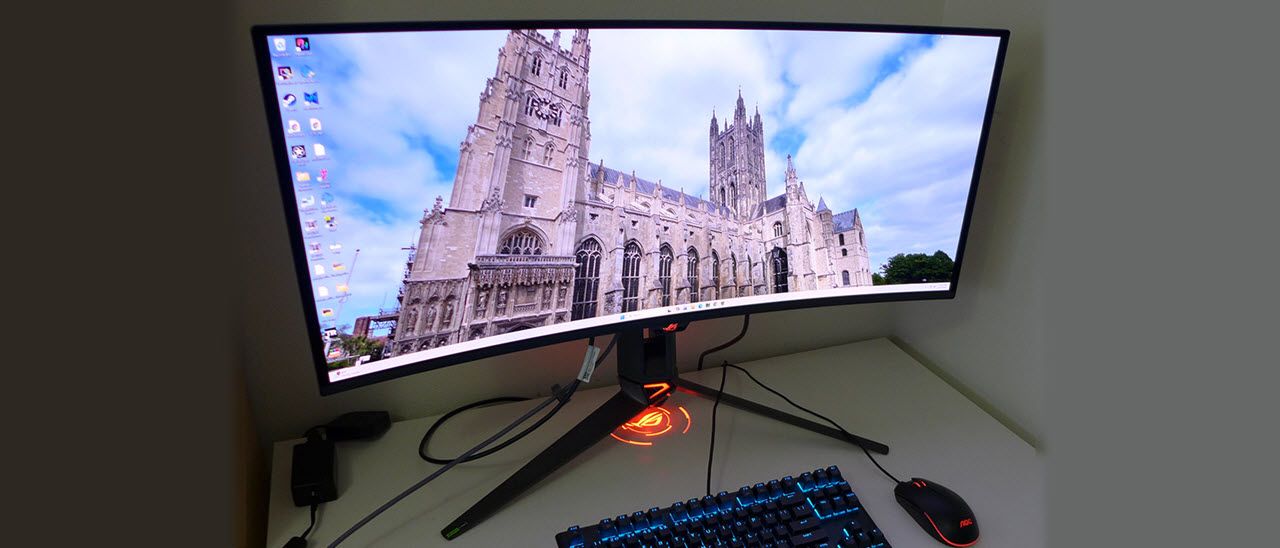
There is no compromise on the outside either, as you get the full treatment of USB ports and LED lighting. The ROG Lite Brite logo appears on the back, along with the logo projector on the bottom of the stand and the backlit trim in the base. Inputs include DisplayPort 2.1 , HDMI 2.1, and USB-C. The only thing missing is internal speakers, but make no mistake, this is a premium all-in gaming monitor. The price is premium too, around $1,500 at this writing.
Asus seems to be in transition with its packaging, sending some models in crumbly foam, but the PG34WCDN arrived in the recyclable stuff made from molded cardboard pulp. The three parts are well protected and assemble without tools. The logo projector comes with a selection of lenses and attaches to the bottom of the stand using magnets. It’s easy to swap out the logo when you wish. The ROG pouch came filled with an IEC power cord plus cables for HDMI, DisplayPort, and USB. You also get a nice sheet of ROG stickers with which to adorn your gear.
(Image credit: Asus) (Image credit: Asus) (Image credit: Asus) (Image credit: Asus) The PG34WCDN’s screen is surrounded by a flush bezel, less than a half-inch wide, on the top and sides. A metal trim strip crosses the bottom edge. That metal construction extends to the back and edges of the screen, which are completely protected. It helps with cooling as well. The screen is shiny, but ambient light doesn’t affect the image much unless you have a bright source directly in front of it. The Black Shield tech works very well, and perceived black levels are clearly better than other screens.
The image is razor-sharp, even a bit more so than on other 34-inch WQHD screens. The RGB Stripe pixel array is a definite upgrade. The technology comes from Samsung, so I expect other companies to follow suit with their new OLED displays. In addition to the gorgeous image, the front of the PG34WCDN features lighting accents on the small protrusion at the bottom of the screen and the stand’s base. That protrusion is where you’ll find the joystick and its two flanking control keys, one for power and one to cancel the OSD. It also houses a proximity sensor that can blank the screen when you leave your desk.
In the back, there is more lighting, with the Lite Brite ROG logo featured on one side and a bit of the stand that says “Swift”. That lets your competitors know that you’ve spent a bit more money than if it said “Strix”. The stand is a very solid piece with a cast-aluminum base and a wide footprint. The upright has a large cable hole and offers 4.3 inches of height adjustment. The panel pivot is free of play and has a 3/20-degree tilt and a 30-degree swivel to either side. If you’d rather use an arm, the box contains a metal adapter with a 100mm VESA bolt pattern. The top of the stand has a tripod mount for things like webcams or microphones.
The I/O panel is up and under the center of the panel’s component bulge and includes two HDMI 2.1, a DisplayPort 2.1, and USB-C video inputs. The latter has 90 watts of power. The DP port is a full-bandwidth UHBR20 with 80 Gbps that supports uncompressed signals up to the PG34WCDN’s full WQHD 360 Hz. USB 3.2 is supported by one upstream and three downstream ports. And there’s a 3.5mm headphone jack.
Pressing the joystick opens the PG34WCDN’s OSD which can be placed anywhere on the screen. I moved it to the lower-right corner, away from the the test patterns. It’s divided into nine sections.
(Image credit: Tom's Hardware) (Image credit: Tom's Hardware) (Image credit: Tom's Hardware) (Image credit: Tom's Hardware) (Image credit: Tom's Hardware) (Image credit: Tom's Hardware) (Image credit: Tom's Hardware) (Image credit: Tom's Hardware) (Image credit: Tom's Hardware) (Image credit: Tom's Hardware) The PG34WCDN’s OSD layout is no different from other ROG displays and is very intuitive. Gaming starts the fun with a VRR toggle, ELMB, GamePlus play enhancements, GameVisual picture modes, and Shadow Boost. ELMB works at 180 Hz or below and cancels out Adaptive-Sync. GamePlus has a set of aiming points, sniper modes, timer, stopwatch and alignment marks. You can turn on a frame counter that’s either a number or a bar graph.
GameVisual has nine total modes, with Racing being the default and best choice. It’s fully adjustable, but calibration is not required. You can tweak the RGB sliders for a small improvement that takes the PG34WCDN to reference level. It can be used as a pro monitor for video mastering and photo editing. Shadow Boost is a way to brighten dark areas of the scene for better visibility. It has three fixed levels and a dynamic mode.
The PG34WCDN has full PIP and PBP functions to view two video sources at once. There are three PBP sizes and four positions for the PIP window, which can be resized. Each source can have its own color settings and audio source.
You can light up the PG34WCDN using Aura RGB, which plays effects and colors on the giant ROG logo on the back. Light in Motion coordinates the show with on-screen activity provided you’ve installed the DisplayWidget Center app and a USB cable.
The four joystick directions plus one control key are programmable by the user for quick access to functions like brightness, GameVisual and the like. It’s a great way to change inputs or activate GamePlus with a single click. You can also save settings to one of two memories for later recall.
The PG34WCDN doesn’t need calibration in its default racing mode. I found it was spot on for grayscale, gamma, and color with just a bit more than 106% coverage of DCI-P3. A few tweaks of the RGB sliders took the numbers to reference level, but the picture looks pretty much the same. I’ve provided my settings below for both states of the Uniform Brightness option. The brightness value is retained between the two modes, which is a nice touch that few other companies offer. HDR signals have their own four picture presets, and there’s a toggle for Adjustable HDR that opens up the brightness, contrast, and Uniform Brightness settings. I noted that making any changes skewed the EOTF tracking, but some users may want to tone down their HDR games for dark room play.
The 27-inch 16:9 genre has long been the gamer’s go-to for the highest refresh rates and lowest input lag. And I have longed for the day when a 34-inch 21:9 monitor would be equal to that. That day is here thanks to the PG34WCDN. This is the first ultra-wide that can replace a 27-inch gaming monitor with something more immersive and engaging.
For my casual gaming skills, any OLED with 240 Hz will do. But to get serious about competition, you need perfect motion resolution and the lowest possible input lag. You’ll see in the next section that the PG34WCDN joins the ranks of the fastest monitors I’ve tested. That it is also in a 21:9 format is icing on the cake.
Motion quality and feel took on an addictive quality. It is a time machine in that you forget how much time has passed when playing. The PG34WCDN moves with precision in all areas, aiming, shifting, turning, and the bread-and-butter move, circle strafe. I could stop exactly where I wished, and high-motion resolution let me discern distant targets as easily as close ones.
I have to credit the RGB Stripe panel with that extra sharpness. OLEDs are already smooth thanks to their super quick panel response. The PG34WCDN is just a bit sharper. Textures are finer and more tactile, and small objects are rendered with higher clarity. I won’t say this is a revolutionary OLED, but it is an evolutionary one.
Though I noted slightly less color volume during testing, the PG34WCDN still lays down a vividly saturated palette with bright primary colors and pro-level accuracy. I played and worked both before and after calibrating and found that adjustment was unnecessary. It’s ready to go out of the box in the Racing picture mode. Just set the brightness to taste.
I appreciated the ability to turn Uniform Brightness off, which effectively enhances highlights. Peaks in HDR mode approached 1,300 nits, creating a significant impact. I could use this option for SDR content, too, which would greatly enhance content like movies or YouTube videos.
If you’re already using an ultra-wide monitor, the PG34WCDN is a terrific upgrade. Its 1800R curve sits in the sweet spot, delivering immersive quality without image distortion. You can easily see large parts of a spreadsheet or put two documents side by side for comparative editing. Photoshop tasks are made easier when you can arrange toolbars around the sides and have the image in the middle.
If you enjoy some bling with your gaming system, the PG34WCDN delivers excellent lighting with its logos and trim LEDs. The projector on the stand base is something unique to Asus ROG displays. When the DisplayWidget Center app is installed, you can create effects that sync with on-screen action. The only thing I wished for was internal speakers. Even timid ones are useful for system sounds or simple games. But I’m glad Asus still provides USB ports.
Takeaway: The PG34WCDN is a premium OLED with a gorgeous image. However, I say that about most OLEDs, this one is just a tad sharper than the rest. It also blows every other 21:9 monitor I’ve reviewed away with its record-low input lag and perfect motion resolution. Until others follow suit with 360 Hz, this Swift will sit atop the hill.
Current page: Features and Specifications
Key considerations
- Investor positioning can change fast
- Volatility remains possible near catalysts
- Macro rates and liquidity can dominate flows
Reference reading
- https://www.tomshardware.com/monitors/gaming-monitors/SPONSORED_LINK_URL
- https://www.tomshardware.com/monitors/gaming-monitors/asus-rog-swift-pg34wcdn-34-inch-qd-oled-360-hz-gaming-monitor-review#main
- https://www.tomshardware.com
- DIYer upcycles an old PC PSU into a flexible bench power supply — 20-year-old relic rescued from dusty neglect
- Into the Omniverse: NVIDIA GTC Showcases Virtual Worlds Powering the Physical AI Era
- Ambitious modder bolts a 360mm server AIO onto an RTX 3080, slashes VRAM temps in half — enormous workstation cooler powers 54 degree drop, 9% performance uplif
- Grab this beginner-friendly Creality 3D printer for as little as $186 right now — Ender 3 V3 SE drops to record-low Amazon price with direct-drive extruder and
- AMD makes the flagship Ryzen 9 9950X3D2 official — first dual-cache X3D CPU arrives in April, with 208MB cache, 200W TDP, promising modest performance gains
Informational only. No financial advice. Do your own research.