
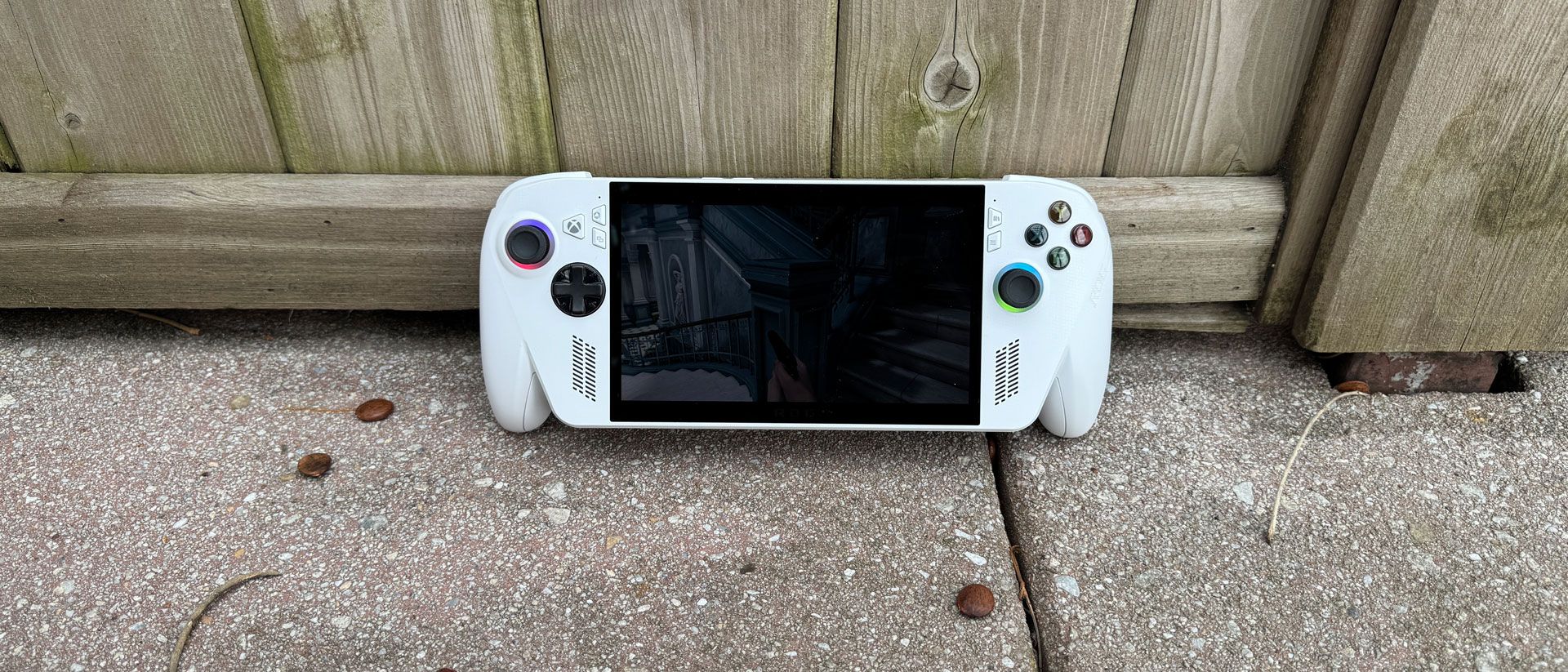
The Asus ROG Ally's 8-core integrated GPU with RDNA 2 graphics effectively ages this machine out of the box. The technology is very similar to the Steam Deck OLED, which also uses 8 RDNA 2 compute units, albeit on a slower processor. The CPU and GPU share 16GB of memory, with 6GB assigned to the GPU by default (you can change this in Asus Armoury Crate SE, but we tested with the standard settings).
The handheld runs at a 15W performance mode when unplugged and a 20W turbo mode when plugged in, though you can switch between them. We ran games at both 1080p and 720p. For the Steam Deck OLED, we tested at 1920 x 1200 and 1280 x 800 to fit its 16:10 aspect ratio.
Using the Xbox Full Screen Experience should free up some memory and provide performance advantages, as it doesn't load some Windows components. We benchmarked games through the FSE, with the exception of our stress test, which requires additional logging software.
I used the ROG Xbox Ally to play Resident Evil Requiem , a game I bought while I was reviewing the handheld. I played the game at 720p without upscaling, using low graphics quality and otherwise auto-configured graphics settings, including low lighting and shadow. The game ran between 32 and 55 frames per second as Grace Ashcroft ran from the early game monster called "The Girl." In a third-person action scene at Rhodes Hill, with Leon Kennedy fighting a wave of enemies with a chainsaw, the tame ran at 34-37 FPS.
(Image credit: Tom's Hardware) (Image credit: Tom's Hardware) (Image credit: Tom's Hardware) (Image credit: Tom's Hardware) Two patterns emerged from our benchmarks . The first is that despite the 1080p screen, this machine is meant to game at 720p. On each of our benchmarks, the system couldn't handle the higher resolution at a playable frame rate, whether plugged in or unplugged. Borderlands 3 wouldn't even let us switch to 1080p at all, which an Asus representative claimed was a feature to encourage higher performance, but it only ever happened on that game.
The other pattern was that to meaningfully beat Valve 's Steam Deck OLED, the Ally had to be plugged in or running at turbo mode. Even then, in some games, like Shadow of the Tomb Raider and Borderlands 3 , it was still very close. On Red Dead Redemption 2 , the Steam Deck was superior no matter what.
On our Metro Exodus stress test, the Xbox Ally ran the benchmark 10 times to simulate about half an hour of gameplay. The handheld averaged 43.28 frames per second and was consistent with a frame or so between runs. The average clock speed of four CPU cores was 2.66 GHz during the test while the GPU ran at 1241.36 MHz.
Like the ROG Ally X that shipped beside it, the ROG Xbox Ally ships with Microsoft 's Xbox Full Screen Experience. While it's far and away better than using the standard Windows 11 desktop on a gaming handheld, there are still some hitches throughout.
You boot straight into the Xbox app, meaning that Windows doesn't load certain components of the OS that aren't used for gaming. This should make the OS lighter and save RAM, letting you put the resources towards the games that you're playing. It came with Steam installed, which I appreciated, and the library also lets you easily download Epic Games, Battle.Net, GOG Galaxy, and Ubisoft Connect.
But still, the launchers don't always play nice with the Xbox controller. Epic Games, for instance, really is designed for a mouse and keyboard, and I was largely forced to use it with touch controls to get it to work. In addition, games bought from launchers are treated as second class-citizens, without box art or analysis of how well the game plays on your system.
Even if you never touch the regular Windows 11 desktop, you'll still have to deal with User Account Control pop-ups.
I was hoping that Asus and Microsoft would have fixed some issues that reviewers found at launch. For instance, I had sleep/wake issues. The first time I put the system to sleep with a game paused, I woke up to a Direct3D error and a crash screen. A few other times, I found that the system wouldn't wake up at all, and ultimately booted back to the Windows desktop. I also had the system wake up to a notification that the controller, permanently attached to the system, had disconnected. So save your progress before you put this system to sleep. If you didn't, you may wish you did.
The ROG Xbox Ally feels more like a PC than an Xbox, and that includes all of the tinkering that some enthusiasts love, but without the simplicity one hopes for in a console-style experience.
The 7-inch, 1920 x 1080, 120 Hz touch screen on the ROG Xbox Ally is surprisingly decent for a standard LED panel.
In Resident Evil Requiem , the screen, even at 40% brightness, was enough for me to see enough of the Rhodes Hill Chronic Care Center's west wing to sneak around. And yes, there was plenty of crimson red blood when some Infected broke out the chainsaws.
On our meter, the Ally covered 85.4% of DCI-P3 volume and 120.6% of sRGB volume. Notably, both of those numbers are a bit higher than the screen on the Asus ROG Xbox Ally X, which is the same on paper. But the regular Ally measured 488.8 nits, which is a bit dimmer than the Xbox Ally X at 515.8 nits. These differences suggest that Asus might have separate sources of displays, with some differences.
Either way, the Ally doesn't touch the Steam Deck OLED's screen, which is way more vivid and, at a max of 597.2 nits, significantly brighter.
Battery life on a gaming handheld will be heavily dependent on the games you play and the settings you play. I often try to keep settings pretty conservative to try battery life, but I did play some intense games on the ROG Xbox Ally. If you play 2D side scrollers, you'll have longer battery life than what I saw.
Perhaps the hardest challenge I threw at the Xbox Ally and its 60 WHr battery was playing a bit of Resident Evil Requiem on it. One night, I sat back in a relatively dark room and snuck through the Rhodes Hill Chronic Care Center as Grace Ashcroft. I used auto-detected settings and low graphics quality at 720p, but with FSR on and the screen locked to 60 FPS and 40% brightness, along with the 15W performance mode that the Ally defaults to when unplugged. After an hour and 17 minutes of playtime, the system had a 45% charge left over. That suggests that, had I not needed to wind down if I wanted to sleep that night, I could have probably hit about two-and-a-half hours at those settings.
In general, the dual speaker system in the Xbox Ally isn't going to beat some decent headphones. Still, it's good enough to play games without them. In Resident Evil Requiem , a boom of thunder was deep enough to surprise me. A shriek from the monster "the girl" was loud and clear, as was an infected chef's repeated meat chopping.
That being said, in dialogue-heavy games, like Marvel's Midnight Suns , I did find myself wishing for a bit more vocal clarity.
The system's front-facing speakers are definitely loud enough. Some games are just better with headphones. That's the case with a PC or handheld of any size.
During our Metro Exodus stress test , we took measurements on the back of the system. The system stayed pretty cool, measuring 88 degrees Fahrenheit at the center of the system, and 89.5 a bit closer to the macro buttons. This is all completely acceptable. The hottest point was at the vent on top of the system, where the hot air exhausts; that hit 104.5 F, but you won't need to touch that portion of the system to play games.
The AMD Ryzen Z2 A SoC hit an average of 67.7 degrees Celsius inside the handheld.
If the 512GB SSD in the ROG Xbox Ally is feeling a bit cramped, I have good news: you can upgrade it. I also have bad news: It's kind of a pain.
The Xbox Ally is held together with eight Phillips-head screws: five on the back of the handheld and three on the bottom. The middle screw on the rear is captive, but every other screw comes out, so have something nearby to keep them organized.
With the screws out, you'll need a tool to pry from the top and all the way around the sides of the system, controller handles included, to separate the back from the rest of the handheld. You'll need to be careful not to damage a ribbon cable that connects the motherboard to the M1 and M2 buttons on the back of the system. It's enough of a hassle that I'd recommend most people just use the microSD card reader instead.
The only component that you can upgrade is the M.2 2280 SSD, which is right at the center when you open the system. The battery cable runs over the SSD, and while you should disconnect that before doing work anyway, you'll need to in order to get the SSD out and install a new one.
Asus is using modular thumbsticks here. These are potentiometers, so they'll be prone to drift eventually. While Asus doesn't sell replacements, other companies, like GuliKit, sell affordable TMR replacements that you can consider if you ever have an issue.
Asus sells the ROG Xbox Ally in just one configuration. The $599.99 model comes with an AMD Ryzen Z2 A processor, 16GB of RAM, a 512GB SSD, and a 7-inch, 1080p touchscreen. As of this writing, it can be found for as low as $499.99 on Amazon , making it cheaper than the Steam Deck OLED with the right deal.
Its more powerful sibling, the Asus ROG Xbox Ally X, has a black chassis and red buttons, and bumps up to an AMD Ryzen AI Z2 Extreme, 24GB of RAM, and a 1TB SSD. It costs $999.99.
There's no denying that gaming handhelds are getting expensive, with many at or over the $999 mark. That makes the Asus ROG Xbox Ally's pricing alone, at $599, a breath of fresh air. While it looks very much like the more expensive ROG Xbox Ally X, it doesn't have the polish or the power.
In terms of price, the Ally's only competition is the Steam Deck OLED, which starts at $549 for the 512GB model. But despite being 3 years old, that system still has a nicer screen, better performance on battery, and similar performance to the Ally when plugged in. That Deck also comes with a carrying case.
Still, the Xbox Ally can play games well enough, which might be all you need. But the fact that I'm still facing sleep/wake issues similar to early reviewers more than seven months after this thing was released suggests they may never be truly fixed.
And while the Windows Full Screen Experience is a huge improvement to the regular Windows 11 desktop, SteamOS is still simpler, smoother, and easier to use.
That would all make for an easy decision, except that, as of this writing, the Steam Deck OLED has been largely out of stock for weeks, with blips in and out. If you're patient, waiting might get you a superior device. But if you want to get a relatively affordable system and don't mind Windows 11 and some technical quirks, the ROG Xbox Ally is here, available, and feels great in the hands.
Andrew E. Freedman is a senior editor at Tom's Hardware focusing on laptops, desktops and gaming. He also keeps up with the latest news. A lover of all things gaming and tech, his previous work has shown up in Tom's Guide, Laptop Mag, Kotaku, PCMag and Complex, among others. Follow him on Threads @FreedmanAE and BlueSky @andrewfreedman.net . You can send him tips on Signal: andrewfreedman.01 ","collapsible":{"enabled":true,"maxHeight":250,"readMoreText":"Read more","readLessText":"Read less"}}), "https://slice.vanilla.futurecdn.net/13-4-20/js/authorBio.js"); } else { console.error('%c FTE ','background: #9306F9; color: #ffffff','no lazy slice hydration function available'); } Andrew E. Freedman Social Links Navigation Andrew E. Freedman is a senior editor at Tom's Hardware focusing on laptops, desktops and gaming. He also keeps up with the latest news. A lover of all things gaming and tech, his previous work has shown up in Tom's Guide, Laptop Mag, Kotaku, PCMag and Complex, among others. Follow him on Threads @FreedmanAE and BlueSky @andrewfreedman.net . You can send him tips on Signal: andrewfreedman.01
Roland Of Gilead Sadly, it's a dumbed down POS. Having Xbox FSE is not something to sing about. It's an absolute waste of time. I played around with it for a bout 1hr, as I had it through a Windows Insider Preview build. It's identical in everyway to simply having the non FSE Xbox app open in front of you. Now, If you want a really good GUI for a purely gaming centric device (which my main PC is), then you don't need to look any further than Steam Big Picture mode. It's everything the Xbox FSE wants to be, but will never get there. Steam BPM is so well known, but it's because it's a refined and thoughtful piece of software that 'just' works as intended., If I had an Xbox Ally/X I would disable FSE, and just ruin steam. It's a much better experience. Reply
helper800 Admin said: "The 7-inch, 1920 x 1080, 120 Hz touch screen on the ROG Xbox Ally is surprisingly decent for a standard LED panel. In Resident Evil Requiem, the screen, even at 40% brightness, was enough for me to see enough of the Rhodes Hill Chronic Care Center's west wing to sneak around. And yes, there was plenty of crimson red blood when some Infected broke out the chainsaws. On our meter, the Ally covered 85.4% of DCI-P3 volume and 120.6% of sRGB volume. Notably, both of those numbers are a bit higher than the screen on the Asus ROG Xbox Ally X, which is the same on paper. But the regular Ally measured 488.8 nits, which is a bit dimmer than the Xbox Ally X at 515.8 nits. These differences suggest that Asus might have separate sources of displays, with some differences. Either way, the Ally doesn't touch the Steam Deck OLED's screen, which is way more vivid and, at a max of 597.2 nits, significantly brighter." -From the above article There are so many things wrong with these comparisons that are not considered at all… The perceived brightness of one screen over another depends on many variables. Let's get the lesser known but important misconceptions out of the way first. 1) If you have two screens that are equal in every respect except brightness measured in nits, and one screen is 500 nits and the other is 1000 nits; what do you think would be the perceived increase in brightness? The answer is about 35% brighter to the eye. The eye does not perceive brightness increased linearly like the stats may imply. Perceived brightness often follows Stevens' Power Law, which means that to perceive a doubling in brightness, you typically need quadruple the physical light output. 2) If both screens have 1000 nits brightness and all else is equal but their diagonal measurement where one is 55 inches and the other 75 inches; which screen is perceived as brighter? If you thought that the larger screen looks brighter, you are correct. This is because of the volume of light increased substantially between the sizes of screens. This is measured as lumens or flux as compared to nits which is a measurement of light density. 3) If both screens have 1000 nits brightness and all else is equal except one has much higher color saturation of 115% of the DCI-P3 color space and the other has 75% color saturation of the DCI-P3 color space; which screen is perceived as brighter? The answer would be the screen with the higher color saturation. This is called the Helmholtz-Kohlrausch Effect. More intensely saturated colors, particularly in the red and blue spectrum are perceived by the human eye as being brighter even with the same exact luminance across both screens. 4) If both screens have 1000 nits brightness and all else is equal except one has much higher contrast at infinite, like an OLED, and the other has a contrast ratio of 1:1000; which screen is perceived as brighter? The answer would be the screen with infinite contrast ratio even at the same luminance. This is because the deeper blacks produced by higher contrast screens create a larger perceived gap in brightness between lighter and darker areas on the screen. 5) If both screens have 1000 nits brightness and all else is equal except the amount of ambient light in the room is different for both screens; for example, one screen is perceived at night in a room with no other lights on and with blackout curtains on all windows, and the other is during mid day outside on a patio with the sun directly on the screen. In that scenario, which screen would look brighter? The screen shown in the dark room at night would look massively more bright than the other. This is because the difference between the ambient light in the room and the brightness of the screen greatly affects perceived brightness. The closer the ambient light is to the brightness of the screen, the more washed out and dull it will look. 6) Lastly, if both screens have 1000 nits brightness and all else is equal except the image shown on both screens is for different durations of time where one screen flashes white for 1/20th of a second and the other for 1 seconds; which screen would be perceived as brighter? The screen that is flashed more briefly would be perceived much less bright than the screen that flashed for a full second. This is because of Bloch's Law. Very basically, your eyeballs are like a camera in that it needs sufficient exposure time of the light or luminance information is lost, thus making the image appear less bright. Brief flashes of light may feel more intense even though they look less bright because it takes the eye 200-500 milliseconds to adjust. While the pupil is still wide and unconstricted it can seem like a punch to the face if the quick flash of light is bright enough. Reply
Key considerations
- Investor positioning can change fast
- Volatility remains possible near catalysts
- Macro rates and liquidity can dominate flows
Reference reading
- https://www.tomshardware.com/video-games/handheld-gaming/SPONSORED_LINK_URL
- https://www.tomshardware.com/video-games/handheld-gaming/asus-rog-xbox-ally-ryzen-z2-a-review#main
- https://www.tomshardware.com
- Creality Sermoon S1 Review: Accessible 3D Scanning
- Anthropic's latest AI model identifies 'thousands of zero-day vulnerabilities' in 'every major operating system and every major web browser' — Claude Mythos Pre
- HP’s flagship Omen Max 45L with an RTX 5090 is on sale for $1,000 off — get a top-shelf 4K gaming PC with 64GB DDR5 and 4TB SSD for $5,499
- Asus ROG Xbox Ally review: The cheapest Windows handheld gets points for showing up
- Intel and SambaNova team up on heterogenous AI inference platform — different hardware performs different workloads
Informational only. No financial advice. Do your own research.