
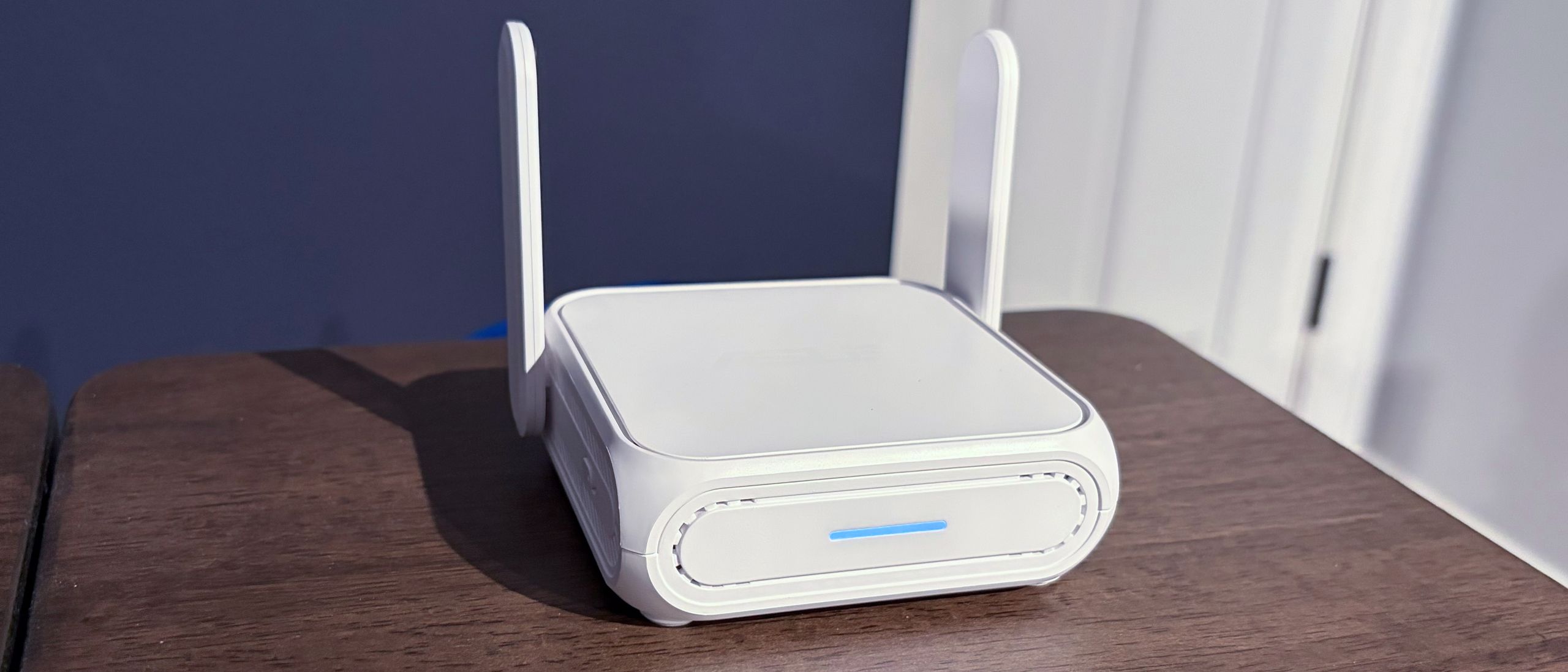
For all of our iPerf3 testing, I used the Ethernet cable method. However, I also used Public Wi-Fi mode to share my iPhone’s cellular connection (via the phone’s personal hotspot) with the RT-BE58 Go.
The large circle presents various status updates that you can scroll through, including real-time traffic, network name, CPU and RAM usage, and the number of connected wired/wireless clients. Below the circle are buttons for internet status, AiMesh status (if enabled), and Wi-Fi information.
The family tab lets you set parental controls for your children on a per-device basis. Finally, the Settings tab gives you access to all of the advanced settings available to the RT-BE58 Go. You can configure the USB port, enable AI Protection (a built-in security suite), run diagnostics on the router, perform firmware updates, backup or restore router settings, enable Google Assistant integration, and more.
The iPerf3 wireless throughput tests are run at 6 feet and 25 feet, with and without network traffic. Tests are conducted separately on the 2.4 GHz and 5 GHz bands. In the congested traffic tests, we add six wireless clients streaming 4K YouTube content across the 2.4 GHz and 5 GHz bands.
(Image credit: Tom's Hardware) (Image credit: Tom's Hardware) (Image credit: Tom's Hardware) (Image credit: Tom's Hardware) The RT-BE58 Go is focused primarily on portability, so it’s not nearly as powerful as desktop-based dual-band Wi-Fi 7 routers. Starting with our 5 GHz iPerf3 test at short range (6 feet), the RT-BE58 Go put up a good showing, hitting 865 Mbps compared to 753 Mbps for the TL-WR3602BE. Switching to our long-range test (25 feet), the Asus router dropped to 391 Mbps, compared to 300 Mbps for the TL-WR3602BE. Congested traffic at both ranges led to a 10 to 15 percent drop for the RT-BE58 Go. However, the Asus still consistently came out ahead of its TP-Link counterpart.
Things were more mixed on the 2.4 GHz band. With our short-range testing, the TL-WR3602BE came out ahead (97 Mbps versus 88 Mbps), but the RT-BE58 Go took a barely perceptible lead at long range (37 Mbps versus 36 Mbps). With congested traffic, the two routers were separated by 1 Mbps at short range and 3 Mbps at long range.
While I primarily used the RT-BE58 Go with a 2.5 GbE WAN port connected to my 2 Gbps fiber modem, I also tested it with my iPhone Air as a hotspot (via the USB-A port and Wi-Fi hotspot). I tested the router outside, connected to my Anker 737 USB-C Power Bank . In Wi-Fi hotspot mode, I achieved an Ookla SpeedTest result of 140 Mbps down and 40.25 Mbps up on an HP OmniBook Snapdragon X Elite laptop. For reference, my iPhone Air natively hit 924 Mbps down and 198 Mbps up using its cellular connection.
The Asus RT-BE58 Go is a full-featured mobile router in a pint-sized package. It’s highly portable, can be powered with a USB-C power bank, and is configurable with a well-designed smartphone app. It allows you to provide internet to multiple devices via WAN, USB-A, or a Wi-Fi hotspot, and it offers various operating modes.
Performance-wise, the RT-BE58 Go outperforms the TP-Link TL-WR3602BE on the 5 GHz band and performs nearly identically on the 2.4 GHz band. Given the almost identical feature set and form factor between the two devices, choosing between them will largely come down to price. The TL-WR3602BE currently has a street price of $99 , while the RT-BE58 Go goes for $119 . Given the price differential, we’d probably still give the nod to the TP-Link, but you can’t go wrong with either choice.
Brandon Hill is a senior editor at Tom's Hardware. He has written about PC and Mac tech since the late 1990s with bylines at AnandTech, DailyTech, and Hot Hardware. When he is not consuming copious amounts of tech news, he can be found enjoying the NC mountains or the beach with his wife and two sons. ","collapsible":{"enabled":true,"maxHeight":250,"readMoreText":"Read more","readLessText":"Read less"}}), "https://slice.vanilla.futurecdn.net/13-4-13/js/authorBio.js"); } else { console.error('%c FTE ','background: #9306F9; color: #ffffff','no lazy slice hydration function available'); } Brandon Hill Social Links Navigation Brandon Hill is a senior editor at Tom's Hardware. He has written about PC and Mac tech since the late 1990s with bylines at AnandTech, DailyTech, and Hot Hardware. When he is not consuming copious amounts of tech news, he can be found enjoying the NC mountains or the beach with his wife and two sons.
TechieTwo It probably won't be long before we find out this router like most consumer grade routers is totoally insecure and easy to compromise. And people wonder how their personal info. gets stolen and their PC compromised… 😡 Reply
helper800 TechieTwo said: It probably won't be long before we find out this router like most consumer grade routers is totoally insecure and easy to compromise. And people wonder how their personal info. gets stolen and their PC compromised… 😡 To my understanding, ASUS routers have a good track record in this regard, but correct me if I am wrong. Reply
Key considerations
- Investor positioning can change fast
- Volatility remains possible near catalysts
- Macro rates and liquidity can dominate flows
Reference reading
- https://www.tomshardware.com/networking/routers/SPONSORED_LINK_URL
- https://www.tomshardware.com/networking/routers/asus-rt-be58-go-wi-fi-7-travel-router-review#main
- https://www.tomshardware.com
- Western Digital details 14-platter 3.5-inch HAMR HDD designs with 140 TB and beyond
- Fractal Design's new North and North XL Momentum Edition cases sport stealthy black wood slats, promise quieter fans – XL model also supports back-connector mot
- Yet another Windows update is wreaking havoc on gaming rigs worldwide — Nvidia recommends uninstalling Windows 11 KB5074109 January update to prevent framerate
- Snag this 4K-capable gaming PC with an RTX 5070 Ti and 32GB of DDR5 RAM for less than $2,000 — a 26% saving on a powerhouse of a rig equipped with Intel's 24-co
- GeForce NOW Celebrates Six Years of Streaming With 24 Games in February
Informational only. No financial advice. Do your own research.