
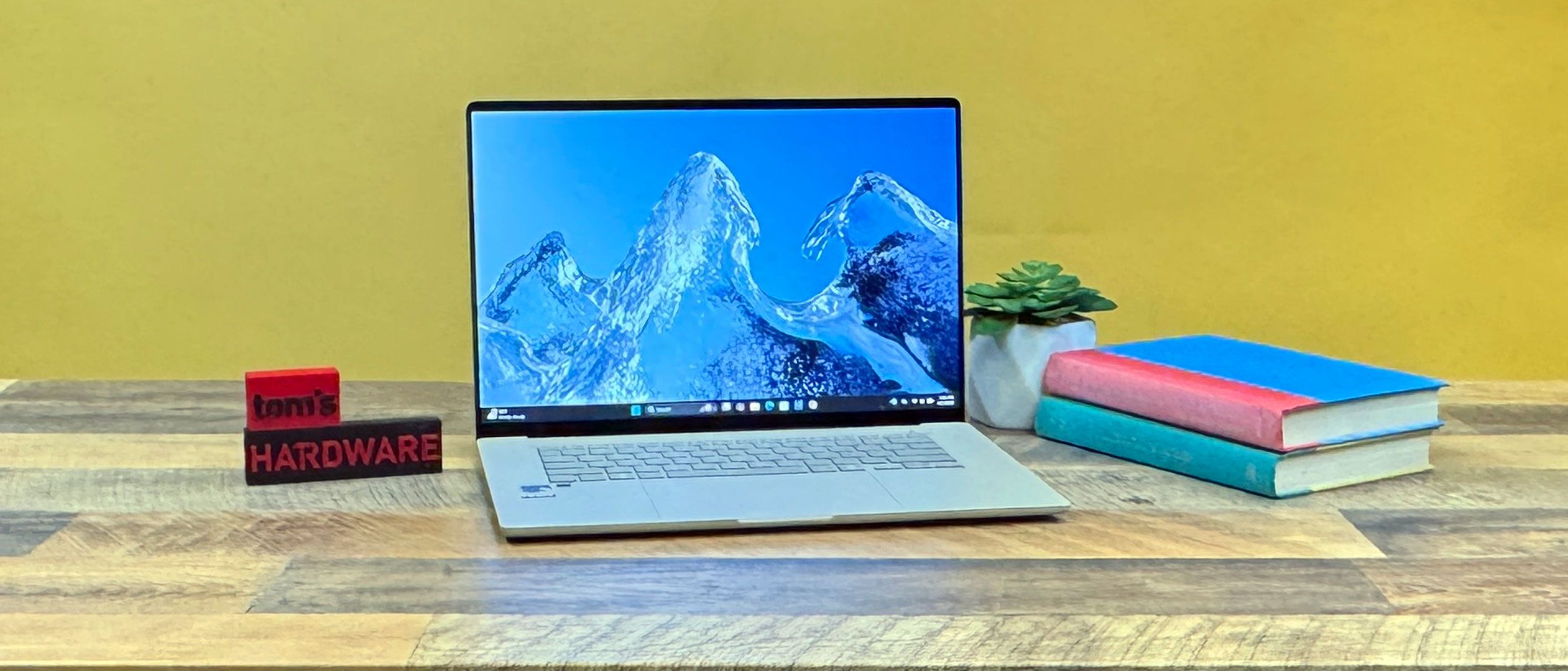
The Zenbook A16 is serving as our first look at Qualcomm's Snapdragon X2 Elite Extreme system-on-a-chip. Specifically, this version, X2E-94-100, has 12 "prime" cores and 6 "performance cores, and can run up to 4.7 GHz in either single or dual-core compute. Multi-core performance tops out at 4.4 GHz.
The chip also offers 53 MB of cache and has a memory bandwidth of up to 228 GB/s. If you're the type of person who cares about NPUs, this version goes up to 80 TOPS, though a different version of the chip, the X2E-90-100, hits 85 TOPS and goes up to 5 GHz single or dual-core but offers less bandwidth.
(Image credit: Tom's Hardware) (Image credit: Tom's Hardware) (Image credit: Tom's Hardware) (Image credit: Tom's Hardware) On Geekbench 6, the Zenbook A16 notched a single-core score of 3,807, beating Intel Core Ultra Series 3-based rivals, but falling to the M5 in the MacBook Air (4,168 in a fanless design). But the Zenbook cleaned up on multi-core, with a score of 22,733. Part of that is because the X2 Elite Extreme has 18 cores. (Apple's M5 Max technically beats it at 29,430 with its own 18 cores, but given the cheapest laptop that system is in is $3,749, it's hard to actually put them next to each other, given the Zenbook is less than half of that price.)
On our file transfer test, the Zenbook A16 put in a fair showing, copying 25GB of files at a rate of 1,744 MBps. The Swift 16 AI was just barely faster (1,745.13 MBps), while the MacBook Air led the field (1,924.84 MBps).
On Handbrake, the Zenbook won decisively, transcoding a 4K video to 1080p in 2 minutes and 8 seconds. The next fastest, the Swift 16, took 4:25, while the XPS 14 lagged behind at 6:45.
To stress test the chip and the system, we put it through 10 runs of Cinebench 2026. The system started at a score of 6,309.72 before dropping to 5,996.52, and then hovering just over 6,000 for the rest of the test.
During the Cinebench test, the Prime cores ran at an average of 4.28 GHz, while the performance cores ran at 3.49 GHz.
On paper, the Adreno graphics integrated into the X2 Elite Extreme are impressive.
On 3DMark Steel Nomad, the Zenbook achieved a score of 1,262, falling only to Intel's top-end graphics offering with 12 Xe cores, in the Ultra X7 358H.
In reality, it's tougher. While the system ran through some benchmarks without issue, when I booted up Resident Evil Requiem , the game crashed when I changed settings. On a second try, I got into the game, and it played smoothly at low settings, but the walls kept disappearing. I chalk this up to issues with Microsoft's Prism emulation.
If your game works, Qualcomm has a decent integrated GPU here. Teh company is promising far more updates than customers received for graphics with the original Snapdragon X processors, so hopefully those create a more stable gaming environment.
We are at a point where if your workload is largely browser-based or uses tools like Word, Excel, and an email client, then Windows on Arm is probably good enough for you.
There are more native apps than ever before, including all of the major browsers, VLC, Spotify, Slack, Microsoft Office, LibreOffice, Blender, Davinci Resolve, Dropbox, Visual Studio, Zoom, and more.
Most of Adobe's software, including After Effects, Photoshop, Lightroom, and Premiere, are Arm native. But InDesign, Illustrator, and Lightroom Classic are still running via emulation , so they may not be as speedy or stable.
Windows 11 includes an emulator, Prism, that runs apps built for x86 processors and converts the instructions, which does take care of a lot of the rest. But some advanced professional tools, like AutoCAD, aren't considered officially supported, though emulation may still work.
The other issue — which will probably never be totally cleared up — is for those who are using legacy peripherals that require drivers. The same goes for old software that is no longer updated.
For basic needs, this should be more than enough now. But some creatives and gamers may still see issues.
Asus has a lovely 16-inch, 2880 x 1800 OLED display on the Zenbook A16. It supports frame rates up to 120 Hz and the DisplayHDR 1000 True Black standard.
The screen covers 119.5% of sRGB color volume and 84.6% DCI-P3 , in range of the LCD panel on the MacBook Air, but better than what Dell offers on the XPS 14. The OLED screen on the Swift 16 AI was dimmer than the rest of the field, but offered the best color volume.
Asus's panel measured 429.4 nits on our light meter. That's dimmer than the MacBook Air (458.8 nits) and XPS 14 (466 nits).
Asus' island-style keyboard offers 1.3 mm of key travel. On the Monkeytype typing test, I hit 120 words per minute at 97% accuracy, but it wasn't the most comfortable. I found the keys to be stiff, both pressing the key in but also with a forceful rebound. I did, however, like the smoothness of the keys themselves.
The touchpad is enormous, but it's just OK. It's smooth enough, and it's responsive to Windows 11 gestures, but you can only comfortably click on the bottom half of it. For a premium machine, I wouldn't mind seeing a haptic touchpad here. You can click a bit above the halfway point, but it requires way more force and also causes the entire palm rest and keyboard to noticeable buckle.
There are also touch strips on the sides of the touchpad. Swiping on the left side adjusts volume, while the right side adjusts screen brightness. Unless you use it constantly, you might not know it's there. I preferred to use the dedicated function row.
The Zenbook A16's speakers are perfectly tolerable, but nothing incredibly special. They're loud enough to fill a room. But when I played Metric's "Victim of Luck," I thought the sound was a bit flat. It ends up that the Dolby Atmos EQ was set to off. Moving to "detailed" helped separate the track's individual components, including the vocals, guitars, synths, and drums.
The drums, however, weren't terribly snappy, and like many thin laptops, there wasn't much bass at all.
Ten Torx T4 screws hold the bottom of the Zenbook A16 onto the chassis. After removing them (the two closest to the hinges are longer), you'll need to carefully pry the base off.
There's not a ton to upgrade in here, especially with the RAM on the chip package. But the SSD is upgradeable, should you need more space down the line (though it's not exactly easy to get a new install of Windows on Arm). The battery is held in with screws, so you could replace that down the line, too.
The ports on the right side are attached to a daughterboard, separate from the mainboard. It's also notable that there's a fair bit of empty space around the battery. I would've preferred a bit more longevity over the savings in weight. Filling the space may also have reduced some of the flexing we saw on the case.
The Arm architecture is known for being efficient, so I was disappointed to see the Snapdragon X2 Elite Extreme, now on a 3-nanometer process, last only 10 hours and 26 minutes on average in our battery test. Our rundown has the screen set at 150 nits while the system browses the web, streams videos, and runs light OpenGL tests.
That's significantly less than the winner of this batch, the Dell XPS 14 with a Core Ultra 7 355, which went over 20 hours. Granted, that system's LCD screen also goes down to 1 Hz when idle. The MacBook Air, an Arm-based competitor, ran for 15 hours and 28 minutes in the newest M5-based model.
The Acer Swift 16 AI, with Intel's more powerful graphics in a Core Ultra X7 358H and its own OLED screen, lasted 12:12.
The Snapdragon X2 Elite Extreme is powerful; powerful enough that Asus decided to ship this laptop with a 130W charger for fast charging. That got us up to 52% charge in half an hour. But for many, the point of these laptops has been that they last long on a charge. This system could use improvement on that front. It's usable, but in context, you see other laptop vendors and chipmakers have gotten more out of systems. It's unclear from a sample of only one laptop just how much of this is specific to power draw from the Snapdragon X2 Elite Extreme SoC.
We measured the Zenbook A16 for skin temperatures while running our Cinebench 2026 gauntlet, illustrating how warm this machine could potentially get under a heavy workload. It gets toasty.
The keyboard reached 104 degrees Fahrenheit between the G and H keys, while the hottest point on the bottom of the system measured 109 F. That's not terrible for the bottom, but the keyboard was noticeably warm. The touchpad remained cool at 81 F.
Usually, we also mention chip temperatures. However, HWInfo, the tool we use to measure, was not yet fully updated for the new Qualcomm chips, leaving us with broad temperature zones but no indication of what was being measured, specifically.
The 1080p webcam on the Zenbook A16 generally impresses. Given that there are higher resolution webcams out there, we have to imagine some of this is simply Qualcomm's image signal processing. It has a lot of experience doing that for phones.
And video calls and photos on the Zenbook were sharp and remarkably clear. In our officeI, I could make out details like chipped paint in our industrial-style ceiling, and there were no issues with overhead lights blowing out the image. The only ding was that the colors were a bit oversaturated.For example, my skin had far more red tones than you see in real life.
Asus has a tendency to overfill its laptops with preinstalled software. Unfortunately, that's still the case here.
If you use one Asus app, make it MyAsus, which has options for fan profiles, screen adjustments to reduce OLED issues, and provides access to customer support services.
But Asus also packs on GlideX (a screen sharing and extending service), ScreenXpert (designed to help manage apps on external monitors or dual screen laptops), Virtual Assistant (a dancing gaming mascot that talks like it's in an early 2000's Budweiser commercial), and StoryCube (a multimedia management app that uses facial recognition to group photos and videos). All of this should opt-in rather than coming pre-installed.
Asus sells the Zenbook A16 with a one-year warranty.
Key considerations
- Investor positioning can change fast
- Volatility remains possible near catalysts
- Macro rates and liquidity can dominate flows
Reference reading
- https://www.tomshardware.com/laptops/ultrabooks-ultraportables/SPONSORED_LINK_URL
- https://www.tomshardware.com/laptops/ultrabooks-ultraportables/asus-zenbook-a16-snapdragon-x2-elite-review#main
- https://www.tomshardware.com
- BenQ DesignVue PD2770U 4K professional monitor review: A blend of flexibility, control, and precision
- Iranian missile blitz takes down AWS data centers in Bahrain and Dubai — Amazon reportedly declares “hard down” status for multiple zones
- Indianapolis politician's home shot at 13 times over data center dispute — police and FBI investigating 'isolated, targeted incident' after city councilor backe
- Advancing Open Source AI, NVIDIA Donates Dynamic Resource Allocation Driver for GPUs to Kubernetes Community
- Sharge Disk Pro 2TB review: Great sustained writes, active cooling, and a built-in hub
Informational only. No financial advice. Do your own research.