
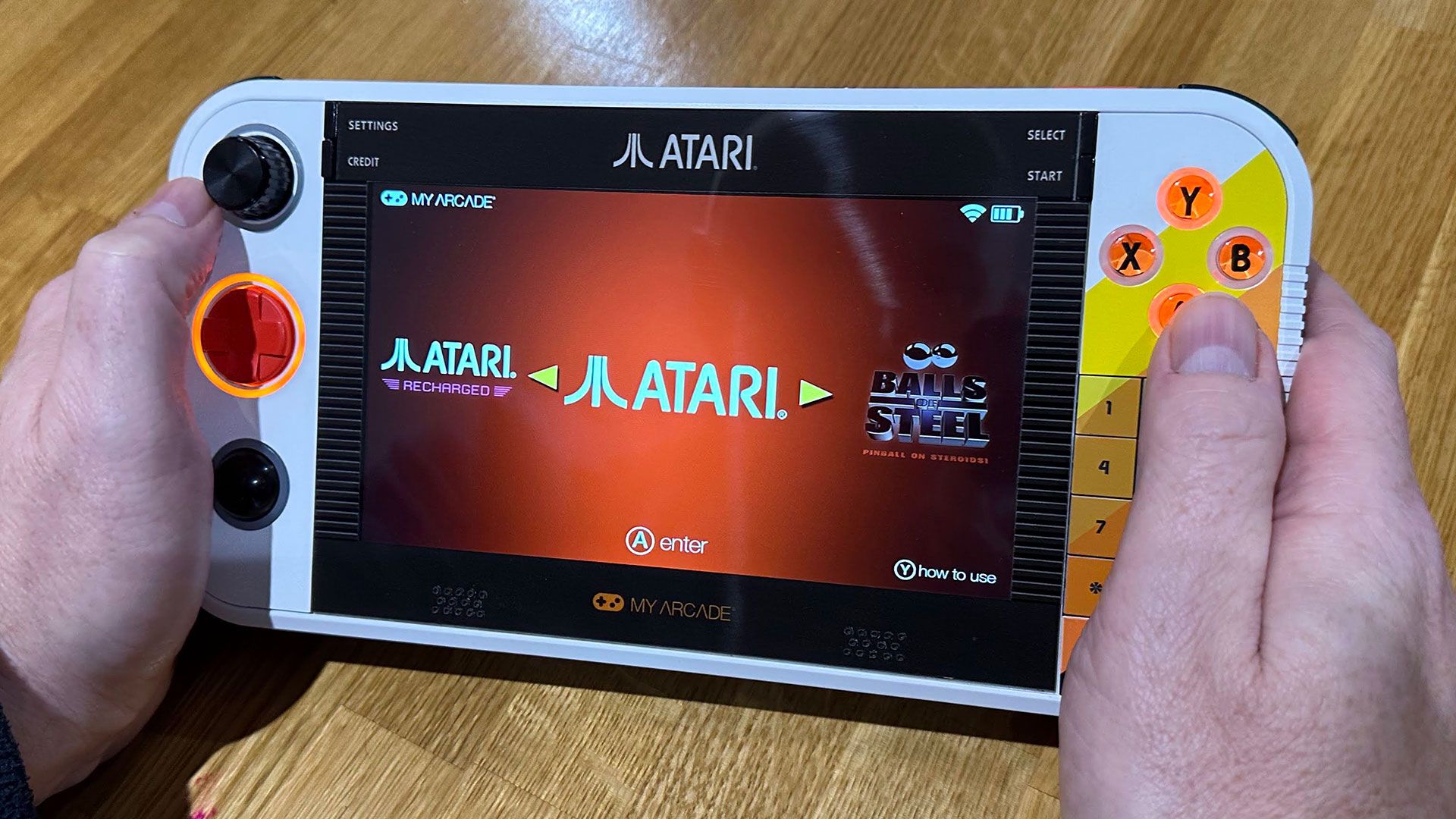
Linux derivative OS, 200+ built-in games, compatibility with other games via microSD access
Atari and My Arcade don't disclose the components used inside the Gamestation Go , so I was more than curious to open up this handheld up to take a look at the PCB.
First, the good news: Accessing the battery was a cinch. Two T6 screws needed to be removed from the back panel, and then the battery cover, sat between the legs of the integrated kickstand, could slide down and reveal the 7,200mAh 3.7W battery pack.
It was simple enough to unplug the battery, as the two adhesive strips fixing it in place just needed some gentle persuasion. This battery is attached to the PCB via a small 3-wire removable connector.
Now onto the bad news. I could find no more screws and couldn’t pry apart the console by levering any of its seams with my tools. Stumped, I went along to my local smart device repair emporium, and they thought the screen would need to be heated up, and the PCB would be uncovered by pulling this up and away, like one might open up a tablet. However, they couldn’t guarantee the device would still work after such an operation, so I decided not to sacrifice this handheld.
We have seen no other teardown online, but Atari enthusiasts buzzing around forums generally think that the innards of the new Gamestation Go are closely related to the non-portable Gamestation Pro, released two years prior. This non-portable TV-companion console was torn down here .
If the assumption that these consoles have a very similar set of inner components is correct, the new Gamestation Go will be Rockchip RK3032-powered. This is a very modest SoC, with dual Arm Cortex-A7 cores, supported by Mali-400MP graphics and up to 512MB of DDR3 RAM.
For software support, an RK3032 retro gaming device maker will usually look to Linux SpectralElec 3.0 and EmuELEC v9.0 builds. It will also struggle with any games newer than the 16-bit era, which tallies with my experience of this system (as we'll discuss later).
(Image credit: Tom's Hardware) (Image credit: Tom's Hardware) Gaming experience From sliding the red switch to the on-position, to reaching the game UI of the Gamestation Go , takes an unwelcome full 30 seconds. Once there, you will be presented with a colorful interface where the D-Pad is used to scroll horizontally between ‘systems.’ After a system has been selected, there are usually subcategories to flick through vertically, followed by a cascading list of actual games.
As you scroll through the list of games in your chosen category, the console UI shows a picture of the cartridge or cabinet, plus an animation showing gameplay, and beneath that, there’s a more-info section.
(Image credit: Tom's Hardware) (Image credit: Tom's Hardware) (Image credit: Tom's Hardware) The games library I was keen to dive into some of the classics I remember from the arcades of yesteryear. Some of these titles ate through quite a few coins in my time. Thus, it was exciting to see Asteroids, Berzerk, Breakout, Millipede, Missile Command, Space Duel, Breakout, and Tempest among the roster of titles.
Quite a few of my favorite old arcade titles are ‘vector’ style, and I enjoyed playing them. However, bear in mind that many arcade games get hard and frantic quite quickly. Remember, these titles were designed to hook people in and extract cash as quickly and efficiently as possible – not for lengthy gaming sessions.
Still on the topic of the arcade games on this machine, it was interesting to check each one, and the SmartGlow lighting choices for controls that had been pre-ordained by My Arcade.
For example, Asteroids used the D-pad for ship rotation and thrust, and one of the ABXY buttons for fire. I also enjoyed using the rotational paddle dial in Super Breakout and Tempest. Some fun trackball games that got me playing were Millipede and Missile Command.
It's also important to note the Gamestation Go ahs many duplicate games. Sometimes I wondered why there were so many duplicates, especially in the Atari library. For example, there are versions of Centipede for the Atari 2600, 5200, 7800, and arcade. Then titles like Asteroids and Breakout also have modern Recharged Editions, as well as various old console and arcade versions.
While control method authenticity is something of a star attraction for Gamestation Go gamers, there are some clear issues with it, in my experience.
One of the first things you may notice when gaming on this handheld is that you can’t change the controller configuration. The pre-defined SmartGlow indicated controller configuration is what you have to live with. If a game is configured to use the D-pad for movement by Atari / My Arcade, then trying the paddle or trackball will be futile. There’s no way to change this in any of the firmwares I had during testing (v 1.0 and v1.1).
Not only did the SmartGlow highlighted pre-selected controller choices and adjustment possibilities disappoint, the physical interfaces aren’t the best. Specifically, I found the inertia of the paddle, dial, spinner (or whatever you prefer to call it) was too strong. So it was often cold-treacle slow to move in response to on-screen action. I didn’t enjoy the trackball either. I’d instead call it the track-marble, as it is so small. This control method is really overly sensitive, with no way to tone it down. The D-Pad, ABXY buttons, and shoulder buttons all felt good enough, though.
With the pre-installed games, I didn’t notice any poor performance or symptoms of the hardware not being up to the job. I’d say the most processor-intensive (newest) titles available in the pre-installed list all worked without a hitch, without slowdowns, glitching, or audio pops or crackling. Thus, this handheld, with its underlying hardware, is fit for purpose.
(Image credit: Tom's Hardware) (Image credit: Tom's Hardware) Micro SD card fun Though not documented by Atari or My Arcade on the official product pages, Gamestation Go users can expand their playable games library using the system’s microSD card slot. This feature is another one that is shared by the prior Gamestation Pro console.
To get an SD card to be recognized by the system, you must format it using exFAT. ROMs for particular systems need to use pre-set extensions. It also makes sense to keep ROMs for different systems in different sensibly named folders, for your hygiene and sanity.
I successfully tested and enjoyed some games from the Sega Genesis (AKA Mega Drive) , Super Nintendo (SNES), Atari Lynx, and NeoGeo Pocket Color (NGPC) systems. All the titles I tried from these systems played nicely, albeit with just the D-Pad and ABXY buttons usable during play. Perhaps some SNES games pushed the system a little too far, as I heard a bit of audio crackling in some of these classic titles.
(Image credit: Tom's Hardware) (Image credit: Tom's Hardware) (Image credit: Tom's Hardware) (Image credit: Tom's Hardware) Moving beyond the 16-bit era, I had no success with original PlayStation, Nintendo 64 , or PlayStation Portable titles, whatsoever. While the latter two platforms may have been limited by the lack of analog joystick controls provided by the Gamestation Go, the PS1 should have been fine in this respect.
I could have tried more titles, and I’ve read of other testers having success with them, but I gave up when all my picks just black-screened and returned me to the UI. I’d only very limited hopes that the Rockchip CPU could have coped with the newer systems, anyway.
My Arcade and Atari have crafted a handheld retro gaming console graced by a bevy of unique retro-futuristic controls. It is clever to differentiate this device by having a paddle and trackball built-in, and this will surely exert a gravitational pull on retro gamers in its orbit. While the Gamestation Go largely works as intended, its appeal is dulled by the lack of user-configuration options, rendering quirks in classic vector games, and a price point that feels misaligned with its level of hardware and software polish. We remain hopeful that further firmware updates can improve matters, but canny customers don't buy on a promise.
Another thorn in the Gamestation Go's sides is that nearly everyone owns a smartphone, with a screen approaching the 7-inch diagonal of this handheld. Many more will have access to a portable in the form of a tablet, laptop, or handheld – often with even larger, more immersive, screens. Add a nice game controller to the powerful mobile device you already own, and you can probably enjoy playing emulated consoles from eras much more recent than the Gamestation Go can hope to support.
These flexible alternative platforms also have legitimate access to many of the same Atari games via Google Play, the Apple App store, and the various PC/Steam games libraries .
Providing yet more competition to the Atari Gamestation Go are consoles like the Nintendo Switch. Users of this popular hybrid console can load up carts / downloads like Atari Mania, and several Atari Recharged collections.
Last but not least, there are dozens of gaming handhelds on Amazon , AliExpress and other marketplaces that are designed primarily for playing retro console and arcade ROMs. These platforms may have fewer legitimately licensed game collection options, but that won't bother some. While I haven't seen any rivals with the trackball or paddle that the Atari offers, they often come with analog joysticks – and enough processing power to make later generations of console and arcade games playable. Moreover, there are lots of options around $50, if a 4-inch screen is enough for your retro gaming fix.
Among these alternatives, to be fair, is the My Arcade Atari Pocket Player Pro at just $39.99 on Amazon at 11% off right now. It has a small screen at just 2.75-inches, and relatively limited controls. However, it still has a decent 100+ licensed games built in and similar cool styling to the newer and more substantial Gamestation Go. That alternative Atari-branded product might just be enough for an enjoyable blast from the past. We'd also expect the larger new console to have some attractive price cuts in due course, rewarding those who are patient.
During my testing, the Gamestation Go’s firmware received an update from version 1.0 to 1.1. It was good to see some improvements, but I feel there’s still plenty more to do in future revisions.
If you're still in for the nostalgia, you can grab the Atari Gamestation Go from Amazon.com for $179.99 today.
Mark Tyson Social Links Navigation News Editor Mark Tyson is a news editor at Tom's Hardware. He enjoys covering the full breadth of PC tech; from business and semiconductor design to products approaching the edge of reason.
JeffreyP55 Admin said: My Arcade and Atari have put together a handheld retro gaming console graced by a bevy of unique retro-futuristic controls. However, the price, and a few hardware and software wrinkles, tarnish its appeal. Atari Gamestation Go review: 200+ Atari classics in your hands, supported by a unique selection of physical controls : Read more Personally don't care for the tiny screen offered by handhelds. Having a ton of Atari 2600 game cartridges since the 80's, I bought a 2600+ backwards compatible emulator. HD out never looked this good on NTSC (never the same color). Great on a 75" HDTV. No 300 ohm switch box needed. USB type C power. I can live with that. Reply
Key considerations
- Investor positioning can change fast
- Volatility remains possible near catalysts
- Macro rates and liquidity can dominate flows
Reference reading
- https://www.tomshardware.com/video-games/handheld-gaming/SPONSORED_LINK_URL
- https://www.tomshardware.com/video-games/handheld-gaming/atari-gamestation-go-review#main
- https://www.tomshardware.com
- Windows 1.01 was launched 40 years ago, but it didn't start well — Microsoft's graphical OS adventures were uncompetitive at launch
- Intel's upcoming Panther Lake CPUs tested ahead of launch — alleged Core Ultra 3 SKU with 10 cores and 16GB RAM surfaces in leaks
- Alienware's 34-inch QD-OLED gaming monitor dips below $500 for Black Friday — QHD 165Hz monitor hits all-time low pricing
- Snapdragon X1 Elite Linux laptop cancelled due to performance concerns — Linux PC maker says Qualcomm CPU is ‘less suitable for Linux than expected’
- Hoto's epic electric screwdriver set with 12 bits drops to less than $30 for Black Friday — this almost half-price kit is perfect for PC building and DIY projec
Informational only. No financial advice. Do your own research.