
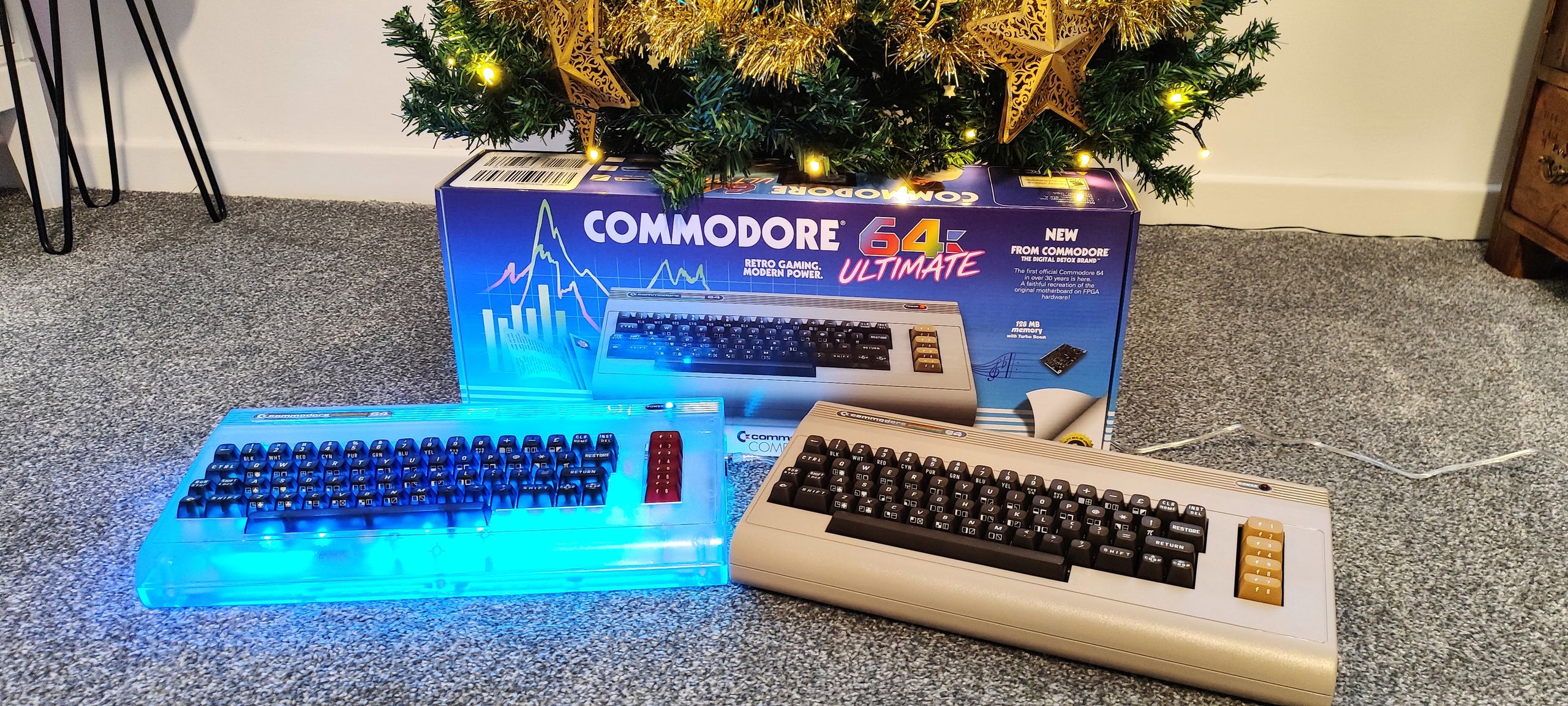
Inside the box, you're greeted by the Commodore 64 Ultimate itself, protected in styrofoam and plastic. To the right is a box full of cables, a power supply, and a red “cassette tape” USB drive that contains a plethora of related files, games, and demos. Underneath the C64 Ultimate lies the wire-bound User Guide. I read my original copy cover to cover as a kid, so seeing this version brought back some good memories.
Setting up was a breeze. Plug in the included HDMI lead, then power and press the multi-function power switch up on its rocker to see the blue BASIC screen that C64 fans know all too well. Yes, I did do the “10 PRINT” loop that everyone knows and does. Pressing the power button up for a brief second switches to another mode, C64U mode, and this is where everything changes.
My own joystick, made from arcade components and housed in a plastic box, worked extremely well, and I was soon blasting aliens and running across platforms, chasing power pills.
The only real cartridge that I own, International Soccer cartridge worked just as I expected. Fast to load, and the CPU always cheats!
My Tapuino, an Arduino -based datasette emulator, worked flawlessly with the C64 Ultimate. I popped a game on the micro SD, connected, and powered up. I typed in LOAD to start the tape loader, then I pressed play on the virtual tape. Minutes later, I had The Empire Strikes Back ready to play, after listening to a classic SID rendition of the Star Wars theme as the game loaded.
These devices worked, but the Commodore 64 Ultimate doesn't need them. It can load games from USB, internal SD card or even over a network. I tested this with a FAT32 USB drive loaded with a mixture of tape images (.tap files) and 1541 floppy disk image (.d64) and the file browser just prompted me to open and play them. Zero effort. If you want to use Tapuino or SD2IEC, or the real thing, then go right ahead!
(Image credit: Future) (Image credit: Future) (Image credit: Future) (Image credit: Future) (Image credit: Future) (Image credit: Future) (Image credit: Future) (Image credit: Future) (Image credit: Future) (Image credit: Future) The PCB inside the Commodore 64 Ultimate is faithful to the layout, if not the components, of the original Commodore 64. There are no CIA chips or MOS branded RAM, nor is there a VIC-II for the video, all of that is handled by the FPGA. The common ports for joysticks, cartridges, and power are all where they should be. The cassette port for datasettes and the serial port for floppy disk drives are also in the right places. Where the user port should be, we have connections for HDMI, Ethernet, and USB, but I am told that there is a user port breakout in the mail, and I intend to check that out later. This connects to a user port connector on the mainboard, but this is some distance from the case edge, so I am left wondering how the breakout will function.
Looking around the PCB, my first thoughts are that this is a quality board. The white PCB has a black silkscreen and gold signatures of the team behind it. Dominating the board is the FPGA breakout, on a SODIMM-type package. By adding the board in this manner, it should be possible to upgrade the unit, should there ever be an upgrade path.
The keyboard connects to the mainboard via USB-C, and the included lead is short but perfectly adequate. If I were planning to continually access the insides, I would put in a longer cable.
At the top left of the motherboard is an ESP32-S3, which provides Wi-Fi to the FPGA, and just above it are the USB ports, Ethernet, and HDMI.
In the center of the board is an innocuous pin header labeled P7, and to anyone but a Commodore fan, this is just a row of pins. In reality, this is a keyboard connector for the original C64 keyboard, so, should you desire, you can use a real C64 keyboard. That said, the included keyboard is great, feeling like a faithful update of the original.
Moving to the right, we see two blue ZIF sockets. These are labeled SID CHIP 1 and SID CHIP 2, and your thinking is correct. You can use your own SID chips in the Commodore 64 Ultimate, and I did, more on that later.
Going to the far right-hand side of the board, we see the cartridge port for your games and utilities, a speaker which is used to emulate disk and tape noises, and internal USB ports, which one would assume are for connecting storage. Lastly, on the outer right edge, we have the 12V power input, a multi-function switch, and two 9-pin connectors for joysticks and mice.
The Starlight edition comes with additional RGB LED panels that connect to headers located on the far left of the board.
The Commodore 64’s SID (Sound Interface Device) chips are highly sought after, with some of the best examples fetching high prices on community forums. Sadly, the SID chip in my Commodore 64, an 8580R5, is not great, producing low audio output and a decidedly unnerving hum. But the virtual SIDs in the Commodore 64 Ultimate are bright and fresh. Producing all of the bells and whistles that one would expect of the era.
The tl;dr is that the virtual SIDs are great, and the ability to use your own elevates the experience for those of us with perfect hearing. You won’t be disappointed.
We really are spoiled for choice! No, seriously, we are! On top of being able to use the original methods (tapes, floppy disks, and cartridges), we also have access to a plethora of games and demos via the included USB. But that’s not all. Both floppy and tape images can be run directly from USB, which means we don’t need access to a Tapuino or SD2IEC in order to run software on the Commodore 64 Ultimate. If, like me, you also have the original hardware, then you will know how important those tools are to get software onto our precious vintage hardware. I tested a few games, just to make sure, and yup, everything is covered, and you can enjoy your real and virtual C64 games to your heart’s content.
Once connected to the Internet, I wanted to explore a few Bulletin Boards (BBS) just like the ol’ days. On the included USB stick, we have everything we need to get online with our Commodore 64 Ultimate. Follow the instructions, no, really do, and you’ll be online in minutes. Getting a real Commodore 64 online is relatively easy; you just need an ESP8266 connected to the user port and some software, but the Commodore 64 Ultimate makes short work of everything.
The process was frictionless, and I love being able to get online in an 8-bit way.
(Image credit: Future) (Image credit: Future) (Image credit: Future) The Beginners All-Purpose Symbolic Instruction Code was the Python of the 1970s and 80s. I’ll admit, I love BASIC. I even wrote an article on how to use BASIC in 2025 , albeit a modern version.
The original Commodore 64 had a user port on the rear to connect datasets, modems, and add-on devices. In recent years, this has been used with cassette tape emulators like Tapuino, 1541 floppy disk drive emulators like SD2IEC, and ESP8266-based Wi-Fi modems. Heck, I’ve even connected mine up to an LED and a motor via a motor control board.
Watch On The user port on the Commodore 64 Ultimate is present but requires a breakout to be used. I've got one on the way and will add my findings once I have it.
We were sent two versions for review, both of which have the same specifications, but one has added RGB LEDs and is called the Starlight edition. This version is $349, versus the beige version at $299, and it includes a series of RGB LEDs inside a translucent case. The main keys are translucent, smoky black, and the function keys are translucent red.
You want all of the features found in the Commodore 64 Ultimate, but you want a real Commodore? Ok, let's break out a spreadsheet and do the math. All of these prices were found on ebay.com in early December 2025.
Header Cell – Column 0 Real Commodore 64
Key considerations
- Investor positioning can change fast
- Volatility remains possible near catalysts
- Macro rates and liquidity can dominate flows
Reference reading
- https://www.tomshardware.com/video-games/retro-gaming/SPONSORED_LINK_URL
- https://www.tomshardware.com/video-games/retro-gaming/commodore-64-ultimate-review#main
- https://www.tomshardware.com
- HDD prices spike as AI infrastructure and China's PC push collide — hard drives record biggest price increase in eight quarters, suppliers warn pressure will co
- NVIDIA and AWS Expand Full-Stack Partnership, Providing the Secure, High-Performance Compute Platform Vital for Future Innovation
- LG TV users baffled by unremovable Microsoft Copilot installation — surprise forced update shows app pinned to the home screen
- New app injects AMD's AI-driven FSR Redstone framegen into unsupported games — pre-alpha OptiScaler build demo shows nice improvements over legacy FSR frame gen
- Oracle reportedly delays several new OpenAI data centers because of shortages — tight material and labor supply frustrate expansion plans, possibly by a year or
Informational only. No financial advice. Do your own research.