
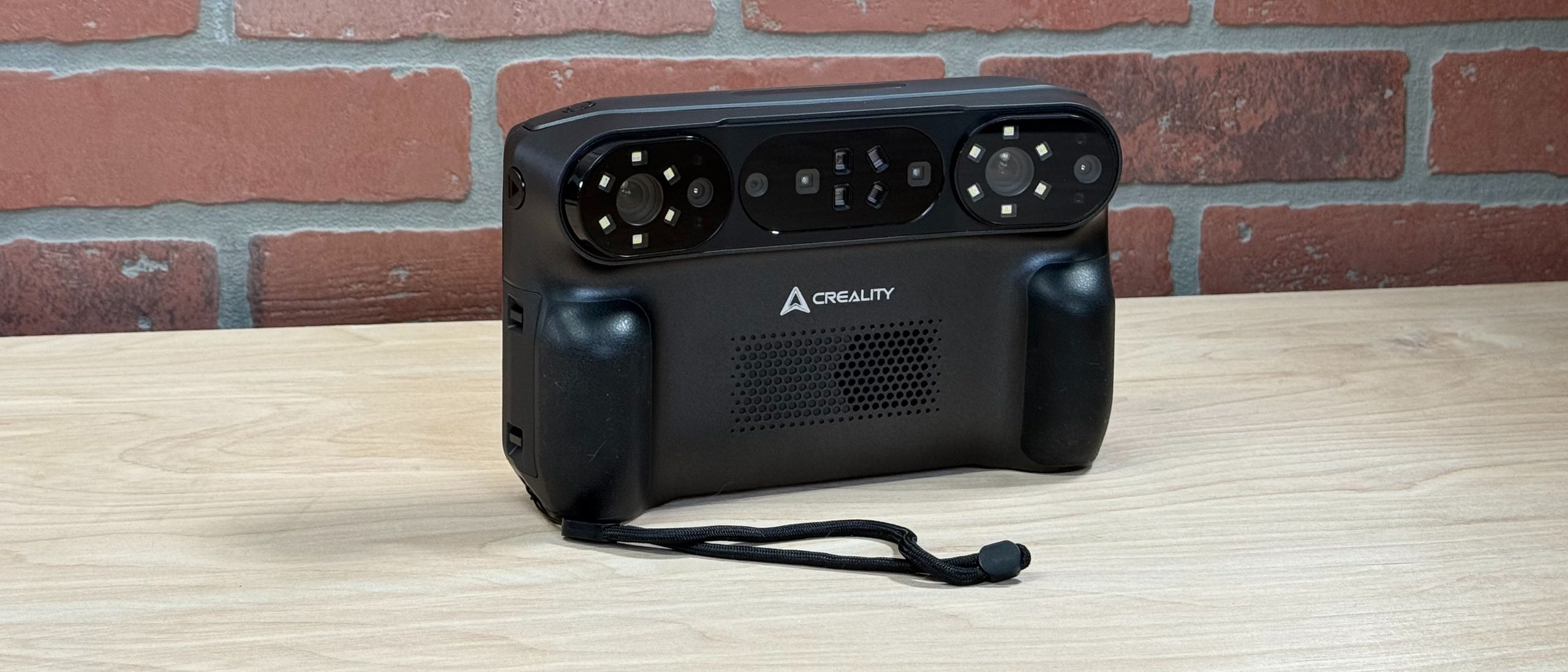
Most consumer scanners like the 3DMakerPro Mole are handheld units which are tethered to a computer during use, limiting the user in where they can effectively create a 3D scan. By integrating the processing capabilities of the Creality scanning software directly into the unit, the Sermoon P1 can be tossed in the included carrying case and brought anywhere in the world to capture and process 3D scans, no computer required.
My only concern with the design of the Sermoon P1 is the enclosure around the sensors (laser, camera, and LEDs). The perimeter around the lens is nearly flush with the glass, meaning the clear protective layer could be scratched or damaged if laid down flat. Most cell phone cases include a small rim that extends past the “camera bump” to prevent this type of damage. Examples of this type of case can be found on sites like Makerworld, such as an enclosure for the Creality Otter 3D scanner designed to protect the lenses.
When I turned on the Creality Sermoon P1 for the first time, a video played that showed the full scanning process with some helpful tips on preparing a model for scanning. I was surprised to discover the scanner had an onboard speaker, which played an audio track with narration during the scanning demo. While experienced users will likely skip through this video, it’s a nice addition for first-time users who are new to 3D scanning. During most operations, the Sermoon P1 will also show tips related to scanning while the operation is processing, a nice way to help users pass the loading time.
(Image credit: Tom's Hardware) (Image credit: Tom's Hardware) The Creality Sermoon P1 includes a glass calibration board that is used to calibrate the scanner before use. The calibration process involves laying the glass board down on a flat surface and gradually moving the scanner around in a controlled manner. This process takes about 10 minutes, and can be a bit tricky so moving slowly and gradually is the best move here.
Creality offers a first-party software for the Sermoon P1 called CrealityScan that is compatible with both Windows and macOS. This software offers essentially the same workflow steps as the onboard software on the Sermoon P1: scan data capture, point cloud fusion, meshing, and texture generation. When the Sermoon P1 is connected to this software via Wi-Fi or a USB cable, the LCD on the rear of the scanner is disabled. A nice touch is the “User Guide” section, which contains helpful tutorials and best practices for various skills, as well as general information about 3D scanning and mesh cleanup.
I’m using CrealityScan 4.1.7 on macOS 26.3 for this review, using a 2021 M1 Max MacBook Pro with 64 GB of RAM. With this computer, the scanning frame rate in NIR mode is up to 30 FPS using a wired connection, a substantial increase over the 18 FPS frame rate in standalone mode. This improved performance comes at a price: the Sermoon P1 needs to be tethered to the computer with a USB cable during scanning and the rear screen is disabled during scanning.
The workflow for the desktop CrealityScan app is the same as the standalone scanner: alignment, meshing, mesh editing, and exporting. The operations are laid out in a linear sequence, making it easy to follow as you go through the editing phase. CrealityScan also has a “One-Click Process” which will go through all the steps automatically, without any adjustment or input needed from the user. I found this to work pretty well for simple objects, but for more complex models with lots of geometry or holes it would be better to use the individual operations with more granular control.
The Creality Sermoon P1 uses blue laser line scanning for detailed geometry capture, and offers three different blue laser scanning modes: 22 crossed laser lines, 7 parallel laser lines, and 1 single laser line. The 22 crossed laser line mode is intended for fast scanning on large objects, the 7 laser line mode is best for capturing fine details, and the single laser line is intended for scanning deep holes or recesses that would be difficult to capture with a NIR or photogrammetry approach.
Automotive applications are a common use of high-resolution 3D scanners: products like aftermarket covers, clips, and other accessories require a quality model to build from, something that automotive OEMs typically don’t publish. An example is this carbon fiber window switch panel on a Mazda CX-3: it looks simple but the compound curve may be difficult to intuitively 3D model without a scan or model to reference. Using the included reflective markers, I placed about a dozen of them at random intervals and switched the Sermoon P1 to laser mode.
For my first pass, I used the 22 crossed laser line mode to capture the bulk of the geometry. This mode is much faster than I was expecting, with the scanner operating at 53 FPS and the geometry filling in almost immediately. After scanning the entire area, I did a second pass using the 7 laser line mode to capture some of the fine detail around the transition between the door panel and the switch cover.
In the center of the panel is a recess where the rocker switch for the window is located. Neither the 22 or 7 laser line mode was able to penetrate all the way to the bottom of this recess, so I switched to the single laser mode which is intended specifically for this type of application. Using the single laser, I worked slowly and carefully and was able to capture the complete cavity. The Sermoon P1 has a “remove tracking markers” function, which will remove the markers before creating the final mesh.
Scanning this switch panel was an eye-opening experience, with the Sermoon P1 surpassing my expectations at every turn. The 22 crossed laser line mode captured a large amount of geometry quickly, and switching between this and the other laser line modes was a seamless experience to complete the scan. From here, bringing the model into a traditional CAD or surfacing program would be the next step to create a parametric solid model to build from.
I’ve tried to scan the badges on the Orange amplifier a few times, but I’ve never had much success. After placing a few tracking dots on the front of the grille of the amp, I used the 7 laser line mode to capture both the bottom and top badges. The Sermoon P1 averaged around 41 FPS during the scan and despite the repeating pattern of the grille in the background, the scanner didn’t lose tracking or get confused when moving it manually.
The bottom badge looked sharp and detailed, with only a small amount of distortion around the crisp edges. The top badge had the majority of the detail present, but the sub-millimeter text on the bottom of the badge didn’t quite resolve. For a quick pass without any scanning spray or other preparation, I was happy with the result and felt confident the results could be improved further with some time spent adjusting the scan parameters.
The laser line scanning mode also works when tracking markers are placed on a turntable, with a marker-free object placed in the middle. I scanned a Tom Sachs Nike GPS sneaker by rotating the turntable as well as moving the Sermoon P1 around the model during the scan. My goal was to capture the text on the bottom of the outsole, as well as aligning multiple scans to create a full model of the sneaker. I used the 7 laser mode and scanned the sneaker three times: once with the outsole facing down, and then twice more to capture each side.
When rotating a model manually (flipping it over, etc.) during the scanning process, the resulting scans need to be aligned in space before the point clouds can be fused. This is typically a difficult process, with most auto-alignment processes picking the wrong features to use as landmarks or just failing to align properly. I used the Automatic alignment on the Sermoon P1, and was impressed to see it perfectly aligned three scans in under a minute.
Scanned with the 7 laser line mode, the text on the bottom of the shoe is clearly legible, and the wear on certain parts of the outsole can be clearly identified. The fabric also showed a good amount of detail, with stitching on the laces visible in the 3D model. I wasn’t expecting such a fast alignment process, and it’s even more impressive that it is completed on the device.
(Image credit: Tom's Hardware) (Image credit: Tom's Hardware) The standalone mode of the Creality Sermoon P1 allows users to bring the scanner to places that would be difficult or impossible if they also needed a computer, internet connection, and power supply. Scanners like this typically work best on an overcast day where the amount of directional light is minimal and the overall lighting on objects outside is uniform. I brought the Sermoon out with me on a day like this and captured a few objects out in the wild to test it out.
The Sermoon P1 has features that are designed explicitly for this type of scan, and I was impressed with how detailed the captured model was. Using the “ Large (500 – 2000 mm) ” mode with the tracking set to “ Geometry ”, I scanned a large brick sculpture using the NIR structured light mode. When scanning such a large object, the frame rate dropped to around 3 FPS, which meant the tracking would occasionally drop when I walked around a corner or zoomed in to capture a small detail.
The geometry of the scan is impressive: accurate, sharp, and even very small tool marks on the edges of the bricks are picked up and represented in the meshed model. This high resolution comes at a price: this model in a meshed form takes up about 3 GB of data on the device, and the exported model was 416.7 MB after cleanup. The Sermoon P1 ships with 256 GB of storage, which is enough to capture dozens of large objects like this without running out of space. If storage runs low, models can be exported to the CrealityScan desktop app to free up space on the device.
Unfortunately, the color texture wasn’t as sharp as the geometry from this scan and had several major issues. There is a clear line around the middle of the sculpture where the brick texture seems to split and diverge. Without an intuitive way to remap the texture on the device and no controls to adjust it, the only option for users here would be to export the model and manually edit the UV mapped texture. There are a few areas where shadows seem to start and stop abruptly, which is caused by the color texture not blending between scans (more on that in the next section).
(Image credit: Tom's Hardware) (Image credit: Tom's Hardware) Scanning sculptures made from bronze can be a challenge, especially when they are located outdoors. There is a wide range between the darkest areas (typically indentations or recesses) and the lightest areas (surfaces reflecting direct sunlight), and the geometry can be hard to capture because of this variance. This is typically a job for photogrammetry, but I wanted to test the Sermoon P1’s ability to successfully scan a bronze sculpture. I attempted to scan the head of a sculpture located in an urban plaza, and was impressed with the results.
Using the default scanning resolution for NIR standalone mode, I saw an average of between 14 to 18 FPS during the capture and captured 1,410 frames and 60,762 points. The scanner handled the bright spots around the sculpture incredibly well, and the tracking didn’t drop even when light was reflected directly into the lens. Because I was only interested in capturing the head of the sculpture, I worked my way around in a circle to capture under the chin, behind the ears, etc. and was able to capture everything I needed in only a few minutes.
I used the integrated point selection tools to isolate the area that I wanted to keep and deleted the rest, which only took a few seconds of processing time. From the point cloud, I was able to fuse, mesh, and add a color texture all from the standalone Sermoon P1 unit, no computer required. The entire post-processing workflow took about 20 minutes; a truly impressive feat for a handheld scanner. The color texture was a little blotchy due to the reflective nature of the material, but the geometry was crisp and accurate to the model that I scanned.
In 3D modeling, “color texture” typically refers to a UV mapped image that is a separate file from the geometry of the model. For instance: the scan of the toad above is composed of two primary pieces of data: a 3D model containing all the geometry in the model, and an image that contains information on how it is UV mapped (or wrapped).
Most users of the Creality Sermoon P1 will likely be using it for reverse engineering, geometry capture, or other applications where color texture isn’t a concern. For anyone interested in also capturing color data, Creality offers a “Texture” operation that allows NIR scans to have a color texture applied to the scan data.
The Sermoon P1 uses an onboard Qualcomm ISP chip, RGB camera, and integrated lighting to capture color textures on a model during scanning. These textures can be baked on a model after the meshing step, but CrealityScan offers limited adjustable parameters and instead offers a one-click texture function. Using this texture function will allow a user to export an .obj file with an associated color texture.
The result is underwhelming, and the color textures have a patchwork appearance where the seams form between scans. Most photogrammetry software will typically blend textures by finding edges or transitions and gently interpolating or averaging between them to prevent hard edges or seams from forming. The Sermoon P1 does not have any adjustable parameters for texture generation, so if the result isn’t acceptable, the user doesn’t have many options for fixing or improving it.
Despite the poor color texture, the geometry from the NIR scan is still impressive. There were only a few small holes around some of the deeper recesses, and the software was easily able to identify and fill them without disrupting the surface of the mesh. Exporting the .stl from CrealityScan resulted in a manifold (watertight) file that was 50 MB in size and was immediately ready for 3D printing.
Printed on a Bambu Lab X1-Carbon , this toad model looks and feels identical to the original. All of the geometry (bumps, ridges, grooves, etc.) of the original sculpture are present, and the scaling appears to be very accurate to the original model.
The Creality Sermoon P1 is a standalone 3D scanner capable of capturing small objects, large objects, and everything in between without requiring extensive preparation work or CAD editing. The onboard software can isolate specific areas of a scan, align multiple scans, and generate mesh files thanks to the 8-core 3.36 GHz CPU and 24 GB of RAM. The three blue laser modes all have unique use cases, and can be combined to quickly scan a large surface and later go back to capture a deep hole or fine geometric texture.
The Sermoon P1 is available as a bundle for $3,129 direct from Creality , which includes the scanner as well as all the accessories required to bring it out into the field. The price of this bundle will keep it out of the range of most hobbyists and users looking to start exploring 3D scanning, especially with less-expensive units like the 3DMakerPro Mole available for under $400. However, for professionals with an application-specific use case who are willing to pay for results, the Sermoon P1 is a compelling choice.
The Sermoon P1 created accurate scans in both laser and NIR modes, and the tracking was impressive in a variety of controlled and uncontrolled environments. The mesh editing (smoothing, hole filling, etc.) worked well both on-device as well as using the CrealityScan macOS app, and I didn’t see a major difference between using the two. The color textures were disappointing given the price point, and that shortcoming is the only major critical point I found when using the Sermoon P1.
Andrew Sink first used a 3D printer in 2012, and has been enthusiastically involved in the 3D printing industry ever since. Having printed everything from a scan of his own brain to a peanut butter and jelly sandwich, he continues to dive ever more deeply into the endless applications of additive technology. He is always working on new experiments, designs, and reviews and sharing his results on Tom's Hardware, YouTube, and more. ","collapsible":{"enabled":true,"maxHeight":250,"readMoreText":"Read more","readLessText":"Read less"}}), "https://slice.vanilla.futurecdn.net/13-4-18/js/authorBio.js"); } else { console.error('%c FTE ','background: #9306F9; color: #ffffff','no lazy slice hydration function available'); } Andrew Sink Social Links Navigation 3D Printing Writer Andrew Sink first used a 3D printer in 2012, and has been enthusiastically involved in the 3D printing industry ever since. Having printed everything from a scan of his own brain to a peanut butter and jelly sandwich, he continues to dive ever more deeply into the endless applications of additive technology. He is always working on new experiments, designs, and reviews and sharing his results on Tom's Hardware, YouTube, and more.
logainofhades You are calling $3,300 expensive for a 3d scanner? That's peanuts compared to what many run. Reply
TheWerewolf Most consumer scanners like the 3DMakerPro Mole are handheld units which are tethered to a computer during use Or… you can get a Legion Go or an Asus Ally and a Mole, and you get portable scanning, a full PC AND play games with it when you're not scanning. Full desktop scanning software too. If you want, you can print a clip to attach the scanner to the Go. And save a lot of money. Reply
Key considerations
- Investor positioning can change fast
- Volatility remains possible near catalysts
- Macro rates and liquidity can dominate flows
Reference reading
- https://www.tomshardware.com/3d-printing/3d-scanning/SPONSORED_LINK_URL
- https://www.tomshardware.com/3d-printing/3d-scanning/creality-sermoon-p1-3d-scanner-review#main
- https://www.tomshardware.com
- The FBI is looking for victimized Steam users who downloaded games with hidden malware — Investigation underway into multiple infected titles from 2024 to 2026
- Invisible malicious code attacks 151 GitHub repos and VS Code — Glassworm attack uses blockchain to steal tokens, credentials, and secrets
- Grab this £59.99 TP-Link wireless router with Wi-Fi 7 support at its lowest ever price — 31% discount unlocks faster connections for lag-free streaming and gami
- The FBI is looking for victimized Steam users who downloaded games with hidden malware — Investigation underway into multiple infected titles from 2024 to 2026
- ABB Robotics Taps NVIDIA Omniverse to Deliver Industrial‑Grade Physical AI at Scale
Informational only. No financial advice. Do your own research.