
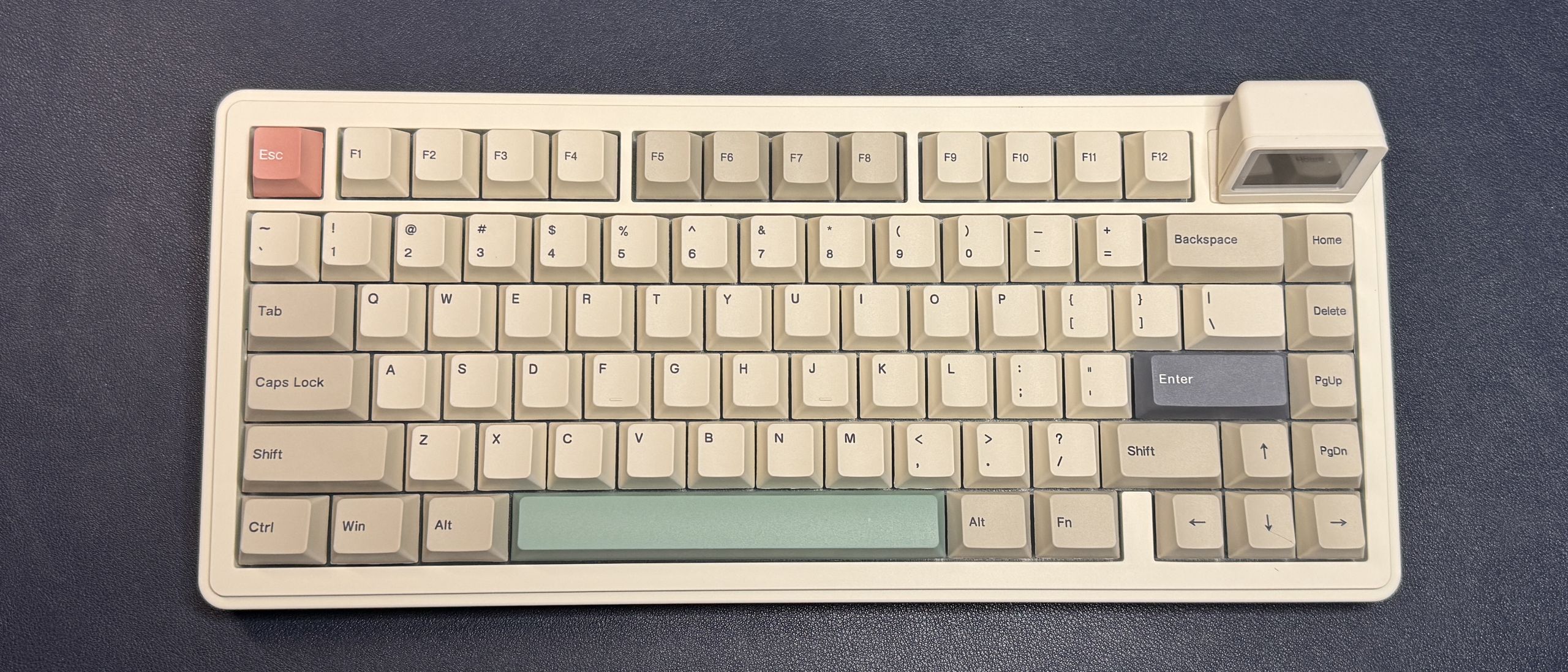
The RT82 comes with your choice of Epomaker's Creamy Jade or Sea Salt Silent switches. Our review unit came with the Sea Salt Silent switches, which are silent, pre-lubed linear switches with an actuation force of 45g. They're extremely quiet and smooth, with a soft, cushiony bottom-out — though I think I'd prefer if the actuation force were slightly lighter. Of course, the board has a hot-swappable PCB, so you can also swap in your own switches.
The keyboard comes with dye-sublimated PBT keycaps in a Cherry profile, which is lower-profile than the traditional OEM profile and features sculpted rows. The caps have a soft, slightly textured finish and lightly curved tops, with printed legends.
Typing on the RT82 is pleasant, if a little too soft and quiet for my liking. The low-profile keycaps mean your fingers aren't traveling quite as much, and while the keypresses are soft, they're not at all mushy. The board is gasket-mounted, with five layers of sound-dampening material (Sandwich Latex, an IXPE switch pad, a PET sound-enhancement pad, and bottom foam and silicone) for a sound profile that is definitely very… dampened. This is one of the quietest keyboards I've ever typed on, so if you're looking for something that won't annoy those around you, it's definitely worth a look.
Gaming on the RT82 is fine — while it's set up to allow gaming, it's definitely not a gaming keyboard first . It does feature N-Key rollover and a 1,000Hz polling rate (both wired and wireless), as well as bright, south-facing per-key RGB lighting, so it's got everything most people need in a gaming keyboard. But it doesn't come with things like dedicated media keys or gamer-ready software. The RT82 is programmable with VIA, which is an open-source mechanical keyboard customization software. It's great for remapping keys and recording macros, but it doesn't have the features you'll find in mainstream gaming peripheral software, such as per-game presets or an easy-to-enable game mode.
To customize the RT82 with VIA, you'll need to have the keyboard's .json file ( which you can download here ). Then, all you do is plug the keyboard in, navigate to VIA , connect the board, and then load the .json file in the design tab. Then, you'll be able to remap keys, record and save macros, and customize the keyboard's RGB backlighting.
The LCD screen is customizable via a different web-based app, which is… clunky, but understandable, as VIA is a generic software. The only thing you can customize on the screen are the custom images/gifs you can add (up to three); the other two screen modes cannot be customized. To add your own images, you'll need to navigate to Epomaker's LCD Screen Driver Software and connect the keyboard. Once it's connected, you can upload three of your own images and edit them (color adjustment, text, drawing) in the software. Then you can save your images to the keyboard and cycle through the screen's three modes with the Fn + Enter shortcut.
(Image credit: Tom's Hardware) (Image credit: Tom's Hardware) The RT82 is a wireless keyboard with three modes of connectivity: 2.4GHz wireless, Bluetooth, and wired(USB-C). It sports a 4,000 mAh battery that lasts up to 14 hours with the screen and RGB backlighting turned on, which isn't great but also isn't unexpected. With the RGB lighting turned on and the screen turned off, you can expect around 17 hours, and with the RGB turned off and the screen turned on, around 45 hours. You should get around 115 hours with both turned off, which is pretty solid.
The Epomaker RT82 will appeal to those who like its retro styling and soft, quiet keypresses. It’s a budget-friendly hot-swappable mechanical keyboard with a surprisingly pleasant typing experience that can also hold its own in most gaming situations. The screen is definitely a gimmick, but at least it's detachable — in theory, this means Epomaker could make alternate accessories (such as a knob or… something else) that you could swap in, if you didn't want the screen, but there are no such accessories as of this writing.
Sarah Jacobsson Purewal is a senior editor at Tom's Hardware covering peripherals, software, and custom builds. You can find more of her work in PCWorld, Macworld, TechHive, CNET, Gizmodo, Tom's Guide, PC Gamer, Men's Health, Men's Fitness, SHAPE, Cosmopolitan, and just about everywhere else. ","collapsible":{"enabled":true,"maxHeight":250,"readMoreText":"Read more","readLessText":"Read less"}}), "https://slice.vanilla.futurecdn.net/13-4-19/js/authorBio.js"); } else { console.error('%c FTE ','background: #9306F9; color: #ffffff','no lazy slice hydration function available'); } Sarah Jacobsson Purewal Social Links Navigation Senior Editor, Peripherals Sarah Jacobsson Purewal is a senior editor at Tom's Hardware covering peripherals, software, and custom builds. You can find more of her work in PCWorld, Macworld, TechHive, CNET, Gizmodo, Tom's Guide, PC Gamer, Men's Health, Men's Fitness, SHAPE, Cosmopolitan, and just about everywhere else.
Key considerations
- Investor positioning can change fast
- Volatility remains possible near catalysts
- Macro rates and liquidity can dominate flows
Reference reading
- https://www.tomshardware.com/peripherals/gaming-keyboards/SPONSORED_LINK_URL
- https://www.tomshardware.com/peripherals/gaming-keyboards/epomaker-rt82-review#main
- https://www.tomshardware.com
- CanisterWorm malware wipes Iranian machines for no apparent reason — sophisticated attack spreads through npm packages and uses ICP canister as control surface
- Minisforum AI X1 Pro 470 review: AMD's Gorgon Point in a sleek mini PC desktop
- Samsung Display debuts 'QuantumBlack' coating for QD-OLED monitors — screen tech boosts ambient black levels while reducing glare
- Seagate FireCuda 530R 2TB SSD Review: A stealthy workstation powerhouse
- Gigabyte Aero X16 Review: Capable hardware, compromised experience
Informational only. No financial advice. Do your own research.