
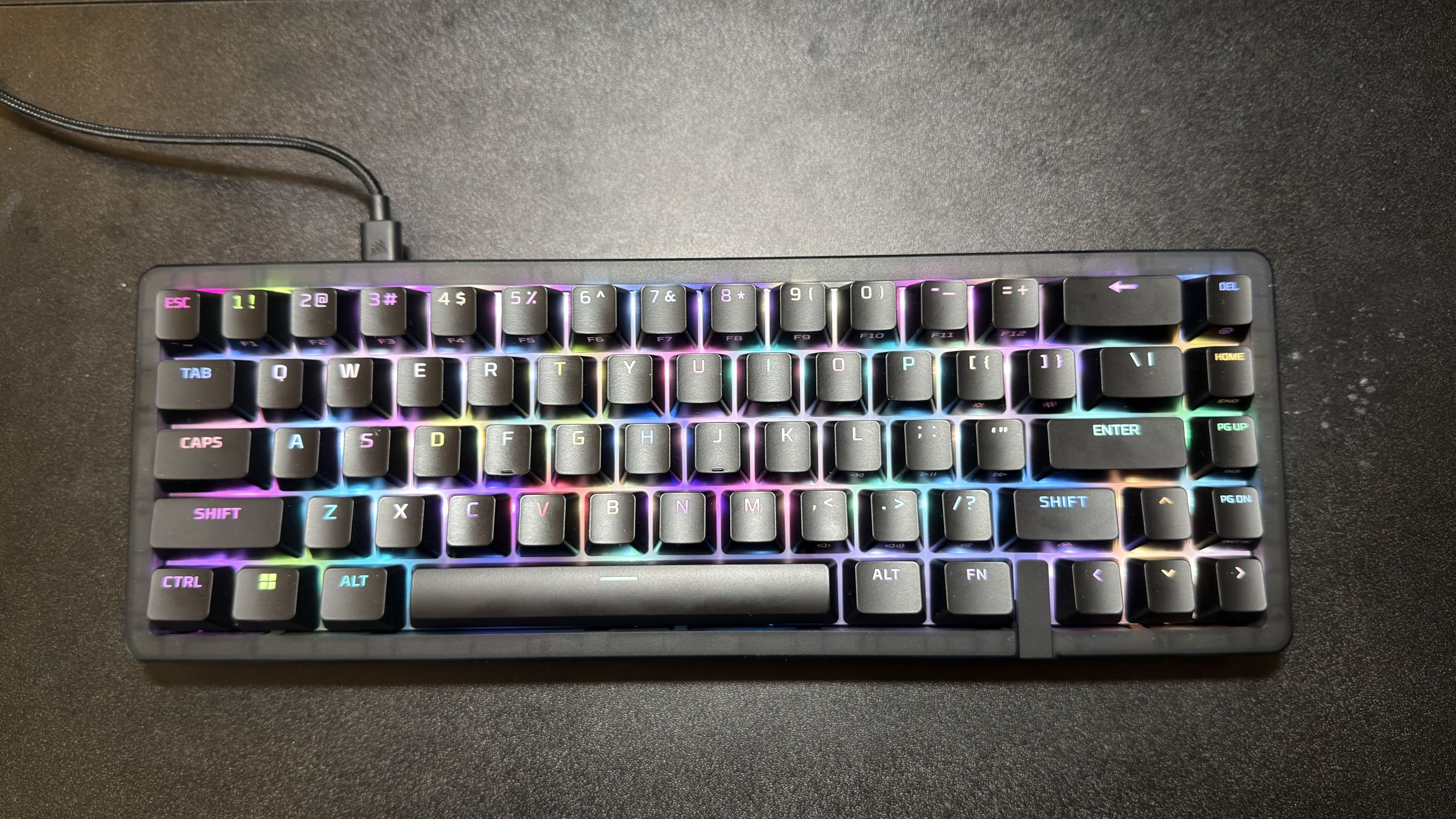
Although I rarely use RGB on my keyboards, I kept it enabled while I was testing the Origins 2 65 — because it just looked that good. It's bright and vibrant; there's a setting called confetti — and even though it's just a slow, flickering preset, it looks great combined with the keyboard's shine-through switches and polycarbonate switch plate and keycaps. It made me feel a bit nostalgic for my original Glorious GMMK that I bought about seven years ago, which had a similar lighting effect. You won't have the same nostalgia trip as I did, but you'll find something you like in the lighting options. The Origins 2 65 features the following lighting presets: alternating, solid, swipe, breathing, calming waves, twinkle, confetti (my favorite), sunrise, and surging waves. The lighting is per-key, so you can also adjust each key's lighting individually. The RGB looks very good on this keyboard — it's bright and pretty, and this is accentuated by the shine-through keycaps and switches. However, you can't shuffle between RGB modes on the keyboard itself — you need to do it manually in the Ngenuity software, which is inconvenient (and a bit inexcusable in 2026).
The rest of the HyperX Origins 2’s design is pretty straightforward. On the back it has one set of flip-up feet along with four rubber feet to keep it from slipping around your desk. The USB-C port is located along the top left of the board, and the cable is removable.
The HyperX Origins 2 65 is attempting to bridge the gap between "best gaming keyboard" and "best typing keyboard," and it doesn't quite succeed — it's much better for gaming than it is for typing. The keyboard comes with a HyperX Linear Reds, which have an actuation force of 40g and a short 1.8mm travel actuation. The keyboard features a hot-swappable PCB and a polling rate of up to 8,000 Hz — and with its compact size, it's perfect for fast-paced gaming.
I’m in the midst of my New Game Plus (NG+) run on Clair Obscur: Expedition 33 because it’s easily the best game I have played in recent memory and I want to 100% it with a keyboard this time around, as I used an Xbox controller in my original playthrough.
Because Expedition 33 utilizes a parry and dodge system, you need to be quick, and because of that, I needed a fast keyboard. While I don’t really believe in polling rate, I do believe that lighter switches play a huge role in succeeding in any fast-paced game.
Performance-wise, the HyperX Origins 2 65 did a great job keeping my expedition alive and my in-game deaths were limited to lack of skill — not a shoddy keyboard. I don't know if it's the compact size, the snappy response, the light actuation and short travel, or all of the above, but I loved gaming with the Origins 2 65.
While I thoroughly enjoyed gaming with the HyperX Origins 2 65, I was a bit disappointed by the o-ring mount design. I’m not sure if it’s because CannonKeys made a splash with the Bakeneko by providing an exquisite, bouncy typing experience, but the Origins 2 felt like a tray mount with good noise dampening. In addition, the switches are loud. While I didn't expect a mechanical keyboard enthusiast-tier typing experience, it does feel like HyperX had a lot of potential with the o-ring mounting system and the POM switches… but that just kind of fell flat.
All in all, the gaming experience with the HyperX Origins 2 65 is superb, but the typing experience was subpar at best.
The HyperX Origins 2 65 is supported by the company’s NGENUITY software and I found it to be simple to use and not bloated like some other mechanical keyboard software. NGENUITY actually reminds me a lot of “VIA” which is the open-source key mapping software used by most enthusiast-level mechanical keyboards.
NGENUITY allows you to change lighting effects, re-map keys and record macros. That’s it — and this is good, because I don’t like when keyboard software is bloated with unnecessary features nobody will ever use.
That said, it was cute to see an animated hedgehog appear when I selected the confetti lighting preset.
The HyperX Origins 2 65 is an interesting mechanical keyboard — it's definitely a gaming keyboard, first and foremost, but its o-ring design suggests the brand is also trying to appeal to keyboard enthusiasts. Unfortunately, that effort falls a little flat — if you're looking for a compact gaming keyboard that will also give you an enthusiast-level typing experience, we suggest the magnetic Arbiter Studio Polar 65 (or you can just go straight to enthusiast with something like the Mode SixtyFive custom keyboard ).
I do hope HyperX will go back to the drawing board and refine its o-ring design, because the components are there — it just needs to be implemented better. But despite the ho-hum typing experience and the lack of ability to change the keyboard's RGB presets on the fly, I did enjoy gaming on the HyperX Origins 2 65. It's a compact, customizable board with easy-to-use software, light linear switches, and a snappy 8,000 Hz polling rate. If you're looking for a compact gaming keyboard you can easily personalize, the Origins 2 65 is a solid option.
Myles Goldman is a freelance writer for Tom's Hardware US. He reviews keyboards and cases. ","collapsible":{"enabled":true,"maxHeight":250,"readMoreText":"Read more","readLessText":"Read less"}}), "https://slice.vanilla.futurecdn.net/13-4-18/js/authorBio.js"); } else { console.error('%c FTE ','background: #9306F9; color: #ffffff','no lazy slice hydration function available'); } Myles Goldman Social Links Navigation Freelancer Writer Myles Goldman is a freelance writer for Tom's Hardware US. He reviews keyboards and cases.
Key considerations
- Investor positioning can change fast
- Volatility remains possible near catalysts
- Macro rates and liquidity can dominate flows
Reference reading
- https://www.tomshardware.com/peripherals/gaming-keyboards/SPONSORED_LINK_URL
- https://www.tomshardware.com/peripherals/gaming-keyboards/hyperx-origins-2-65-review#main
- https://www.tomshardware.com
- Rumored RTX 5050 9GB GDDR7 could make hay from recycled RTX 5060 silicon — refreshed entry-level Blackwell card might finally have enough VRAM for DLSS and MFG
- Meta reveals four new MTIA chips built for AI inference — to be released on a six-month cadence
- How AI Is Driving Revenue, Cutting Costs and Boosting Productivity for Every Industry in 2026
- Ambitious semiconductor enthusiast builds DIY 'class 100 cleanroom' in his garden shed — contains a plasma etcher, vacuum furnace, and even custom software-driv
- Apple MacBook Neo review: a budget-priced game-changer
Informational only. No financial advice. Do your own research.