
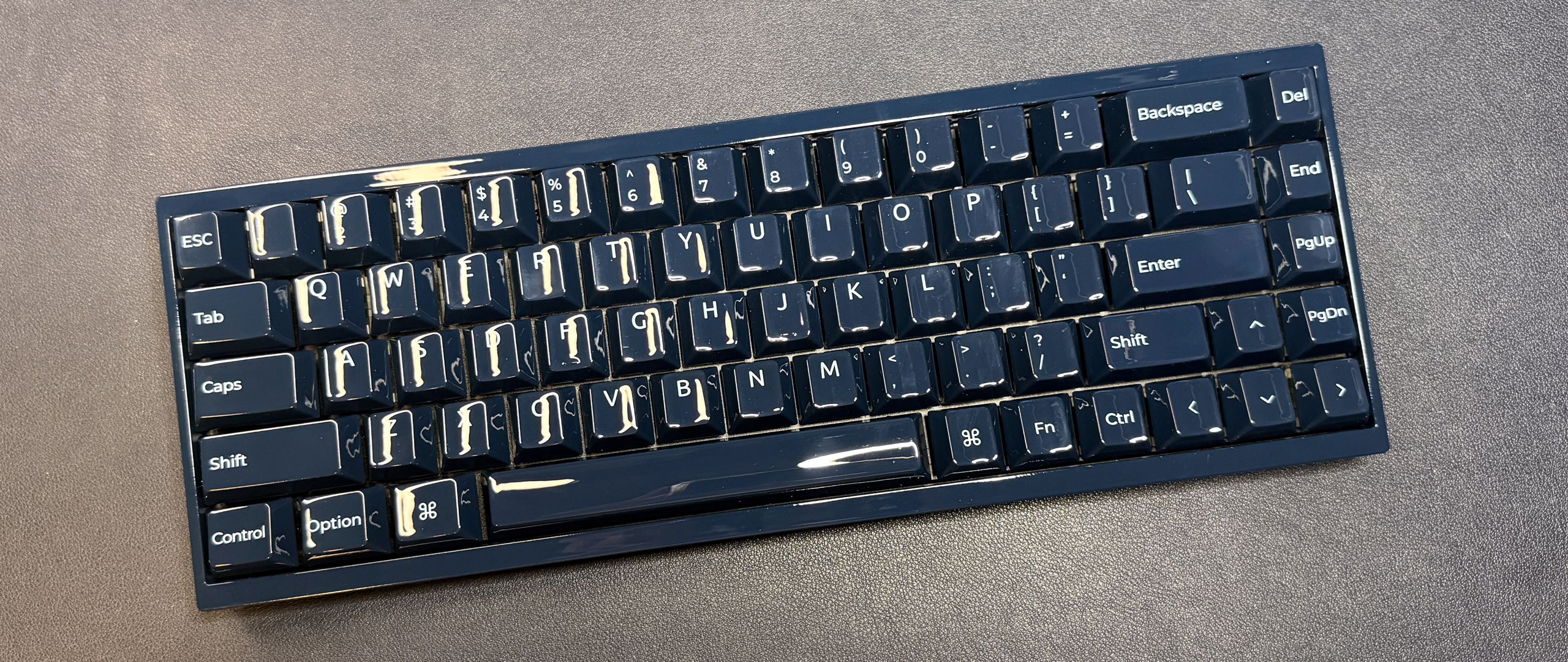
The Q16 HE 8K comes with Keychron's "Ultra-fast" Lime magnetic switches, which are pre-lubed linear switches with a starting force of 30g and an ending force of 55g and an actuation range of 0.1 – 3.35mm. The keyboard features a hot-swappable PCB, so you can swap in your own switches, though, like most magnetic switch keyboards, you can only use other magnetic switches — and Keychron warns that it's not compatible with Gateron, Jade, or other magnetic switches. So that leaves you… with Keychron's magnetic switches? Let's just say that you probably shouldn't consider this board if you hate the sound of the switches it comes with.
Typing on the Q16 HE 8K is… well, let's just say it wasn't my favorite typing experience. Now, I'll point out that I haven't tried a lot of ceramic keycaps — and I haven't tested any for longer than a quick feel. But I have tested other non-ceramic keycaps and keyboards, and given that the allure of ceramic is supposed to be a better feel and sound, I can confidently say I was not impressed.
As I mentioned earlier, the keycaps don't feel much different from extremely glossy non-ceramic keycaps on the surface. Of course, there aren't a lot of extremely glossy keycaps (because extreme gloss attracts fingerprints, I assume), so I suppose they're somewhat unique-feeling in that sense. I can feel the difference when I'm typing, however — the ceramic keycaps feel a little heavier and thicker.
Keychron describes these keycaps as offering a "uniquely cool and silky-smooth touch, while delivering a clear, resonant sound with every press." And while they are smooth (too smooth), I'm not getting this "clear, resonant sound." They're clacky, but not in a good way — my keypresses are very loud for how hollow and rattly they sound. This is not only the keycaps' fault, of course, and the board does have sound-absorbing foam and a latex bottom pad to tune the acoustic profile, it's… not really working. I just didn't expect this keyboard to be so… noisy — and again, not in a good way.
As for feel, since the keycaps don't feel particularly good (or bad), the only takeaway there is that they're a little too heavy — I'm definitely starting to feel some fatigue, and I write a lot, so that's saying something. The switches, at least, feel good — they're very smooth, stable, and responsive, and the lighter starting actuation is perhaps the main thing that's keeping my fingers from tiring.
As for gaming — the Q16 HE 8K has all the hot gaming features thanks to its magnetic switches — Rapid Trigger, SOCD, dual-actuation, long-press actuation, and adjustable actuation by individual key. It also gets up to an 8,000 Hz polling rate, which you can change using Keychron's web app (Keychron Launcher); it ships with a default polling rate of 1,000 Hz. But there are a lot of magnetic switch gaming keyboards with 8K polling rates out there — some of which are also from Keychron. Switch performance aside, these keycaps are just too slippery for gaming. While I didn't slip and miss keys a crazy number of times, I couldn't help thinking that I wouldn't have missed any if I'd been using regular keycaps.
The Q16 HE 8K is configurable with Keychron's web-based software, Keychron Launcher. While I don't love most non-web-based peripheral apps, I also don't love web-based apps — after all, it seems a little ridiculous to have to connect to the internet to remap a couple of keys or switch your polling rate.
(Image credit: Tom's Hardware) (Image credit: Tom's Hardware) (Image credit: Tom's Hardware) (Image credit: Tom's Hardware) (Image credit: Tom's Hardware) (Image credit: Tom's Hardware) (Image credit: Tom's Hardware) (Image credit: Tom's Hardware) (Image credit: Tom's Hardware) That said, Keychron Launcher at least worked smoothly for me, unlike some web-based apps I've used recently. The app has a lot going on, but what you need to know is that this is where you can remap keys, customize the lighting, and adjust various magnetic switch features, such as actuation distance, Rapid Trigger, SOCD, and dual-actuation. You can program up to four layers on the keyboard, though you'll have to figure out which key you're using to switch between them. The keyboard comes with a handful of preset Fn key shortcuts, mostly for configuring the RGB lighting on the board; you'll probably need to set a few of your own, since you're working with fewer keys than most.
(Image credit: Tom's Hardware) (Image credit: Tom's Hardware) (Image credit: Tom's Hardware) The RGB backlighting is moderately bright but the ceramic keycaps are of course not shine-through, so you'll only see the lighting as it filters through the gaps. Keychron includes 22 preset lighting effects that you can cycle through without even using the software. You can also set the keyboard's per-key RGB and layer multiple effects — more than you can do with QMK / VIA (the open-source software many boutique keyboard companies, including Keychron, use for their non-magnetic keyboards), so that's nice.
For the world's first all-ceramic keyboard, the Keychron Q16 HE 8K is definitely underwhelming – at least to me. It looks nice if you like the ultra-glossy finish, but you'll need to wipe it down every time you want to look at it. And while I'm not necessarily a connoisseuse of ceramic keycaps, this keyboard didn't sound or feel as good as most of the non-ceramic keyboards I've tested recently. (The Corsair Makr Pro 75 , which is also a magnetic board that costs way more than it should, sounded better than this.)
If you're looking for that premium ceramic keycap feel, you unfortunately won't get it here. But if you're looking for a 65-percent magnetic switch gaming keyboard that you can also enjoy typing on, I still love the Arbiter Studio Polar 65 .
Sarah Jacobsson Purewal is a senior editor at Tom's Hardware covering peripherals, software, and custom builds. You can find more of her work in PCWorld, Macworld, TechHive, CNET, Gizmodo, Tom's Guide, PC Gamer, Men's Health, Men's Fitness, SHAPE, Cosmopolitan, and just about everywhere else. ","collapsible":{"enabled":true,"maxHeight":250,"readMoreText":"Read more","readLessText":"Read less"}}), "https://slice.vanilla.futurecdn.net/13-4-18/js/authorBio.js"); } else { console.error('%c FTE ','background: #9306F9; color: #ffffff','no lazy slice hydration function available'); } Sarah Jacobsson Purewal Social Links Navigation Senior Editor, Peripherals Sarah Jacobsson Purewal is a senior editor at Tom's Hardware covering peripherals, software, and custom builds. You can find more of her work in PCWorld, Macworld, TechHive, CNET, Gizmodo, Tom's Guide, PC Gamer, Men's Health, Men's Fitness, SHAPE, Cosmopolitan, and just about everywhere else.
doubleoog I got this keyboard from their Kickstarter and to say that I'm disappointed is an understatement. I own several Keychron keyboards and this was by far the biggest let down. Not because it is a below average keyboard, but because the packaging and handling by them was so poorly managed that I'm surprised the keyboard didn't come broken. It came in a very dirty plastic seal and the box was damaged in all four corners from it being thrown around. The additional accessory boxes that came with that were also smashed because of the poor packaging. The whole thing felt rushed and poorly managed. I hope that my next order from them is managed much better than this one was. Reply
Key considerations
- Investor positioning can change fast
- Volatility remains possible near catalysts
- Macro rates and liquidity can dominate flows
Reference reading
- https://www.tomshardware.com/peripherals/mechanical-keyboards/SPONSORED_LINK_URL
- https://www.tomshardware.com/peripherals/mechanical-keyboards/keychron-q16-he-8k-review#main
- https://www.tomshardware.com
- The Nightmare Returns in the Cloud: GeForce NOW Unleashes Capcom’s ‘Resident Evil Requiem’
- Where to buy Apple's new MacBook Neo, MacBook Air, and MacBook Pro — grab the most affordable MacBook, along with the latest M5 silicon refreshes, from these to
- Fiber internet provider says it can detect leaking water pipes using existing infrastructure, prevented loss of 2 million liters a day over three months — Light
- Zombie ZIP vulnerability lets compressed malware leisurely stroll past 95% of antivirus apps — security suites are blissfully unaware of security issue
- Qatar helium shutdown puts chip supply chain on a two-week clock — SK hynix forced to diversify after 30% of global supply removed from the market
Informational only. No financial advice. Do your own research.