
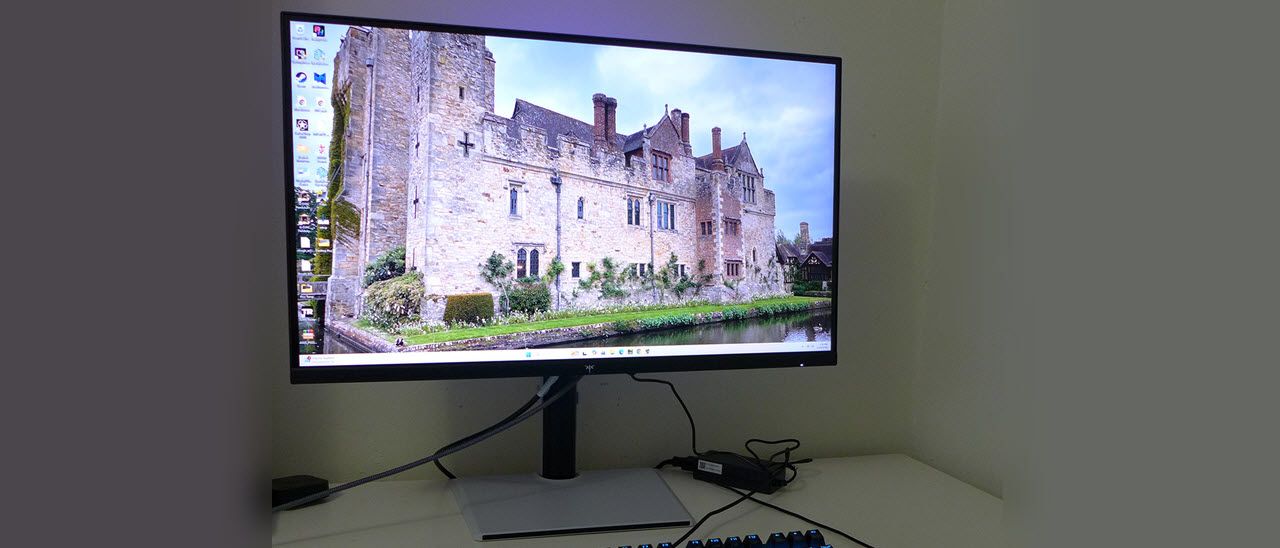
The H27E6 arrives packed securely in crumbly foam and assembles without tools. If you’d rather use your own arm or bracket, there’s a 100mm VESA mount in back, but you’ll need to source your own fasteners. A small external power supply is provided along with a DisplayPort cable.
(Image credit: KTC) (Image credit: KTC) (Image credit: KTC) White displays always stand out, and the H27E6 manages to look different without screaming for attention. From the front, the base is the only obvious white part with a crosshatch pattern molded onto the black upright. In the back, the panel is completely white, as is the back of the stand. Inset around the mount point is more of the crosshatch texture ringed by LED lights. The KTC logo lights up as well. The only other thing in the back is the OSD joystick, which sits in the lower corner.
The stand is of decent quality with just a little wobble, but firm movements that maintain position. You get 5/20 degrees tilt and 45-degree swivel, along with a 90-degree portrait mode and a 5.1-inch height adjustment.
The input panel is under the center of the panel and includes two HDMI 2.1 and two DisplayPort 1.4 ports. G-Sync works only through DisplayPort, but FreeSync will operate over any input. The HDMIs support VRR for consoles as well. You can see a USB port in the photo, but it’s just for firmware updates. There are no internal speakers, but you get a 3.5mm headphone jack.
The H27E6’s OSD is text-based with a KTC logo as the only graphic. It’s the first one I’ve seen with selectable color schemes, there are four to choose from. Pressing the joystick brings it up.
Gaming Setup has the video processing features with a FreeSync/G-Sync toggle, gaming aids, overdrive and MPRT. The aids include crosshairs (two shapes in five colors), a timer and an FPS counter. The overdrive has three fixed levels and a dynamic option. I found it worked without artifacts at the Standard setting. Dynamic showed slight ghosting, but it stayed consistent with changes in frame rate. You also get MPRT (backlight strobing) that works up to 320 Hz and retains the overdrive. However, you can’t use it with Adaptive-Sync. But it is one of the better examples I’ve seen with only a slight phasing artifact.
The H27E6 supports HDR10 signals with an automatic switch as long as HDR is set to Auto. I saw that I could calibrate white balance in HDR mode, which is something I rarely see. More on that later. Advanced Settings also has the overclock toggle. Turn it on for 320 Hz. My sample ran reliably at that speed for the duration of the review.
My H27E6 sample needed a bit of tweaking for the best picture. Initial measurements showed that gamma was too light and the color temp was a bit blue. The warm preset was too red, so I worked the RGB sliders to make things right. Light gamma means a washed-out image, so I upped the preset to 2.4, which made a significant difference. My settings are below, and you’ll notice the RGB values for HDR as well. This is one of the only monitors I’ve encountered that includes HDR calibration, and it too makes a positive difference.
Playing games on the H27E6 showed me quickly that KTC has gotten the formula right. The image is superb once calibrated and gaming feel is on par with any premium display I’ve encountered.
The picture is superb for SDR and HDR. It needs calibration to get there, but if you’re reading this review, you have the information you need. It’s the only monitor I’ve seen that leaves the RGB sliders active for HDR, so I used them to make a visible improvement in both color accuracy and perceived contrast. It doesn’t have any dynamic dimming for HDR, but the IPS panel renders around 1,500:1, which is 50% better than the class average. If the H27E6 had a Mini LED backlight, it would be a giant slayer.
It also has superb video processing. Panel response is super quick and smooth at 320 Hz, which ran reliably for the entirety of my review. You can set the overclock once and forget it. My test PC, with its GeForce RTX 4090 , had no trouble maintaining 320 fps at QHD resolution with Doom Eternal’s detail set to max. Input lag was a non-factor as well. 180-degree turns were instantaneous, literally as fast as I could move the mouse. And it took no time for me to commit those movements to muscle memory so I could stop where I wanted. The H27E6 is a competitor’s weapon for sure.
If you don’t have a high-performance video card, the MPRT feature works very well, as does the overdrive. MPRT cancels out Adaptive-Sync but still lets you use the overclock to 320 Hz. It also retains the overdrive, so you can get excellent motion resolution at lower framerates. If you can keep it above 200 fps, though, stick with AS and overdrive on the Standard setting for tear-free operation.
As a 27-inch flat QHD monitor, it is ideally suited for day-to-day use, with 109 ppi pixel density and a sharp picture. The screen’s anti-glare layer works as advertised without imparting any grain or artifacts. Color is vivid and bright with just the right balance. The native gamut covers 101% of DCI-P3 , which makes it a little oversaturated for SDR but pleasing, nonetheless. I tried out the sRGB mode and found its gamma too light, which flattened the image. The gamma presets were grayed out, but I could calibrate grayscale in this mode, which is a standout feature. Most monitors gray out all picture options in their alternate gamut modes.
I enjoyed the H27E6’s styling very much, mainly because its white accents set it apart from the sea of black displays that come across my desk. The white back, base, and stand have just enough black parts to keep it from screaming for attention while still making a nice statement. Physical details are just enough to maintain elegance without becoming gaudy. And finding a lighting feature at this price point is a rarity. The LEDs backlight a half ring and the KTC logo in back. The only things left out here are USB ports and internal speakers.
Takeaway: The H27E6 is an early-effort product with all the refinement of a seasoned model line. It combines excellent picture quality with premium video processing and mature styling. You’d never expect its price to be so low, but it truly delivers a lot for the money. With a bright and colorful picture, and addictive gameplay, it’s sure to have a wide appeal.
Current page: Features and Specifications
Key considerations
- Investor positioning can change fast
- Volatility remains possible near catalysts
- Macro rates and liquidity can dominate flows
Reference reading
- https://www.tomshardware.com/monitors/gaming-monitors/SPONSORED_LINK_URL
- https://www.tomshardware.com/monitors/gaming-monitors/ktc-h27e6-27-inch-320-hz-qhd-gaming-monitor-review#main
- https://www.tomshardware.com
- Save $40 on a Samsung P9 microSD Express storage card for your Switch 2 — Just $79 for 512GB of superfast capacity
- OpenAI cofounder's journal seemingly outlines plot with Altman to oust Musk to establish a for-profit biz — ‘This is the only chance we have to get out from Elo
- Newegg bucks the trend by offering a $50 discount on 16GB of DDR5-6000 RAM — limited time deal on the cheapest kit you can buy
- Elon Musk restarts Dojo3 'space' supercomputer project as AI5 chip design gets in 'good shape' — will be first Tesla-built supercomputer to feature all-in-house
- Survive the Quarantine Zone and More With Devolver Digital Games on GeForce NOW
Informational only. No financial advice. Do your own research.