
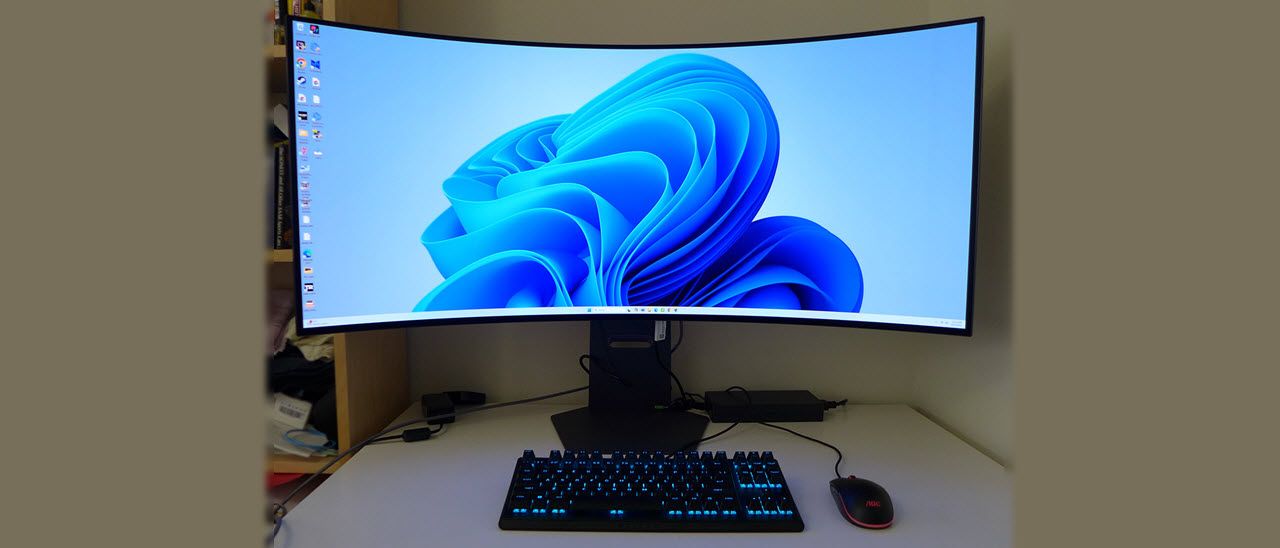
The native refresh rate is 165 Hz, and you get a 330 Hz mode at 2560×1920 resolution. It’s easily accessed with a switch in the OSD. The 45GX950A is certified G-Sync Compatible and for FreeSync Premium Pro as well. There’s plenty of bandwidth available through the DisplayPort 2.1 input, and you get two HDMI 2.1 ports, along with a USB-C port that supports DisplayPort and delivers 90 watts of power. Two USB downstream ports handle peripherals, and you get a nice pair of internal speakers. The headphone jack is a four-pole design that supports surround sound and DTS Headphone:X.
There is little that the 45GX950A doesn’t have, and all that goodness will cost you $1,600 at this writing. For that sum, you’re getting something relatively unique that brings a new level of immersion and realism to your favorite flying and driving simulators.
The 45GX950A arrives in a huge box with plenty of crumbly foam inside. It’s needed to support that extremely curved panel, and my sample showed up unscathed. The stand and base are substantial and assemble without tools. Cables include DisplayPort, HDMI, and USB-C. You also get an enormous external power brick that thankfully has a cord long enough that you can put it on the floor.
(Image credit: LG) (Image credit: LG) (Image credit: LG) (Image credit: LG) The 45GX950A is impressive from any angle, not only in size but in shape. An 800R curve is tighter than anything you’ve seen before, unless you read my review of the AOC AG456UCZD , which is the same size but has lower resolution. When you sit two or three feet from the screen’s center, the sides aren’t that far from your ears. It’s about as immersive as you can get short of VR goggles.
The stand has a relatively small footprint thanks to its heavy cast metal base. The upright is wide and features a 4.7-inch height range, plus 10/15 degrees tilt and 10 degrees swivel. I appreciated that it set the screen high enough to keep it perfectly vertical with my eyepoint centered. This is especially important for a monitor as curved as the 45GX950A. Any tilt ruins the immersive effect. The height adjustment is firm, nicely dampened, and wobble-free.
The back is perfectly smooth and features a ring of LEDs controllable from the OSD and an LG logo. The cable hole in the upright is trimmed in purple. Underneath the center is a single joystick that controls all monitor functions. The headphone jack is also under the front edge, making it easy to access. The remaining ports are up and under and include two HDMI 2.1 ports, a DisplayPort 2.1 port, and a USB-C port with DisplayPort function and 90 watts of power. You also get two USB downstream ports. A snap-on cover helps to hide the cabling.
The 45GX950A’s OSD appears when you press the joystick. It’s game-focused with a slick look that includes color and fade effects, with important info always displayed at the top.
Dual-Mode is the refresh rate/resolution toggle, offering 5120×2160 at 165 Hz and 2560×1080 at 330 Hz. You can also change the aspect to 16:9 or 21:9/39” to accommodate games that distort the image at full-screen settings. The switch was seamless every time; I didn’t need to set it up in the Nvidia Control Panel beforehand. LG and I recommend that you make the switch before starting up a game. Additional gaming aids include aiming points and a frame rate counter.
Sound comes from two internal speakers that play with 10 watts of power. Or you can use the headphone output, which supports DTS Headphone:X. This requires compatible headphones with a four-pole connector, but once plugged in, the surround-sound experience is incredible. If you typically play with headphones, I recommend going for DTS Headphone:X models. It takes audio to another level.
The 45GX950A can be enjoyed without calibration in its default Gamer 1 mode. When I tweaked the RGB sliders, I was able to improve grayscale tracking slightly, but gamma was negatively affected. I wound up leaving the settings at their defaults for the best picture. Color is spot-on in either case. I noted that the sRGB mode allowed calibration, which is something I rarely see. I’ve provided my brightness settings below. They are valid when Peak Brightness is turned off. If you use the high or low setting, you might need to lower them a tad to compensate.
In HDR mode, you get six of the 13 picture modes, Gamer 1 is still the best. You can also adjust brightness, and the Peak Brightness setting is available too, which is a nice touch. Most monitors have no brightness options in HDR mode.
I rarely have a new gameplay experience, given the over 450 monitors I’ve reviewed in the past 10 years. But the 45GX950A provided just that. You’ve undoubtedly heard the cliché, “it brings the action closer.” Well, it does, truly. I had to readjust my perceptions when playing familiar maps in Doom Eternal and Call of Duty WWII. Getting close to enemies makes them uncomfortably close until you adapt.
Movement and control are blindingly quick. I had no trouble with lag or hesitation of any kind. 165 Hz means there’s a tiny bit of motion blur, but it never distracted during gameplay. I played for a bit at 330 Hz and found it was smoother, but the loss of resolution was significant. While I gained clarity by removing all traces of blur, it was lost in the lowered pixel density. I noted that it was no problem to maintain 165 fps using a GeForce RTX 4090 . This same setup typically runs around 220 fps with the best 4K gaming monitors .
The HDR image was simply stunning. The 45GX950A is a bit brighter than other ultra-wide OLED monitors I’ve reviewed. That made up for its lack of Quantum Dot color. It was rich and vibrant with highlights that popped and deep shadow detail. It also had a textural quality that made me want to reach out and touch objects on the screen.
For daily use, the extreme curve took some getting used to. The 45GX950A is different from anything else except the AOC AG456UCZD which I reviewed last year. And the LG has a higher resolution than that screen, making it well-suited for graphics and photo work. There is some image distortion from the extreme curve, but it should be easy for users to adjust. It’s important to keep the screen vertical so your eyepoint is equal to all parts of the screen. The 45GX950A’s stand is high enough for this purpose.
Takeaway: Despite its extreme shape and size, the 45GX950A is a superb gaming monitor in all respects. It might be a little too in-your-face for shooters, but I can’t imagine a better screen for racing or flying sims. The dual refresh feature isn’t terribly useful because it lowers pixel density too much. But it was more than smooth and responsive enough at 165 Hz to be addictive. This is truly a monitor to crave. It takes gaming to a new level of immersion and realism.
Current page: Features and Specifications
Key considerations
- Investor positioning can change fast
- Volatility remains possible near catalysts
- Macro rates and liquidity can dominate flows
Reference reading
- https://www.tomshardware.com/monitors/gaming-monitors/SPONSORED_LINK_URL
- https://www.tomshardware.com/monitors/gaming-monitors/lg-ultra-gear-45gx950a-45-inch-ultra-wide-oled-gaming-monitor-review#main
- https://www.tomshardware.com
- One of the best PCIe 4.0 SSDs we’ve tested is down to 7 cents per GB – the WD Black SN850X 2TB drops down to $139
- Creality 3D printers see big discounts in 'Mega Sale' — up to 34% off
- Microsoft Windows boss posts lackluster response to ‘agentic OS’ backlash — Microsoft is working to address broad problems with the OS
- Arm joins Nvidia's NVLink Fusion ecosystem — Arm's Neoverse CPUs to get access to Nvidia GPUs
- After six years of promises and no shipping silicon, Tachyum revises Prodigy processor specs to 1,024 cores with 1,600W of power consumption — likely another 5-
Informational only. No financial advice. Do your own research.