
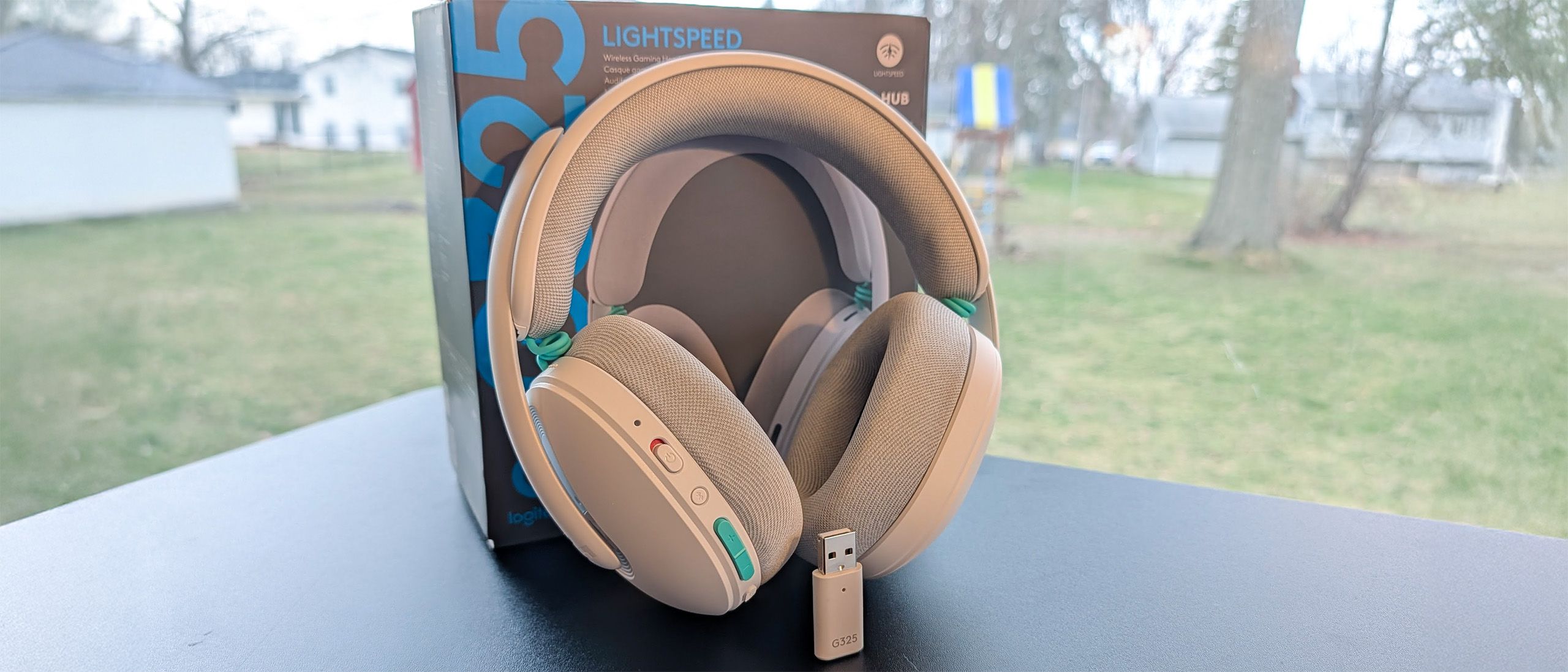
The Logitech G325 features a gaming-first sound profile, but thanks to a high-quality equalizer built into G Hub, it also offers a greater-than-average ability to customize the sound to your taste for different types of content. Out of the box, however, they buck expectations when it comes to the amount of bass.
Out of the box, the sound is mid-forward with accentuation in the treble. Bass, while not absent, takes a backseat and fills in the foundation of the sound so it never sounds thin, but the stock balance is clearly aimed at the footstep range, increasing your situational awareness. It’s a smart choice by Logitech, because you’re able to add more bass at any time through the G Hub software but it’s refreshing to see an affordably priced gaming headset that’s actually designed to benefit your performance versus just sounding “big” with a fattened low-end.
That isn't to say that the headset makes things sound thin or unenjoyable if you're looking for that action-packed experience, or if you slip away with a movie’s cinematic score. But where the average gaming headset overplays the bass and winds up crowding out the mids and highs, the G325 provides a much more balanced experience.
That said, this is definitely a "gaming-first" headset. For music, I found myself raising the low end with the in-app EQ. A word of caution here: Start with small changes. Pushing the bass too much quickly bleeds into the mids and will leave you with a similar listening experience to other gaming headsets: bloated lows and masked audio cues. Slow and steady wins the EQ race.
For music in particular, the headphones are fine but aren't going to compete with the best music headphones but get the job done well enough to provide an enjoyable experience. While the G325 provides adequate detail and clarity to hear what's happening in a game or track, a great pair of music headphones like the Sennheiser HD HD 600 are better tuned to bring out the nuance, layering, and sense of space crafted into a track.
This is a closed-back headset, so you shouldn't expect a massive soundstage. I was impressed to find that the G325 is significantly more spacious-sounding than it looks like it will be. I'm not sure if it's the inner geometry of the earcups or the supporting action of the pressure vents, but there’s more width, depth, and layer separation to songs than I anticipated. A pleasant surprise, to be sure, and all but uncommon in the closed-back headset space without the help of digital surround sound.
On that front, it’s important to note that the headset is fully compatible with software-based spatial surround sound. Windows Sonic and Dolby Atmos can both be used with this headset and definitely seem to enhance the verticality of songs and audio cues. I recommend choosing one and leaving it enabled for the best listening experience across all types of content.
The microphone in the Logitech G325 is good for calls, but there’s audible distance that reduces presence and volume. I give Logitech credit because it is one of the better-sounding earcup microphones I've heard, but the extra reverb and ambient noise make it obvious that you’re not actually talking “into” a mic and are instead just being picked up by one.
That said, it is better than most other embedded mics and is clear enough that your teammates and the recipients of your voice calls will be able to hear you well. In other words, the microphone is great for what it is, but it’s still an earcup mic.
Logitech G325 Lightspeed uses the G Hub suite for all of its customization options. Even if you're not a fan of keeping software running in the background, it's worth downloading because it can make a meaningful impact on the performance of the headset.
As with my other recent experiences with Logitech software, I found it to be polished, straightforward, and beginner-friendly. After choosing the headset on the launch page, you're greeted with a selection of tabs to customize its general behavior (such as how long it needs to be idle before going into sleep mode), sound, and microphone characteristics.
(Image credit: Tom's Hardware) (Image credit: Tom's Hardware) (Image credit: Tom's Hardware) (Image credit: Tom's Hardware) (Image credit: Tom's Hardware) Like I mentioned previously, you're able to choose from a limited range of genre-based EQ presets to customize the sound or to dial in your own using a 10-band equalizer. The combination of quality drivers and DSP make the headset especially responsive to and accommodating of different EQ profiles without risking distortion. Since most of these are designed around gaming, you'll want to take care to try the different options or your own tweaks using content you actually plan to listen to when using the headset outside of games. A mid, low-treble emphasis might be great for hearing footsteps but can make music sound nasally.
Just as importantly, given its lack of adjustable boom mic, G Hub also allows you to customize the tonal character of voice with more or less bass and treble, as well as apply a limited selection of effects to dial in its quality and noise rejection. While it's not a complete solution for the sense of distance created by hiding the mic inside the earcup, it definitely helps and can also give you golden pipes in the process.
Logitech quotes battery life at roughly 25 hours. It’s important to note, however, that this is at 50% volume. The headset gets plenty loud, and I rarely found a need to turn it up past 70%, but you should expect less than this the higher you go over 50%.
In my case, at roughly 70% volume and connected over Lightspeed wireless, I averaged about 20 hours. Depending on how much you use it, that could mean anything from recharging every few days to uptime of a week or more. In my case, my job doesn’t require or allow me to wear headphones all day and I was able to stretch the battery life to 12 days before I needed to plug it in.
While the headset doesn't offer the absolute best battery life, it does offer enough to be functional and not feel short. This isn’t a headset you can use for months at a time between recharges, but, depending on how much you use it every day, it could go weeks — and that’s solid for this price point
At only $80, the Logitech G325 Lightspeed is an exceptional deal. It’s lightweight, comfortable for full workday sessions, and offers an impressive and versatile sound for the price point… even if you trade metal for plastic to get there.
If you're looking for something that feels a bit more solid in the hand, the HyperX Cloud III is a very good alternative with a slightly higher weight and price point. Or, if you can stretch your budget, the Steelseries Arctis Nova 5 Wireless more than doubles the battery life while maintaining impressive comfort and customizability.
Overall, Logitech has done an impressive job balancing price and performance with the G325. For the price, it’s a great budget option that is well worth considering.
Chris is a regular contributor for Tom\u2019s Hardware, covering mechanical keyboards, peripherals, and content creation gear. ","collapsible":{"enabled":true,"maxHeight":250,"readMoreText":"Read more","readLessText":"Read less"}}), "https://slice.vanilla.futurecdn.net/13-4-18/js/authorBio.js"); } else { console.error('%c FTE ','background: #9306F9; color: #ffffff','no lazy slice hydration function available'); } Christopher Coke Social Links Navigation Contributor Chris is a regular contributor for Tom’s Hardware, covering mechanical keyboards, peripherals, and content creation gear.
Dr3ams I own a lot of Logitech hardware, but I'm not a fan of their headphones. I bought the G635 about a year ago and have had nothing but problems with them. The first couple of days were OK, but other gamers were telling me that the microphone kept breaking up. I updated the firmware and that's when the headphones stopped connecting to Windows entirely. Even the 3.5 mm jack wouldn't play sound when hooked into the PC. I tried everything, but nothing seems to work. Checking online, I found that a lot of other users were having the same issues, but had no real solution to it's problems. So I boxed them up and the headphones are sitting in my hardware closet. I have other headphones and maybe some day I'll take the G635 out again and see if Logitech solved the connection issues it's having. Maybe I should have sent them back, but I don't need the cash and maybe tinkering with them later will be fun. Reply
3ogdy Dr3ams is right. I owned the G933. Logitech hardware is usually good, but their headphones are very poorly made. The software (G-Hub) didn't help either. The headphones sounded differently depending on how they were connected to the PC. When connected through their own USB soundcard, G-Hub(used to control the headphones) would randomly disable the equalization and I'd end up with headphones that sounded hollow. Tried updating firmware, software, nothing really worked. One of the main gripes was the fact that you needed G-Hub to enjoy the product. Sound-wise t's like they sold me headphones that were a 4/10, but with them help of software they'd be a 7.5/10, if the latter worked. I'd have to Google issues. Distortion was fixed by reconfiguring the surround settings and lowering individual channel volume. Got so ducking tired of starting up G-Hub and seeing that stupid startup animation go on and on and on while I couldn't enjoy my headphones. Erase temp files, reinstall, check for newer versions, install an older version etc… Works for a while, then no longer does. Rinse and repeat. The earpads were kept in place by cheap, thin rubber, which ended up coming apart and earpads would just fall off. You have no idea how happy I was I had bought extended warranty for them. The power switch would also cause issues, as I'd sometimes have to power cycle them only to get them to work properly. (lights would come on without sound, buttons didn't respond, headphones themselves wouldn't respond etc. The G-Hub experience ). Sometimes they'd flash red and power cycling wouldn't work. Plugging them in through microUSB didn't help. I'd have to carefully remove and disconnect the battery, leave them like that for a while and then check. I felt like I was going crazy, as solutions would work randomly until something else came up. Good software engineers are essential if your hardware depends this much on software. Logitech headphones are not built to last. They're built cheaply and the experience is great until you realize all the problems you have to go through as someone who paid for the product and cannot enjoy it. Reply
Key considerations
- Investor positioning can change fast
- Volatility remains possible near catalysts
- Macro rates and liquidity can dominate flows
Reference reading
- https://www.tomshardware.com/peripherals/gaming-headsets/SPONSORED_LINK_URL
- https://www.tomshardware.com/peripherals/gaming-headsets/logitech-g325-lightspeed-wireless-gaming-headset-review#main
- https://www.tomshardware.com
- Blacklyte Athena Pro Review: Watch out, Secretlab?
- Blacklyte Athena Pro Review: Watch out, Secretlab?
- California scientists 'FlyTrap attack' on DJI drones demonstrated — patterned umbrellas lure autonomous drones close enough to be captured or even induced to cr
- Apple MacBook Air (13-inch, M5) review: Steady as it goes
- Elon Musk unveils $20 billion ‘TeraFab’ chip project to make chips, memory, and package processors all under one roof — targets a terawatt of annual compute
Informational only. No financial advice. Do your own research.