
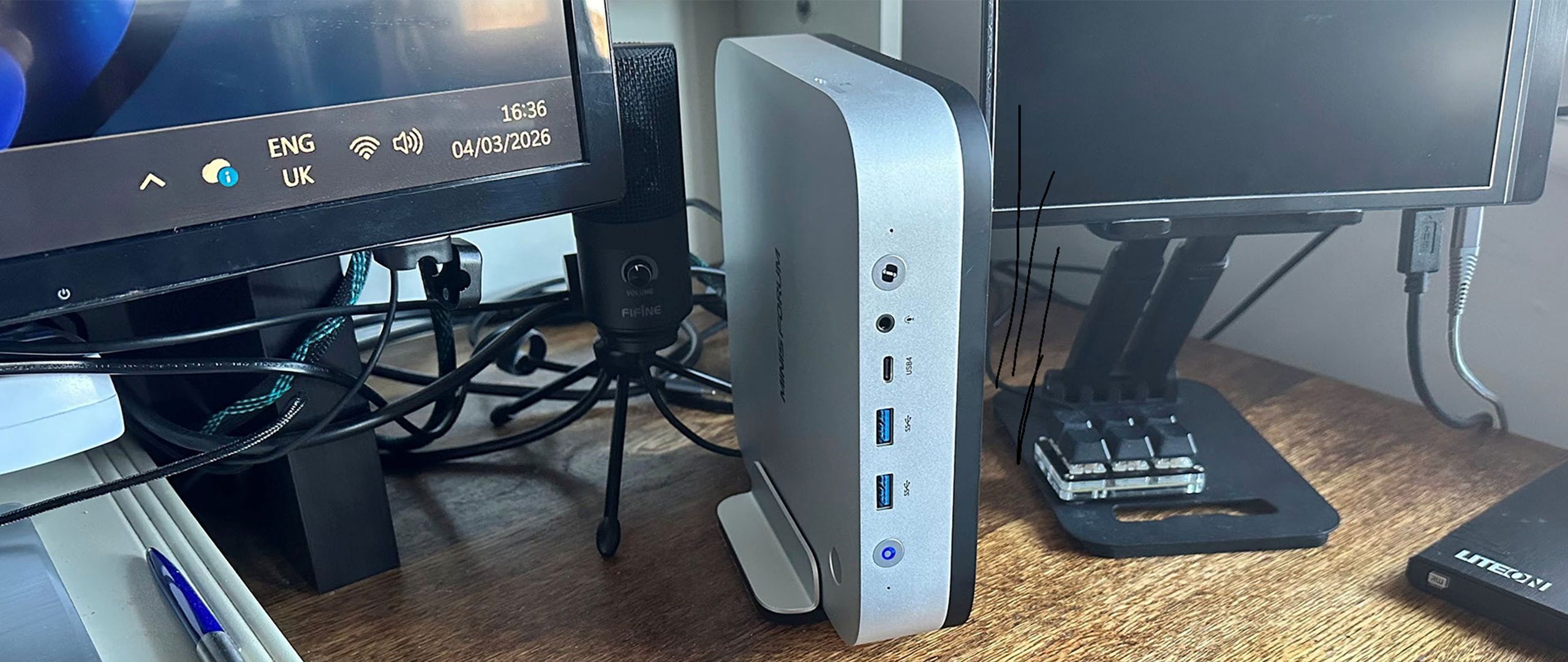
Fingerprint reader, Copilot button, stereo speakers, dual-array mic, VESA and vertical mounts supplied
While the AI X1 Pro 470 has a wide selection of ports, I’d like more. Having 2x USB 3.2 Gen 2 Type-A (10Gbps) ports, a USB4 Type-C (40 Gbps, supports Alt DisplayPort 2.0 & 15W PD out), and a 3.5mm Combo Audio Jack on the front, alongside the power and Copilot buttons, is a good start. To the left side, there is a full-sized SD card slot, with a Kensington Lock on the right.
Round the back there are numerous of ports, including another USB4 Type-C (40 Gbps, supports 100W PD-in to power the PC, Alt DisplayPort 2.0, and 15W PD out), another USB Type-A (but USB 2.0), plus an OCuLink Port, HDMI 2.1 FRL, DisplayPort 2.0, 2x 2.5 Gigabit Ethernet (RJ45), and an AC inlet (next to a reset / clear CMOS hole).
That sounds like a lot of variety, but just a single slow USB-A around the back is poor. It means I’ll be using a USB-C dock/dongle at the back, so the front system ports can remain ‘clean’ and available for handy occasional peripheral plugging. On the other hand, this little PC can connect up to four 4K screens simultaneously, straight from the box.
Wireless connectivity is decent. A MediaTek MT7925 Wi-FI 7 Card fitted to the motherboard also provides Bluetooth 5.4 with BLE support.
Before even opening up this device, it is pleasing to see that both OCuLink and USB4 are available for fast docking and eGPU connectivity. Inside, there’s quite a bit of room for upgrades, too – especially for a mini PC.
Minisforum provides three M.2 storage slots. With my 32GB/1TB config, one of the slots already has a 1TB drive installed, specifically a Kingston PCIe Gen4 NVMe drive with HMB caching and QLC NAND . Adequate but nothing fancy, it managed peak read and write speeds of almost 5.7 GB/s and 5.0 GB/s, respectively, in ATTO Disk Benchmark. According to the specs, this mini PC can fit three such drives, maxing out at 12TB total capacity (3x 4TB). Extra fittings and thermal pads are supplied in the box.
This ‘AI mini PC’ can pack up to 128GB of DDR5 RAM, using two SODIMM slots. You can buy it barebones direct from Minisforum or Amazon . We received a 32GB/1TB model for testing. These Ryzen AI 300 and 400 chips can be sensitive to memory bandwidth, especially for tasks that lean on the iGPU, so it was unfortunate that the 32GB here was a single DDR5-5600 module. In a ‘normal’ market, we think Minisforum would have supplied 2x 32GB, or a 2x 16GB option, but this 32GB was supplied with a single SODIMM, which seems to be a by-product of the RAMpocalypse.
(Image credit: Tom's Hardware) (Image credit: Tom's Hardware) (Image credit: Tom's Hardware) Adding or changing RAM or storage requires removing five screws from the bottom of the device (1 short, 4 long), followed by 7 further internal screws marked with triangles. Then lift the PSU with the secondary cooling fan gently, as there are three wired connections to the motherboard. You don’t need to detach these cables; there’s enough clearance to lean this assembly to the side, get in, and reach the RAM and SSD slots.
We tested the Minisforum AI X1 Pro system, and its AMD Ryzen AI 9 HX 470 processor, using the supplied RAM/Storage configuration with Windows 11 pre-installed and the default ‘Balanced’ profile selected in the BIOS. VRAM was set at 8GB in the BIOS.
Taken in isolation, the results look pretty good. However, as I had an Asus Zephyrus G16 with 32GB quad-channel DDR5-7500 RAM at hand (my personal desktop replacement portable), I thought it would be interesting to check the difference between the Ryzen AI 9 HX 370 (Asus laptop, PL1 65W, PL2 70W) and Ryzen AI 9 HX 470 (Minisforum mini PC, PL1 60W, PL2 65W).
Due to the aforementioned mini PC RAM configuration, the older-gen, thermally-constrained Asus laptop trounced the new-gen Minisforum challenger. Disappointing. I wanted to see if the Minisforum could fight back if I upgraded it to dual-channel. Luckily, I could source a matching DDR5-5600 SO-DIMM, so I’ve also tabulated those results. Spoiler: the RAM upgrade makes a huge difference, convincingly putting the Gorgon Point processor in the mini PC into pole position most of the time.
Above, you have two popular synthetic CPU benchmarks that concentrate on CPU performance. Then the Procyon AI tests I did looked at AI image generation using the onboard NPU. These results equate to a series of 500×500 pixel AI-generated images being produced from a prompt in Stable Diffusion Lite every 10 or 11s. Last but not least, Handbrake was used to convert a reference 4K/60 HDR nature video to 1080p/30.
What we said about the single-vs-dual channel memory above applies even more in 3D gaming workloads that need to squeeze the best out of the Radeon 890M iGPU. Most readers will know about the theoretical benefits of improved memory bandwidth for Radeon iGPU graphics performance, but seeing, feeling, and measuring it is something else. We can thank the AI industry for opening our eyes to this and moving an extra matching memory module far beyond an impulse purchase.
Shadow of the Tombraider 1080p Medium fps
Key considerations
- Investor positioning can change fast
- Volatility remains possible near catalysts
- Macro rates and liquidity can dominate flows
Reference reading
- https://www.tomshardware.com/desktops/mini-pcs/SPONSORED_LINK_URL
- https://www.tomshardware.com/desktops/mini-pcs/minisforum-ai-x1-pro-470-review#main
- https://www.tomshardware.com
- Samsung Display debuts 'QuantumBlack' coating for QD-OLED monitors — screen tech boosts ambient black levels while reducing glare
- Seagate FireCuda 530R 2TB SSD Review: A stealthy workstation powerhouse
- Gigabyte Aero X16 Review: Capable hardware, compromised experience
- Advancing Open Source AI, NVIDIA Donates Dynamic Resource Allocation Driver for GPUs to Kubernetes Community
- Sony increasing PlayStation 5 prices across all consoles, starting April 2 — PS5 and PS5 Digital Edition receive $100 hikes, while PS5 Pro will now sell for $90
Informational only. No financial advice. Do your own research.