
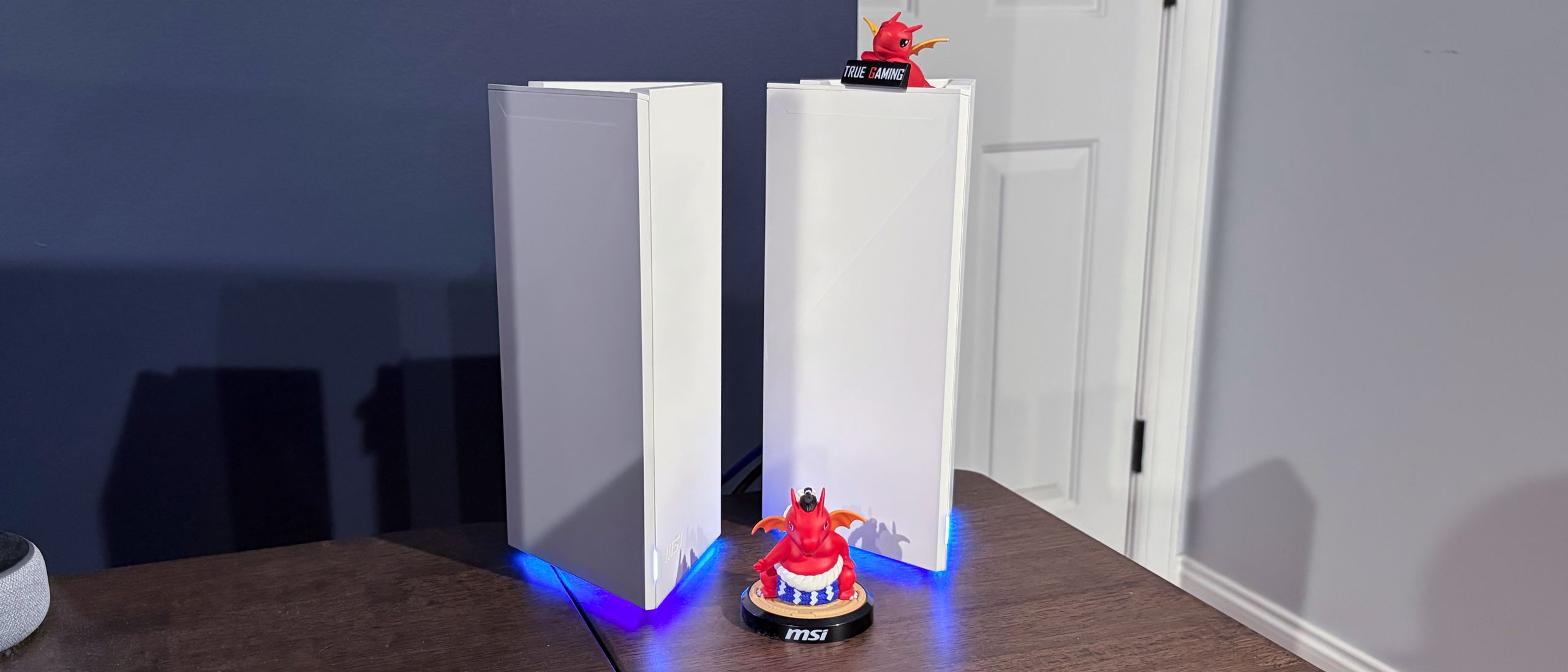
I created an admin username/password and chose an SSID/password for the Wi-Fi network. Finally, the setup program informed me that a firmware update was available, so I went ahead and applied it. The router rebooted and was accessible from within the Router 2.0 app.
However, the next step is where I encountered problems. According to MSI, setting up the second node is as simple as plugging it in near the router and letting the two nodes communicate for a few minutes to finish setup. I did this, but the second node never completed its link. The status LED on the second node would go through various light dances, then go solid green without ever confirming a connection (the status LED turns solid white when a connection is made).
I tried adding the second node from the Router 2.0 app several times to no avail, and even performed a factory reset on the node in failed attempts to bring it back to life. After about a half-hour of reboots, resets, and sheer frustration, I decided to try the manual pairing method. I pressed the WPS button on the back of the primary router, and then pushed the WPS button on the back of the second node. Within a few minutes, the status LED on the second node turned solid white, confirming that it had joined the mesh network and was visible in the Router 2.0 app. I then performed the firmware update on the node, which ended my frustrating experience setting up the mesh network.
Once I got past the setup headaches with the Roamii BE Pro, the Router 2.0 app was actually relatively easy to use and configure. The main dashboard provides internet status, connection status for both nodes, quick access to Wi-Fi settings, and quick controls for Guest, Child, and IoT networks. You’ll also see upload/download rates on the network, along with the number of connected devices.
There’s a wealth of wireless settings you can configure, including enabling multi-link operation (MLO) and fast roaming (802.11r). You can also configure the router to broadcast on all three bands (2.4 GHz, 5 GHz, and 6 GHz) for the main network, or you can choose not to enable certain bands.
You have this same flexibility when configuring the IoT, Child, and Guest networks. Personally, I’d limit the IoT network to 2.4 GHz traffic only, and configure the guest network for 2.4 GHz and 5 GHz traffic.
MSI also offers a Security Center, which provides free security protection for connected devices. The security suite can automatically protect devices from ransomware, infected links, web threats, and network intrusions (among other threats). Devices are automatically scanned for vulnerabilities, and you can view a daily report of any actions taken for an individual device.
There’s also a comprehensive set of parental controls that can be applied per device. Again, MSI provides an easy-to-use interface that shows how many times it had to step in to block access to inappropriate sites (you can control this setting), or when a child has reached their daily allotment of internet access.
Finally, the Advanced Settings tab is where you’ll find a wealth of settings you can manage, from QoS tweaks to setting up a file service via the USB ports to controlling the RGB effects for the LEDs mounted near the bottom of each node. You’ll also find your typical management-related tasks, such as initiating a firmware update and setting a reboot schedule for the router.
The iPerf3 tests are conducted at six feet and 25 feet, with and without traffic across the network. In the congested traffic tests, we add six wireless clients streaming 4K YouTube videos evenly across all bands.
(Image credit: Tom's Hardware) (Image credit: Tom's Hardware) (Image credit: Tom's Hardware) (Image credit: Tom's Hardware) (Image credit: Tom's Hardware) (Image credit: Tom's Hardware) Generally speaking, the Roamii BE Pro performed well on our tests, particularly on the 5 GHz band. On the 6 GHz iPerf3 test at short range (6 feet) with no additional traffic, the Roamii BE Pro achieved 1,580 Mbps, while the long-range performance clocked in at 1,047 Mbps. The TP-Link Deco BE63 had higher performance at short range (1,990 Mbps), but dropped to just 786 Mbps at long range.
Shifting gears to 5 GHz band testing, the Roamii BE Pro again showed that consistency is key. It topped the Deco BE63 at short range (1,323 Mbps versus 1,287 Mbps) and had a smaller performance falloff at long range (839 Mbps versus 523 Mbps). The Roamii BE Pro’s 5 GHz performance was also better than its dual-band sibling, the Roamii BE Lite, which came in at 934 Mbps and 541 Mbps, respectively.
The Roamii BE Pro again came out ahead of the similarly priced Deco BE63 on the 2.4 GHz band, albeit by a narrow margin. It was just 1 Mbps faster on average at short range, and 8 Mbps faster at long range. Interestingly, the Roamii BE Lite actually took top honors at both distances, delivering 122 Mbps and 69 Mbps, respectively.
The performance situation was very similar, with congested traffic, and the Roamii BE Pro came up short against the Deco BE63 in the 6 GHz iPerf3 short-range tests (1,474 Mbps versus 1,940 Mbps), but it flipped the script at long range (997 Mbps versus 724 Mbps). The Roamii BE Pro again ran the tables on the 5 GHz band, hitting 1,243 Mbps and 812 Mbps at short and long range, respectively. Finally, the 2.4 GHz tests showed that the Roamii BE Lite maintained a strong lead in both tests, with the Roamii BE Pro coming in second, just ahead of the Deco BE63.
The MSI Roamii BE Pro is a strong entry in the tri-band Wi-Fi 7 mesh router market, offering strong hardware specs and connectivity (three 2.5 GbE ports, 2.5 GbE WAN, USB 3.0), RGB design flourishes, and included wall mounts (which only MSI seems willing to offer in this category). The MSI Router 2.0 app is well-featured and easy to use.
On the performance front, the Roamii BE Pro offered competitive performance on the 6 GHz band, particularly excelling at long range. Its 5 GHz performance bested all competitors, and its 2.4 GHz performance couldn’t beat the Roamii BE Lite, but it was still respectable.
My only real hangup with the router was the issues that I had setting up the satellite mesh node. They didn’t pair automatically out of the box, and the app proved useless for help. However, using the trusty WPS button cleared up the issue right away, even though I shouldn’t have had to use the button in the first place.
The Roamii BE Pro has an MSRP of $349 for a two-pack, but its current street price on Amazon is $299 . For comparison, the TP-Link Deco BE63 has a current street price of $349. The routers are well-matched, with the Roamii BE Pro holding the advantage in long-range 6 GHz testing and running the tables in 5 GHz and 2.4 GHz testing. At this price point, the Roamii BE Pro is the mesh router to beat if you’re looking to spend around $300.
Brandon Hill is a senior editor at Tom's Hardware. He has written about PC and Mac tech since the late 1990s with bylines at AnandTech, DailyTech, and Hot Hardware. When he is not consuming copious amounts of tech news, he can be found enjoying the NC mountains or the beach with his wife and two sons. ","collapsible":{"enabled":true,"maxHeight":250,"readMoreText":"Read more","readLessText":"Read less"}}), "https://slice.vanilla.futurecdn.net/13-4-13/js/authorBio.js"); } else { console.error('%c FTE ','background: #9306F9; color: #ffffff','no lazy slice hydration function available'); } Brandon Hill Social Links Navigation Brandon Hill is a senior editor at Tom's Hardware. He has written about PC and Mac tech since the late 1990s with bylines at AnandTech, DailyTech, and Hot Hardware. When he is not consuming copious amounts of tech news, he can be found enjoying the NC mountains or the beach with his wife and two sons.
Mindstab Thrull @Brandon Hill_TH Might sound crazy but I wonder if part of the reason you had issues connecting the two devices together was they had different firmware versions when you went to add the second to the mesh. Mindstab Thrull Reply
S58_is_the_goat Watch this before wasting money on wifi 7 routers. Not saying this msi router is one of those without certain features but none of the ones that were tested supported mlo. -5o_Qu3XToQ View: https://youtu.be/-5o_Qu3XToQ Reply
Key considerations
- Investor positioning can change fast
- Volatility remains possible near catalysts
- Macro rates and liquidity can dominate flows
Reference reading
- https://www.tomshardware.com/networking/routers/SPONSORED_LINK_URL
- https://www.tomshardware.com/networking/routers/msi-roamii-be-pro-wi-fi-7-mesh-router-review#main
- https://www.tomshardware.com
- Claimed 1,100% increase in AI-driven layoffs in 2025 might be misleading — firms accused of exaggerating AI performance to downplay poor business performance
- Developer creates real-time 3D shader demo for the Game Boy Color — you can download the ROM or interact with the 3D teapot online
- Nvidia now produces three times as much code as before AI — specialized version of Cursor is being used by over 30,000 Nvidia engineers internally
- MSI's RTX 5090 Lightning storms in at a thunderous $5,200 — limited edition GPU shatters everything from world records to your bank account
- 20-gigawatt Chinese microwave weapon touted as ‘Starlink’s worst nightmare’ by country's media — portable 5-ton device can deliver full-minute destructive burst
Informational only. No financial advice. Do your own research.