
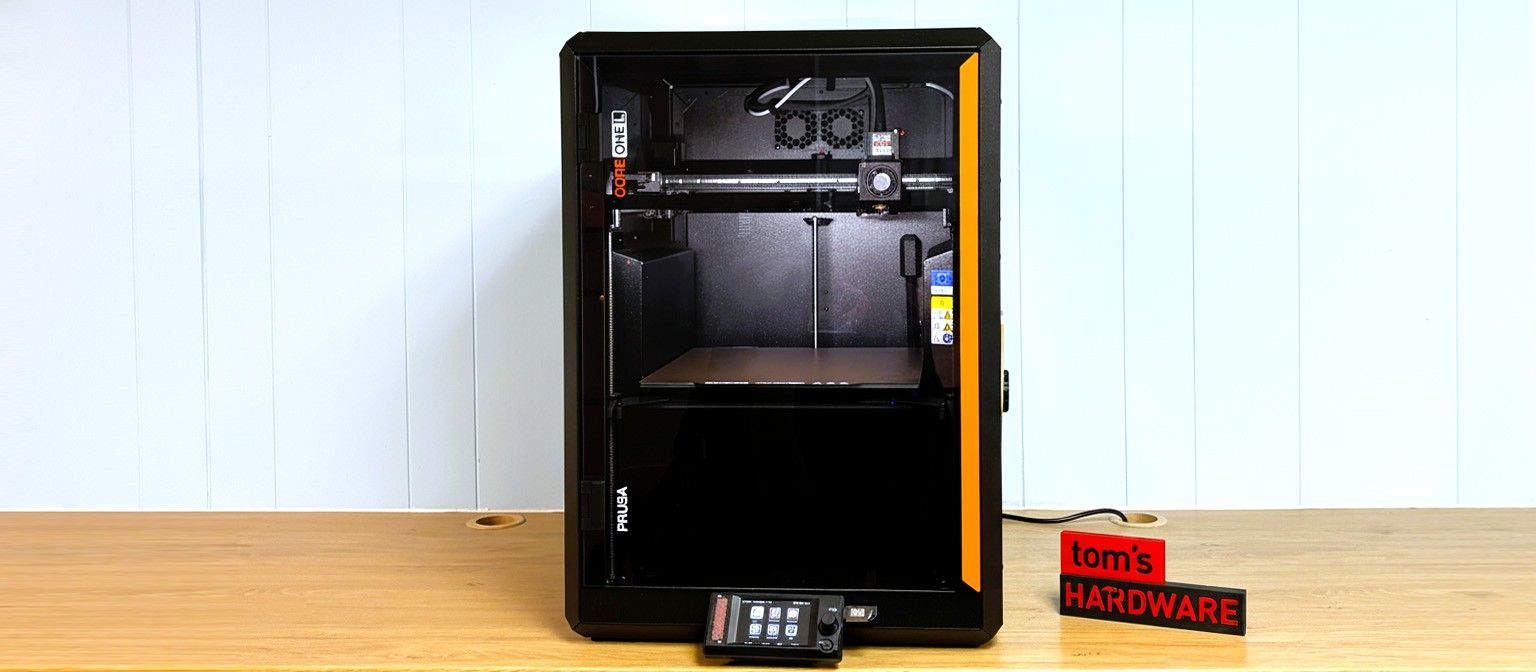
It has the same indents on either side to conceal the spool holder and customizable storage space, though now magnets will only stick to the frame. The door and upper parts of the side panels are translucent black polymer. The top panel snaps into place. The top vent can now be opened or closed by the printer itself. It’s still not exactly airtight, with many gaps at the seams, but a few gaps in the frame won’t spoil the system.
The exoskeleton provides a strong, stiff frame for the printer while also minimizing materials and avoiding the cheap plasticky feel we get from other brands. The indented sides reduce the interior space of the printer, making for less space to heat.
The biggest change to the CORE One L is the heat bed, which is now a solid chunk of aluminum, heated with AC power. It provides uniform heating from corner to corner, which is essential with such a large surface. There are two fans underneath the bed to distribute the heat like a convection oven. This eliminates the need for a second heating system, as the bed can now be used more efficiently to warm the entire chamber for technical filaments.
The CORE One L still shares many 3D parts with its Prusa siblings, which are produced at the large Prusa Research print farm in Prague (or in Delaware by Printed Solid if you buy one in America). CORE One 3D parts are made with PC Blend Carbon Fiber, printed on a combo of MK4s and CORE One machines. Prusa also does its own injection molding, which you can see on the LCD case.
Another thoughtful touch is the door hinge, which can be flipped if you rather have it open on the other side. The door can completely open 180 degrees, but Prusa encourages users to go ahead and keep it closed for any material, thanks to their active cooling system. The door has a sensor that will warn you to keep it shut and stop the print when the door is opened. This is a nice safety feature for schools, parents of small children, and pet owners. Thankfully, the sensor can be switched off if you want the freedom to poke your nose or a camera in there.
The CORE One L specs don’t include acceleration rates, as the company is famous for putting quality over speed . The machine does come with a high flow nozzle, input shaping and factory tuned print profiles for over 200 filaments. Still, I opened up PrusaSlicer to see what kind of settings they’re using for speed and acceleration. The top printing acceleration rate of 3000 mm/s² would not impress a Bambu user who easily has twice the speed. However, acceleration isn’t everything. Using their default settings, both the CORE One L and the similarly sized Bambu Lab H2S printed a Maker’s Muse calibration castle in about one hour and 15 minutes using .25mm layer height and default settings. Sure, the Bambu might be faster printing a big, plain box, but how often do you print things that are so boring?
The CORE One L finally has an onboard accelerometer, though it’s completely factory calibrated and ready to print as soon as you plug it in. It also has an NFC antenna to make getting the machine online and connected to the Prusa app and slicer very easy. The app is entirely optional for those who wish to keep their printers offline. The CORE One L has a USB port for manually loading files, which is the printer’s only place for file storage.
The Prusa CORE One L comes nearly assembled. You just have to unpack it and remove a few screws that held the bed down during shipping. The screen arrives packed inside, attached to the front trim plate, and just needs to be slapped on the printer with magnets.
Our machine came with the optional filtration system, which did need more complex assembly. That involves removing the back panel to access the electronics, plugging the fans to the board and screwing everything back together. It was fairly straight forward, but I did have to hunt down the directions online.
Bed leveling is a no-brainer, as the Prusa CORE One L is fully automatic. There are no manual adjustments and no need to adjust the Z offset. The printer uses a load cell sensor connected to the nozzle, which physically taps the print surface for precise measurement.
The printer trams the bed and calculates the required z height before each print.
Loading filament is very simple. Simply place the spool into side mounted rack and feed the plastic into the reverse Bowden tube until it reaches the hotend. The printer will automatically detect it and pull it in the rest of the way. The screen will then ask what kind of material you’re using to set the temperature. Once it gets hot enough, it will pull the filament into the hotend and ask if the color has changed. If it has, you can say yes and move on. If the answer is no, it will purge more material.
If you’re running flexible filaments, there’s a switch where the tube enters the chamber that allows you to switch off one of the filament sensors (another is on the tool head). This allows soft TPU to load as easily as PLA and I didn’t have any trouble at all.
You’ll need to download PrusaSlicer, which is free and open source. It is developed by Prusa Research and serves as the foundation for many other slicers. It comes with hundreds of profiles for every material and nozzle size that Prusa Research makes.
PrusaSlicer can also directly access Printables.com , which offers a wide selection of free file models for both fun and practical prints. If you’re using the mobile app, files can be sent directly from Printables to the online EasyPrint slicer and then directly to your printer if you choose to have it online.
The CORE One L comes with a full 1 KG roll of Prusament PLA Galaxy Black. If you want more colors and materials like silks and multicolor filaments, you should check out our guide to the best filaments for 3D printing for suggestions.
We used the sample material to print a Benchy to see what the CORE One can do with its fastest default slicer settings. We used Speed Benchy rules for fairness: 2 walls, 3 top and bottom layers, 10% infill, a .25 layer height and .5 layer width. Using these settings, we got a very nice benchy in 23 minutes with a bit of wisps probably due to the humidity in the house.
I also printed some cute clips, which mix practical with whimsical. These “Vicegriptor” locking clips have surprising bite when printed in PETG. A word of warning – you need to be very careful loosening them up the first time, or you risk breaking the print in place joints. Once they’re limbered up, they work really nice for holding chip bags and the like.
I printed eight at a time on the CORE One L’s roomy bed, taking 3 hours and 13 min, using a .2 layer height and default settings. This was printed in Greengate’s recycled Deepwater Blue, a sparkly filament created for 3D Print Bunny.
For TPU I made another ill-fated dog toy for my Standard Poodle Ripley. The print was excellent, but 3D printed dog toys for strong chewers is still not that great. The filament loaded very easily, thanks to the new switch, and I had no trouble at all pushing it through to the Nextruder.
This printed in 6 hours and 6 minutes, using Inland Rainbow TPU and a .2mm layer height. It lasted about 6 hours after I gave it to the dog too. Before the dog destroyed it, it had very nice smooth and glossy surfaces and very slight blemishes from layer lines.
We ran a lot of high-temperature material from it, like this Fiberon Red PET-GF15 by Polymaker. This is a form of Polyethylene terephthalate, like PETG, but without the G (glycol), which is usually added to make the material behave. Instead, Polymaker added 15% glass fiber to make the PET stiff, dimensionally stable, and thermal resistant. It prints fast and super hot, and this needed 280 °C on the nozzle and 80 °C on the bed. I filled the bed with parts, and it printed very nicely without warping. There were some goobers on the edges that will brush off.
The CORE One L is a great addition to the Prusa lineup, filling a space between the “medium” MK4/CORE One and the Prusa XL tool changer. It gives you Prusa quality and security in a larger size without having the larger pro price tag. It has a retail price of $1,799 (including import duties and tariffs) and comes with 24/7 customer service and a complete ecosystem.
Its new aluminum bed with even AC-powered heating is excellent, and it has a few perks like the camera, TPU switch, and self-opening top vent that could be easily added to the smaller CORE One. It will also be the first printer to try out OpenSourceTag when it hits the market.
We’re also keeping our fingers crossed for a tool changer mod through a partnership with Bondtech, but details are still vague as of this writing.
If a Prusa CORE One L seems just a bit too spendy for your budget, the smaller Prusa CORE One comes in at $999 for a kit. The delightfully budget-friendly Bambu Lab P1S Combo is currently on sale for $549, and if you need some massive CORE XY size, the Creality K2 Plus is worth checking out at $1199.
Denise Bertacchi Social Links Navigation Freelance Reviewer Denise Bertacchi is a Contributing Writer for Tom’s Hardware US, covering 3D printing. Denise has been crafting with PCs since she discovered Print Shop had clip art on her Apple IIe. She loves reviewing 3D printers because she can mix all her passions: printing, photography, and writing.
S58_is_the_goat Think you should have put low nozzle temp(290 or so) and long time to heat up the chamber under cons. It still doesn't have a dedicated chamber heater. Reply
Key considerations
- Investor positioning can change fast
- Volatility remains possible near catalysts
- Macro rates and liquidity can dominate flows
Reference reading
- https://www.tomshardware.com/3d-printing/SPONSORED_LINK_URL
- https://www.tomshardware.com/3d-printing/prusa-core-one-l-3d-printer-review#main
- https://www.tomshardware.com
- The Ultimate Black Friday Deal Is Here
- AMD FirePro S10000 dual-GPU card from 2012 runs Arc Raiders at playable frame rates — but half of its GPU power goes unused in the process
- White House U-turn on Nvidia H200 AI accelerator exports down to Huawei's powerful new Ascend chips, report claims — U.S. committed to 'dominance of the America
- China starts list of government-approved AI hardware suppliers: Cambricon and Huawei are in, Nvidia is not
- The Ultimate Black Friday Deal Is Here
Informational only. No financial advice. Do your own research.