
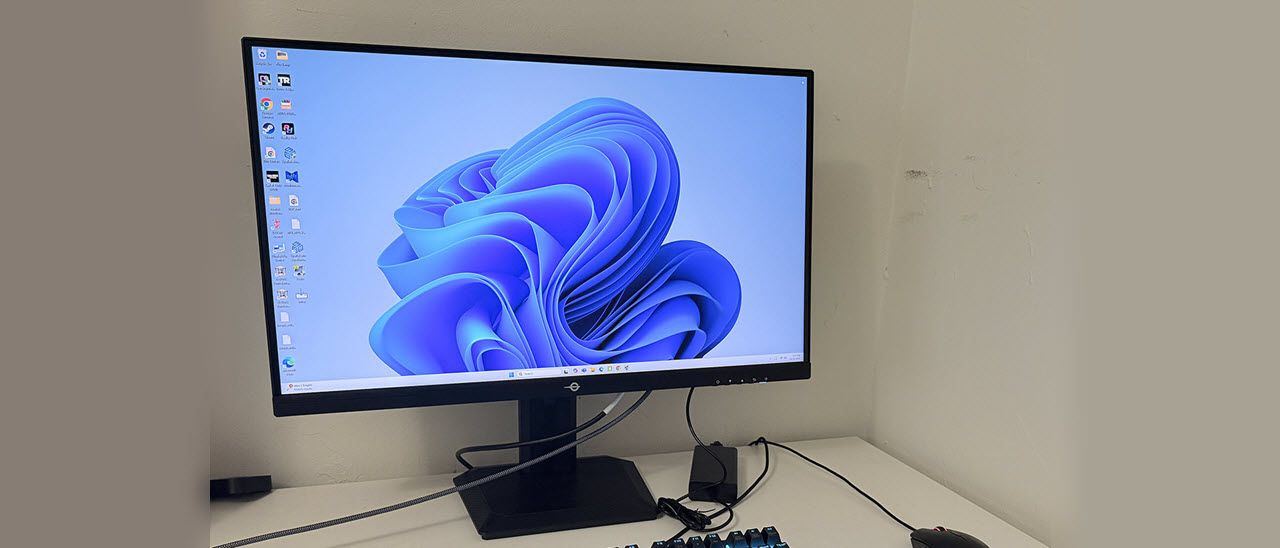
Titan Army has always impressed me with its value. The P2712V’s bang-for-the-buck quotient is very high with little left out for $325 at this writing. Let’s check out some test results.
The P2712V’s plain brown wrapper is so subtle that you have to look at the stick-on label to know which model is inside. Once the crumbly foam is parted, you’ll find the base, upright, and panel securely packed. A small external power supply delivers the AC, and you get a heavy-gauge DisplayPort cable.
(Image credit: Titan Army) (Image credit: Titan Army) (Image credit: Titan Army) (Image credit: Titan Army) My apologies for the stock photos above; the P2712V doesn’t actually make characters climb out of the screen. The picture looks awesome, though, thanks to the packing of 8.3 million pixels into a 27-inch IPS panel. The anti-glare layer cuts reflections nicely without spoiling that razor-sharp image. A thin bezel extends past the picture by just a few millimeters, creating a flush and frameless look. Only a Titan Army logo appears at the bottom, which reminds me a bit of a mouth harp. You know, one of those thingies that twangs when you pluck it. At the lower right is a row of OSD control keys and a backlit power button.
The LED lights trim two sides of the P2712V’s backside, making a nice contrast to all the textures going on. The perimeter looks like carbon fiber weave, and the center section has a brushed finish. The base also has a carbon fiber look. The lighting can be controlled in the OSD with multiple color and effect options.
The upright features 5/20 degrees tilt and a 90-degree portrait mode. You also get a solid four-inch height adjustment. There is no swivel. Movements are firm with confident positioning, but there is a little wobble where the panel attaches to the stand.
Up and under, you’ll find four video inputs, two HDMI 2.1 and two DisplayPort 1.4 . All operate at full resolution and 160 Hz with HDR and Adaptive-Sync. You also get a 3.5mm headphone jack with volume control in the OSD. There are no USB ports or internal speakers.
The P2712V’s OSD is the same one I’ve seen in all Titan Army monitors. It offers many options for picture adjustment, gaming aids, and video processing, but it is a bit clunky to operate. After a bit of back-and-forth, I figured it out.
The P2712V has 12 picture modes, though it could be said there are 24, since each has a default and a custom memory. To keep confusion at bay, stick with Standard mode in its default configuration. It doesn’t need calibration, and in fact, tweaking provides no benefit. If you need sRGB, it’s on the second screen of mode choices. It too has default and custom modes and can be calibrated if you wish.
My initial measurements of the P2712V were excellent. It doesn’t need calibrating in the Standard mode. It also works well in sRGB mode where you get accuracy suitable for color-critical tasks. The native gamut covers 93% of DCI-P3, so it will be oversaturated for SDR content but not in a way that anyone will object to. I tried calibrating the RGB sliders, but found they weren’t fine enough to make any improvement. Below are the brightness settings for commonly used peak levels. HDR signals get three of their own modes, Auto, Movie and Game. Testing showed that Movie was the best choice.
To prepare the P2712V for dual-refresh operation, I started in 4K and set the rate in the Nvidia Control Panel to 160 Hz. There were no issues running at full honk for hours of gaming. The P2712V was completely stable. To set up 320 Hz, first activate the dual-mode option in the OSD. On means 320 Hz at FHD resolution. Then return to the Nvidia Control Panel and set the refresh rate to 320 Hz. In both modes, use level 3 for the overdrive. It removes nearly all motion blur and doesn’t cause ghosting. Extreme will add artifacts, so it’s best avoided. There is no backlight strobe feature here, but it isn’t necessary if you run 4K faster than 140 Hz. My setup uses a GeForce RTX 4090, so I ran steadily at 160fps.
Games like Doom Eternal proved to be very responsive; I could not detect any input lag. The picture is super sharp, whether moving or stationary. Fast camera pans don’t cause the smearing that calls out a lesser display. Titan Army’s video processing is very well done.
To switch refresh modes, I had to return to the Windows desktop. Activating dual-mode in a game usually ends in a visit to Task Manager to close the crashed program. This is true of all the dual-refresh monitors I’ve reviewed. At 320 Hz/FHD, the P2712V is very smooth with no visible motion blur. You won’t be wishing for backlight strobing. The overdrive should still be set to level 3. The loss of pixel density is certainly obvious, but not a major negative. It will be attractive to users with less powerful PCs that can’t maintain 160fps at 4K. When it comes to frenetic gameplay, smoothness beats sheer resolution.
The HDR image was colorful and bright, but not more dynamic than SDR. This is solely due to the P2712V’s lack of dynamic contrast. A field dimming option would be welcome here, but in fairness, it is far from the only screen with this deficiency. It supports HDR but doesn’t embrace it.
For everyday tasks, the P2712V is a great choice. Pixel density like this is super nice for photo and graphics work. There’s no visible pixel structure at close viewing distances; I’m talking about 18 to 24 inches away from the screen. Color accuracy is also good enough for critical tasks, especially if you need sRGB. Titan Army nails that mode.
Takeaway: The P2712V punches above its weight class in gaming performance with premium video processing, responsive play and refresh rate flexibility. It can serve equally well with high-end and mid-grade systems. HDR imagery is color accurate and well saturated, but lacks the depth of monitors with dynamic contrast, which is absent here. I’m not a fan of the OSD, but in fairness, you won’t have to use it much since calibration isn’t necessary. Overall, the P2712V gives you a lot to be happy about at a low price.
Current page: Features and Specifications
Key considerations
- Investor positioning can change fast
- Volatility remains possible near catalysts
- Macro rates and liquidity can dominate flows
Reference reading
- https://www.tomshardware.com/monitors/gaming-monitors/SPONSORED_LINK_URL
- https://www.tomshardware.com/monitors/gaming-monitors/titan-army-p2712v-27-inch-dual-mode-4k-gaming-monitor-review#main
- https://www.tomshardware.com
- Hobbyist solo miner scores a full Bitcoin block worth $270,000 despite 1 in 180 million odds — 3.146 Bitcoins mined by a single low-powered 6 TH/s ASIC with abo
- AMD's Radeon RX 9070 XT is back down to its lowest price ever at $599 — PowerColor's Reaper is a good choice for an upgrade or new build this Black Friday
- Elon Musk claims he will 'build chips at higher volumes ultimately than all other AI chips combined' — Tesla AI engineering team has AI5 chip ready to go and is
- The Great Flip: How Accelerated Computing Redefined Scientific Systems — and What Comes Next
- Best Black Friday tech deals live 2025 — best tech and PC hardware deals on GPUs, CPUs, SSDs, and more
Informational only. No financial advice. Do your own research.