
Finally, I was given the option to turn on automatic firmware updates for the router. The entire process took less than 5 minutes, with the required steps clearly outlined and explained for novices.
Although I used the Tether app to set up the Archer GE400, I switched to the web GUI for the rest of my testing. The interface's overall aesthetic is pleasing, dominated by black and red. This is a stark departure from the white and blue design theme that you’ll find on non-gaming Deco and Archer routers from TP-Link.
(Image credit: Tom's Hardware) (Image credit: Tom's Hardware) (Image credit: Tom's Hardware) The Game Center tab is what separates the Archer GE400 from TP-Link's other, more basic dual-band Wi-Fi 7 routers like the Archer BE3600. The primary Game Panel shows you current network traffic, CPU/memory load, connected USB devices, and allows you to configure the RGB strip on the top of the router.
The Internet tab is basic, as it only shows your current connection type and allows you to clone a MAC address for the router.
The Wireless tab lets you control all the available SSIDs on the Archer GE400. By default, the Archer GE400 enabled Smart Connect, which combines the 2.4 GHz and 5 GHz bands into a single SSID and routes devices to the optimal band. I prefer to keep a separate SSID for each band, so I disabled Smart Connect and created two SSIDs: Archer_GE400 for the 2.4 GHz band and Archer_GE400_5G for the 5 GHz band. You can also create an MLO network, allowing you to simultaneously send and receive data on the 2.4 GHz and 5 GHz bands. Finally, TP-Link will enable you to create separate Guest and IoT networks — you can configure either to allow only 2.4 GHz traffic, only 5 GHz traffic, or both.
Finally, the Advanced tab is where you’ll find more granular control of features that gaming enthusiasts might want to tweak. Many of the functions from the previous five main tabs are also duplicated here, but you’ll also find other additions like SpeedTest, an option to create an EasyMesh network with another supported router, VPN integration, firmware updates, backup/restore of router settings, and a router reboot schedule (among many other features).
Our iPerf3 throughput tests are conducted at six-foot and 25-foot distances, with and without traffic on the network. In the congested traffic tests, we add six wireless clients streaming 4K YouTube videos across multiple wireless bands.
One word sums up the performance I was able to extract from the Archer GE400: disappointing. When it comes to baseline wireless performance, the Archer GE400 should offer comparable performance to the dual-band Archer BE3600. However, our results showed the Archer GE400 lagging behind its cheaper sibling in nearly every metric.
The Archer GE400 brought up the rear of the pack in our 5GHz iPerf3 test with no additional network traffic. The router achieved 951 Mbps at close range (6 feet), which put it nearly 200 Mbps behind the Archer BE3600 and even further behind the Asus RT-BE86U (1,473 Mbps) and the RT-BE88U (1,256 Mbps). It wasn't much better at 25 feet, though the Archer GE400 managed 552 Mbps, compared to just 382 Mbps for the sub-$100 Archer BE3600.
Things looked slightly better for the Archer GE400 with the 2.4 GHz test, where it hit 135 Mbps at 6 feet, putting it in second place behind the Archer BE3600 (214 Mbps). However, when stretching out to 25 feet, the Archer GE400 lagged all competitors at 36 Mbps.
In our iPerf3 test, with congested traffic, the Archer GE400 secured third place with 882 Mbps at 6 feet and even came in first place (478 Mbps) at 25 feet. It was another mixed bag with congested traffic on the 2.4 GHz band — the Archer GE400 snagged second place with 102 Mbps, while the Archer BE3600 led the field at 205 Mbps. However, the Archer GE400's fickleness reared its ugly head again at 25 feet, where it finished last with 31 Mbps.
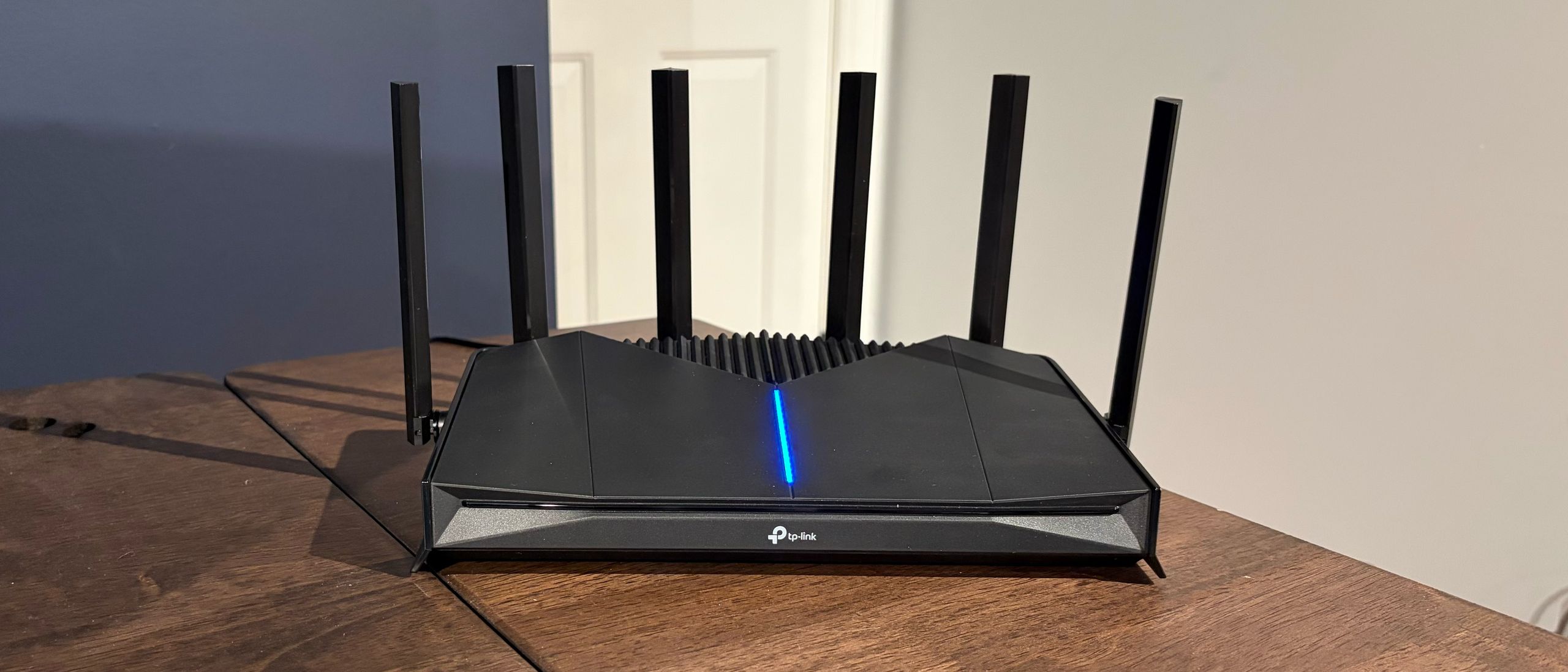
The TP-Link Archer GE400 features an angular design and RGB lighting meant to appeal to gamers, and includes a 2.5 GbE WAN and an additional dedicated 2.5 GbE gaming port. TP-Link also provides a comprehensive suite of gaming-related enhancements that can be configured via the Tether smartphone app or the web GUI.
However, those pluses clash with its real-world wireless performance, which was a mixed bag. Short-range performance on the 5 GHz band lagged its rivals, although the tables turned at longer distances. Conversely, the Archer GE400 showed relatively strong performance at short range on the 2.4 GHz band but faltered at long range.
The biggest knock against the Archer GE400, however, is pricing. The router has an MSRP of $219.99, but is currently available at Amazon for $169.99 after a $50 instant discount. For comparison, the Archer BE3600, which offers faster and more consistent wireless performance, is available for just $89.99 . If you can look past the fancy RGB lighting and don’t need the gaming-specific tweaks, it’s hard to justify the $80 price differential.
Brandon Hill Social Links Navigation Brandon Hill is a senior editor at Tom's Hardware. He has written about PC and Mac tech since the late 1990s with bylines at AnandTech, DailyTech, and Hot Hardware. When he is not consuming copious amounts of tech news, he can be found enjoying the NC mountains or the beach with his wife and two sons.
Key considerations
- Investor positioning can change fast
- Volatility remains possible near catalysts
- Macro rates and liquidity can dominate flows
Reference reading
- https://www.tomshardware.com/networking/routers/SPONSORED_LINK_URL
- https://www.tomshardware.com/networking/routers/tp-link-archer-ge400-wi-fi-7-gaming-router-review#main
- https://www.tomshardware.com
- AMD's B650 chipset isn't going anywhere, according to a new rumor — rising memory costs and softening DIY demand mean the transition to B850 may take longer tha
- The Ultimate Black Friday Deal Is Here
- Marvell’s $5.5B Celestial AI acquisition expands its role in AI data center hardware — firm now positioned to deliver next-gen optical interconnects
- AI On: 3 Ways Specialized AI Agents Are Reshaping Businesses
- Nvidia refuses to replace RTX 5080 FE GPU's broken 16-pin power connector retention clip — the owner says Nvidia is trying to 'burn my house down'
Informational only. No financial advice. Do your own research.