
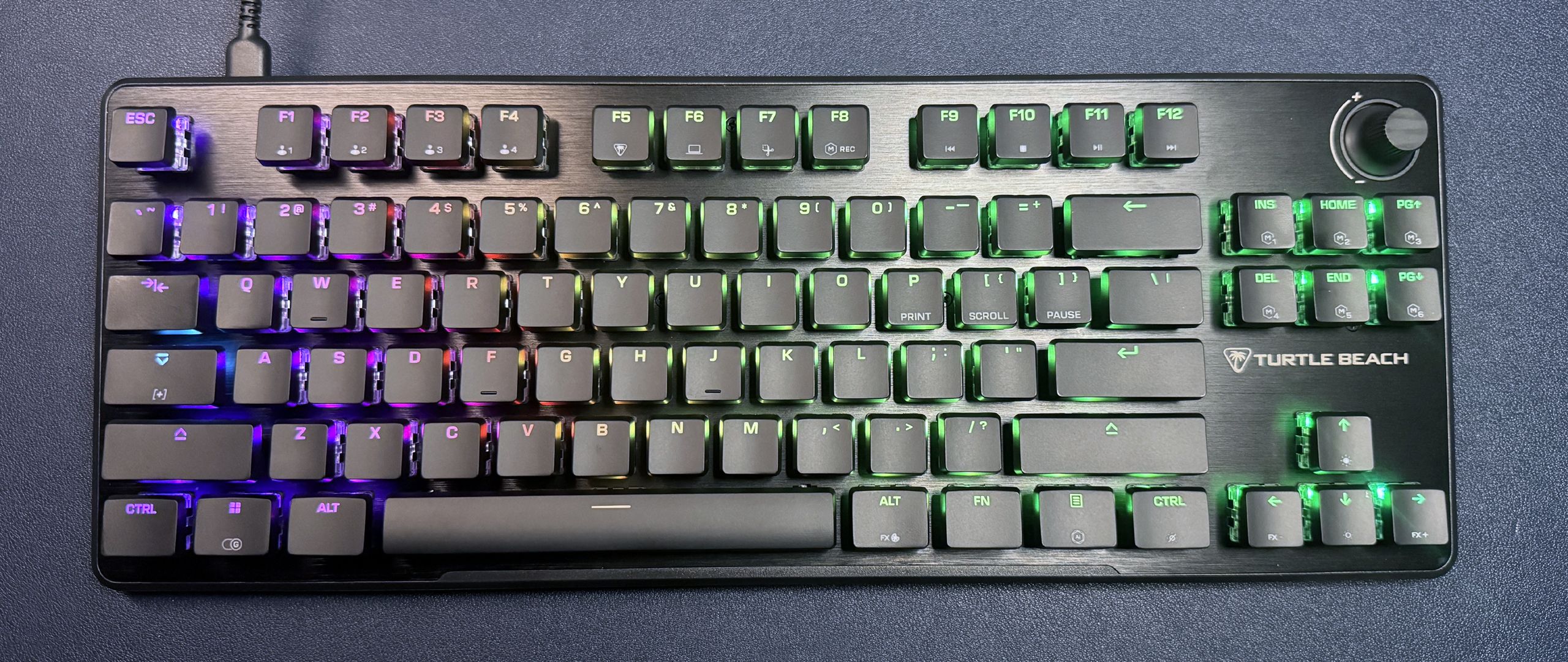
The Vulcan II TKL features Turtle Beach's in-house Titan HS (linear) switches, rated for up to 50 million keystrokes, with a 45g actuation force and a 1.8mm actuation distance. Unlike (what seems like) most gaming keyboards on the market right now, these are not Hall Effect switches — they're regular old linear mechanical switches. The keyboard does have a hot-swappable PCB that accepts both 3- and 5-pin mechanical switches, so you have plenty of switch options if you don't like the switches it comes with.
Typing on the Vulcan II TKL is… an interesting experience. Keypresses are lightweight and smooth, with a soft, mushy sound. They don't feel particularly mushy — and I didn't have any issues with accidentally pressing keys while I was typing or gaming, so my general accuracy wasn't affected — but they sound mushy. This seems to be almost entirely the switches — the case isn't very thick, but it does a decent job of absorbing sound, and there's very little case ping.
Perhaps switching out the keycaps would improve the typing experience — I found the Vulcan II TKL's keycaps to be a little too high-profile, especially on such a thin, low-profile chassis. But that's just personal preference, and the keycaps are easy to swap out — though most other keycaps will mean losing all that showy RGB lighting. This board does have a north-facing PCB, so full-sized keycaps will likely reduce the lighting by a lot.
Gaming on the Vulcan II TKL is solid, though I wouldn't necessarily recommend this keyboard for competition. The switches are smooth, and my keypresses were accurate, even if they didn't sound as perfectly crisp as I wanted them to; I didn't have any issues with switching between keys quickly or moving my hand around the board to find different keys. While the switches aren't magnetic and therefore do not support features such as Rapid Trigger, actuation adjustment, or Snap Tap, they actuate quickly (1.8mm), and Turtle Beach has its own software solution to Snap Tap that you can set up with the Swarm II software.
The Vulcan II TKL is customizable via Turtle Beach Swarm II, which is the universal peripheral software Turtle Beach inherited when it fully absorbed Roccat. You can use the Swarm II software to remap keys, customize the keyboard's RGB lighting, update firmware, and set up "ReacTap," which is Turtle Beach's answer to Snap Tap / SOCD. It's a software solution that lets you bind two inputs to one key, allowing you to then activate a second key by pressing it without fully releasing the first (like Snap Tap, ReacTap prioritizes the last-pressed input. Also like Snap Tap and other variations of this feature, it might be considered cheating in certain games.
(Image credit: Tom's Hardware) (Image credit: Tom's Hardware) I've never been a big fan of the Swarm II software, but I didn't have any issues with it this time around. There are only two screens for the Vulcan II TKL (remapping and lighting), and remapping is fairly straightforward — the keyboard is equipped with multiple layers you can remap, including a Function layer and an "Easy Shift" layer. Easy Shift is activated by holding down Caps Lock (can be reassigned) and is just another full keyboard layer. You can also turn on ReacTap on the remapping screen — you can set it up yourself with custom keys, but Swarm II also gives you the option of quickly assigning it to A & D (for strafing). The volume knob is unfortunately not remappable.
(Image credit: Tom's Hardware) (Image credit: Tom's Hardware) (Image credit: Tom's Hardware) The lighting options for the Vulcan II TKL are, as always, very pretty — I'm a big fan of the company's default AIMO lighting scheme, which is bright, colorful, and not as mundane as typical spectrum cycle defaults, but there are also a handful of other presets you can choose from, as well as an editor for fully customizing every key.
The Vulcan II TKL is a nicely-built compact TKL keyboard featuring the Vulcan II's signature aesthetic — slim chassis, brushed aluminum top plate, T-shaped keycaps, and bright, glowy RGB lighting. It's fully mechanical, equipped with soft, lightweight linear switches (that will at least make your coworkers and roommates happy) and a decently sound-dampened case. It's not a particularly exciting keyboard — it looks just like the other Vulcan II keyboards, but it looks great if you like the look.
It is $120, though — not particularly expensive in general, but a little pricey for a wired keyboard that doesn't have too many extra features. You could spend a little more and pick up something like the Logitech G515 , which is lower-profile and wireless (but not as pretty, in my opinion), or you could pick up a magnetic keyboard like Arbiter Studio's Polar 75 Pro , which retails for $165 but is currently on sale for $110.
Sarah Jacobsson Purewal Social Links Navigation Senior Editor, Peripherals Sarah Jacobsson Purewal is a senior editor at Tom's Hardware covering peripherals, software, and custom builds. You can find more of her work in PCWorld, Macworld, TechHive, CNET, Gizmodo, Tom's Guide, PC Gamer, Men's Health, Men's Fitness, SHAPE, Cosmopolitan, and just about everywhere else.
Key considerations
- Investor positioning can change fast
- Volatility remains possible near catalysts
- Macro rates and liquidity can dominate flows
Reference reading
- https://www.tomshardware.com/peripherals/gaming-keyboards/SPONSORED_LINK_URL
- https://www.tomshardware.com/peripherals/gaming-keyboards/turtle-beach-vulcan-ii-tkl-review#main
- https://www.tomshardware.com
- Bernie Sanders calls for halt on AI data center construction — wants to ensure that the technology benefits ‘all of us, not just the 1%’
- New Texas Instruments fab will pump out tens of millions of chips per day — first 300mm fab starts production after $60 billion investment
- Enthusiast modder stuffs an entire gaming PC inside a gutted Commodore PET 2001 — replaced the screen with an iPad Retina LCD, but the original keyboard still w
- '$100 Steam Machine' uses a cut-down PS5 APU with Bazzite — DIY console offers 60 FPS at 1080p with 16GB of GDDR6
- AI surpasses 2024 Bitcoin mining in energy usage, uses more H20 than the bottles of water people drink globally, study claims — says AI demand could hit 23GW an
Informational only. No financial advice. Do your own research.