
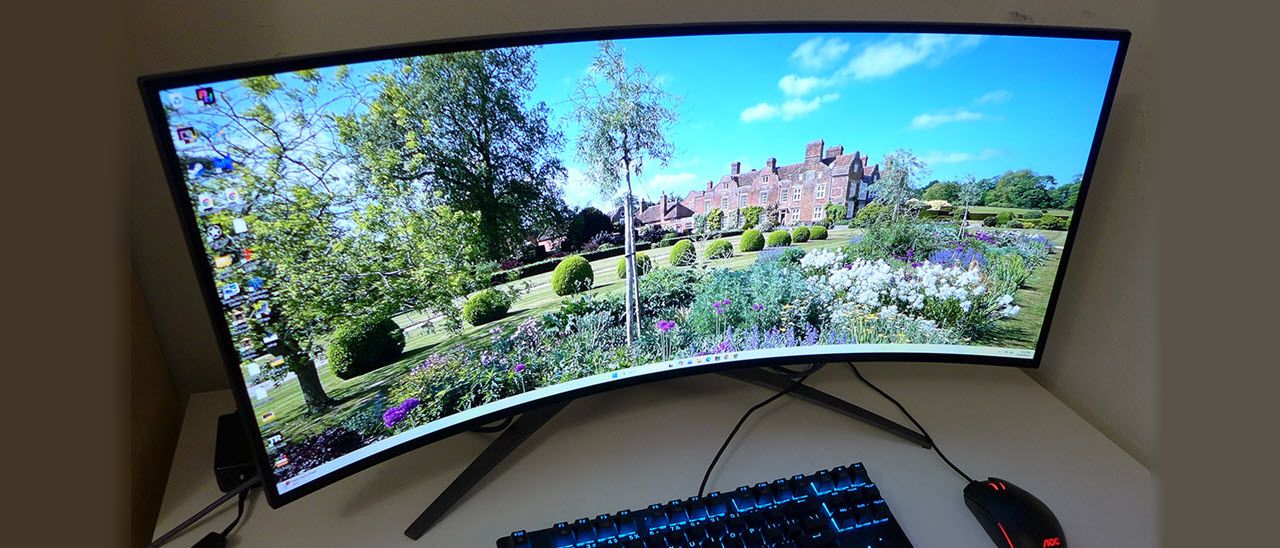
The X34 OLED comes packed in crumbly foam, which in my case, was extra crumbly, but it protected the contents from damage just fine. The base features a large footprint and is made from solid aluminum. It attaches to the upright with a captive bolt, then you snap the panel on. There’s a 100mm VESA mount in the back with fasteners included if you want to use an arm. The cable bundle includes IEC power for the internal supply, HDMI, and two USB ports, one A/B and one USB-C.
(Image credit: Acer) (Image credit: Acer) (Image credit: Acer) (Image credit: Acer) The X34 OLED is all-screen on the front, with thin, flush bezels on all four sides. The Predator logo is relegated to the base, which is also slender and elegant. It’s plenty solid, though, more than capable of keeping the screen steady during heated competition.
From the top, you can see the extreme curve. 800R is about as tight as it gets for the category. It enhances the X34 OLED’s immersive quality with the most convincing cockpit effect you’ll find outside a pair of VR goggles. Sound reflects back to the user when sitting close, creating a bubble-like experience. It’s excellent for first-person games like shooters or simulators. Three of these screens would form a half-circle for a driving or flying rig.
In back, styling is understated, with just a couple of textural elements on the component bulge that houses the internals, the stand attachment, and the inputs. The upright is slender and features rock-solid movements that include 5/15 degrees tilt, a 15-degree swivel, and 4.7 inches of height. The screen sits just high enough to allow a vertical position with a center eyepoint, which is the best way to enjoy any curved monitor.
The input panel includes two HDMI 2.1 ports and one DisplayPort 1.4 port. A USB-C port serves as a DP Alt, bringing the total to four video inputs. You also get one upstream USB 3.2 Type-A, two downstream USB Type-Bs, and extra ports on the panel’s bottom edge, one more USB Type-C and one more USB Type-B. The USB Type-C supports up to 90 watts for charging and powering peripherals. Two internal speakers play clean and loud with five watts apiece, and you get a 3.5mm headphone jack.
The X34 OLED includes a constant or variable brightness option for both SDR and HDR. When it’s on, brightness tops out at around 250 nits, but when it’s off, a 25% window can top 400 nits with even higher values for smaller areas of the screen. I like to use constant brightness for work and variable brightness for video and gaming. HDR is a simple affair. If you set it to Auto, the switch is automatic. There are no adjustments or additional modes for HDR content.
There are eight picture modes with three of them being programmable by the user. Standard is the default choice and it’s fairly close to the mark though I found the gamma a bit dark. A few tweaks in User mode took the X34 OLED to reference-level. Acer includes a complete set of color space options, including a near-perfect sRGB mode. General uses the full gamut, 95% of DCI-P3, for all content. Calibration options include five gamma presets, four color temps and a user mode with gain and bias sliders. You can also adjust hue and saturation for all six colors.
My X34 OLED sample came out of the box needing a few tweaks. Grayscale ran slightly green and gamma was slightly dark. The latter issue isn’t a big deal with a high contrast OLED since you can just up the brightness to compensate. The green tint was dealt with by adjusting the RGB gain sliders. I didn’t have to touch the bias controls. The end result was reference-level color and improved gamma. My recommended settings are below. I’ve included brightness values for Uniform Brightness on and off. For HDR signals, just set HDR to Auto so it switches without user intervention. There are no controls in HDR mode, but it’s close to the standards for color and luminance. You can check out those test results on page five.
When I received the X34 OLED for review, I realized that there aren’t a lot of these OLEDs available for sale. There are plenty of 34-inch curved ultra-wides out there, but OLED takes gaming to another level with its superior contrast, color depth, and smooth operation. Add to that an extreme 800R curve, and you have a perfect display for first-person games like shooters and simulators.
Ideally, you’d have two or three curved screens in a flying or driving simulator. But if you are on a budget and can swing only one, an 800R monitor is the ticket. It wraps around enough to fill all your peripheral vision if you sit about two feet away. And you can do that with the X34 OLED because its pixel density is a tight 109ppi, enough to hide the dot structure. OLED contrast and color saturation up the perception of detail even more. If you see jaggies, it’s in the content. I also noted no banding thanks to the 10-bit panel in use.
Gameplay is super quick and smooth. When the frame rate is above 180fps, which was all the time for me and a GeForce RTX 4090, there is no blur or hesitation. Control inputs are instantly translated. It’s so responsive, I could tell a visual difference between different mousing surfaces; on-screen movement is that precise. Gamers of any skill level, up to the most competitive professional, will want this monitor in their toolkit.
The image is stunning, whether the content is SDR or HDR. I noted a couple of things in the convenience category, though. Switching between formats is automatic, but the X34 OLED doesn’t have separate settings for each. If you’ve turned on Constant Brightness for SDR, something I commonly do, it stays on when switching to HDR, necessitating a visit to the OSD. Also, in SDR mode, the brightness setting stays the same whether Constant Brightness is on or off. I prefer to equalize the peak to 200 nits for both modes, so to do that here, I had to readjust the slider each time. These are minor issues, but they represent room for improvement.
The X34 OLED’s audio quality is exceptional. The speakers play loud and clean and manage to cover a wide frequency range from midrange to treble. There isn’t much bass, but they have broader dynamics than most. The screen’s curve contributes to the sound stage by focusing it toward the user. Though it is wide and deep, it is also very present, which enhances gameplay.
If you do a lot of busy work like document editing and spreadsheets, the X34 OLED requires some adaptation. The extreme curve means some image distortion, but on the upside, windows on the sides of the screen are closer to the user’s eyepoint. More of the image is in focus than a less curved monitor would be. For photo work, the best thing was to keep the graphic in the center third of the screen while using the sides for toolbars or other applications.
The X34 OLED has Acer’s typical high standard of build quality. I’ve never seen a Predator display that wasn’t engineered and manufactured at the premium level. I appreciated the USB ports, especially the ones on the panel edge, which were very easy to access for things like phone charging. The headphone jack is there too, which makes a lot of sense for ergonomics.
Takeaway: The X34 OLED isn’t the least or the most expensive 34-inch OLED out there, but it delivers high performance and solid usability. Aside from a few minor inconveniences with the OSD, it served me well as a daily companion in both work and play scenarios. It has a stunning image and is one of the quickest gaming monitors I’ve reviewed. It certainly takes the speed crown in the 34-inch ultra-wide category.
Current page: Features and Specifications
Key considerations
- Investor positioning can change fast
- Volatility remains possible near catalysts
- Macro rates and liquidity can dominate flows
Reference reading
- https://www.tomshardware.com/monitors/gaming-monitors/SPONSORED_LINK_URL
- https://www.tomshardware.com/monitors/gaming-monitors/acer-predator-x34-oled-34-inch-wqhd-240-hz-gaming-monitor-review#main
- https://www.tomshardware.com
- Survive the Quarantine Zone and More With Devolver Digital Games on GeForce NOW
- WinRAR exploit reportedly remains widely-used by China and Russia state actors despite patch — vulnerability allows malicious archives to deliver a hidden paylo
- ‘Largest Infrastructure Buildout in Human History’: Jensen Huang on AI’s ‘Five-Layer Cake’ at Davos
- From Pilot to Profit: Survey Reveals the Financial Services Industry Is Doubling Down on AI Investment and Open Source
- Wisconsin towns reportedly signed secret NDAs for billion-dollar data center deals — Microsoft and Meta hide behind confidential agreements
Informational only. No financial advice. Do your own research.