
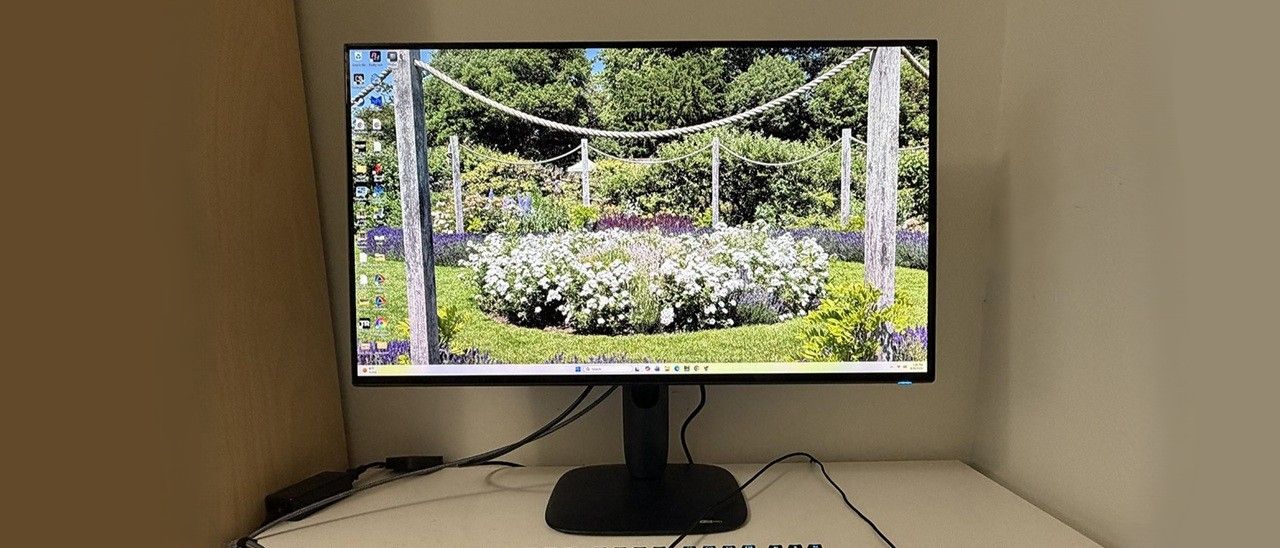
The AW3226Q arrived in fully recyclable packaging consisting of a clamshell-style carton and molded pulp forms to protect the contents. The upright snaps onto the panel and the base attaches with a captive bolt. The resulting piece is solid and stable on the desktop. The power supply is internal, so you get a stout IEC cord plus cables for DisplayPort, HDMI, and USB-A/B.
(Image credit: Dell) (Image credit: Dell) (Image credit: Dell) (Image credit: Dell) Image 1 of 4 View Original
The AW3226Q’s screen is touted as “almost frameless”, and indeed, it is. The top and side frames are just 8mm, while at the bottom, it’s 14mm and flush on all sides. There is no extra protruding trim. The bottom is not without utility, though, as it puts a headphone jack and two USB ports within easy reach. The remaining I/O is in the usual spot, up and under, where you’ll find a DisplayPort 1.4 , two HDMI 2.1, and more USBs, one upstream and one downstream.
The stand features Alienware’s latest design where the upright’s attachment point appears to float above the base. There are no sharp edges or square corners here. Everything is smoothly tapered, including the bulge in the back, which is generously vented around its perimeter. On one side is the Alienware head, which has the main LED feature. It can light up in a variety of colors and effects, all controlled from the OSD.
The upright has an angled cable management hole, which is cool because then you can’t see through it from the front. It features 5/21 degrees tilt, 20 degrees swivel, a 90-degree portrait mode, and 4.3 inches of height range. Movements are smooth and firm with no wobble or play. If you’d rather use an aftermarket support, the stand comes off to expose a 100mm VESA mount with fasteners included.
Pressing the AW3226Q’s joystick opens a well-stocked OSD with nearly every option a gamer or enthusiast could want. Except for one that I’ll tell you about below.
(Image credit: Tom's Hardware) (Image credit: Tom's Hardware) (Image credit: Tom's Hardware) (Image credit: Tom's Hardware) (Image credit: Tom's Hardware) (Image credit: Tom's Hardware) (Image credit: Tom's Hardware) (Image credit: Tom's Hardware) (Image credit: Tom's Hardware) (Image credit: Tom's Hardware) Image 1 of 10 View Original
With another upclick, we get the full OSD, which has 11 sections starting with Game and the 12 picture modes. Standard is the default and its color is accurate, but you can get some improvement by using Custom Color and its two-point white balance sliders. Creator mode gives you access to the sRGB and DCI-P3 gamuts. The one thing missing, and this is true of every Dell and Alienware monitor I’ve ever reviewed, is a gamma control. Normally, this isn’t an issue, but in the AW3226Q’s case, the default gamma is too light with no practical way to correct. I’ll show you what I mean on page four.
Game Enhance includes a set of timers and a frame rate counter. The aiming point editor is called AlienVision, and it gets its own screen with parameters for reticle shape, color, and position. You can also roll your own sniper mode with variable magnification and opacity. There are three memories to save your configurations. Esports modes include 25 and 27-inch images with reduced resolution, which is a benefit to frame rates, although you’re still capped at 165 Hz.
AlienFX lighting refers to the Alienware head in the back and the power button LED, which you can see from the front. They can display in any color or effect or be turned off if you want total darkness.
The AW3226Q includes full PIP/PBP functions for viewing two video sources at once. You can move the PIP window to any corner or decide how to split the PBP mode.
Most of the AW3226Q’s panel maintenance is handled by an algorithm that tracks the panel’s usage and manipulates pixel brightness accordingly. You can also initiate a panel refresh routine manually if you prefer.
Calibrating the AW3226Q was something of a compromise. In Standard mode, color and grayscale are without visible errors, but gamma is too light. And there is no gamma control in the custom color mode. You can adjust gamma in Creator mode and select sRGB if you like, but then you give up grayscale calibration. There’s also a gamma control in Console mode, but this only works over HDMI. I have long wished that Alienware and Dell would add gamma to the options in Custom Color mode. And when they do, I hope it’s a fine resolution slider like the Asus XG27AQNGV has, not the usual presets that are 0.2 apart. Anyway, my suggested settings are below.
For HDR10 signals, you get seven specific picture modes. Desktop is the default, but for the highest brightness and impact, choose Peak 1000 Bright.
Gameplay on the AW3226Q was satisfying and successful. But it didn’t quite have the shooting-fish-in-a-barrel feel of some of the 240 Hz monitors I’ve experienced. Motion was smooth and quick, but I had to concentrate a bit more on my aim to make sure I wasn’t wasting ammo. I’m in nit-pick mode here because I play on so many different monitors. After a short time, I adapted to the AW3226Q and was handily dispatching gory monsters and aliens in Doom Eternal.
The AW3226Q was a monitor I could easily live with long term. The image is gorgeous for starters. Tandem RGB Stripe OLEDs (TRS-OLEDs) are sharper than other variants, by enough that you can tell the difference in a side-by-side comparison. I spend a lot of time in Photoshop, and this monitor is easily on par with the best professional displays I’ve reviewed. It’s also colorful and accurate. I noted light gamma during testing, which only had a minor effect. It wasn’t that I found the picture lacking; it was that I didn’t have a practical option to darken the gamma to my liking.
In a nutshell, Standard mode has no adjustments. Custom Color lets you tweak grayscale with a two-point control, but there are no gamma presets. Creator has color gamut options for sRGB and DCI-P3 and gamma presets, but no RGB sliders. So, whatever you choose, there’s a compromise.
Physically, the AW3226Q is a presence in a good way. I love Alienware’s newest styling aesthetic, which has been around for a while now. The almost frameless screen delivers on its promise. When the picture is on, the bezel disappears. Taking away the bottom trim strip makes a big difference there. Though I missed internal speakers, I appreciated the inclusion of USB ports, especially the ones right under the bezel. They, along with the headphone jack, are within easy reach. And even though it is a value-oriented display, it has the same premium build quality and solid feel as Alienware’s flagship models.
Current page: Features and Specifications
Key considerations
- Investor positioning can change fast
- Volatility remains possible near catalysts
- Macro rates and liquidity can dominate flows
Reference reading
- https://www.tomshardware.com/monitors/gaming-monitors/SPONSORED_LINK_URL
- https://www.tomshardware.com/monitors/gaming-monitors/alienware-aw3226q-32-inch-4k-oled-gaming-monitor-review#main
- https://futureplc.com/privacy-policy/
- NVIDIA Expands Advanced Technology Access for Europe’s Scientific Community Through Open Learning Resources, Collaborations and Compute
- European Cities Deploy NVIDIA-Powered AI Agents to Run Smarter Urban Operations
- 32GB of DDR5 6000 RAM now costs $450
- Grace Hopper Celebration canceled two weeks out as AnitaB.org runs short of funds
- Jailbroken PS5s can now run local AI models at over 100+ tokens per second
Informational only. No financial advice. Do your own research.