
(Image credit: AOC) (Image credit: AOC) (Image credit: AOC) (Image credit: AOC) (Image credit: AOC) Image 1 of 5 View Original
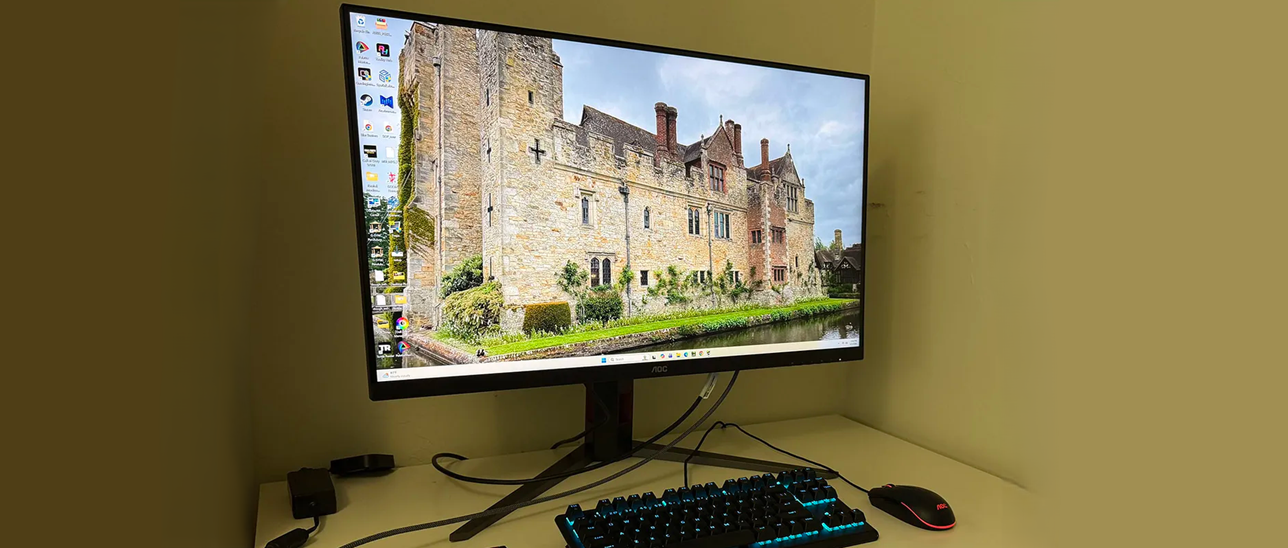
The U32G4’s styling is simple and elegant, with the panel’s shape formed from triangles in the back. A bright red trim ring encircles the fulcrum in the back and the words “AOC Gaming” appear as well. The cooling vents are hidden inside the gap you see at the top.
The screen has an 8 mm-wide flush bezel with a 20mm strip across the bottom. Under the right corner are four OSD control keys and a power toggle. A tiny status LED glows orange in standby and white when the power is on. The screen’s anti-glare layer keeps ambient light from spoiling the image while being clear and grain-free.
The stand is secure and tight in operation. It includes a red-trimmed cable hole that’s turned to the side, so it doesn’t show from the front. Ergonomics include a 5/23-degree tilt, 20-degree swivel, and a 5-inch height adjustment. You also get a 90-degree portrait mode. Movements are firm and smooth with little to no play. Though relatively lightweight, the U32G4 is a solid piece of gear.
There isn’t much happening on the I/O panel, except for a DisplayPort 1.4 port and two HDMI 2.1 ports. There are no internal speakers, but you can plug headphones into the 3.5mm jack. There are no USB ports or LED lighting. If you prefer to use a monitor arm, a 100mm VESA mount is provided with fasteners included.
(Image credit: Tom's Hardware) (Image credit: Tom's Hardware) (Image credit: Tom's Hardware) (Image credit: Tom's Hardware) (Image credit: Tom's Hardware) (Image credit: Tom's Hardware) (Image credit: Tom's Hardware) (Image credit: Tom's Hardware) (Image credit: Tom's Hardware) Image 1 of 9 View Original
There are three HDR emulation modes that extend the perceived dynamic range of SDR content. When HDR10 signals are present, a fourth mode appears, Display HDR. It is the best choice for its accurate grayscale, EOTF, and color tracking.
The only other peripheral feature I noted here was PIP and PBP. You can view two sources at once and the PIP window can be moved and sized. You can swap the windows and select which one plays audio through the DisplayPort or HDMI inputs.
The U32G4 looked a tad warm to my eyes, and initial measurements showed it was a little short on blue in grayscale patterns. It can be used without calibration, but a few tweaks to the RGB sliders removed all visible errors. Gamma runs a shade dark on the 2.2 setting. Changing it to 2.0 was too much; it washed out the image. I noted that the sRGB mode had no calibration options, but it tracked grayscale and color with reasonable accuracy, though it showed a few gamma quirks. I’ll tell you more about that on page four. HDR signals have four modes available, with Display being the best choice. They cannot be calibrated. Below are my recommended SDR settings. Please enjoy.
Right out of the gate, I could see how quick the U32G4 was. Even at a “mere” 160 Hz, it delivered smooth motion thanks to its precise and artifact-free overdrive. It’s one of the better implementations I’ve seen, especially at this price point. I used the Faster setting (third of four) and was rewarded with no perceivable motion blur. I was able to stay at 160fps thanks to a GeForce RTX 4090.
I tried the backlight strobe and found it effective at lower frame rates. I capped the action at 120 Hz and still had a smooth experience. It keeps Adaptive-Sync on, which is something I’m rarely able to do. There aren’t many monitors at any price that have that ability. If you have a slower video card, you can still enjoy 4K resolution at lower frame rates.
There are no Quantum Dots here, so I missed a little green saturation. But otherwise, the U32G4 is very colorful. DCI-P3 coverage is around 90%, so there is plenty of color for SDR content. The sRGB gamut option is useful when a smaller color space is needed, but I noticed slight gamma issues. Shadow areas were a bit light, and some highlights were muted. You can see why in the tests on page four.
For workday tasks, I stuck with Panel Native and a few tweaks to the RGB sliders to remove all grayscale errors. Gamma is a shade dark, but there is no loss of detail. Set the brightness slider to 200 nits, and you’ll enjoy a vivid and pleasing image.
4K at 32 inches has plenty of pixel density at 139ppi. That’s fine enough to hide the dot structure unless you sit inches from the screen. Text is smoothly rendered without visible jaggies. Graphics look realistic with photos being particularly enjoyable. That might have something to do with the large format. 32 inches is my go-to and it’s the size of my reference screen. It’s perfect for writing where I need to keep extra windows open to refer to charts and data. Spreadsheets can be viewed with much less scrolling, and webpages display more of their content too. Photoshop lets you see the picture and keep lots of toolbars at hand.
Takeaway: For $320, it’s hard to imagine a better 4K gaming monitor than the U32G4. It’s fast, bright, and colorful. It doesn’t have USB ports or internal speakers, but it does have all the goods for high-performance gaming with low input lag, smooth motion resolution, and accurate color. It’s equally adept at productivity with lots of screen area for documents and large, clear text. If you have the desktop space for something bigger, a 32-inch monitor is a great option.
Current page: Features and Specifications
Key considerations
- Investor positioning can change fast
- Volatility remains possible near catalysts
- Macro rates and liquidity can dominate flows
Reference reading
- https://www.tomshardware.com/monitors/gaming-monitors/SPONSORED_LINK_URL
- https://www.tomshardware.com/monitors/gaming-monitors/aoc-u32g4-32-inch-4k-dual-refresh-gaming-monitor-review#main
- https://futureplc.com/privacy-policy/
- Framework nearly doubles memory pricing for 32GB, 64GB Laptop 13 Pro overnight — CEO says absorbing LPCAMM2 supplier hikes would put 'our ability to operate at
- 45% off: Slashed to just $1,099, this bargain RTX 5060-powered gaming laptop is discounted by $900 at HP — near half-price HyperX Omen 16 is the perfect gaming
- Grand Theft Auto Multiverse with real-time portals created by ambitious modder — San Andreas, Vice City and GTA III all run simultaneously, with cross-game inte
- At SIGGRAPH, NVIDIA Advances Graphics and Simulation With Agentic and Physical AI
- Intel and AMD sign long-term server CPU deals with Chinese customers as prices jump over 40%, report claims — agreements purportedly guarantee purchase volumes
Informational only. No financial advice. Do your own research.