
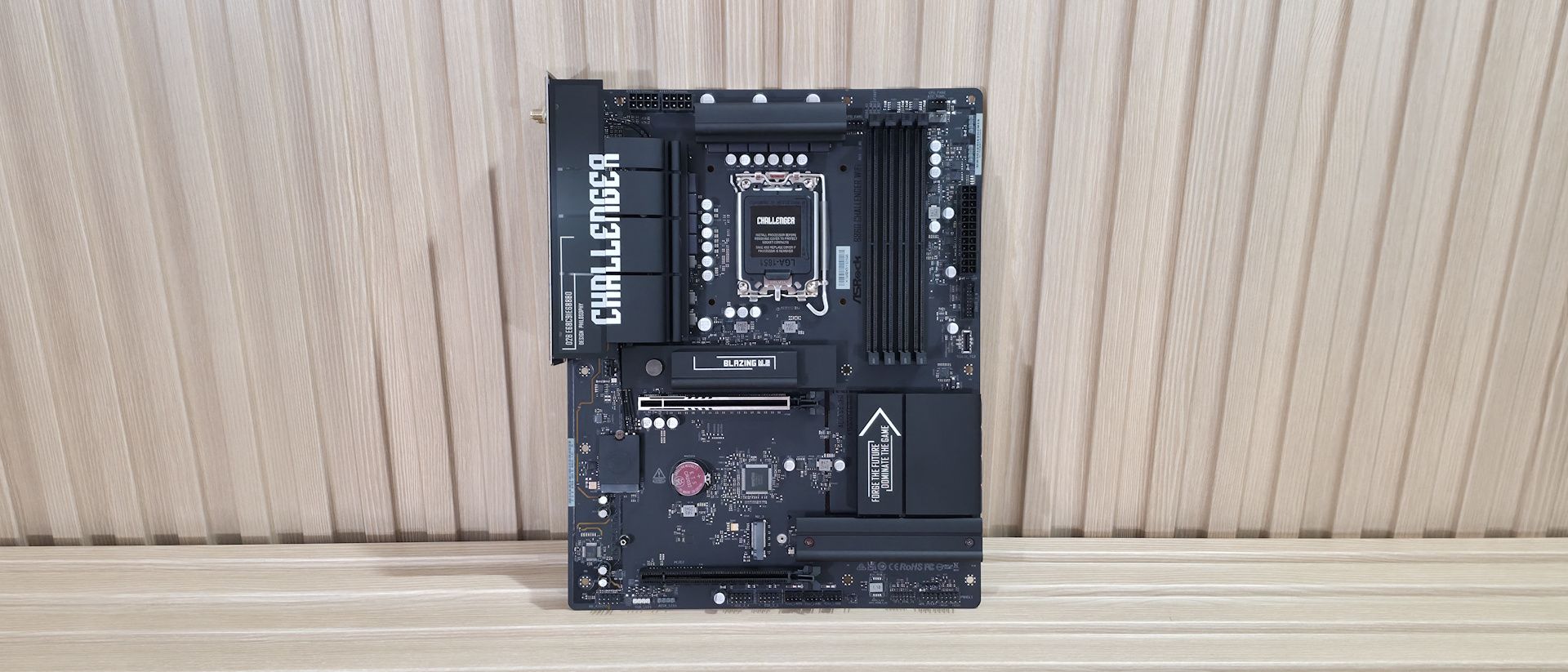
Power delivery on the B860 Challenger is paltry, but not by phase count; it’s 14 phases total, 10 dedicated to Vcore — but by the weak MOSFETs. Power heads from the EPS connectors to a Richtek RT3638AJ 3-rail, 8-phase PWM controller (meaning the Vcore runs ‘teamed,’ common in today’s systems). From there, power goes to 10 50A Vishay SiC632 Dr.MOS power stages. The 500A available isn’t a lot, but it handled our Core Ultra 270K Plus without throttling. That said, the VRMs ran hot during our 30-minute stress test, so make sure you have good airflow to keep temperatures down.
On the bottom half, starting on the left edge, is the audio solution: the basic Realtek ALC897 and a couple of dedicated audio capacitors. This isn’t the best audio section around, but par for this class of board. Still, most users will be satisfied with this implementation. Two full-length PCIe slots sit in the middle of the board and couldn’t be spaced further apart. The top slot is reinforced, connects through the CPU, and is your primary slot for graphics running PCIe 5.0 x16 speeds (it does not bifurcate). The bottom slot connects through the chipset and runs up to PCIe 4.0 x4. The large gap between them lets you fit any video card, while still leaving that bottom slot open for expansion.
Mixed in and around the PCIe slots are three M.2 sockets. The first, above the primary PCIe slot, uses a larger heatsink with a quick-release mechanism that makes installing and removing the device easy. Under the heatsink is a CPU-connected M.2, M2_1, that runs at PCIe 5.0 x4 (128 Gbps) and supports devices up to 80mm. The other two M.2 sockets run at PCIe 4.0 x4 (64 Gbps), with one, M2_2, under a simple (not EZ DIY) heatsink and the other, M2_3, with no heatsink. If you want to use RAID on the M.2 drives, you’ll have to look elsewhere, as the B860 Challenger doesn't list support for that here. Note that the primary M.2 socket made good contact with the M.2 drive. Moving right, past the chipset heatsink to the edge of the board, we reach the four SATA ports. These you can use RAID with (RAID0/1/5/10) for that extra speed or redundancy. Finally, we snapped a few images of the board’s active ICs. This ASRock board uses a combination of Richtek (PWM controller), ASMedia (USB), Realtek (audio and networking), and Vishay (MOSFETs).
(Image credit: Future) (Image credit: Future) (Image credit: Future) (Image credit: Future) (Image credit: Future) Image 1 of 5 View Original
At the bottom are several headers, including front-panel audio and USB ports. A complete list of connectivity is listed below, from left to right:
Flipping the board around to the rear I/O, we can see enough ports for most users. Starting on the left, we see the HDMI (v2.1) output for integrated graphics, with the Wi-Fi 7 (the ‘slower’ 160 Hz) antenna screw-in connections above it. Moving right, we spy the only USB Type-C port on the rear IO, and it’s a slow 5 Gbps port. In fact, 5 Gbps is the fastest USB you’ll see on this board, which will disappoint anyone looking for speedy USB.
Next are two USB 2.0 ports (black), six more 5 Gbps ports (blue and yellow: the latter are the Lightning USB ports for reduced latency). Above the yellow Lightning Gaming ports is the Realtek-based 2.5 GbE. Next are the audio inputs/outputs, with three 3.5mm jacks (input/output/microphone). The B860 Challenger lacks SPDIF optical output, which could affect users who want to send the audio signal to an AV/R or other external output.
If you’re an esports gamer where every millisecond counts, the Lightning Gaming ports could come in handy. Otherwise, the feature adds little value for the average user.
MORE: Best Motherboards MORE: How To Choose A Motherboard MORE: Best Motherboard Deals MORE: Best Motherboard Combo Deals MORE: All Motherboard Content
Current page: ASRock B860 Challenger Wifi Features and Specifications
Key considerations
- Investor positioning can change fast
- Volatility remains possible near catalysts
- Macro rates and liquidity can dominate flows
Reference reading
- https://www.tomshardware.com/pc-components/motherboards/SPONSORED_LINK_URL
- https://www.tomshardware.com/pc-components/motherboards/asrock-b860-challenger-wifi-motherboard-review#main
- https://futureplc.com/privacy-policy/
- Europe’s Industrial Leaders Reinvent Engineering and Manufacturing With NVIDIA
- OpenAI CEO says it's 'quite terrible' for your PC to have RAM
- Walmart honors massive shelf price mistake, lucky buyer gets two $2,299 CyberPowerPC gaming rigs for $1,099 each
- NVIDIA Transforms European Retail, From Digital Discovery to Physical Operations
- Biwin M560 2TB SSD Review: The DRAM-less drive to beat
Informational only. No financial advice. Do your own research.