
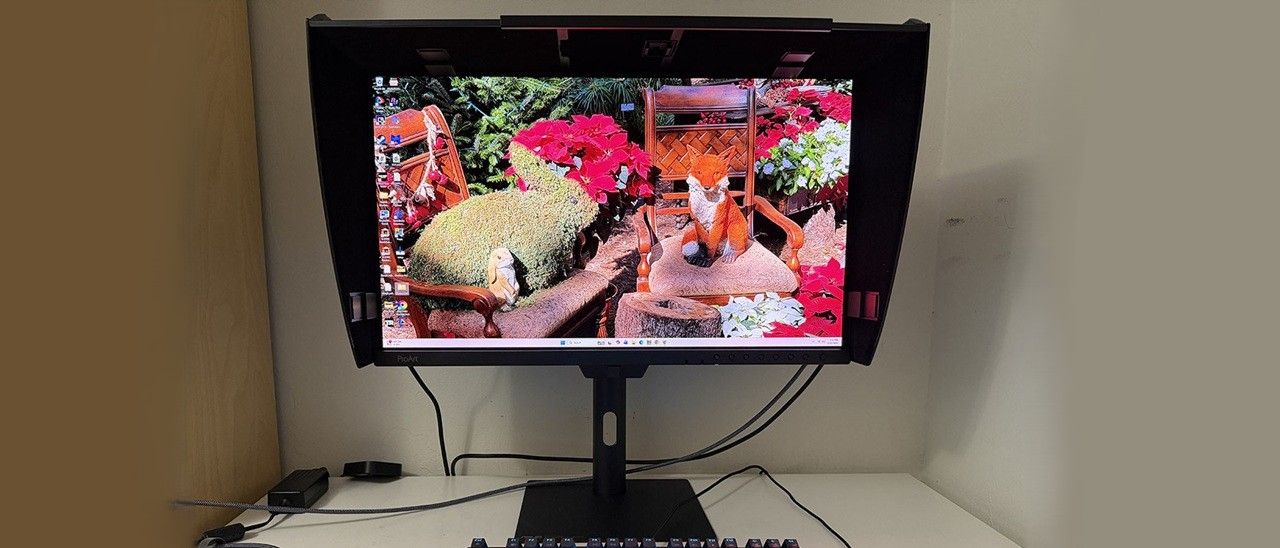
There are pro monitors less capable than the PA27USD that cost $5,000 or more. Asus is offering this one for $2,199. While that’s a lot for a 27-inch OLED, it’s a bargain in the pro-video world, especially considering its huge list of capabilities.
The PA27USD comes in a clamshell box packed in fully recyclable molded pulp. Two stands are included, one with two rotating legs and a traditional telescoping type with full ergonomics. You also get cable management bits that attach to the panel sides and the upright. A rigid light hood features light-absorbing felt on the inside, easy toolless attachment, and holes for cabling and light meters. The cable bundle includes three USB, HDMI, and DisplayPort, plus IEC for the internal power supply.
(Image credit: Asus) (Image credit: Asus) (Image credit: Asus) (Image credit: Asus) The first photo shows the PA27USD’s default stand option. The feet snap into the bottom of the panel and swivel for easy storage. They are ruggedly constructed from cast aluminum. If you want to use the traditional desktop stand, it has a heavy metal base with an equally solid upright. To install it, you first have to pluck the tiny rubber plugs from the 100mm VESA mount threads on the panel, then bolt it up with the included Phillips-head screwdriver. It includes a 5/23-degree tilt, a 30-degree swivel, and a 90-degree portrait mode. The height adjustment range is 5.2 inches. Movements are smooth and solid, making the PA27USD feel nearly indestructible.
The panel is designed for location use with a large metal handle on the back and ports on the sides. On the right, you get a DisplayPort 2.1, two HDMI 2.1, two Thunderbolt 4, which are chainable, and USB-C and A ports for the KVM function. On the left is the 12G SDI port. This means that you can hook a camera or signal distribution hub directly to the PA27USD in tether mode. If you’ve ever watched the guy behind roving cameramen at football games on TV, he’s carrying a coaxial cable. SDI is robust and has a locking bayonet connector.
The PA27USD also includes audio support in the form of a 3.5mm headphone jack and a pair of internal speakers, which play to a reasonable volume in the upper midrange frequencies.
On the bottom front of the panel is the integrated colorimeter. It swings up into place when activated by the OSD. Calibrations can be performed manually or scheduled for later. Also in the front is a row of buttons for quick access to input selection, picture presets and other functions. A joystick controls the OSD and it can be accessed from the Windows or Mac desktop using Asus’ DisplayWidget Center app.
(Image credit: Tom's Hardware) (Image credit: Tom's Hardware) (Image credit: Tom's Hardware) (Image credit: Tom's Hardware) (Image credit: Tom's Hardware) (Image credit: Tom's Hardware) (Image credit: Tom's Hardware) (Image credit: Tom's Hardware) (Image credit: Tom's Hardware) (Image credit: Tom's Hardware) (Image credit: Tom's Hardware) (Image credit: Tom's Hardware) First up are the image presets, labeled to match industry standards. Native is the default, and it is the same as Display P3 but with a little extra color saturation. The other modes are nearly spot-on with their respective specifications, though I found slight gamma anomalies that I’ll tell you about later. SDR signals get seven modes, while HDR gets five, including HDR10, Hybrid Log Gamma (HLG), and Dolby Vision support. There are also three user memories, which can be anything you like. You start with a target spec, then modify it in the OSD and run the calibration to save it.
The Palette field shows the parameters for each mode including the target brightness. You can adjust the white balance with a two-point RGB slider if you wish. You also get hue and saturation sliders for all six colors.
Calibration is super easy, you just pick a target, or all the modes if you want, make sure the PA27USD is warmed up for 30 minutes, then execute. Or you can schedule it for later when you’re not working.
The input list shows that the SDI port is shared with HDMI 1, which means the total connections can be four at most. There are two Thunderbolt ports, and they are for daisy chaining multiple monitors.
Finally, two of the keys on the panel’s bezel can be programmed to different monitor functions.
The PA27USD arrives ready to go out of the box. All the presets are factory-calibrated before shipping. For my review, I set about measuring every mode to verify its accuracy. You can see all the results on page four. For HDR signals, you must choose a specific HDR standard. HDR10, PQ in Asus’ parlance, can be rendered with either P3 or BT.2020 color. If you want to work with HLG or Dolby Vision content, just choose that mode. I noted that for P3, you could choose between D65 and D63 color temps and 2.2 or 2.6 gamma. This corresponds to Display P3 and Cinema P3, respectively. Other SDR modes include sRGB, BT.709, Adobe RGB and BT.2020. Here is a rundown of the SDR modes and their default gamut, color temp and gamma settings.
The PA27USD includes a rigid light hood with light-absorbing felt on the inside. It installs easily by snapping it onto the bezel. I noted that the inside fittings used to hold it in place were not covered by felt and they reflected the image. I suspect that there will be users covering them with black tape.
For daily use, I chose the Native preset, which conforms to Display P3 but with a little extra color. The PA27USD covers 102% of DCI-P3 which is a nice bonus for things like web browsing and watching video for entertainment. I noted good sound quality from the internal speakers and easy access to the headphone jack and other inputs from the right side of the panel.
Gaming had the same addictive quality I find with every fast OLED. My RTX 4090 -equipped PC maintained around 220 fps, which is a must for the smoothest motion and lowest input lag. The image was gorgeous, too, and it was nice to finally experience a pro screen that is also a premium gaming display. My Nvidia LDAT tests revealed slightly more input lag than other 240 Hz OLEDs, but this did not affect gameplay in the slightest. Every turn and slide was instant and precise. Moving backgrounds stayed clear while moving objects retained their detail at the fastest speeds. If I had to complain, I’d say include a frame counter, but honestly, that’s a tiny nit at best.
When you look at HDR on a screen this good, it takes on a very different feel. The depth and realism are incredible thanks to spot-on tone-mapping and color tracking. Though the PA27USD isn’t a BT.2020 monitor, it was beautifully saturated for all types of content from rendered games to video from YouTube, Apple TV or 4K Blu-ray.
A monitor like this is certainly overkill for anything but content creation. But it looks so good, I’d gladly make it my everyday screen.
Takeaway: The PA27USD is the most capable and versatile professional monitor I’ve reviewed to date. It covers every color standard currently in use plus every form of HDR signal except HDR10+. The image is bright, clear and colorful in every scenario with excellent out-of-the-box accuracy. It also games well thanks to a 240 Hz refresh rate and Adaptive-Sync. I also loved the side input panel and the inclusion of SDI support. And with two quality stands in the box, you have more installation options.
Current page: Features and Specifications
Key considerations
- Investor positioning can change fast
- Volatility remains possible near catalysts
- Macro rates and liquidity can dominate flows
Reference reading
- https://www.tomshardware.com/monitors/gaming-monitors/SPONSORED_LINK_URL
- https://www.tomshardware.com/monitors/gaming-monitors/asus-proart-pa27usd-27-inch-oled-review#main
- https://www.tomshardware.com
- NVIDIA and Doosan Group Collaborate to Advance Physical AI and AI Factory Infrastructure
- Microsoft is reportedly testing Copilot+ AI features with discrete GPUs instead of NPUs — a feature available on Windows App SDK with a Windows Insider Experime
- Computer History Museum recalls ‘astonishing’ retro haul recovered from abandoned German warehouse — over 2,000 artifacts spanning the 1930s to 1980s required s
- 2021 Honda Civic infotainment system can be jailbroken via USB — flaw uses public Android test keys to install unauthorized apps, enables for 'EvilValet' attack
- Microsoft is reportedly testing Copilot+ AI features with discrete GPUs instead of NPUs — a feature available on Windows App SDK with a Windows Insider Experime
Informational only. No financial advice. Do your own research.