
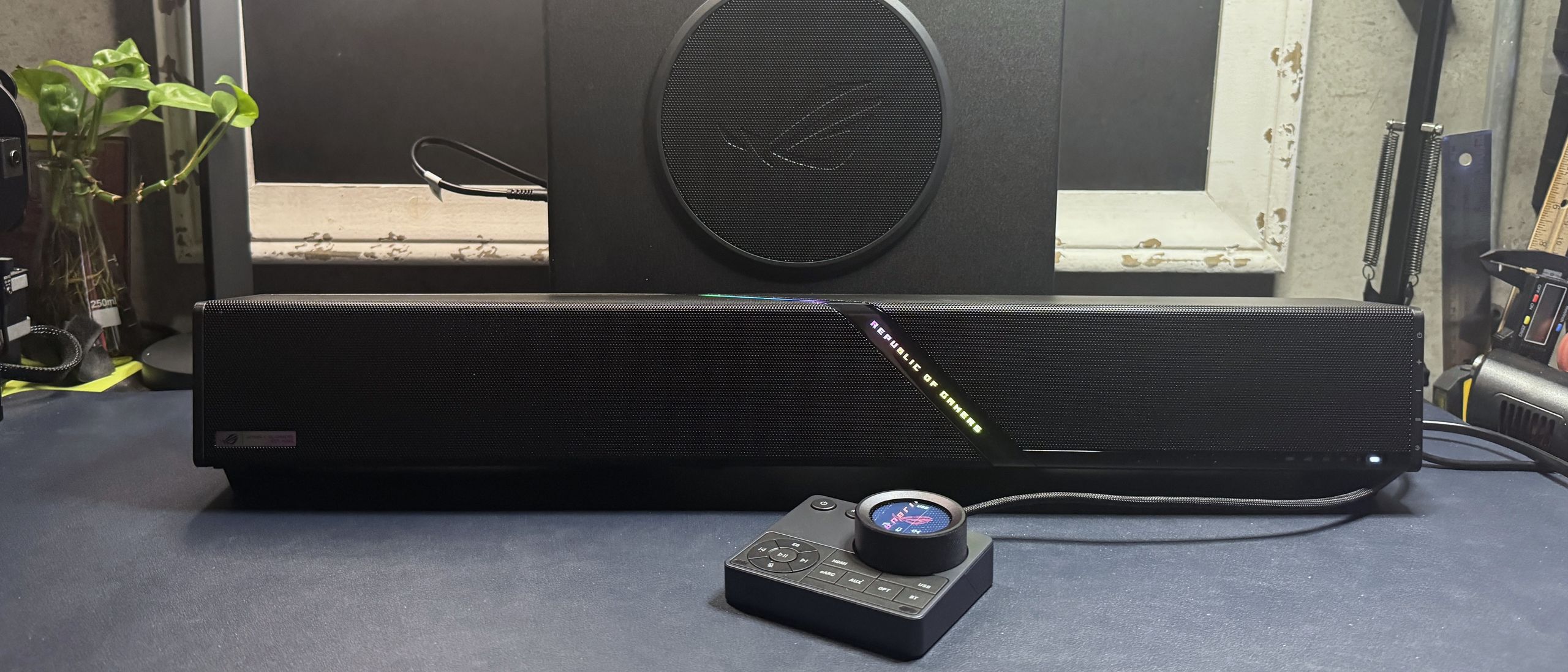
The ROG Gjallar is a 2.1.2 system — the two primary speakers (each consists of a full-range driver and a tweeter) and two up-firing speakers in the soundbar, plus a 6.5-inch subwoofer. The two main speakers face forward, while the up-firing speakers are angled upward to create the illusion of more multi-dimensional sound.
Audio on the ROG Gjallar sounds pretty good for a soundbar — though it's not significantly better (or different) than the audio performance we've heard on other premium-priced gaming sound bars. While the opening bass in Lorde's Royals had at least some detail and depth (thanks, in part, to the subwoofer), and the breathiness in Britney's voice in Toxic was fairly clear, the overall soundstage in songs like Beyonce's Single Ladies and K-391's Lonely World was still pretty limited.
Games sounded pretty good on the Gjallar, especially with some EQ tweaking. While the soundstage still didn't sound huge in games like Baldur's Gate 3 and God of War: Ragnarok , most of the layered details in the audio still managed to come through. Directional sound on the Gjallar was also about as good as you can expect from a soundbar, thanks to Dolby Atmos.
The Gjallar's built-in Acoustic Echo Cancellation microphones have a dedicated DSP and are designed to intelligently filter out sound coming from the speakers to pick up your voice better. Unfortunately, this works better on paper than it does in practice. While the mics did a decent job of filtering out noise from the soundbar — including music, games, other people's voices, and my 110th rewatch of Pirates of the Caribbean at 80% volume — that was about all they were good at.
The people I spoke to over voice chats couldn't hear what I was listening to in the background, and they could hear me — but they couldn't really understand me very well. My voice not only sounded fuzzy, but my words were frequently cut off, likely from an overly aggressive noise-reduction algorithm. Turning the echo cancellation and noise reduction to its lowest setting didn't seem to make much of a difference, and turning it off completely resulted in nobody being able to hear me at all (and I'm pretty loud). The quick-start guide that came with the Gjallar does point out that for the best results you should have the control hub located directly in front of you, but that didn't do much for me (and also wasn't exactly convenient). I guess the mics on the Gjallar are okay if you have absolutely nothing else with a built-in mic, but I think I'd rather have the option to simply plug in a microphone or a headset via the control hub.
The ROG Gjallar comes with its dedicated audio control hub, so you can do some customization through that — such as switching between EQ and RGB lighting presets. For real customization, such as setting up your own EQ and lighting presets, you'll need to connect to Asus' web-based Gear Link software.
On one hand, Gear Link is relatively easy to navigate and works fairly well. Just connect via the pop-up in your browser, switch up your settings, and hit "apply," and they save directly to the device. On the other hand, it does seem a little unnecessary to require an internet connection just to do something like turn down the subwoofer level (there are no physical controls on the subwoofer — you must use Gear Link to adjust the level). You also can't really customize the audio control hub aside from switching out the graphic displayed on the LCD screen. You can't remap the volume wheel or any of the buttons, which is a little disappointing.
(Image credit: Tom's Hardware) (Image credit: Tom's Hardware) (Image credit: Tom's Hardware) (Image credit: Tom's Hardware) (Image credit: Tom's Hardware) (Image credit: Tom's Hardware) (Image credit: Tom's Hardware) Image 1 of 7 View Original
What you can do with Asus Gear Link: adjust the EQ and set up your own presets, change the subwoofer level, turn off the soundbar's height channel upmix, adjust the mic's noise reduction level, and adjust power settings (i.e., idle time before the soundbar goes into sleep mode). You can also customize the lightbar, but you will need to use Asus' Armoury Crate software to use Aura Sync (for the lighting to sync with your games and other Asus peripherals).
The Asus ROG Gjallar sounds good for music, movies, and games — and sounding good is, of course, the most important part of a soundbar. But it doesn't sound that good. It has a limited soundstage and the mid-range often sounds a little strained — and it just feels like Asus could have made its first premium gaming soundbar a little more… premium. The audio control hub is a nice idea, but I'd like it to be more customizable. The most you can really do with it is have it display the time, or a picture of your cat. And I don't know why Asus even bothered to include the mics.
While $600 certainly isn't unheard of for a premium gaming soundbar (the OXS Thunder Pro+ costs $700 and doesn't come with a subwoofer, though it does come with a wireless neck pillow/speaker), it's still more than twice the price of most 2.1 gaming PC speaker systems. Even Razer's Nommo V2 Pro costs about $150 less, and it also features a wireless subwoofer and a wireless control hub.
Sarah Jacobsson Purewal is a senior editor at Tom's Hardware covering peripherals, software, and custom builds. You can find more of her work in PCWorld, Macworld, TechHive, CNET, Gizmodo, Tom's Guide, PC Gamer, Men's Health, Men's Fitness, SHAPE, Cosmopolitan, and just about everywhere else. ","collapsible":{"enabled":true,"maxHeight":250,"readMoreText":"Read more","readLessText":"Read less"}}), "https://slice.vanilla.futurecdn.net/13-4-25/js/authorBio.js"); } else { console.error('%c FTE ','background: #9306F9; color: #ffffff','no lazy slice hydration function available'); } Sarah Jacobsson Purewal Social Links Navigation Senior Editor, Peripherals Sarah Jacobsson Purewal is a senior editor at Tom's Hardware covering peripherals, software, and custom builds. You can find more of her work in PCWorld, Macworld, TechHive, CNET, Gizmodo, Tom's Guide, PC Gamer, Men's Health, Men's Fitness, SHAPE, Cosmopolitan, and just about everywhere else.
Key considerations
- Investor positioning can change fast
- Volatility remains possible near catalysts
- Macro rates and liquidity can dominate flows
Reference reading
- https://www.tomshardware.com/speakers/SPONSORED_LINK_URL
- https://www.tomshardware.com/speakers/asus-rog-gjallar-review#main
- https://www.tomshardware.com/membership
- Back-to-back Amazon CPU scam delivers empty Ryzen 5 9600X boxes in 72 hours — $ 10,000-a-month business customer captures fraud on camera
- 25 years after the death of 3dfx, the Voodoo 3 gets a Linux driver update — classic Voodoo GPUs can now boot without a PC BIOS
- Grab the Asus Prime Radeon RX 9070 OC for $629.99 — save $120 on this 16GB gaming GPU for reliable 1440p and 4K gaming
- Spending on physical games falls to lowest on record since 1995 — US console sales plunge 39% in July as memory costs push average price to $542
- Nine indicted by Taiwan over illegal export of Nvidia B300 GPUs to China — details reveal five-point strategy to exploit and avoid customs controls
Informational only. No financial advice. Do your own research.