
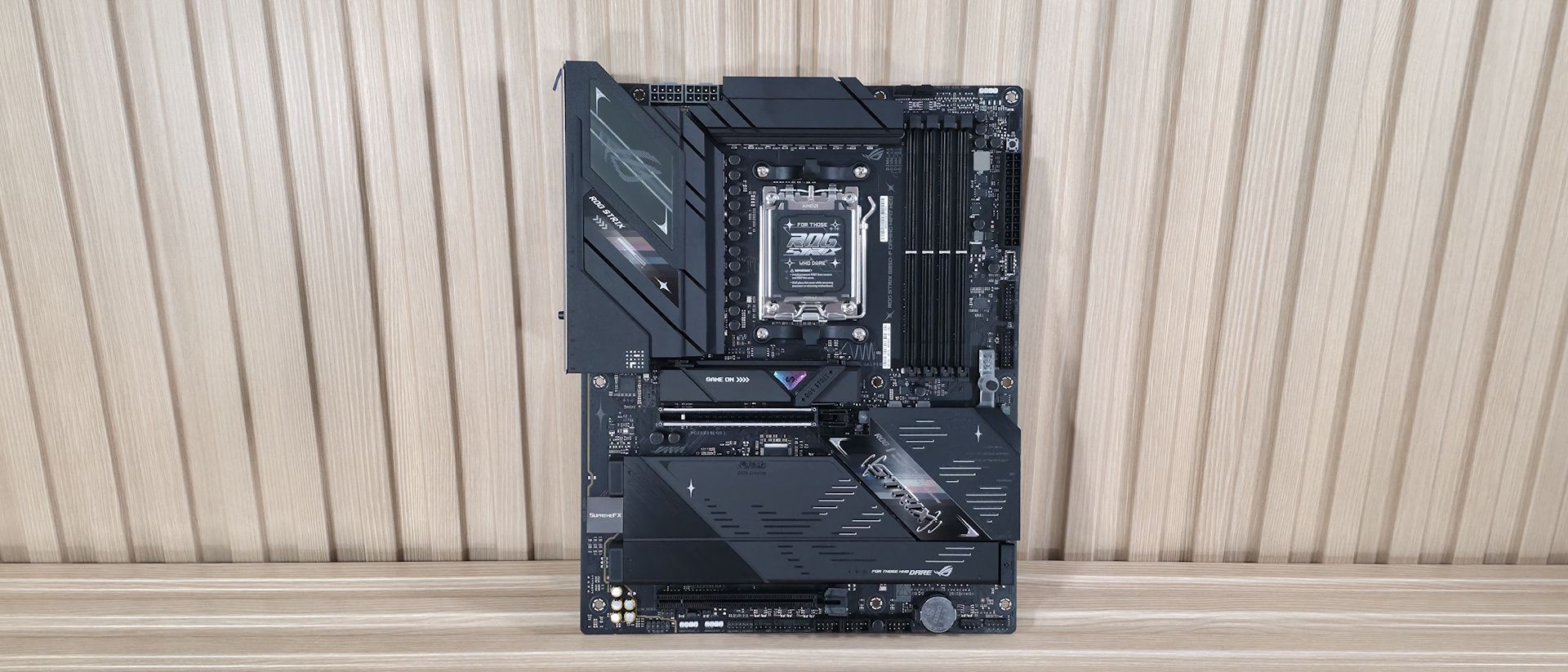
Just to the right of that is the first (of three) 3-pin ARGB headers, also controlled through Asus Motherboard Manager. Below that is the Q-LED feature that lights up during the POST process. If there’s a problem during this critical startup time, the offending LED (red CPU, yellow DRAM, white VGA, green Boot) remains lit. This isn’t as detailed as the 2-character POST code display, but is still helpful. Making our way down the right edge, we run into another 4-pin fan header (CPU_OPT) and below that a simple start button to turn the PC on without connecting to, or needing to jump, the front panel header. Continuing down the edge, we find the 24-pin EPS connector, your front panel USB 3.2 Gen 2×2 (20 Gbps) Type-C connector (the fastest on the board), and two 19-pin USB 3.2 Gen 1 (5 Gbps) headers – one more than the original B850-F Gaming Wifi.
Power delivery on the B850-F Gaming is the same robust configuration we saw on the original. There are a total of 20 phases, with 16 dedicated to Vcore. Power heads from the 8-pin EPS connectors and on to the Digi+ (read: ASP2308CGQW PWM controller). From there, power moves to the Vishay Sic829 80A DrMOS MOSFETs. The 1,280A available is enough for any processor, whether it’s stock or overclocked. In short, the VRMs and heatsinks won’t have any issues, even with a Ryzen 9 9950X or the Ryzen 9 9950X3D2 crunching away.
On the bottom of the board, we’ll start on the left with the audio section. Hidden under the shiny SupremeFX shroud is the Realtek ALC4080 audio codec along with dedicated capacitors and a Savitech SV3H712 amplifier. While not the flagship codec (the ALC4082 is), it’s a solid audio solution, especially for a B850-class board. In the middle are two full-length PCIe slots. The top slot, the primary slot for graphics, connects through the CPU and runs up to PCIe 5.0 x16 (no bifurcation). This slot uses Asus’ PCIe Slot Q-Release, where you press a button to release the locking mechanism. The second full-length slot connects through the chipset and runs up to PCIe 4.0 x4, offering plenty of bandwidth for expansion. Mixed in among the PCI slots are four M.2 sockets. The top-most, above the primary PCIe slot and using the large, tool-free M.2 Q-Latch and Q-Release heatsink, supports up to PCIe 5.0 x4 speeds, while M.2_2 under the larger quick-release plate heatsink is the second 5.0-capable socket. Also hiding below their own quick-release plate heatsink (note: the Q-Release heatsinks on the Neo are an upgrade from the original B850-F Gaming Wifi) are two more M.2s, and these are PCIe 4.0 x4-capable. The primary M.2 heatsink made light contact with the controller on top and no contact on the bottom. If you plan to beat on these hot-running, fast PCIe 5.0 drives with sustained transfers, it’s best to use your own heatsink or get slightly thicker thermal pads to ensure it doesn’t throttle. Moving right and past the chipset to the edge are your two SATA ports. Last, we've also included a few images of the active ICs for the board. Asus uses a combination of Realtek (audio, networking), ASMedia (USB), and Vishay (MOSFETs) bits for various functions.
(Image credit: Future) (Image credit: Future) (Image credit: Future) (Image credit: Future) (Image credit: Future) (Image credit: Future) (Image credit: Future) Image 1 of 7 View Original
At the bottom are several headers, including front-panel audio and USB ports. A complete list of connectivity is listed below (from L to R):
Looking at the rear IO, we can plainly see it’s packed with ports. There’s a total of 12 USB ports: 2x USB 3.2 Gen 2 (red), 5x USB 3.2 Gen 2 (blue, and two more than the previous B850-F Gaming), 2x USB 2.0 (black), and three Type-C ports (2x USB 3.2 Gen 2, 1x USB 3.2 Gen 1). An HDMI port on the left handles integrated video, while in the middle, among all the USB ports, are tiny Clear CMOS and BIOS Flashback buttons. The Realtek 5 GbE, up from 2.5 GbE, is on the right along with the 160 MHz (slower) Wi-Fi 7 Q-Antenna. Last, on the right is the audio stack consisting of two 3.5mm jacks and SPDIF output. Nothing special here, and about the only thing missing is a 40 Gbps port or two (that are rare on this platform anyway).
MORE: Best Motherboards MORE: How To Choose A Motherboard MORE: Best Motherboard Deals MORE: Best Motherboard Combo Deals MORE: All Motherboard Content
Current page: Asus ROG Strix B850-F Gaming Wifi Neo Features and Specifications
Key considerations
- Investor positioning can change fast
- Volatility remains possible near catalysts
- Macro rates and liquidity can dominate flows
Reference reading
- https://www.tomshardware.com/pc-components/motherboards/SPONSORED_LINK_URL
- https://www.tomshardware.com/pc-components/motherboards/asus-rog-strix-b850-f-gaming-wifi-neo-motherboard-review#main
- https://www.tomshardware.com/membership
- Self-driving Ford F-250 truck with shotgun-equipped drone-killing turret tested by US Army — autonomous system designed to blast fast-moving drones at between 1
- Bring your ideas to life with epic savings on Flashforge 3D printers — Flashforge joins the AliExpress 828 mega-sale
- Huge $2,200 discount makes this RTX 5090 gaming PC cheaper than the GPU's standalone price — epic HP Omen Max 45L rig ships with 64GB DDR5 and a 2TB SSD for jus
- Asus ROG Gjallar Review: It looks better than it sounds
- Hot Chips 2026: Micron warns HBM wafer penalty is widening with every generation — AI memory uses 3x more silicon than DDR5, company says memory wall is 'gettin
Informational only. No financial advice. Do your own research.