
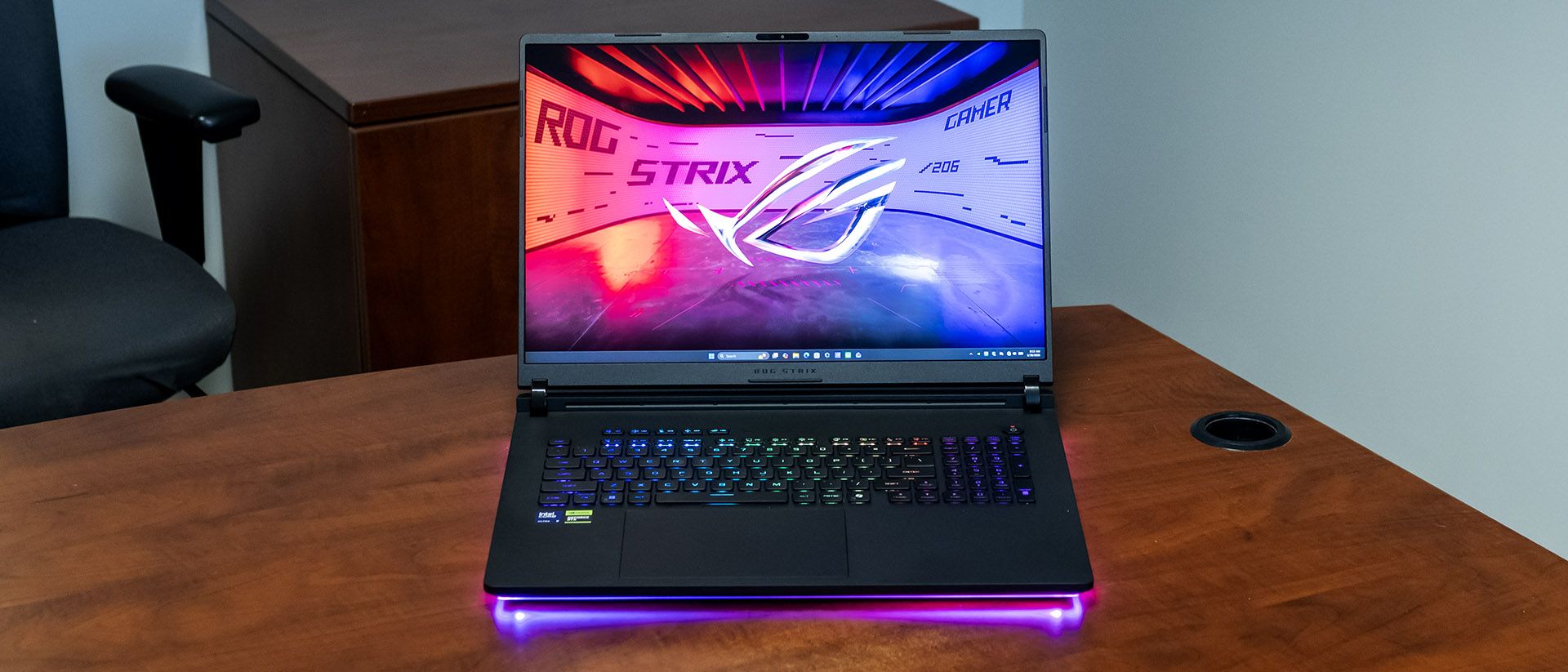
I put the Scar 18 through its paces playing 007: First Light at 3840 x 2400 with all detail settings maxed out. At first, this proved too demanding – I saw 26 to 32 frames per second (FPS) in most scenes. Enabling DLSS more than doubled the frame rate – I saw around 70 FPS or better, and the game was supremely playable.
Our comparison lineup includes Alienware’s 16 Area-51 (RTX 5080), MSI’s Raider 16 Max HX (RTX 5090), and Razer’s Blade 18 (RTX 5090). All laptops use a Core Ultra 9 290HX Plus and have GPUs rated for 175 W like our Asus. Their native screen resolutions, however, are different: Alienware and MSI are 2560 x 1600 while Razer has a unique dual-model display supporting both 1920 x 1200 and 3840 x 2400.
(Image credit: Tom's Hardware) (Image credit: Tom's Hardware) (Image credit: Tom's Hardware) (Image credit: Tom's Hardware) (Image credit: Tom's Hardware) The Scar 18 was competitive across the board at 1200p, typically a few FPS ahead of the Alienware but a few FPS behind the MSI and particularly the Razer.
Bumping the resolution to 4K, the Scar 18 trailed the Razer in most games – the delta was at or almost 10% in Shadow of the Tomb Raider, Far Cry 6 , Cyberpunk 2077, and F1 23 . ( Red Dead Redemption 2 was the exception.) While those numbers won't make the difference between playability and unplayability, the price of these laptops makes it difficult to overlook.
Differences versus the Razer aside, the Scar 18 still demonstrates ample performance for gaming at 4K in most of the games we tested, though not all – it averaged only 21 FPS in Cyberpunk 2077 on ray tracing ultra, indicating that it won't be possible to play every game at maximum detail settings.
We stress test gaming laptops running 15 loops of the Metro Exodus stress test at RTX settings. During the test, the Scar 18 averaged 141 FPS with minimal variance between runs, starting at 141.5 FPS and finishing at 141.1 FPS. The Core Ultra 9 290HX Plus CPU averaged 4.59 GHz on its P-cores and 2.58 GHz on its E-cores while the RTX 5090 had an average boost clock of 1.98 GHz.
We tested the Scar 18 with a Core Ultra 9 290HX Plus CPU, 32GB of RAM, and a 1TB PCIe 4.0 SSD. Not including a PCIe 5.0 drive seems like a missed opportunity at this price, though Razer does the same thing.
(Image credit: Tom's Hardware) (Image credit: Tom's Hardware) (Image credit: Tom's Hardware) In Geekbench 6, the single-core numbers between these laptops were almost indistinguishable as we might expect given they all use the Core Ultra 9 290HX Plus, though the Scar 18’s multi-core score of 17,629 points significantly trailed the others, which all scored over 20,000 points.
The Scar 18 landed middle of the road in our 25GB file transfer test, averaging 2,042.69 MBps, putting it ahead of the MSI (1,357.93 MBps) and Razer (1,670.53 MBps) but behind the Alienware (2,738.9 MBps).
The Scar 18 also proved competitive in our 4K-to-1080p Handbrake transcoding test, completing it in two minutes and 11 seconds to lead the Alienware (2:24) but trail the MSI (1:51) and Razer (2:01).
The Scar 18’s “Nebula” HDR display is its crowning feature. With a 3840 x 2400 (4K) resolution, mini-LED backlighting with 2,000 dimming zones, a 240 Hz refresh rate, and Nvidia G-Sync, this is quite advanced.
Tweaking is required to get this display to perform as intended, and it’s not simple. Out of the box, HDR is disabled, the refresh rate is capped at 120 Hz, and G-Sync is unavailable since Nvidia Optimus, which dynamically switches between the CPU’s integrated graphics and the RTX 5090, is enabled. To unlock maximum performance, the GPU must be put in “Ultimate” mode in Armoury Crate, which is effectively a MUX toggle that disables the integrated graphics. A restart is required for this to take effect. G-Sync, the 240 Hz refresh rate, and a special feature called “Extreme Low Motion Blur” (ELMB) then become available. The latter is aimed at esports players– it manipulates the pixels so that they turn off when switching colors, theoretically eliminating blur. (More on this in a moment.)
Those aren’t the only settings you’ll need to know about. You can toggle the mini-LED backlighting control between one zone, multi-zone balanced, or multi-zone strong. These settings produce very different images – one-zone provides the deepest contrast, multi-zone balanced is the dimmest but evens out the contrast to make dark scenes appear brighter, and multi-zone strong is the brightest and most vibrant. I stuck with the latter for nearly everything.
ELMB only works in one-zone mode without HDR. I tested it using the Blur Blusters UFO Test . It clearly made a difference – in the 240 fps scrollbar, the UFO looked crisp moving across the screen. Disabling ELMB caused it to become blurry, making it harder to see details. This feature can really matter for competitive esports.
But wait, there are even more settings! Armoury Crate includes many color modes through a feature called GameVisual — racing, scenery, RTS/RPG, fps, cinema, eyecare, vivid, and e-reading. On top of that, it also provides color temperature and gamut settings.
Then there’s the question of HDR. To get that working, it must first be enabled in the Windows Settings app. Back in Armoury Crate, you’ll find GameVisual, color temperature and gamut settings, Extreme Low Motion Blur, and mini-LED backlighting settings are no longer available. That’s the trade-off.
Complicating all this is that the settings I just mentioned are in different places in Armoury Crate. Some are in the display section, while others require going into the Devices section, selecting the Scar 18, and making changes there. It’s not straightforward, and those that simply use this laptop out of the box without tweaking won’t get the best visual experience.
After much experimentation, I played 007: First Light in GPU Ultimate mode, G-Sync enabled, a 240 Hz refresh rate, and True Color HDR enabled through Windows. The picture left little to the imagination – colors seemed to pop off the screen and the 4K resolution provided exquisite detail right down to the patches on Bond’s uniform. HDR effects from muzzle flashes and explosions were dazzling in dark environments.
When I watched Zootopia 2 , I switched off HDR and used SDR multi-zone strong. Colors looked exquisite, and brightness was borderline excessive in a darker room. Bright objects like lamps almost seemed overexposed, but they weren’t – the display was simply that bright, and colors were so saturated that I found it hard to look away.
The Scar 18’s numbers are from its default out-of-the-box display settings. In color coverage, its 77.9% DCI-P3 coverage was last in the group – Alienware's OLED screen achieved 93.7% — but is still high enough to create vibrant-looking colors. Its 428.2-nit peak brightness was mid-pack, brighter than the Alienware's 368.6 nits but well back from Razer's 538 nits.
Also shown in our charts are the multi-zone strong settings, which produced 584.6 nits of brightness, with parts peaking at 625 nits. Enabling HDR, we measured an astounding 1,124 nits at 10%, 1,090 nits at 40%, and 943 nits at 100%. If you're looking for one of the brightest laptop displays around, the Scar 18 ranks high on the list.
The Scar 18’s keyboard is great for gaming – the keys require enough actuation force that resting your fingers on WASD or the arrow keys won’t produce accidental presses. Key travel is communicative in the sense your fingers know exactly when a key is at the top or bottom of the stroke. The bright RGB backlight is sharp and easy to see.
Asus’ mechanical touchpad is excellent, with an expansive surface and a smooth but fingerprint-resistant surface coating. Its clicking action is quiet.
The Scar 18’s quad-speaker array delivers a decent, if not remarkable, audio experience. In 007: First Light , soft details like the footsteps of approaching enemies were easy to pinpoint, thanks to the expansive soundstage – there’s plenty of room to separate the speaker placement on a laptop this large. Bass is muted, though, resulting in explosions and gunfire that don’t stir up as much excitement as they could.
In Phil Collins’ “Don’t Lose My Number,” high hats on drum hits were sharp but missed low-end bump. Switching to the Chainsmokers’ “Summertime Friends,” I also noted the lack of bass, though the vocals were crisp. The overall sound signature is on the hollow side, but that can be sharpened up using the Atmos Detailed equalizer in the Dolby Access app. None of the equalizers made up for the lack of bass, though. Volume levels are also moderate – I found myself pushing at least 80% volume for most situations.
Getting inside the Scar 18 couldn’t be easier – simply slide the latch below the palm rest, slide the entire bottom panel forward, and lift it away. You don't even need tools.
Upgrade possibilities include two M.2 slots, two SODIMM slots, and the battery.
Key considerations
- Investor positioning can change fast
- Volatility remains possible near catalysts
- Macro rates and liquidity can dominate flows
Reference reading
- https://www.tomshardware.com/laptops/gaming-laptops/SPONSORED_LINK_URL
- https://www.tomshardware.com/laptops/gaming-laptops/asus-rog-strix-scar-18-2026-review#main
- https://futureplc.com/privacy-policy/
- Elon Musk receives FTC greenlight to buy Mesh Optical as interconnects emerge as AI's tightest bottleneck — the move will expand Musk's growing stack of critica
- NVIDIA and AWS Collaborate to Bring AI to Production at Scale
- NVIDIA BioNeMo Agent Toolkit Brings Accelerated AI to Life Sciences Researchers in Claude Science
- Bambu Lab collabs with Insta360 for epic design contest — win thousands in 3D printers, Luna Ultra cameras, and gift cards
- Micron lifts U.S. spending to $250 billion — company takes $500 million position in America's only 300 mm wafer plant
Informational only. No financial advice. Do your own research.