
For extras, the XB27AQNGV has a full suite of GamePlus options with aiming points, frame counters, timer, stopwatch, and alignment marks. And there are six picture modes including sRGB and G-Sync Esports. LED lighting comes with a backlit ROG logo and the full set of Aura RGB and Sync options. A handy joystick and four control keys provide access to everything, or you can use the top-mounted ambient light sensor for automatic control of color and brightness.
The XB27AQNGV is selling for $500 at this writing, which is closer to premium than most 27-inch QHD screens. But it’s one of only four monitors that offer G-Sync Pulsar, and if you don’t want to buy an OLED, it’s the only LCD variant that is as smooth and responsive.
The XB27AQNGV ships in a plain brown carton with the words “For Those Who Dare” stenciled on the side. Dare to what? I cannot say. But I dared to open it and found the monitor packed in crumbly foam (hate that stuff). The upright is already attached, so all that needs doing is to attach the base with a captive bolt. To expose the inputs, remove the snap-on plastic cover. The cables and external power supply come in a zippered pouch and include DisplayPort and USB.
(Image credit: Asus) (Image credit: Asus) (Image credit: Asus) (Image credit: Asus) Image 1 of 4 View Original
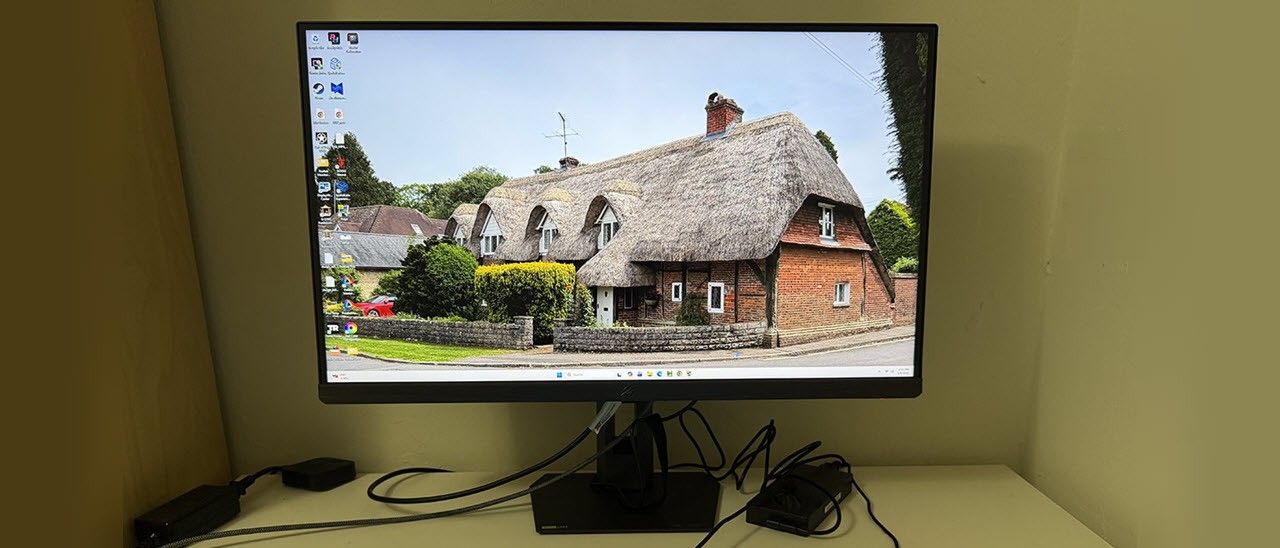
The XB27AQNGV doesn’t show much from the front besides the screen. The bezel is 8mm thin with a flush mount and a wider trim strip across the bottom adorned with a small ROG logo. The base is a solid metal plate with a small and stable footprint. The upright includes a cable hole to keep wires tidy. Ergonomics include 5/20 degrees tilt, 45 degrees swivel, a 90-degree portrait mode, and 4.25 inches of height range. Movements are very stiff with no hint of play. The XB27AQNGV will stay put even when you’re shaking things up on the virtual battlefield. On top of the stand is a quarter-inch threaded socket for things like webcams and other peripherals. Also on top is the ambient light sensor, which can automatically adjust brightness and color temperature.
Around the back right is the OSD joystick and three control keys plus a power toggle. Two of the keys can be programmed by the user. The large ROG logo is backlit with a glowing border around a reflective material. You can see in the photo that the panel’s back is smoothly tapered left to right and top to bottom.
The input panel is hidden under a cover with a small hole to let the cables out. It’s a little tricky to plug in large connectors because the ports are very recessed. I/O options include a DisplayPort 1.4 with Display Stream Compression (DSC), two HDMI 2.1 ports, a 3.5mm headphone jack, and a large array of USB ports. There’s a USB-B upstream and three USB-A downstream.
Press the XB27AQNGV’s joystick and a large OSD appears. You can move it to a corner if you like. It’s divided into eight sections.
(Image credit: Tom's Hardware) (Image credit: Tom's Hardware) (Image credit: Tom's Hardware) (Image credit: Tom's Hardware) (Image credit: Tom's Hardware) (Image credit: Tom's Hardware) (Image credit: Tom's Hardware) (Image credit: Tom's Hardware) Image 1 of 8 View Original
Gameplay on the XG27AQNGV is instantly addictive. Though it doesn’t have the deep contrast and vivid color of an OLED, its motion quality and responsiveness are indistinguishable from that premium technology. G-Sync Pulsar is truly a game changer for LCDs.
Playing Doom Eternal in HDR mode, I noted that my contrast settings did not carry over from SDR, so I had to change the slider whenever I switched. And since there’s no dynamic dimming, there was no more contrast or depth to the image. But it was a little more colorful thanks to the intentional oversaturation Asus included. You can read more about that on page five.
The image was plenty sharp enough, but what struck me the most was how much the XG27AQNGV felt like an OLED. Its smoothness and responsiveness are the same as any premium display. Though I would buy an OLED for myself, I realize that some users prefer LCD. If you want OLED performance in an LCD, a G-Sync Pulsar monitor is the best way to achieve that. It’s better than a 500 Hz LCD, or a 540 Hz LCD for that matter. There is no motion blur whatsoever, and input lag is super low.
Since I had no problem running over 300fps, there was no need for the low-speed compensation option. But it’s nice to know it’s there for systems that don’t have a GeForce RTX 4090 video card. I never needed the overdrive, and with Pulsar engaged, it was grayed out. When I tried it out, it worked well and reduced blur but didn’t eliminate it. The 400-step control was super cool though.
The XG27AQNGV is a solid choice for productivity with 109ppi pixel density and a sharp, colorful image. If you’re used to a Quantum Dot screen with its jumbo gamut, you’ll notice a little less color here, but the difference isn’t huge. It’s a worthwhile sacrifice to make for the incredible gaming performance on offer.
I spent time browsing the web and using Photoshop, and for that, the XG27AQNGV functioned as well as any bread-and-butter display. 27 inches is a good compromise between footprint and screen real estate, and the image is clean and detailed. I noted the extra USB ports, which many monitors don’t have. And though there were no internal speakers, I could plug into the 3.5mm jack when I wanted game sound. The stand is a quality piece, and it keeps everything solid and secure despite its small base. The inputs were a bit fiddly because they’re very recessed and hard to manage with cables that have large connectors.
Takeaway: The XG27AQNGV is an excellent all-around display and a superlative gaming monitor. G-Sync Pulsar delivers the same smooth and responsive performance as a premium OLED. It was very bright for both SDR and HDR, but I missed a dynamic dimming option for greater contrast. I noted slightly less color saturation than other speedy screens, but the XG27AQNGV is still more colorful than a typical sRGB monitor.
Current page: Features and Specifications
Key considerations
- Investor positioning can change fast
- Volatility remains possible near catalysts
- Macro rates and liquidity can dominate flows
Reference reading
- https://www.tomshardware.com/monitors/gaming-monitors/SPONSORED_LINK_URL
- https://www.tomshardware.com/monitors/gaming-monitors/asus-rog-strix-xg27aqgnv-27-inch-g-sync-pulsar-gaming-monitor-review#main
- https://futureplc.com/privacy-policy/
- Corsair's Vengeance RGB DDR5 32GB memory receives a $108 price cut
- US Army to use 3D-printed rocket motors for low-cost cruise missiles
- Official DLSS 5 running on unsupported games delivers up to 90% better performance than the leaked version
- Open From Data Center to Desktop: NVIDIA Expands Nemotron Family With Highest Efficiency Super VL and Bolt Models
- Sandisk’s 512GB Switch 2-ready microSD Express card is a steal for $98 during sale
Informational only. No financial advice. Do your own research.