
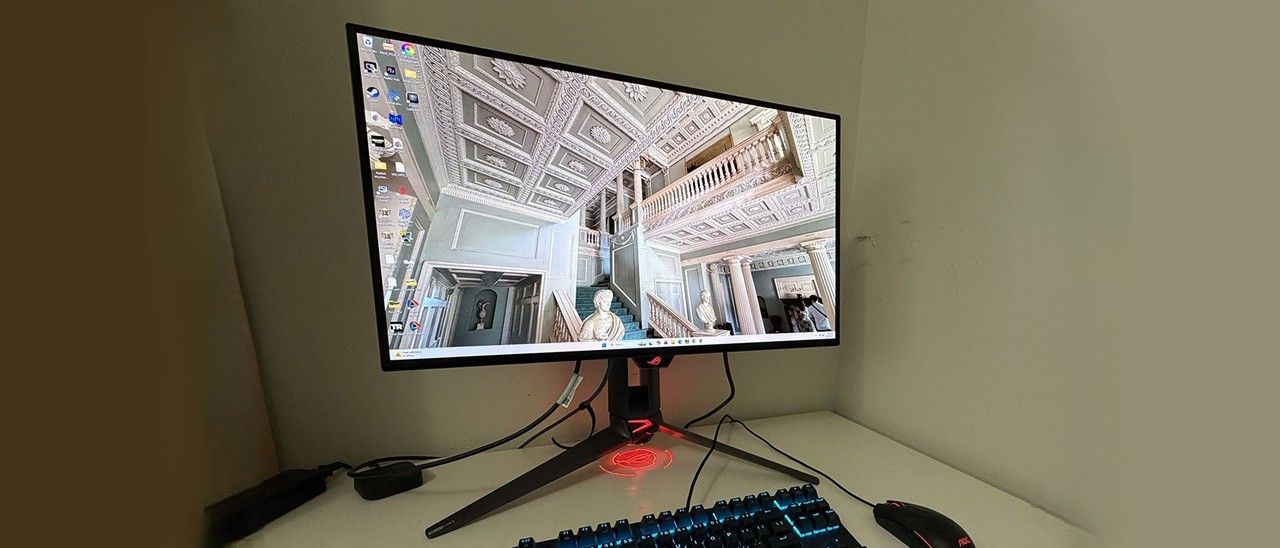
There are plenty of cables included, along with Asus’ signature LED lighting and graphics. The PG27UCWM is firmly in the premium segment at a starting price of $1,099. I would expect greatness for that sum, and if you read on, we’ll see if it delivers.
The PG27UCWM arrives in a well-adorned carton with colorful graphics and secure, recyclable packaging. The base, upright, and panel are separate, as is the lens for the ROG logo projector that shines symbols on your desk. It includes multiple lenses. The ROG pouch reveals cables for USB, HDMI, and DisplayPort, plus IEC for the internal power supply. There’s also a heavy stamped steel bracket that snaps onto the panel to create a 100mm VESA mount.
(Image credit: Asus) (Image credit: Asus) (Image credit: Asus) (Image credit: Tom's Hardware) Image 1 of 4 View Original
The PG27UCWM features Asus’ latest ROG Swift styling cues, with clear plastic on the back that reveals some of the monitor’s internal components. Opposite that is the Lite Brite ROG graphic that can light up in a multitude of colors and effects. More LEDs can be found on the front, on the small protrusion beneath the screen, as well as on the base and even the sliding bit on the stand’s upright. All this fun can be controlled in the OSD and by DisplayWidget Center.
In front, the bezel is very narrow on all sides, just 9-11 millimeters, with a small protrusion at the bottom center for the joystick and control buttons. It also contains a sensor that works with the OLED care features to shut off the panel when you leave your desk.
From the side, you can see the panel-on-box design that is common to many OLEDs. This not only looks nice but aids in cooling. The OLED is backed by a metal plate that helps dissipate heat, along with a graphene layer inside, heatsinks on the internal circuit boards, and a heat-efficient power module. The PG27UCWM is fanless and always ran cool during my time with it.
The stand is very solid with a cast aluminum base that is both wide and deep. The upright features full ergonomics with a 4.4-inch height range, 5/20-degree tilt, 30-degree swivel, and a 90-degree portrait mode. Movements are firm and smooth with no wobble or play. The stand also has a threaded tripod socket on top for things like webcams.
The I/O panel is well-appointed with a single DisplayPort 2.1 (UHBR20, 80 Gbps), two HDMI 2.1, a USB-C, and a USB hub with one upstream and three downstream. The hub has full KVM functionality, along with version control and power for the USB-C up to 90 watts. There are no internal speakers, but you do get a 3.5mm headphone jack.
(Image credit: Tom's Hardware) (Image credit: Tom's Hardware) (Image credit: Tom's Hardware) (Image credit: Tom's Hardware) (Image credit: Tom's Hardware) (Image credit: Tom's Hardware) (Image credit: Tom's Hardware) (Image credit: Tom's Hardware) (Image credit: Tom's Hardware) (Image credit: Tom's Hardware) Image 1 of 10 View Original
The PG27UCWM is one of the few monitors to support Dolby Vision in addition to HDR10. Dolby Vision uses dynamic tone mapping from the content metadata to tailor its luminance curve for each individual display. This renders the content more faithfully and with more impact than the fixed tone curve from HDR10 material. For that format, you get four more modes with the option to adjust brightness and other parameters.
To adjust color, the PG27UCWM includes a gamut selector, gamma presets, and color temps arranged by Kelvin value. You can also adjust RGB sliders for finer control. My sample was nearly perfect out of the box, and I could only make a tiny difference with calibration.
OLED Care includes many toggles for screen savers, logo detection, and more. Pixel Cleaning is a panel refresh feature that takes about six minutes to complete. When I first powered up the PG27UCWM, it prompted me to do this. I’ve found this to improve screen uniformity with brand-new panels, so I make it a habit for every review. A front-mounted sensor can be configured to shut off the monitor when you leave your desk.
To view two video sources simultaneously, use the PIP and PBP options. Each can have its own color settings, and you can size the PIP window. Aura RGB is the lighting feature, and it offers a wide range of effects and colors. Light In Motion works with the DisplayWidget Center app to create light shows that mimic what’s happening on the screen.
The PG27UCWM measured close to spec out of the box for grayscale and color, but I noted a slight gamma shift. To improve this metric, I selected the 2.4 preset, which made it a tad darker in a good way. I also adjusted the RGB sliders for a tiny gain in grayscale accuracy. For gaming, calibration is completely unnecessary. My suggested settings are below and include brightness values for Uniform Brightness on or off.
For HDR10 content, I recommend the Gaming HDR mode even though its EOTF tracking is lighter than spec. You can read more about this on page five. For spot-on HDR, True Black mode is the winner.
I have yet to game on an Asus OLED that wasn’t addictive in its imagery and responsiveness. The PG27UCWM was no exception. It’s super quick with no perceptible input lag and perfectly smooth motion resolution. For frame rates, I tried both modes, 240 and 480, and had excellent results. With a GeForce RTX 4090 in my test PC, I kept the action at 220-230fps in 4K with HDR enabled. This was awesome, to say the least, with every detail rendered sharply whether static or moving. I knew my system was working hard because the fans ran fast and there was a good bit of warm air circulating about my legs as I dispatched enemies in Doom Eternal.
To switch refresh modes, I had to exit to the Windows desktop to prevent the game from crashing. This is typical of the dual-refresh monitors I’ve reviewed and has nothing to do with their operation. At 480 Hz in FHD resolution, the picture was softer but not tremendously so. Games were just as playable and addictive. I kept the frame rate locked at 480 fps across all scenarios. It didn’t make play better for me, but I can see the advantage for users with slower PCs. Or if you just want to brag about frame rates.
HDR color and contrast were exemplary, and I toggled between two HDR picture modes: Gaming and True Black. You’ll see the technical differences between them on page five, but visually, Gaming provided a bit more brightness while True Black had better midtone contrast. It came down to game type for me. Bright outdoor scenery looked better in Gaming while dark imagery looked better in True Black. As with the frame rate boost feature, switching HDR modes should be done on the Windows desktop rather than in a game.
I noted light gamma during testing, which in SDR mode manifested as a slight flattening of the image. I fixed this by upping the gamma setting to 2.4 and raising the brightness value a few points. This added more texture to the picture, which was easy to see in a side-by-side comparison. For a more scientific explanation of the PG27UCWM’s gamma performance, see my test results on page four.
Like all Asus ROG Swift displays, the PG27UCWM is premium in every respect. It looks great just sitting on a desk with its clear back and extensive but not garish lighting. I turned on all the Aura RGB elements and enjoyed the show without distraction from games or work. The accents are well-balanced, even down to the logo projector, a feature unique to Asus ROG Swift monitors.
The Tandem RGB Stripe panel was visibly sharper than last year’s Quantum Dot-based PG27UCDM. The difference is small, but it is there. Text was rendered with perfect edges, free of artifacts such as fringing or jaggies. I could also see a difference in photos, especially when zooming in to the pixel level. This is a great monitor for content creation and writing. I also appreciated the inclusion of Dolby Vision for watching movies and TV shows. There is a lot of DV content on disc and through streaming services like Netflix, Disney+, and HBO Max.
The PG27UCWM has plenty of convenience features, such as USB ports with KVM and a tripod thread on the stand. But I missed internal speakers. Game sound had to come through headphones plugged into the provided 3.5mm jack.
Takeaway: The PG27UCWM is a supremely versatile monitor with lots of features, premium styling, excellent build quality, and top-level game performance. Competitive gamers will appreciate its advanced video processing, low input lag, and smooth response. Image quality is also top-shelf with accurate and saturated color, high luminance, and a variable brightness option. The Tandem RGB Stripe tech delivers a sharper picture than Quantum Dot or single-layer OLEDs.
Current page: Features and Specifications
Key considerations
- Investor positioning can change fast
- Volatility remains possible near catalysts
- Macro rates and liquidity can dominate flows
Reference reading
- https://www.tomshardware.com/monitors/gaming-monitors/SPONSORED_LINK_URL
- https://www.tomshardware.com/monitors/gaming-monitors/asus-rog-swift-pg27ucwm-27-inch-4k-oled-gaming-monitor-review#main
- https://www.tomshardware.com/membership
- Micron offers Taiwan employees $31,650 cash bonus as unions threaten strike over AI windfall — workers reject record payout package, demand 15% profit-sharing p
- Engineer turns simulated fly brain into a crypto day trader, posts downloadable sim to GitHub — 166,700 virtual neurons read candlestick charts for dopamine hit
- Valve engineers discuss the duality of the Steam Frame and pricing — Valve's newest VR headset pivots SteamOS to Arm
- Engineer turns simulated fly brain into a crypto day trader, posts downloadable sim to GitHub — 166,700 virtual neurons read candlestick charts for dopamine hit
- Skild AI Taps NVIDIA Physical AI to Teach Robots New Tasks From a Single Video
Informational only. No financial advice. Do your own research.