
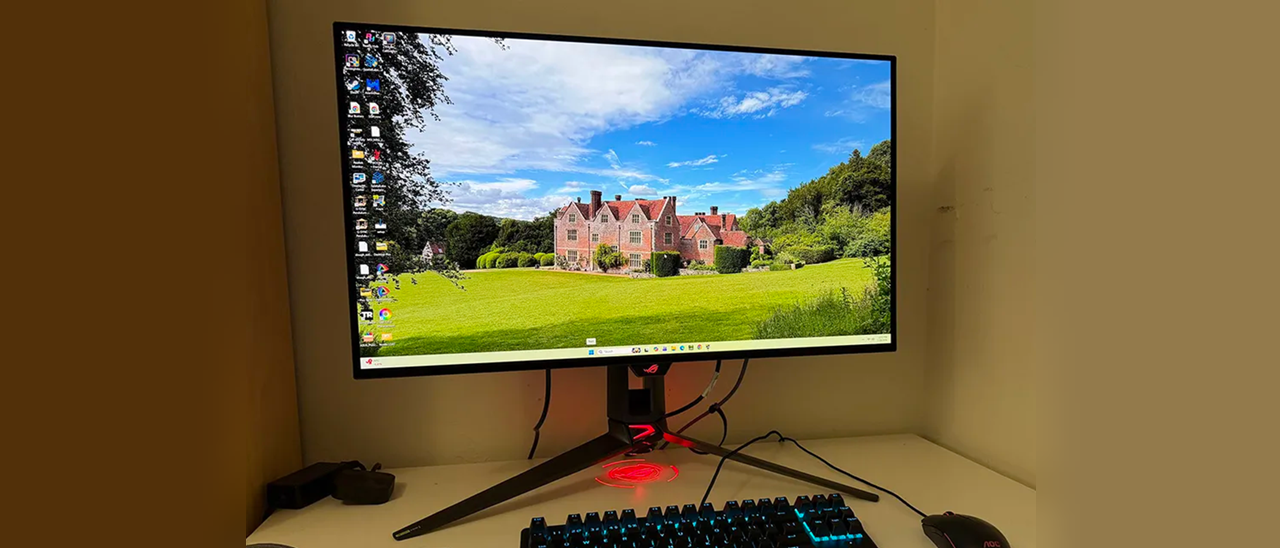
Swift displays usually come with a price premium over their competition, but the PG32UCWM comes out of the gate at $1,299, which isn’t a huge number when you consider its build quality and performance. It is a true flagship.
A colorfully adorned box houses the PG32UCWM in molded pulp, which is completely recyclable. The stand, base, and panel assemble without tools. The ROG logo projector lens fits under the base with magnets and includes extra lenses. A zippered pouch disgorges a cable bundle consisting of IEC cords, two USBs, HDMI, and DisplayPort . You also get sheets of ROG decals and a microfiber cleaning cloth for that beautiful shiny screen. Speaking of shiny, there is a lot of bling on this monitor, all protected by bits of clear film. It almost becomes a game to find it all, but at least you can be sure your PG32UCWM won’t arrive with scratches.
(Image credit: Asus) (Image credit: Tom's Hardware) (Image credit: Asus) (Image credit: Tom's Hardware) Image 1 of 4 View Original
The latest crop of Swift displays, like the PG32UCWM, set themselves apart with LEDs in the stand, a logo projector and clear plastic on the back that reveals the internal componentry. It’s a great complement to a transparent PC case, which Asus can also sell you. The right half includes the Lite-Brite LED feature, which can play a vast array of colors and effects. You also get lighting in the stand where it says “Swift”, in the base, in the ROG logo up front, and in the projector under the stand.
The stand is super solid and includes a 3.1-inch height adjustment plus 5/20 degrees tilt and 15 degrees swivel. There is no portrait mode. If you want one, you’ll need an aftermarket arm that interfaces with the included adapter bracket, which provides a 100mm VESA mount. It comes with beefy fasteners.
The styling is a two-piece configuration with the screen and its metal backing attached to a component bulge. This improves cooling along with a graphene layer and internal heat sinks. Several OLED care features enhance panel life, and Asus backs the PG32UCWM with a three-year warranty that includes burn-in. No internal fans are needed to keep running temps low.
The I/O panel includes one DisplayPort 2.1 (configurable to 1.4), two HDMI 2.1, and a USB-C (DP Alt). USB 3.2 is supported by one upstream and three downstream ports. Audio comes only through a 3.5mm headphone jack; there are no internal speakers.
The PG32UCWM’s OSD has every feature one could want in a flagship gaming monitor, including video processing and extensive image controls. It’s operated by a joystick behind the small protrusion in the front center. Two buttons flank it; one toggles power, and the user can program the other.
(Image credit: Tom's Hardware) (Image credit: Tom's Hardware) (Image credit: Tom's Hardware) (Image credit: Tom's Hardware) (Image credit: Tom's Hardware) (Image credit: Tom's Hardware) (Image credit: Tom's Hardware) (Image credit: Tom's Hardware) (Image credit: Tom's Hardware) Image 1 of 9 View Original
HDR is available in HDR10 and Dolby Vision formats. When the appropriate signal is present, you can pick between four different picture modes and turn on an adjustment toggle that enables the brightness and contrast sliders. Also included is Uniform Brightness for both SDR and HDR. If you turn this off, the peak output of small highlights can top 1,000 nits. I measured 532 nits from a 25% window pattern. This feature improves HDR impact and is handy for SDR gaming and video. Turn it on for productivity and static graphics where it will reduce eye fatigue during long work sessions.
Asus takes OLED care very seriously with a host of options like pixel cleaning, screen saver, orbiter, and logo brightness. All of these can be toggled individually. When I first powered up my PG32UCWM sample, it recommended running the pixel clean straight away, so I did. This often improves screen uniformity for brand-new monitors, though I didn’t see a difference in this case. You also get a proximity sensor that turns off the screen when you leave your desk.
The PG32UCWM doesn’t need calibration in the Racing mode but I tweaked the RGB sliders for a nice gain, which took it into pro-monitor territory. Color is spot-on whether you choose wide gamut or sRGB. I found similar results in HDR mode when using either Gaming HDR or True Black modes, more about that on page five. Below are my suggested SDR settings including brightness values for Uniform Brightness on or off. You only need to set this value once for each mode, which is nice when switching back and forth.
I’ve often said that it’s nearly impossible to buy a bad OLED. All the displays I’ve reviewed over the past few years are super close in performance and image quality. That said, there have been several variations in technology that have subtle effects on the picture. Asus currently has the largest selection of different panel types covering Quantum Dot, Tandem, and RGB Stripe as the major categories. The PG32UCWM combines the latter two into a fourth variant, Tandem RGB Stripe. Looking at my sample, I could immediately see its sharper image. OLEDs are always razor-sharp, but this one is sharper, and I could see that in a side-by-side comparison with a typical Quantum Dot panel.
I could see it while gaming too. The detailed environments of Doom Eternal were even more textural and sharply resolved than usual. Little things like the reflections of light on a gun barrel, or the changing hues of the player’s hand as I moved around had me almost entranced. I’ll warn you now, if you audition a PG32UCWM, you will want to buy it. The sharpness and clarity of this monitor is addictive.
Video processing was exemplary, as it is with any Asus ROG Swift display. Movements and transitions happened with surgical precision as I ran through my usual sequence of run-and-gun maneuvers. Turn and shoot became second nature as I was able to stay apart from enemies and still put most of my ammo on target. Lobbing grenades became easier too. I love the sticky ones!
When the games were put away in favor of getting work done, the PG32UCWM continued to provide a picture that was hard to look away from. It is very colorful, though a few Quantum Dot displays will show you a tad more red and green. But the PG32UCWM covers 100% of DCI-P3 so it still overachieves for SDR in a good way. When editing graphics, I switched the Color Space option to sRGB and enjoyed similarly high accuracy.
The effect of Asus’ True Black Glossy coating was also evident. Blacks seemed deeper because there was no reflected ambient light. The screen is shiny, but it rejects room light as if it were matte. This also makes color more vibrant. It was like having a light-blocking hood in place.
Takeaway: The PG32UCWM is a benchmark gaming display with a reference-quality image. It’s incredibly sharp, and it looks great in brightly lit rooms thanks to its advanced screen coating and Tandem RGB Stripe technology. The refresh rate boost will be useful for those with less stout video cards, and its scaling down to FHD resolution is excellent. Paired with a well-endowed gaming PC, the PG32UCWM is about as good as it gets.
Current page: Features and Specifications
Key considerations
- Investor positioning can change fast
- Volatility remains possible near catalysts
- Macro rates and liquidity can dominate flows
Reference reading
- https://www.tomshardware.com/monitors/gaming-monitors/SPONSORED_LINK_URL
- https://www.tomshardware.com/monitors/gaming-monitors/asus-rog-swift-pg32ucwm-32-inch-oled-gaming-monitor-review#main
- https://www.tomshardware.com/membership
- NVIDIA Alpamayo 2 Super, the Frontier Open Model for Robotaxis and Autonomous Vehicles, Now Available for Commercial Use
- AI Leaders Propose SAFE Guidelines for Cybersecurity Transparency
- Bring the Fire: Play Games on GeForce NOW With New Firefox Browser Support
- Google to stop making Pixel devices in China, report claims — India and Vietnam prime candidates for manufacturing shift owing to Beijing-Washington tensions
- Get 32GB of RAM for only $241 in this 3-item gaming combo from Newegg —save $249 on this inclusive bundle with Ryzen 7 9800X3D, Corsair Vengeance RAM, and a Gig
Informational only. No financial advice. Do your own research.