
The chassis sits on four feet integrated into the metal frame that raise it roughly an inch off the floor to help with clean intake. The bottom uses a small dust filter for the PSU area only. It pulls out of the back, so depending on where your case lives, you may need to move it to get it out. But the good news is that it’s short, so you don’t need as much clearance as if it ran the full length of the case, as others do.
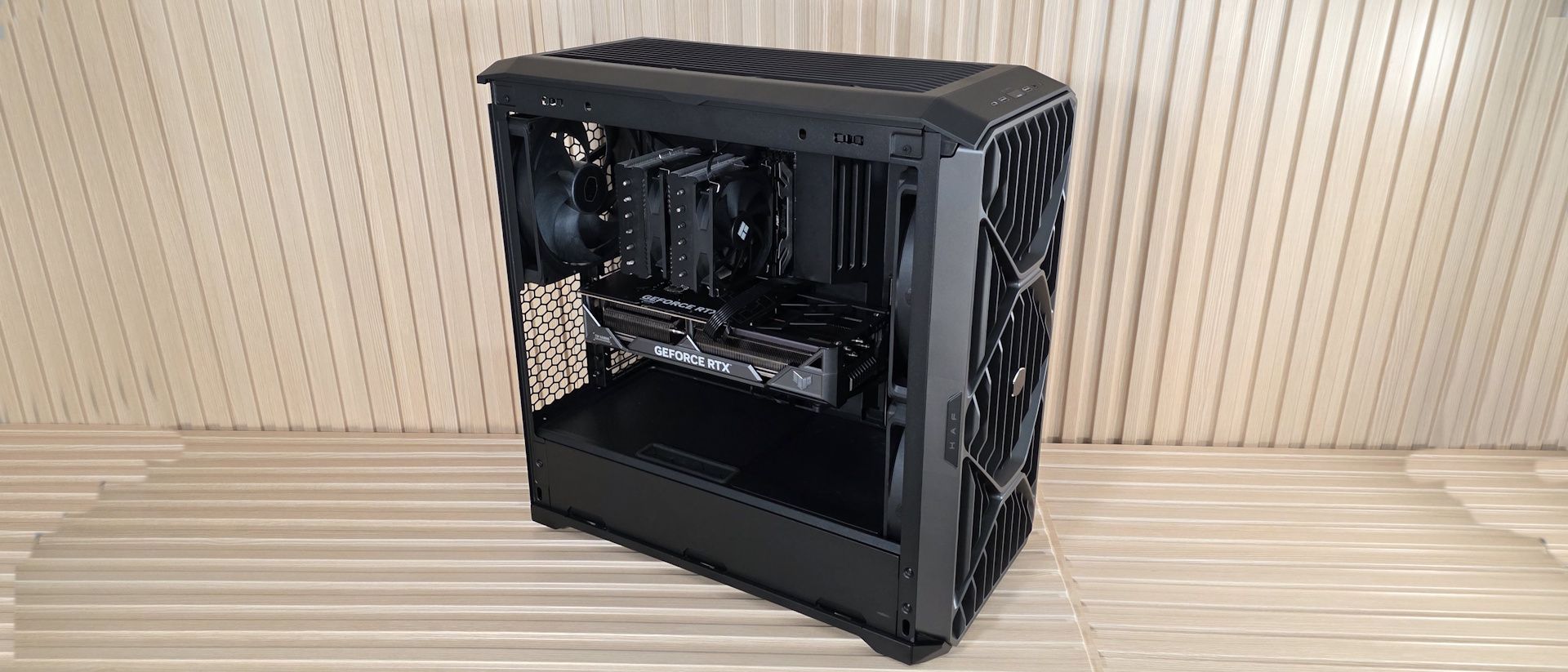
Moving inside the case, one of the first things you’ll notice is the amount of room inside, the huge fans, and the scoop to improve video card cooling. Since it’s over 10 inches wide, it feels like you’re working in a warehouse, with room for whatever components you can think of (within reason, of course). Starting at the front, we get a better look at the two Mighty40 F220 fans that bring air into the space. These dual ball-bearing fans spin from 200-1,500 RPM, and according to the specifications, each one moves over 203 CFM of air at 3.1 mmH2O static pressure, and does so at a low 36 dBA. This area supports up to 3x 120 mm fans/radiators or 2x 180 mm fans/radiators (up to 72mm thick if the air divider is removed).
(Image credit: Future) (Image credit: Future) (Image credit: Future) (Image credit: Future) (Image credit: Future) Inside, a split-level layout separates the power supply and drive storage areas from the rest of the case. Towards the front is a sloped baffle covering part of the bottom fan, directing most of the air up towards the video card. The rest is dispersed within the power supply chamber, cooling any 2.5-inch (up to six) or 3.5-inch (up to three) drives in the space.
The panel where the motherboard mounts has an interior-sliding panel and a rear door, which makes building your rig and routing cables much easier. You don’t have to play games moving from one side to the other to find and plumb them; just send the cables through the large gap when both are open and connect. Easy. Once you’re done, slide the interior panel and secure it at the top with a twist of the tab (the thumbscrew at the bottom lets it slide fore and aft), so you can’t see the wires. It’s a really clean look. Also attached to that panel is the mount for the GPU support strut(s). It comes with one already mounted, but includes another in the accessories kit, to support two graphics cards.
The HAF II supports up to E-ATX motherboards and comes with the motherboard standoffs already installed (as we expect at this price point). There’s a large cutout on the motherboard baffle and plenty of room to install cooling hardware with the board already mounted. One thing I’d like to see in this case that isn’t here is rear-connect (BTF, Stealth, Project Zero) support for motherboards. You’ll have to use a ‘traditional’ motherboard. Cooler Master does stamp out plenty of holes around the edge of the motherboard real estate for cable routing.
(Image credit: Future) (Image credit: Future) (Image credit: Future) (Image credit: Future) (Image credit: Future) (Image credit: Future) (Image credit: Future) The rear of the case holds the third included fan, in this case, a Mighty40 V180. This big guy spins from 25 to 1,370 RPM and delivers over 161 CFM at 4.0 mmH2O static pressure, at only 34 dB(A), according to the specifications. Below that are the eight PCIe expansion slots, which allow you to install up to two 3.5-slot video cards (72mm with two cards, up to 40mm each if installing four cards), rare for a mid-tower. You can run a single vertical GPU, but you’ll have to buy an adapter ( PCI 4.0 or 5.0 ) separately. Sliding off the top of the case (it moves back an inch or so, then lifts) exposes the MasterRail multi-purpose mounting system for fans or radiators. The rails and fully adjustable mounting points allow flexible placement of fans and radiators, enabling easy upgrades and fully custom setups. This space supports up to 3x 120 mm fans/radiators or 2x 180 mm fans/radiators (up to 58mm thick).
Flipping the case around to the back, we can see the second chamber at the bottom, along with space for the power supply and drive bays. The three pre-installed drive caddies support up to three 3.5-inch drives or six 2.5-inch drives, which is a lot in the age of M.2 form factor SSDs. PSU clearance is up to 210mm when the drives are installed in East-West orientation (pictured), and 150mm when you turn them North-South. As is, there’s enough room to hide your cables, but I wouldn’t call the cable space plentiful with all the caddies in place and East-West oriented.
Cooler Master includes several pre-installed Velcro strips for cable routing, and when you take the time to use them, they can really keep things clean in this normally messy area. In the middle, you can see that ‘door’ we talked about earlier to help with cable management. Again, open this up, slide the front one back, route your cables, slide the front back, and secure this rear one with two captive thumbscrews. I’d like to see captive thumbscrews on the side and top panels, too. Along the top edge, we can see the included fan hub. The SATA-powered device supports up to six 4-pin PWM fans and six 3-pin ARGB devices. It supports up to 32W, which means you can use up to six ~5W fans. The takeaways for me here are how much room there is for components and fiddling around, the copious amount of airflow, and how quiet it is at low speeds (and how it performs there as we’ll see in our testing below).
Current page: HAF II 500 Features and Specifications
Key considerations
- Investor positioning can change fast
- Volatility remains possible near catalysts
- Macro rates and liquidity can dominate flows
Reference reading
- https://www.tomshardware.com/pc-components/pc-cases/SPONSORED_LINK_URL
- https://www.tomshardware.com/pc-components/pc-cases/cooler-master-haf-ii-500-case-review#main
- https://futureplc.com/privacy-policy/
- Joyride Through July With 12 Games Coming to GeForce NOW
- Lenovo's Legion 7a gaming laptop now comes with an RTX 5070 12GB GPU option — but it costs $3,375 paired with a Ryzen AI 9 CPU, SKU was previously limited to RT
- Sotheby’s video showcases working Apple-1 serial number 01-0033 — part of its upcoming History of Science & Technology sale
- AMD FSR Multi-Frame Generation with 8x mode spotted — experimental driver settings could hint at FSR's next evolution
- Razer Soma Chroma Gaming Chair Review: Light on adjustability, but heavy on RGBs
Informational only. No financial advice. Do your own research.