
Last but certainly not least, the outside features the front IO panel on the bottom with your typical selection of ports. Starting on the left is a fast USB 3.2 Gen 2×2 (20 Gbps) Type-C port. Next are two USB 3.2 Gen 1 (5 Gbps) Type-A ports that flank the LED-lit power button. On the right is a single 3.5mm mic/ audio combo jack. It’s rare to see a 20 Gbps USB port on such an inexpensive case. And if you don’t like the IO panel on the bottom (or the left when laying horizontal), you can move it to the top (or right in horizontal orientation).
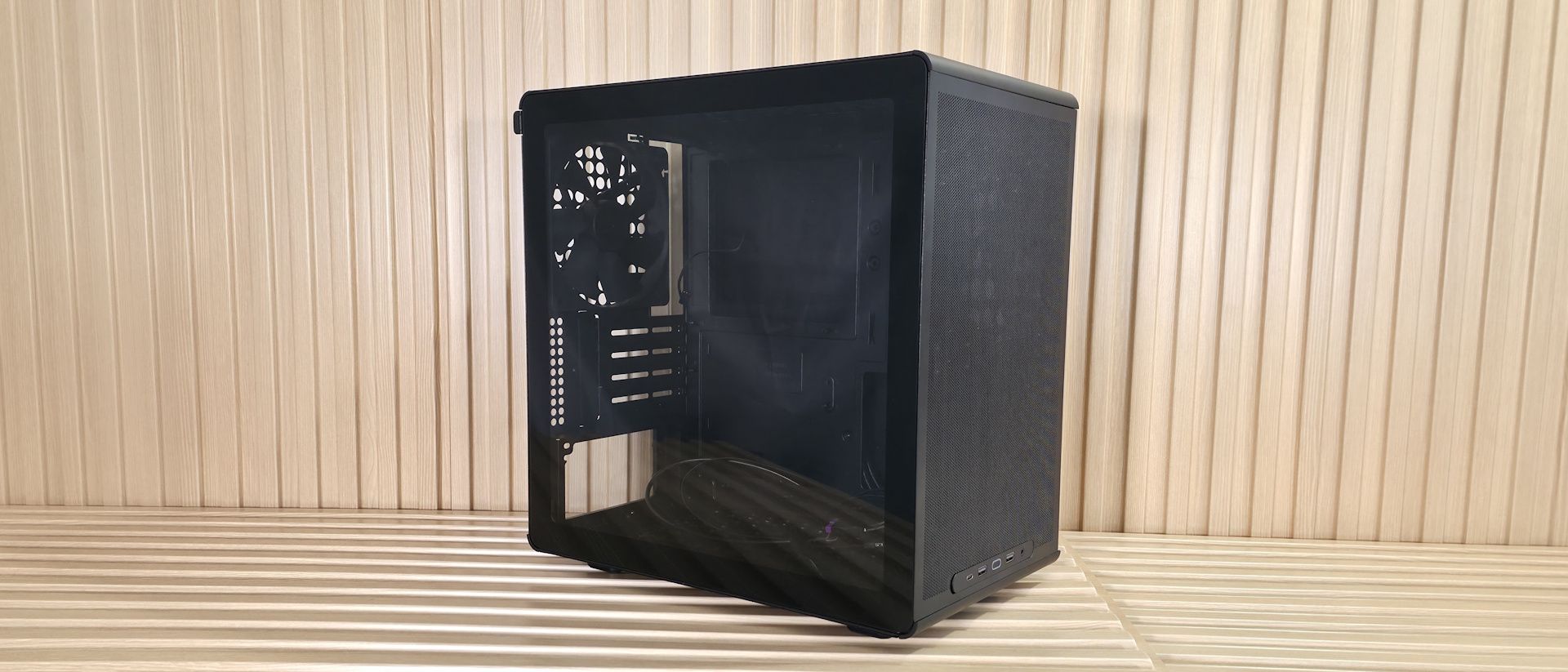
Inside the case, there’s a fair amount of space to work in, and nothing like power supply shrouds or other cable-routing doors to get in the way. You can see a large cutout on the motherboard tray for easy access from the back; however, it doesn't support rear-connect (think Asus BTF, Gigabyte Stealth , MSI Project Zero ) boards, and it only supports Mini-ITX and Micro ATX form factors. ATX motherboards need not apply. There are plenty of rectangular, round-cornered cutouts for cable management, though none have any grommets; I wouldn’t expect that at this price, either.
(Image credit: Future) (Image credit: Future) (Image credit: Future) (Image credit: Future) (Image credit: Future) Image 1 of 5 View Original
At the front we spy the enlarged holes for airflow, and you can see the mounting location for 2×120/140mm fans/radiators. GPU clearance is 366mm without any fans. This fits an RTX 4080 FE, but our RTX 4080 TUF was too long. If you add fans, or fans and a radiator, that number shrinks, so be careful when choosing what you’re going to put up front versus the length of your video card.
On top, we again get a good look at the airflow holes and the mounting locations for the 2×120/140mm fans/radiator that fit here. There’s very little space above the motherboard, and a fan/radiator combination easily overhangs the motherboard/top VRM heatsink. So, to fit fans and a radiator, Cooler Master offset the mounts away from the motherboard and closer to the tempered glass window side. A fan and radiator combination will absolutely overhang the top edge of the motherboard and top VRM heatsink.
On the back rear, we see the pre-installed Cooler Master 140mm (DF1402512RFLN) fan. The OEM fan spins from 650 to 1,400 RPM, using up to 0.24A (~3 W). I can’t find any dBA ratings for it, but I can tell you it does a good job cooling in our noise-normalized testing. That said, it does get louder than other cases I’ve tested at 100%, even with the additional MasterFan M120. Below that are the four PCIe expansion slots, secured by screws and a ‘cap’ that goes on top. On the bottom, we get a better look at the ‘box’ the power supply mounts to, as well as the enlarged airflow holes. Just be aware that the power supply isn’t in its own chamber or hidden under a shroud. Once you install it and connect everything, you will see the initial few inches of cables coming out of the PSU, though you can hide the rest nicely in the space behind the motherboard baffle between the other side (or bottom) panel.
(Image credit: Future) (Image credit: Future) (Image credit: Future) (Image credit: Future) (Image credit: Future) Image 1 of 5 View Original
Flipping the case around to expose the other side, we see ample room to store cables (30 mm) and the drive mounting locations. The Q300L V3 also has multiple tie-down locations and includes a few zip ties to help tidy the wires. At the bottom right, above the two holes for cable routing, you can mount a single 3.5-inch HDD or two 2.5-inch HDDs/SSDs. You can easily see your components inside through the non-tinted tempered glass window. Once we put our PC together, it looked fairly clean, even though we could see the cables coming out of the power supply. A tinted glass panel would look better and hide some of the inevitable visible wires for this class chassis. But for a case with an MSRP under $45, you can’t expect to hide everything.
Current page: Features and Specifications
Key considerations
- Investor positioning can change fast
- Volatility remains possible near catalysts
- Macro rates and liquidity can dominate flows
Reference reading
- https://www.tomshardware.com/pc-components/pc-cases/SPONSORED_LINK_URL
- https://www.tomshardware.com/pc-components/pc-cases/cooler-master-q300l-v3-microatx-case-review#main
- https://www.tomshardware.com/membership
- Enthusiast mods GTX 1080 Ti with a dual-tower CPU cooler, sees up to 32°C reduction in temps — Mod yields 30W power savings and 9% higher FPS
- Decades-long Linux ownership dispute effectively dead after Xinuos appeal rejected — US Court of Appeals halts the legal wrangling over IBM’s and Red Hat’s use
- Grab the Asus Prime Radeon RX 9070 OC for $629.99 — save $120 on this 16GB gaming GPU for reliable 1440p and 4K gaming
- Nvidia reportedly warns biggest customers of 15% price hikes on AI servers — memory costs continue to soar
- LG's native 1,000 Hz 1080p gaming monitor has a matching $1,000 price tag — preorders open for the 25-inch UltraGear 25G590B
Informational only. No financial advice. Do your own research.