
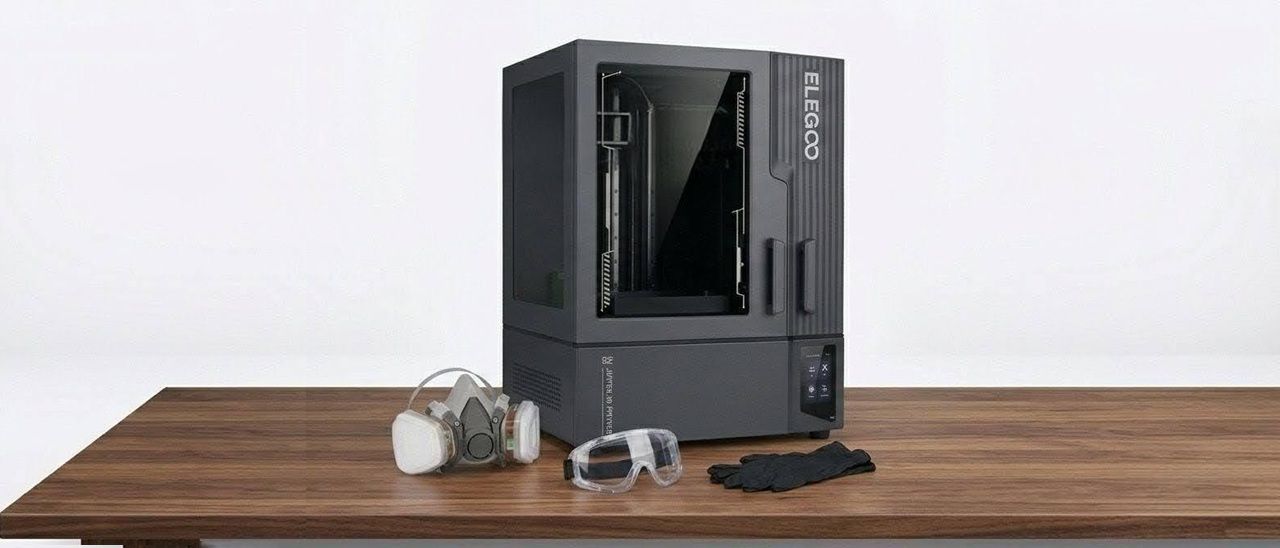
This setup only allows the use of 2kg bottles to fit safely in its tray. The good thing is Elegoo does include an extra empty 2kg bottle for those who use other resins or have extra 1kg bottles of Elegoo resin around. The cool thing you can do here is you can easily mix old and new resins, and they will print just fine, or even add in your favorite flex resins to make the resin you have loaded in the bottle a little more impact-resistant.
The Elegoo Jupiter 2 is a large resin printer, and its main focal point is large-scale resin prints. However, you can print anything you want. Sadly, this printer is a bit slower than the previous models, but the quality of the 16k resolution is stunning.
The printer is mostly plastic to keep the weight down a bit for shipping and moving purposes, but it still weighs in at 40kg (88lbs). There is a front window for viewing that is UV-protected. The auto-feed system does make the printer a bit deeper due to its placement on the back side of the printer.
The overall design of the Jupiter 2 is nice and easy to navigate, and swapping out the bottles of 2kg resin is simple. The Jupiter 2's camera is placed a little high for my taste, but you can still see what is printing and get great time-lapse footage. The auto-refill is a great system to have, filling the vat when needed. It also has a reclaim system, which can empty a vat in 5 minutes from full capacity.
The Elegoo Jupiter 2 comes with a heated vat that keeps the resin at a constant 30 degrees Celsius. There is also a way to preheat the vat for those printing in lower temp climates and want to make sure that the vat is up to temp before printing.
The Elegoo Jupiter 2 comes with a copy of SatelLite slicer, which is Elegoo’s own custom slicing software. At the moment, this is the only slicer that works with this machine. (I’m sure Lychee and Chitubox will follow soon enough.) I did encounter some issues printing the elephant footing, caused by a glitch in the slicer.
Even trying to raise the print off the plate at 10mm and supporting it ended up printing into the raft. So a workaround was needed. I used Chitubox for my Workspace and exported the file as an STL and then imported it into the SatelLite slicer to just slice, and it worked perfectly. I think some work can be done on this slicer to make it a little better for workflow, but if you want a single slicer for your Elegoo resin printers, then it’ll work just fine.
Washing resin prints is a must to ensure that you get all the excess uncured resin off your prints. Most people will use 80% or higher isopropyl alcohol. Other choices include Denatured alcohol, Simple Green, Mean Green, and if you are printing water-washable resin, you can use water.
These solutions are a crucial part of removing the uncured resin properly so that the resin print can cure and be handled properly. You can use various types of wash stations to remove the uncured resin: agitation by whirlpool effect (most efficient), ultrasonic cleaners (slightly less efficient), and spray/wash systems (limited efficiency).
After the prints are washed, it is best to let them dry out for about 10 to 15 minutes, or if you're pressed for time, you can use a blow dryer.
The next step is curing. Cure times will vary depending on print size, resin type, and whether you are printing something hollow or solid. But the standard cure time is around 10 to 15 minutes.
Also, remember that your wash solution should never be thrown down the drain. Resin and resin wash are chemicals, and pouring them into the water supply is never a good idea. Please properly dispose of the waste. You can contact your local sanitation office for information on the proper disposal of chemicals. But an easy way to dispose of it yourself is to set the wash outside in an open container and leave it in direct sunlight for a few days. The wash should evaporate naturally, and the remaining resin will cure, allowing you to dispose of it properly.
Make sure to change or filter your resin wash once it gets cloudy to ensure you get the best print results. I always suggest using a pre-wash or pre-rinse setup before going into your main rinse with old resin wash to keep your main wash from getting dirty too fast.
The Elegoo Jupiter 2 allows you to print a wide range of both big and small prints due to its large build volume.
The 16k resolution helps a ton with this printer since it is a 14-inch screen size, making the prints turn out in the highest quality.
(Image credit: Tom's Hardware) (Image credit: Tom's Hardware) Both of the prints I tested (Gorillaz band pack and 50mm Mini Akumamods) were exported from Chitubox and sliced in the Elegoo slicer.
I wanted to showcase the ability to print mass batches for those looking for a larger build plate and wanting to print full campaigns of minis. This mini (below) is a 3D scan of me and scaled down to 50mm. These minis printed with no issue, and you can fill the plate with about 40 on the build plate with a little bit of room left for small items.
I also wanted to go a little bigger and printed some action figures (below). Exporting the file from Chitubox into the Elegoo Slicer, these printed super easy with no issue, and the print quality was great.
The Elegoo Jupiter 2 is a nice upgrade from the previous model. The new features added to the machine make this printer simple to operate and make it a very good deal at the $949 price tag .
Features like the auto-refill system make it a worry-free printing experience for users when printing larger items. As a bonus, there is a reclaim feature, so no need to struggle with funnel and pouring a large vat back into a bottle and hoping you don't spill. While it is a longer process to reclaim the resin, it's a welcomed feature for any resin printer.
The quick-change FEP (Fluorinated Ethylene Propylene) system is something the community has been calling for for a long time now, and finally, Elegoo has answered. It takes mere seconds to swap out an FEP film now – no more broken bolts or lost bolts. It’s nice to see features like this being added. The only downside is that you might be stuck with that FEP, but that’s a minimal downside for me.
Having a camera on the Elegoo Jupiter 2 is a moot point for me personally, but I know several people who have gotten used to wanting to check on the progress of the print while they are away or even show friends and family a cool timelapse of their prints. I will say that the Jupiter 2 does provide a very nice, flawless timelapse. My only gripe about it is the position of the camera. It’s hard to see what, if anything, is printing for the first 100mm. All you see is the build plate. But past 100mm, it’s smooth sailing, and visibility is great.
As pointed out earlier, I feel that users might face a challenge with the doors over time. When Jupiter was first showcased at Rapid TCT back in early April 2025, I noticed the doors were plastic, and the hinges were metal. While the doors and hinges seemed to be okay at the time, I feared that with the constant opening and closing of the doors, the hinges would sag. Sure enough, by day three of Rapid TCT, with all the people looking at it, I noticed the door became a bit lopsided. It did not affect the opening or closing of the doors, but it sure did not look very good. I hope that since then, Elegoo has taken the time to update the strength of the plastic in that area to keep it from happening to the production units.
Besides my hiccup with the slicer and the size of the Jupiter 2 when it is fully open, this printer has been wonderful to use. It’s great to see how resin printers have advanced over the last year. Ease-of-use features are making it more open for those who might have been hesitant about using resin printers in the past.
All in all, I would rate this a 4.5 out of 5 stars. The big volume and ease of use make this a powerful machine in the hands of makers. While there are some minor issues to be looked at, mostly the slicer, it has been a solid machine. Of course, if you encounter any issues, you can always reach out to Elegoo’s support team for help.
So if you're looking to get into getting a large-volume resin printer, it’s safe to say the Jupiter 2 will be a great choice. Alternatively, you can check out the Anycubic Photon Mono M7 Max available at Amazon for $699, which also offers high-speed with big volume (but slightly smaller than the Jupiter 2). If you are not looking to go big, the Elegoo Saturn 4 Ultra is a smaller machine with excellent 12K resolution and is currently on sale for $427 .
Key considerations
- Investor positioning can change fast
- Volatility remains possible near catalysts
- Macro rates and liquidity can dominate flows
Reference reading
- https://www.tomshardware.com/3d-printing/SPONSORED_LINK_URL
- https://www.tomshardware.com/3d-printing/elegoo-jupiter-2-resin-3d-printer-review#main
- https://www.tomshardware.com
- Startup’s ‘miracle’ solid-state battery actually uses lithium-ion chemistry, according to third-party tests — Donut Lab raised $25M and is valued at $1.25B on w
- 3D-printed nozzles could revolutionize drug and self-healing material manufacturing — MIT-developed triaxial electrospray design makes cleanroom fabrication opt
- Bag a huge $308 saving on a two-year ExpressVPN Advanced sub and get four bonus months on top for free — 78% discount gets you this fast no-logs VPN service wit
- ASML becomes Europe's most valuable company ever as analysts bet on higher EUV output — its market cap hit $674 billion this week
- Farmer donates land for a park, city sells it for data center development — $10 gift became $10M for city government, with $30M tax expected over next decade
Informational only. No financial advice. Do your own research.