
On top of the case, Fractal updated the design with a dense pattern of circular holes for air to pass through. This feels a bit more restrictive than the more open design on the Define 7, but still allowed air to escape even without fans on top in our testing. The good news, at least when this area is used as exhaust, is that there isn’t a mesh dust filter to thwart airflow further. The top panel also pops off easily (via more ball-and-socket retention clips) from the back, exposing the inner frame where you mount fans or a radiator.
The IO panel sits at the front edge and offers your typical assortment of ports. You get three USB ports: one USB 3.2 Gen 2×2 20 Gbps Type-C, and two USB 3.1 Gen 1 (5 Gbps) Type-A ports. This is exactly what we want to see in a case of this caliber. There’s also a shiny power button with the Fractal symbol in the middle, a 3.5mm combo audio jack on the left, and finally a skinny LED light at the top. The front panel also comes off easily. Removing the top panel exposes two levers, so you can remove the front panel, access the front of the case, and reach those three 140mm Momentum 14 fans and dust filters.
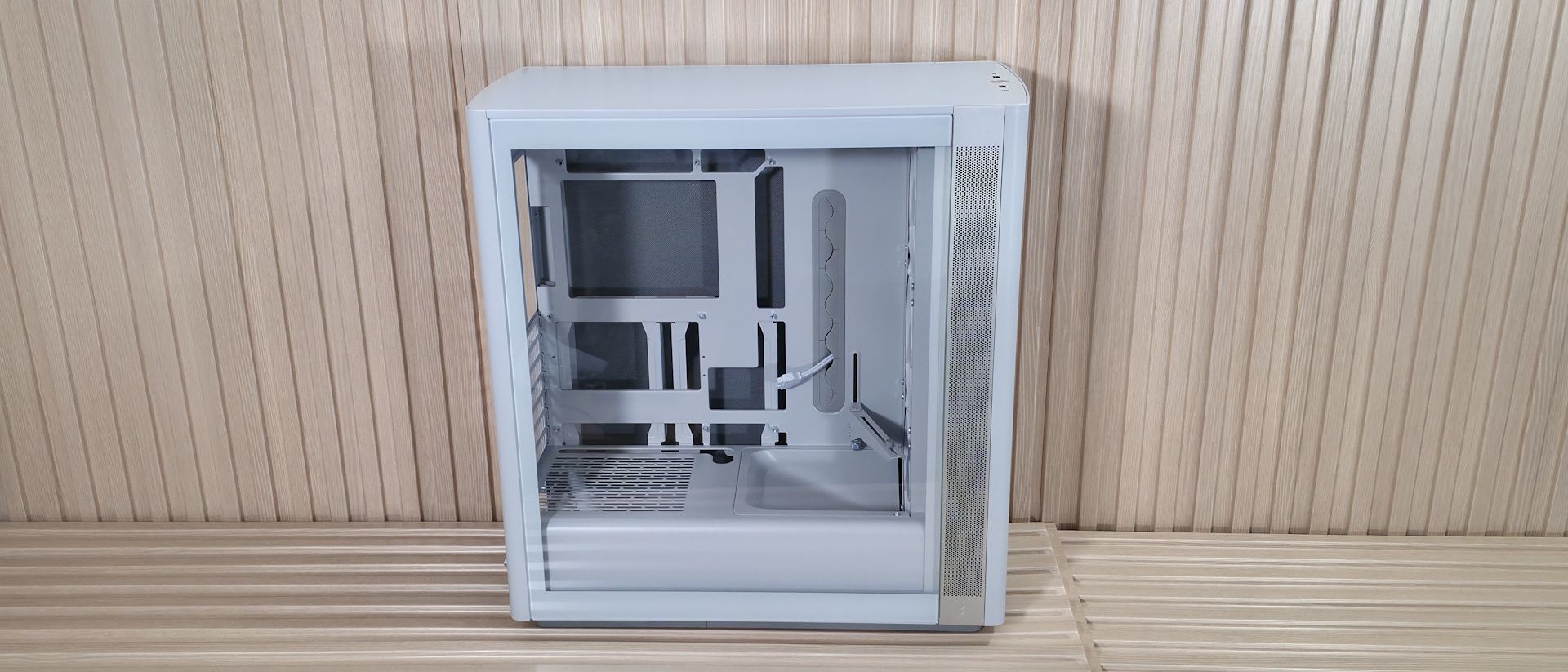
Inside the case, you have two separate chambers. One is for the power supply and cables, while the other is for the components. One of the first things that jumped out to me is the integrated front air guide, which helps direct airflow to the graphics card. I like this, as the front bottom fans' air isn’t wasted on the power supply and instead focuses on what is likely the hottest-running component. Just above that is the adjustable support bracket for the video card, mounted directly to the motherboard tray. Two screws let it move a couple of inches up or down, so it supports video cards of nearly any size.
Next up is the motherboard tray, and it has plenty of cutouts. The largest one, behind the socket, is great for accessing the rear of the motherboard and mounting your cooling solution while the board is in the case. The rest are there for cable management (top or bottom) and to support rear-connect motherboards like Asus BTF, Gigabyte Stealth , and MSI Project Zero boards. A large gray grommet for hiding wires runs vertically to the right of the motherboard. This grommet satisfied a pet peeve of mine by not moving out of its spot easily, as some others do. In fact, in some cases I’ve owned, I’ve glued the grommets in because I was tired of them pulling out when building or changing parts.
(Image credit: Future) (Image credit: Future) (Image credit: Future) (Image credit: Future) (Image credit: Future) (Image credit: Future) Image 1 of 6 View Original
Looking at the front from the inside, we get a better view of the pre-installed Momentum 14 fans and the removable front fan brackets. You can mount a 3×120 mm radiator here, with a maximum length of 405 mm and 30 mm thick if you keep the air guide (435 mm and thicker radiators, up to 65 mm, if you remove it), or it fits 280/240/140/120mm radiators. There are plenty of options, but make sure you know your radiator size so you know what you need to remove, if anything.
Looking at the ceiling of the case from the inside, we see the removable top bracket, held in by two screws. The top holds up to two 140mm fans or a 280mm radiator. You have around 60mm or so before the radiator/fan combo covers the top of the motherboard, so you don’t have to worry too much about fitment or covering the top of your motherboard if you choose to use a radiator in this space. At the rear of the case, we spy the 120mm fan mounting location and the seven available expansion slots.
On the bottom rear, we can see the power supply chamber, along with space to route cables for any headers located along the bottom of the motherboard. The bottom chamber is vented, but won’t radiate a ton of heat, as the power supply gets cool air from the filtered intake on the bottom.
(Image credit: Future) (Image credit: Future) (Image credit: Future) Image 1 of 3 View Original
Let’s look behind the motherboard panel. Here, we see the difference between cheap cases that cut corners and one that doesn’t. First, there’s 37 mm (1.46 inches) between the motherboard tray and the back panel for cables. That’s plenty of space to haphazardly stuff your cables in without a bulging panel. Next, you’re likely to notice the cable management features. On the left are two plastic pieces and pre-installed Velcro. The plastic pieces slide in and out so you can more easily get the cables in the channel.
On the rear of the case are more Velcro straps to route cables, like your 8-pin EPS for the CPU, cleanly up the back. A keen eye also spots the two 2.5/3.5-inch drive mounts. You can fit two 3.5-inch drives (one in each mount location) or four 2.5-inch drives (two in each mounting location). The case fits six 2.5-inch drives total, with the other mounting areas hidden on the floor, under the front air guide. Overall, the Define One is a good-looking case in the “Light” colorway. The contrasting aluminum intake area breaks up the monotony of an all-white chassis, giving it some visual life. From the way the panels come off to the internal features, it’s clear some thought went into making this an intuitive building experience.
Current page: Features and Specifications
Key considerations
- Investor positioning can change fast
- Volatility remains possible near catalysts
- Macro rates and liquidity can dominate flows
Reference reading
- https://www.tomshardware.com/pc-components/pc-cases/SPONSORED_LINK_URL
- https://www.tomshardware.com/pc-components/pc-cases/fractal-define-one-case-review#main
- https://www.tomshardware.com/membership
- Kingston's NV3 1TB PCIe 4.0 SSD drops to $156.99 at Newegg — 27% off brings it down to just 15.7 cents per GB
- Universitas Gadjah Mada, Indosat and NVIDIA Open Indonesia’s First University AI Center to Develop Local AI Talent
- Leading Publishers Bring Blockbuster PC Games and Technology to NVIDIA RTX Spark
- Oklahoma city tries to charge farmer arrested at data center debate $17,000 for body cam footage of the incident — accused faces trespassing charge for going ov
- Trump says communities that reject data centers 'want to end up being backwards and poor' — President claims China 'could not be happier' with AI data center ba
Informational only. No financial advice. Do your own research.