
Bruno Ferreira is a contributing writer for Tom's Hardware. He has decades of experience with PC hardware and assorted sundries, alongside a career as a developer. He's obsessed with detail and has a tendency to ramble on the topics he loves. When not doing that, he's usually playing games, or at live music shows and festivals. ","collapsible":{"enabled":true,"maxHeight":250,"readMoreText":"Read more","readLessText":"Read less"}}), "https://slice.vanilla.futurecdn.net/13-4-25/js/authorBio.js"); } else { console.error('%c FTE ','background: #9306F9; color: #ffffff','no lazy slice hydration function available'); } Bruno Ferreira Social Links Navigation Contributor Bruno Ferreira is a contributing writer for Tom's Hardware. He has decades of experience with PC hardware and assorted sundries, alongside a career as a developer. He's obsessed with detail and has a tendency to ramble on the topics he loves. When not doing that, he's usually playing games, or at live music shows and festivals.
psyconz As soon as it becomes a product, people pay attention as if it's the newest best thing since sliced bread. Exactly the same functionality described in this article has been available with an open source utility called CompactGUI – for literally years. Or maybe it's just because Toms was paid to advertise? Reply
StrangerNN I can't figure out how this is any different from enabling compression on the game folder using Windows, and doing so completely free of charge.🤷♂️ If I remember correctly, this option was introduced along with NTFS in Windows NT 3.1 in 1993. And it's also been included in the Windows license for free ever since. Reply
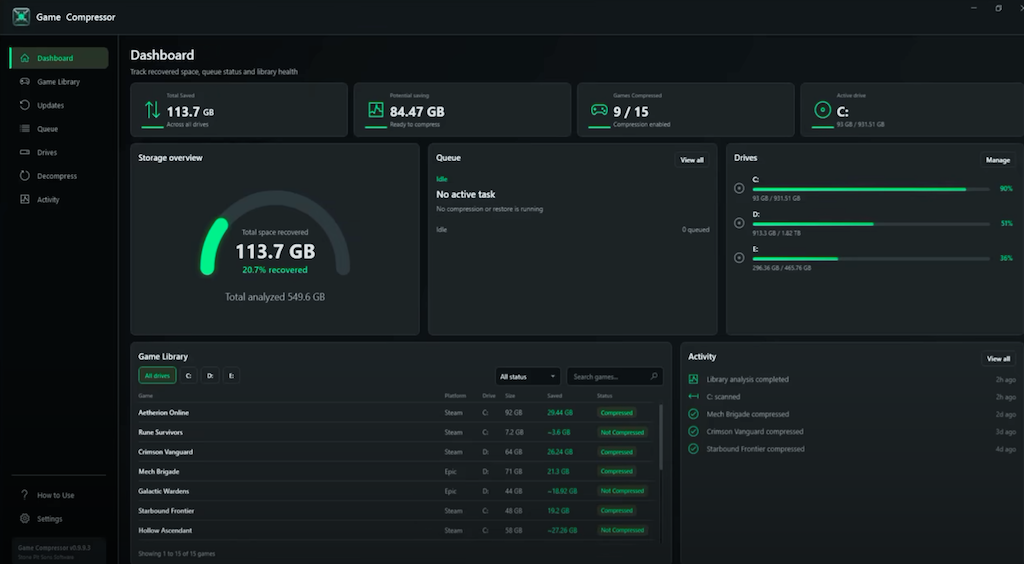
Jabberwocky79 psyconz said: As soon as it becomes a product, people pay attention as if it's the newest best thing since sliced bread. Exactly the same functionality described in this article has been available with an open source utility called CompactGUI – for literally years. Or maybe it's just because Toms was paid to advertise? Thanks, I just saved myself 5 bucks! StrangerNN said: I can't figure out how this is any different from enabling compression on the game folder using Windows, and doing so completely free of charge.🤷♂️ If I remember correctly, this option was introduced along with NTFS in Windows NT 3.1 in 1993. And it's also been included in the Windows license for free ever since. You must not have read as far as paragraphs 3-4 then? It mentions the existing native option along with the drawbacks that the native compression does not show you a preview of compression results or continuously monitor games and re-compress after patches. Reply
psyconz StrangerNN said: I can't figure out how this is any different from enabling compression on the game folder using Windows, and doing so completely free of charge.🤷♂️ If I remember correctly, this option was introduced along with NTFS in Windows NT 3.1 in 1993. And it's also been included in the Windows license for free ever since. Yeah, as Jabberwocky79 implied – from memory, standard NTFS compression through the folder or file properties window is a different and lesser type of compression compared to LZX – that is, on modern systems which have plenty of spare CPU cycles compared to their IO bandwidth. I can't remember the exact details. I do know by using LZX back when I still used Winblow$ a few years ago, I saved a ton of space over default compression. And as the article states, it's 'transparent' in terms of user experience, so it made sense to use it at the time. Reply
PEnns psyconz said: Even on a fairly high-end setup, compressing a large folder takes quite a lot of CPU cycles and a fairly long time. But once it's done, with the folder watching feature, from that point, only new data needs to be compressed (obviously, I suppose 🤣). So back when I did it, I just left my PC working on my >1TB Steam folder for a while, then after that point, I didn't have to think about it again unless there was a large update, and even then, it didn't seem to make it take much longer. Apart from the constant process I seemed to face of nursing Windows so it didn't kill itself, that is. But that wasn't a compression problem 😛 Anyway, I can't think of any potential drawbacks to compressing basically any folder or file, and I never experienced any issues with such things myself. Save for a when I made the mistake of compressing certain Windows folders and files – which I can recommend taking care with, if you decide to compress your system drive, and don't want to have to fix your Windows install! 😋 Makes sense. Thanks 👍!! Reply
Li Ken-un With $5 of tokens, I could have vibe-coded this. Reply
Key considerations
- Investor positioning can change fast
- Volatility remains possible near catalysts
- Macro rates and liquidity can dominate flows
Reference reading
- https://www.tomshardware.com/pc-components/storage/SPONSORED_LINK_URL
- https://www.tomshardware.com/pc-components/storage/game-compressor-can-save-you-hundreds-of-gigs-across-your-game-library-usd6-utility-leverages-windows-built-in-lzx-compression-for-substantial-space-savings#main
- https://www.tomshardware.com/subscription
- Why Performance per Watt Is the Ultimate Metric for AI Infrastructure Efficiency
- AMD’s new X100 chip lineup puts embedded Ryzen AI 'Strix Halo' chips into robots – APUs for physical AI bring Zen 5 CPU, RDNA 3.5 GPU cores to compete with Inte
- OpenAI took ten days to tell Hugging Face its models were behind the July 11 weekend hack, report claims — rogue AI agents reportedly active on the open Interne
- Pro-Ukraine group claims it helped hack Russian drone air defense system, shooting down Su-57 in friendly fire incident — Moscow confirms fifth-generation fight
- Grab an Nvidia RTX 5060 Ti gaming PC with Core Ultra 7 CPU and 32GB RAM for under $1,200 — Thermaltake's View u2660T-170 slashed by 33%
Informational only. No financial advice. Do your own research.