
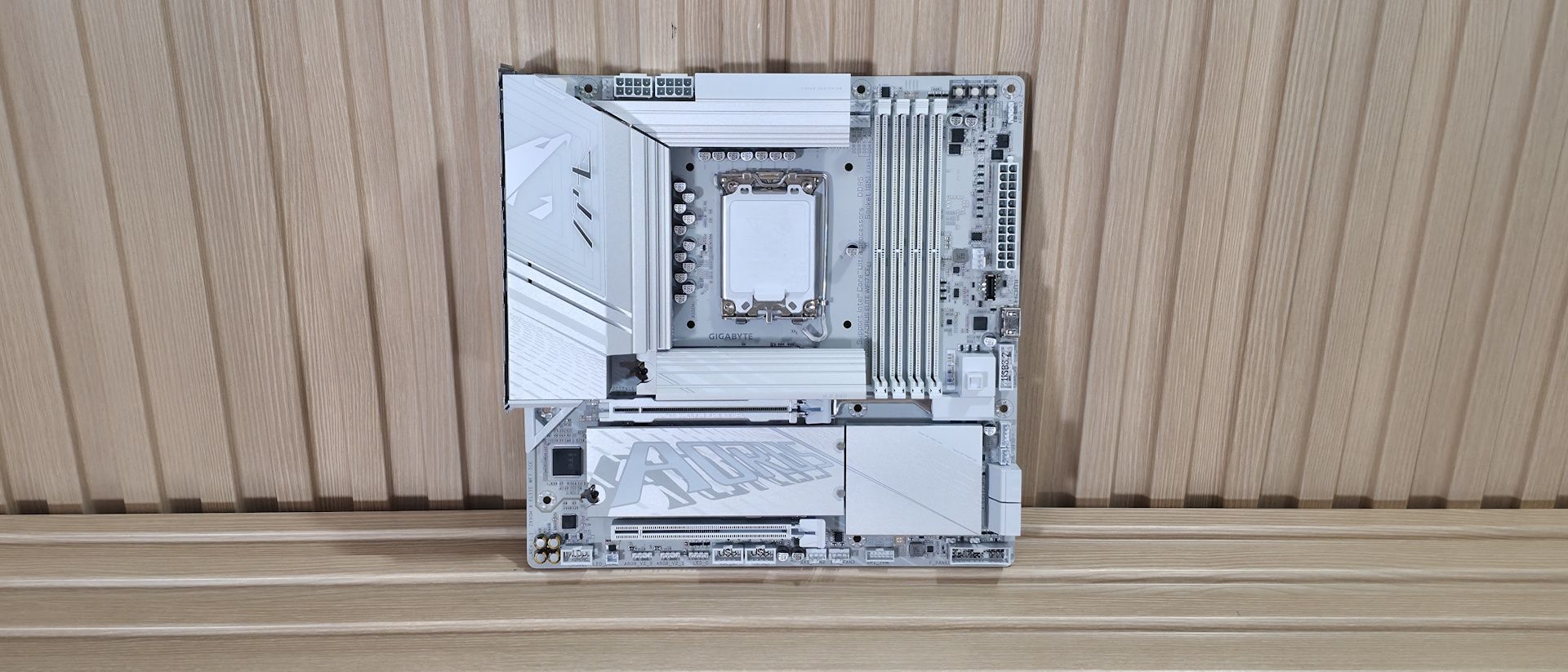
Above the DRAM slots is the Q-LED feature. Four LEDs, CPU/Boot/VGA/RAM, light up during POST. If a failure occurs during that time, the offending RGB stays lit, giving you a general idea of where the problem may be. Next to it, in the upper-right corner, are three simple buttons: power, reset, and Q-Flash. Down the right edge, you'll find the first (of three) 3-pin ARGB headers. The other two are along the bottom edge. GCC and the RGB Fusion app inside control these headers and the integrated lighting, offering users plenty of canned LED effects and customization. Below that are the 24-pin ATX connector to power the board, another 4-pin fan header, the front-panel USB 3.2 Gen 2 (10 Gbps) connector, and a 19-pin front-panel USB 3.2 Gen1 (5 Gbps) header. Between those is a front-panel HDMI output, making it easy to add secondary displays for monitoring or further chassis customization.
Power delivery on the Z890M Aorus Elite WiFi7 Ice is capable, but it doesn’t quite reach the level of "robust." The board has 15 phases, 12 of which are dedicated to Vcore. Power comes from the dual 8-pin EPS connectors and is controlled by the OnSemiconductor NCP81537 8-phase controller (teamed configuration). From there, power moves on to the OnSemi NCP302155 60A DrMOS MOSFETs and then to your processor. The 720A available isn’t a lot, but it can handle the Core Ultra 7 270K Plus , the Core Ultra 5 250K Plus , and even the Core Ultra 9 285K — though I’m not sure how hard I’d push it overclocking the 285K or 270K Plus. Just be sure to keep air flowing through your chassis, as these components will get warm under sustained heavy use.
On the bottom half of the board, starting on the left edge, we spy the audio solution. The Z890M uses the budget Realtek ALC897 codec, plus a few dedicated audio capacitors (yellow and black). While one of its direct competitors has a better one, this codec is fine for most users, and there's no reason to avoid it unless you're making music with the board or consider yourself a PC-focused audiophile. In the middle of the board are two full-length PCIe slots. The primary slot, using Gigabyte’s PCIe UD Slot X reinforcement) connects through the CPU and runs at PCIe 5.0 x16 speeds (no bifurcation, FYI). The second slot at the bottom sources its bandwidth through the chipset and runs up to PCIe 4.0 x4. There’s plenty of bandwidth for expansion; just make sure your graphics card doesn’t cover the second slot if you need to use it.
Between and above the PCIe slots are three M.2 sockets. The top socket, under the beefy EZ-Latch heatsink (made good contact, note), connects through the CPU and is the main PCIe 5.0 x4 (128 Gbps) M.2 socket. Under the plate-style heatsink (also using EZ-Latch along with EZ-Click to secure the M.2 without screws) are two more M.2 sockets. Both sockets connect via the chipset, support 80mm devices, and run up to PCIe 4.0 x4 speeds. The bottom socket supports up to 110mm modules, while the middle socket supports the more familiar 80mm. If you need the additional speed or redundancy RAID offers, the board supports RAID0/1/5/10 modes for NVMe SSDs. We've also captured several images of the ICs that make this motherboard work, including Realtek Ethernet and audio, ASMedia (for the front HDMI), and OnSemiconductor MOSFETs/PWM controller.
Moving right, past the chipset heatsink and the other RGB lighting element, we spot a couple of Thunderbolt headers and four SATA ports (supporting RAID0/1/5/10 modes). At the bottom of the board is a slew of headers, offering the typical connectivity in this area, with nothing worth calling out.
(Image credit: Future) (Image credit: Future) (Image credit: Future) (Image credit: Future) (Image credit: Future) Image 1 of 5 View Original
Below, we’ve listed all the connections across the bottom of the board.
Key considerations
- Investor positioning can change fast
- Volatility remains possible near catalysts
- Macro rates and liquidity can dominate flows
Reference reading
- https://www.tomshardware.com/pc-components/motherboards/SPONSORED_LINK_URL
- https://www.tomshardware.com/pc-components/motherboards/gigabyte-z890m-aorus-elite-wifi7-motherboard-review#main
- https://futureplc.com/privacy-policy/
- NVIDIA Cloud Partners Scale Across Europe — Sovereign, Open and Built for Safe AI Agents
- Europe’s Industrial Leaders Reinvent Engineering and Manufacturing With NVIDIA
- 17 Russian trawlers logged mapping undersea cables connecting the US and Europe
- NVIDIA Confidential Computing Expands, Enabling Frontier Model Builders to Securely Scale Across Global Infrastructure
- Razer Basilisk V4 Pro Review: Tried and true and now with AI
Informational only. No financial advice. Do your own research.