
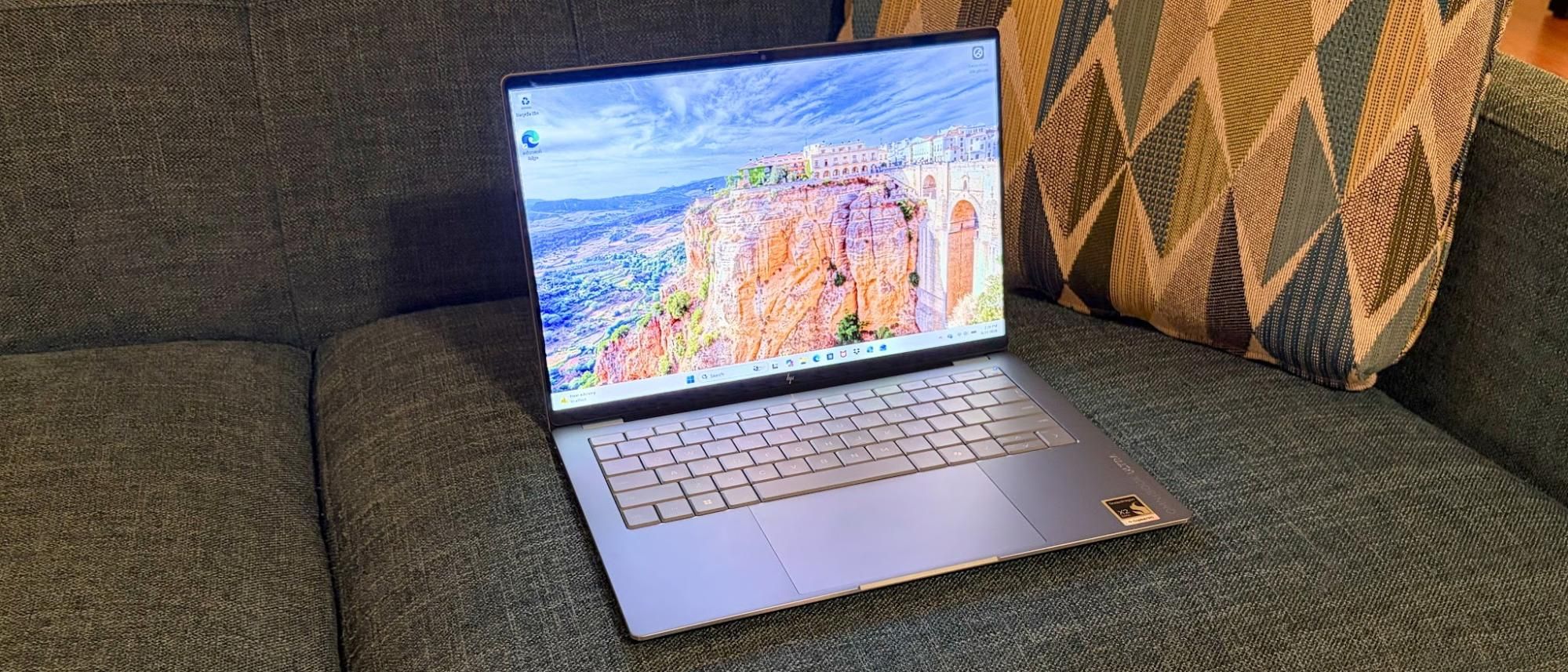
The OmniBook Ultra is among the first laptops we’ve tested to use the new Snapdragon X2 Elite SoC (up to 5.0 GHz clock speed, 18 cores), with the first being the Asus Zenbook A16. As we learned in our review of the ZenBook A16, the Snapdragon X2 Elite is a strong performer, and it’s made even more potent by the inclusion of 64GB of LPDDR5x-9523 in our review unit, paired with a 2TB PCIe 5.0 SSD.
The Snapdragon X2 Elite also includes an integrated Hexagon NPU, which delivers up to 85 TOPS of compute performance.
The OmniBook Ultra made a strong showing in the Geekbench 6 CPU benchmark, securing a single-core score of 3,942, putting it in second behind the MacBook Air with its M5 SoC (4,168). The ZenBook A16 wasn’t far behind with 3,807. Looking at multi-core performance, the ZenBook A16 jumped up in the lead with 22,733 compared to 20,075 for the new OmniBook Ultra. The new OmniBook Ultra was also well ahead of the Ryzen AI 9 HX 375 model (2,846 single-core, 14,838 multi-core).
(Image credit: Tom's Hardware) (Image credit: Tom's Hardware) (Image credit: Tom's Hardware) (Image credit: Tom's Hardware) HP has opted for a PCIe 5.0 SSD on the OmniBook Ultra, and our review unit came in at a healthy 2TB of capacity. The laptop dominated our 25GB file transfer test, delivering 2,620.91 MBps compared to 1,924.84 MBps for the second-place MacBook Air.
The Snapdragon X2 Elite in the OmniBook Ultra again flexed its muscle in our Handbrake test, which involves transcoding a 4K video file to 1080p. Here, the OmniBook Ultra completed the task in 2 minutes and 11 seconds, putting it just three seconds behind the ZenBook A16. Both the AMD-equipped UltraBook Ultra and the MacBook Air took well over 4 minutes to complete transcoding.
We run Cinebench 2024 through ten loops to stress-test ultrabooks. The first run delivered the highest score at 1,099. The subsequent runs fell short of that high mark, settling between 920 and 950 towards the end of the test. The 12 Prime cores averaged 4.03 GHz, while the 6 Performance cores averaged 3.05 GHz.
HP is using a 14-inch 2880 x 1800 display on the OmniBook Ultra, and it, like many in this segment, is an OLED panel. The panel has a 120 Hz refresh rate and a glossy finish. However, with the brightness cranked to the max, stray reflections were hardly noticeable.
I used the OmniBook Ultra to watch about half an hour of Marvel’s Thunderbolts on Disney Plus, and spent a good chunk of time watching the San Antonio Spurs blow the biggest lead in an NBA championship series via Sling TV. In both instances, the display looked great with accurate colors and excellent contrast.
In our testing, the OmniBook Ultra covered 87% of DCI-P3 and 122%of sRGB, placing it at the top of the rankings among the assembled laptops. Maximum brightness measured crested 400 nits, specifically hitting 414 nits. While impressive for an OLED display, the ZenBook A16 (429.4 nits) and MacBook Air (458.8 nits) were brighter still.
The display on the OmniBook Ultra is multi-touch-capable, and I had no trouble navigating the Windows interface or using swiping gestures. However, reaching out to touch the screen isn't a natural movement for me, and it isn’t very ergonomic. I was perfectly fine using the humongous trackpad.
The OmniBook's keyboard is full-size and backlit, and the lattice-free keys themselves felt good under my fingers. There’s no clickiness to the keys, and you’ll hear a gentle, low “thud” as you type along. There’s plenty of key travel, and I was comfortable typing on the keyboard for an extended period of time. My only complaint concerns the half-height up and down arrows squeezed between the full-size left and right arrows.
Using my trusty keyhero.com typing benchmark tool, I managed 87 words per minute with 97 percent accuracy. This was roughly equivalent to what I scored with the keyboard on the previous-generation model.
Complementing the keyboard is a haptic touchpad measuring a large 5.4 x 3.4 inches. It’s a haptic touchpad that provides a satisfying “click” no matter where you press on its surface. While some top-hinged touchpads require additional force to register a click as you move towards the top of the mousing surface, there are no such limitations on the OmniBook Ultra.
I played a wide variety of music, ranging from Steve Wonder’s keyboard-heavy and soft vocals on Superwoman from 1972 to the ear-splitting screaming and electric guitars of Linkin Park’s Lying from You , from the band's early 2000’s sophomore album.
Interestingly, no sound utilities are installed by default to tune the speakers further.
Hopping inside the OmniBook Ultra is incredibly easy – there are only four screws to remove from the bottom panel, which is at least half as many as you’ll typically find on a thin laptop.
(Image credit: Tom's Hardware) (Image credit: Tom's Hardware) Once the bottom panel is removed, there’s not much that’s replaceable. The battery is at least easily accessible, with four screws securing it and one cable connecting it to the motherboard. You also have access to the PCIe 5.0 SSD, which sits beneath a heat shield. That’s about it when it comes to upgrades for the OmniBook Ultra.
Our OmniBook Ultra 14 review unit came powered by a 70 WHr battery, which is topped off using a 65-watt GaN USB-C charger. Our battery life test includes web browsing, video streaming, and WebGL tests, with the display set to 150 nits.
We were able to extract 13 hours and 27 minutes out of the OmniBook Ultra, exceeding the runtime of the ZenBook A16 with the same Snapdragon X2 Elite chip by 3 hours. It also outlasted its predecessor by over half an hour. The only laptop that stood in its way was the MacBook Air, which lasted an impressive 15 hours and 28 minutes.
Heat output on the OmniBook Ultra was measured while running our Cinebench 2024 stress test. The keyboard measured around 95 degrees Fahrenheit between the G and H keys, while the hottest part of the laptop was the bottom rear near the exhaust vents, at 118 F.
(Image credit: Tom's Hardware) (Image credit: Tom's Hardware) The touchpad stayed cool to the touch at 77 degrees, the ambient temperature in the room at the time.
While we usually mention CPU temperatures in this section, HWInfo, in its current iteration, does not provide the specific values we need for reporting.
HP has included a 5MP webcam on the OmniBook Ultra, which has IR capabilities to support Windows Hello biometric authentication. Like the previous generation, the image quality was decent, but not segment-leading.
My face and shirt looked slightly blurry, and my skin tones were "off." This performance would be passable for a laptop costing in the $1,000 to $1,500 range. But for a laptop with an MSRP of nearly $2,900, it's a tough pill to swallow. The Lenovo Yoga Slim 7i Aura Edition I recently tested, with an MSRP of $1,700, had a far better onboard webcam.
And of course, there’s also the usual Windows bloat in the form of app links to Booking.com, Dropbox, and various other services. And we can’t forget McAfee, which is always an instant delete when I set up a new PC for friends and family.
The OmniBook Ultra comes with a 1-year manufacturer's warranty.
Key considerations
- Investor positioning can change fast
- Volatility remains possible near catalysts
- Macro rates and liquidity can dominate flows
Reference reading
- https://www.tomshardware.com/laptops/SPONSORED_LINK_URL
- https://www.tomshardware.com/laptops/hp-omnibook-ultra-14-snapdragon-x2-elite-2026-review#main
- https://www.tomshardware.com
- The Ultimate Summer Sale Pairing: Steam Sale Meets GeForce NOW Discounts
- Meta reportedly plans to rent out its AI compute, sending AI stocks tumbling — 'Meta Compute' would put company in direct competition with AWS
- Palantir CEO Alex Karp claims AI companies are stealing customers' data while charging them for unproductive tokens — says 'livid' businesses 'are paying for to
- Intel expands production of photomasks in California: EUV and High-NA EUV in the focal point
- Intel expands production of photomasks in California: EUV and High-NA EUV in the focal point
Informational only. No financial advice. Do your own research.