
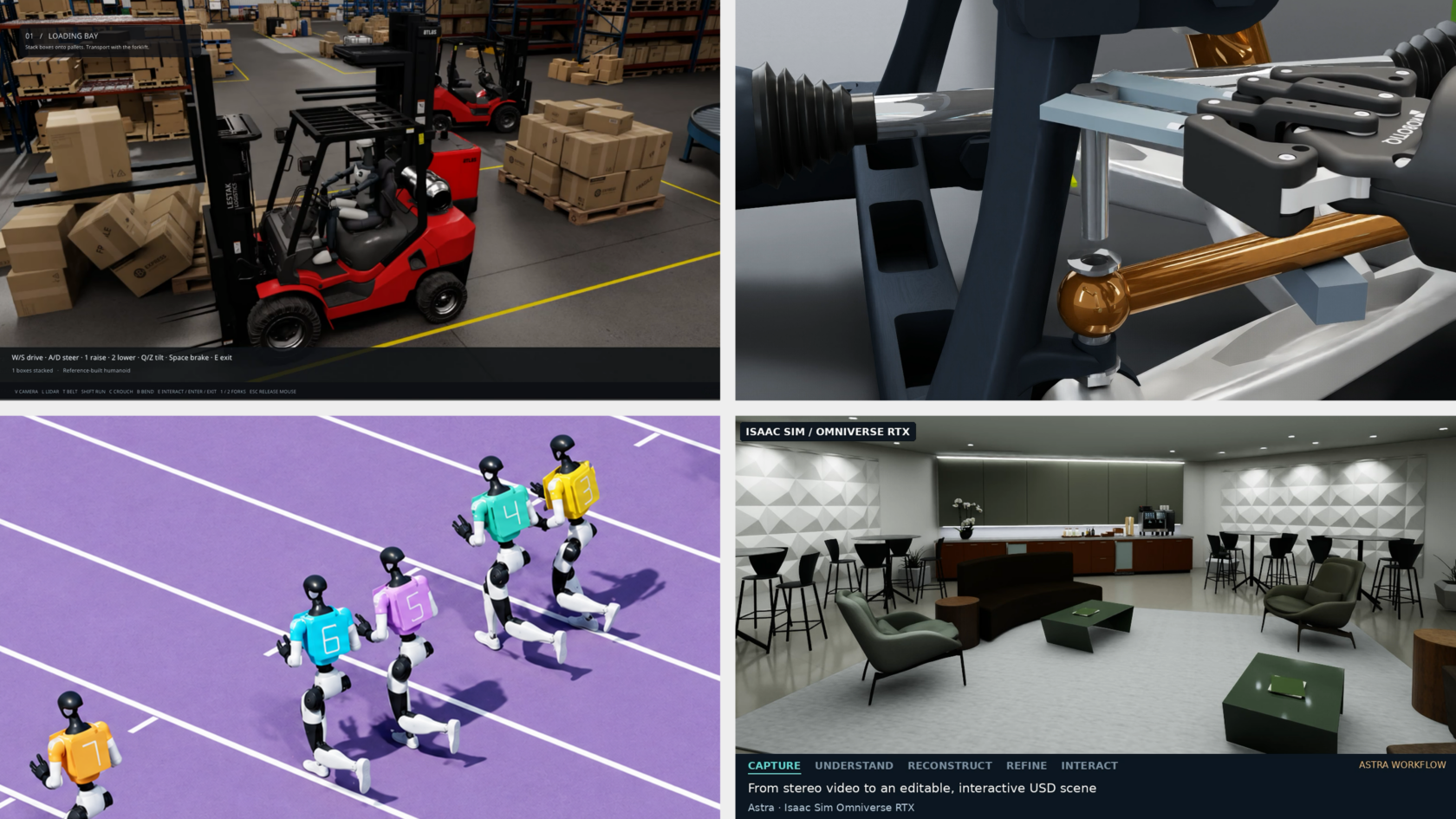
Turning a simulation idea into a working application means assembling assets, connecting physics and rendering, and checking that the scene behaves as intended. Developers are combining frontier AI models with NVIDIA Omniverse libraries to help carry out that work — building applications for exploring scenarios, investigating failures and improving designs.
Developers direct AI agents through natural-language instructions, review results and guide changes. Omniverse libraries provide GPU-accelerated physics, rendering and sensor simulation capabilities.
Explore the projects below to see frontier AI models such as GPT-6 Astra at work, and check back for new examples from NVIDIA teams and developers across the ecosystem.
AI agents powered by frontier models pave the way to autonomous operations. They use industrial tools and engineering data to help engineers build digital twins that test plans and processes and evaluate operational decisions.
Falkor, a KONGSBERG company, shows how this works in practice. The company’s Falkor Surface platform lets customers turn their computer-aided design and engineering data into facility-scale digital twins using the GPT-6 Astra model. The platform uses NVIDIA Omniverse libraries and NVIDIA RTX PRO 6000 Server Edition GPUs on Microsoft Azure to enable advanced physics simulation.
AI agents built on Falkor’s agentic engine understand dense technical documentation, spatial relationships and real-world physics. Engineers can create and test plans in simulation before traveling on site, reducing costly delays and mistakes. They can also inspect equipment and check clearances in a shared view.
Read Falkor’s article and watch the livestream f or a closer look at how the company builds these tools and checks the agents’ work.
Getting a robot model into a scene is only the start. Developers also need to assemble its components, add controls and check whether it can complete a task.
NVIDIA developers Dillon Bailey and Rishabh Chadha used 3D assets from the SimReady Central library to build a pick-and-place simulation of a robot moving a can using the NVIDIA Isaac Sim framework. They directed an agent equipped with GPT-6 Sol and Isaac Sim skills to assemble the scene and generate pick-and-place controls.
Testing the assembled scene shows how the assets work together, from joint movement and contact behavior to the gripper’s ability to hold, move and release the can. With that baseline in place, developers can adjust object positions and motion paths and repeat the tests to evaluate how each change affects the task.
Follow the walkthrough to assemble and test a pick-and-place simulation in Isaac Sim, with sample agent prompts and checks for robot movement and grasp behavior.
Bringing 3D assets into virtual reality (VR) requires more than rendering a scene. Objects need to respond to controllers and behave as expected when grabbed, moved or released.
NVIDIA Omniverse community developer Michael Wagner took on this challenge. He directed GPT-6 Astra to use Blender software to model a study environment from two reference images, balancing visual quality with efficient performance in VR.
He then used Claude Code to build an application that lets users find SimReady Central assets by voice and interact with them in an immersive VR scene. The Claude Code agent worked for about eight hours, and Wagner built the application over a weekend using an NVIDIA RTX 6000 Ada workstation and a Meta Quest 3 VR headset.
The application ran on NVIDIA Omniverse libraries : ovstage shared the OpenUSD scene, ovrtx rendered it, ovxr enabled VR and ovphysx ran physics. Wagner later built a second version with ovnewton , which integrates with ovstage, to compare the physics libraries.
The biggest challenge for Wagner was checking what happened inside the headset. Automated tests missed problems he could feel, including objects shaking when grabbed. Wagner reported the symptoms, guided the agent through changes and verified the interaction himself. Updating the grab control once per frame resolved the shaking. His takeaway: Give agents renders and logs to inspect, then check the experience directly.
Explore his open source demo f or build instructions, a starting prompt and reusable agent skills.
Before adapting a robot to a new environment, developers need to test whether its walking policy — the AI that controls how it moves — can keep it stable in that setting.
AI developer Maziyar Panahi directed Claude Code, using Claude Opus 5.5, to assemble an intensive care unit from 13 NVIDIA SimReady hospital assets and test Microduck robots inside it. The assets came with Newton physics settings, so Panahi didn’t have to model the furniture or create collision geometry from scratch. The Newton physics engine also helped replicate the ward so hundreds of copies could run together on one NVIDIA RTX PRO 6000 GPU.
When the cloud containers lacked graphics support, Panahi and the Claude Code agent separated simulation from rendering, recording robot poses in the cloud and rendering them locally. They also treated the furniture as static collision objects, which enabled larger runs within the solver’s limits.
The robots walked using AI they had already been trained on and followed preset points along a route. Panahi checked how many robots remained upright: In a 256-ward run, 766 of 768 Microducks were still standing after 14 simulated seconds. He said the agent’s work took about two hours.
Explore the open source demo for a starter prompt, checks and instructions to begin with one ward on a CPU, then scale to hundreds on an NVIDIA GPU.
Creating animated 3D content requires connecting modeling, simulation, materials and rendering. Nick Scarcella, a senior technical artist on NVIDIA’s BondLab team, directed AI agents — primarily using Claude — to work with CUDA libraries and Isaac Sim to create animations. The BondLab team uses SideFX Houdini and the NVIDIA ovrtx library to develop materials, lighting and the final rendered appearance.
In one experiment, Scarcella guided Astra to recreate an OP-1 portable synthesizer using product images, manuals and technical direction. He exported the model into the OpenUSD framework, tested it in Houdini and Blender, then used Astra and Opus to refine details before adjusting materials and textures for ovrtx rendering.
Scarcella also used a publicly shared robot-hand checkpoint in Isaac Sim, directing the motion and developing materials and lighting in Houdini with Claude’s assistance. Working with team member Steven Dvornik, the team created an “Echos” visualization: translucent versions of the hand overlap and merge into a single hand animation, offering a visual interpretation of robot training.
Figure: An artistic visualization of simulated robot-hand motion, developed with AI assistance and Houdini’s materials and lighting tools.
These workflows bring agent-assisted creation into existing artist tools, giving teams editable content they can inspect, refine and render across applications.
Explore Scarcella’s Houdini MCP tools and agent skill .
Key considerations
- Investor positioning can change fast
- Volatility remains possible near catalysts
- Macro rates and liquidity can dominate flows
Reference reading
- https://blogs.nvidia.com/blog/developers-simulation-frontier-ai-agents/#primary
- https://blogs.nvidia.com/blog/author/nvidiawriters/
- https://blogs.nvidia.com/blog/developers-simulation-frontier-ai-agents/#disqus_thread
- Critical Java vulnerability puts millions of sites, services, and devices at risk of remote code execution
- CUDA at 20: How the Platform Transformed Scientific Computing
- Developer vibe codes Windows 11 alternative operating system for amd64, arm64, and riscv64 hardware
- NVIDIA Announces Rubin HPC — A New GPU to Accelerate Agents for Science, Engineering and Analytics
- Critical Java vulnerability puts millions of sites, services, and devices at risk of remote code execution
Informational only. No financial advice. Do your own research.