
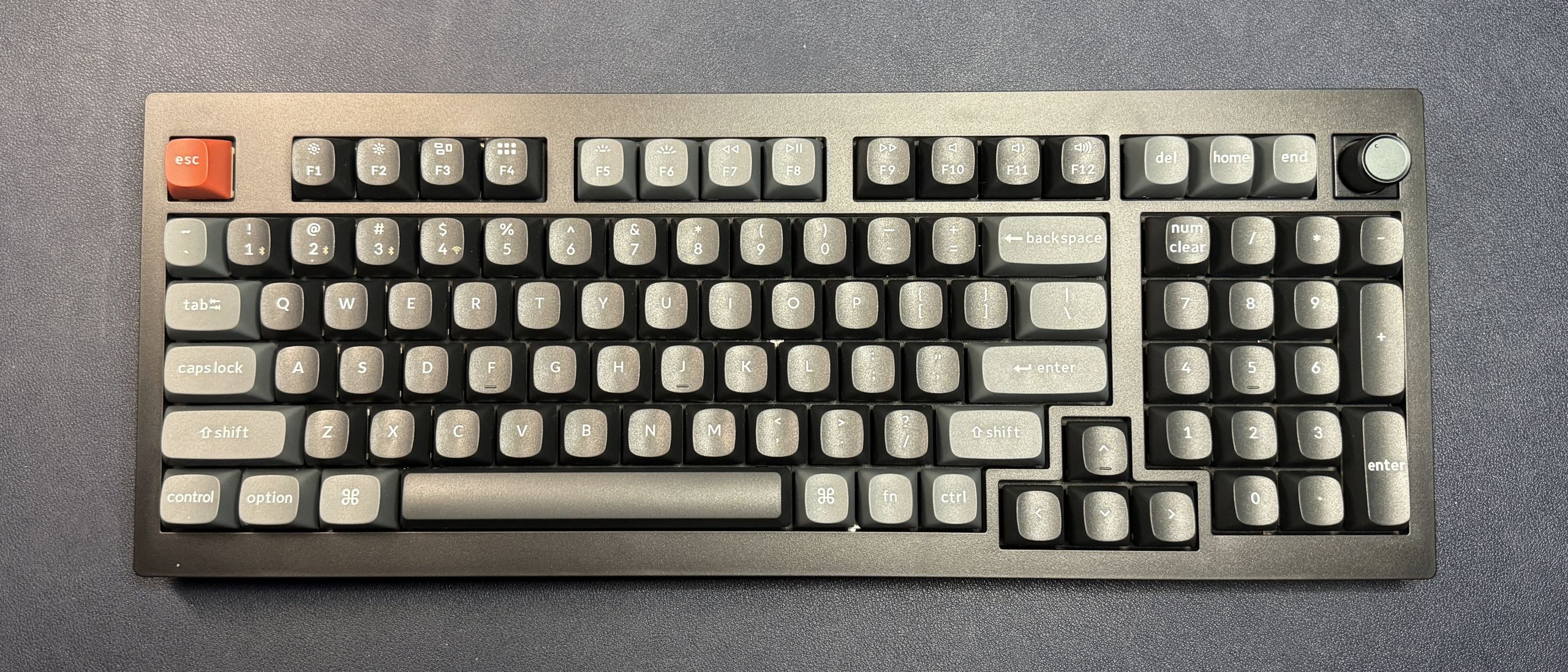
The V5 Ultra 8K comes with Keychron's Silk POM mechanical switches in red (linear), brown (tactile), or banana (tactile). Our review unit came with banana switches, which have an actuation force of 57g and a total travel distance of 3.4mm. While I didn't love the extremely light tactility of the brown tactile switches in the Keychron Q6 Ultra 8K , the banana tactile switches have a more traditional tactile feel, with a light but noticeable tactile bump on the way down, and no audible "click."
Typing on the V5 Ultra 8K was a relatively pleasant experience — the switches still weren't my favorite, but they were smooth and stable and relatively easy to get used to. The OSA profile of the keycaps also helped — OSA keycaps are relatively close to OEM height, but slightly lower than KSA-profile keycaps (like we saw on the Q6 Ultra 8K), with wider, flatter tops and less aggressive angling. Typing on the V5 Ultra 8K wasn't quite like typing on a keyboard with Cherry-profile keycaps, but it was much more comfortable, for me, than typing on the Q6 Ultra 8K.
Of course, the V5 Ultra 8K features a hot-swappable PCB and comes with a keycap/switch puller, so it's pretty easy to swap in your own switches and keycaps, if you like. Keycaps and switches aside, the V5 Ultra 8K feels nice, thanks to its flexible gasket mount, and sounds decent, too — the case is pretty well-dampened, and the polycarbonate plate gives you a bright, crisp sound.
Gaming on the V5 Ultra 8K is solid, thanks to its N-key rollover and high 8,000 Hz polling rate, though serious gamers will probably want to opt for red (linear) switches instead of tactile switches. The V5 Ultra 8K does have plenty of extra keys thanks to its 96-percent layout, but if you're used to a full-size board, the layout may still throw you off. (I can't really get used to the location of the arrow keys on 96-percent boards, no matter how much I use them).
The V5 Ultra 8K is configurable via Keychron's web-based Keychron Launcher, which you'll need to connect to via a wired connection. You can use the Keychron Launcher to remap keys, set up "Snap Action" (Keychron's software-based version of SOCD), and customize the backlighting.
(Image credit: Tom's Hardware) (Image credit: Tom's Hardware) (Image credit: Tom's Hardware) (Image credit: Tom's Hardware) (Image credit: Tom's Hardware) (Image credit: Tom's Hardware) (Image credit: Tom's Hardware) (Image credit: Tom's Hardware) (Image credit: Tom's Hardware) (Image credit: Tom's Hardware) (Image credit: Tom's Hardware) There are several customizable lighting presets you can pick from, or you can choose per-key lighting, which lets you pick the color (and effect, though the effects are more limited) of each key individually. There's also an option for "mix RGB," which lets you set up two different RGB zones on the keyboard.
While it's not quite as robust as the layered lighting effects you can get from gaming peripherals apps, such as Razer's Synapse or Corsair's iCUE, the ability to customize per-key RGB is more advanced than you'll find on keyboards that rely on QMK / VIA for customization.
(Image credit: Tom's Hardware) (Image credit: Tom's Hardware) You can also use the Keychron Launcher to update the firmware, test keys after hot-swapping switches, and record and manage macros.
Of course, one of the big selling points of the V5 Ultra 8K is its battery life — it gets up to 660 hours of wireless battery life over a 2.4GHz wireless connection with an 8,000 Hz polling rate (with the lighting turned off). Unlike the Q6 Ultra 8K, the V5 Ultra 8K ships with a standard 1,000 Hz polling rate out of the box — you'll need to connect to Keychron Launcher and switch the polling rate to 8,000 Hz manually (and you'll need to do this for both the wired and wireless connections, which have separate polling rates). Of course, if you want to use the keyboard with the backlighting turned on, the battery life drops significantly, even at the lowest brightness setting, to just 200 hours — which is still pretty good, considering.
If you don't mind the cramped 96-percent layout, the Keychron V5 Ultra 8K might just be everything you want in a keyboard — it's got all the keys you could ask for, an unnecessarily high polling rate, crazy-long battery life, and it's not too expensive, at just $120. And there's not a ton of competition, because 96-percent layouts aren't terribly common. There's the recently-launched Asus ROG Strix Morph Wireless , which has a similar all-plastic build and hot-swappable PCB, but lacks the 8K polling rate and somehow still manages to get worse battery life (590 hours vs. the V5 Ultra 8K's 660, so it's not that much worse) — and costs $20 more. And there's our long-time favorite Asus ROG Strix Scope II 96 Wireless , which has a better build and a higher price tag (though it's currently on sale for just $136 at Amazon ).
Sarah Jacobsson Purewal is a senior editor at Tom's Hardware covering peripherals, software, and custom builds. You can find more of her work in PCWorld, Macworld, TechHive, CNET, Gizmodo, Tom's Guide, PC Gamer, Men's Health, Men's Fitness, SHAPE, Cosmopolitan, and just about everywhere else. ","collapsible":{"enabled":true,"maxHeight":250,"readMoreText":"Read more","readLessText":"Read less"}}), "https://slice.vanilla.futurecdn.net/13-4-20/js/authorBio.js"); } else { console.error('%c FTE ','background: #9306F9; color: #ffffff','no lazy slice hydration function available'); } Sarah Jacobsson Purewal Social Links Navigation Senior Editor, Peripherals Sarah Jacobsson Purewal is a senior editor at Tom's Hardware covering peripherals, software, and custom builds. You can find more of her work in PCWorld, Macworld, TechHive, CNET, Gizmodo, Tom's Guide, PC Gamer, Men's Health, Men's Fitness, SHAPE, Cosmopolitan, and just about everywhere else.
Key considerations
- Investor positioning can change fast
- Volatility remains possible near catalysts
- Macro rates and liquidity can dominate flows
Reference reading
- https://www.tomshardware.com/peripherals/mechanical-keyboards/SPONSORED_LINK_URL
- https://www.tomshardware.com/peripherals/mechanical-keyboards/keychron-v5-ultra-8k-review#main
- https://www.tomshardware.com
- Rethinking AI TCO: Why Cost per Token Is the Only Metric That Matters
- YMTC's third Wuhan fab clears Beijing's 50% local tooling threshold as two more are planned — move positions company toward 3D NAND production to capitalize on
- Quantum photonics roadmap — how Xanadu and PsiQuantum are looking to transfer qubits through beams of light
- Broadcom to supply Meta with custom silicon through 2029 — Broadom CEO Hock Tan departs Meta's board
- From RTX to Spark: NVIDIA Accelerates Gemma 4 for Local Agentic AI
Informational only. No financial advice. Do your own research.