
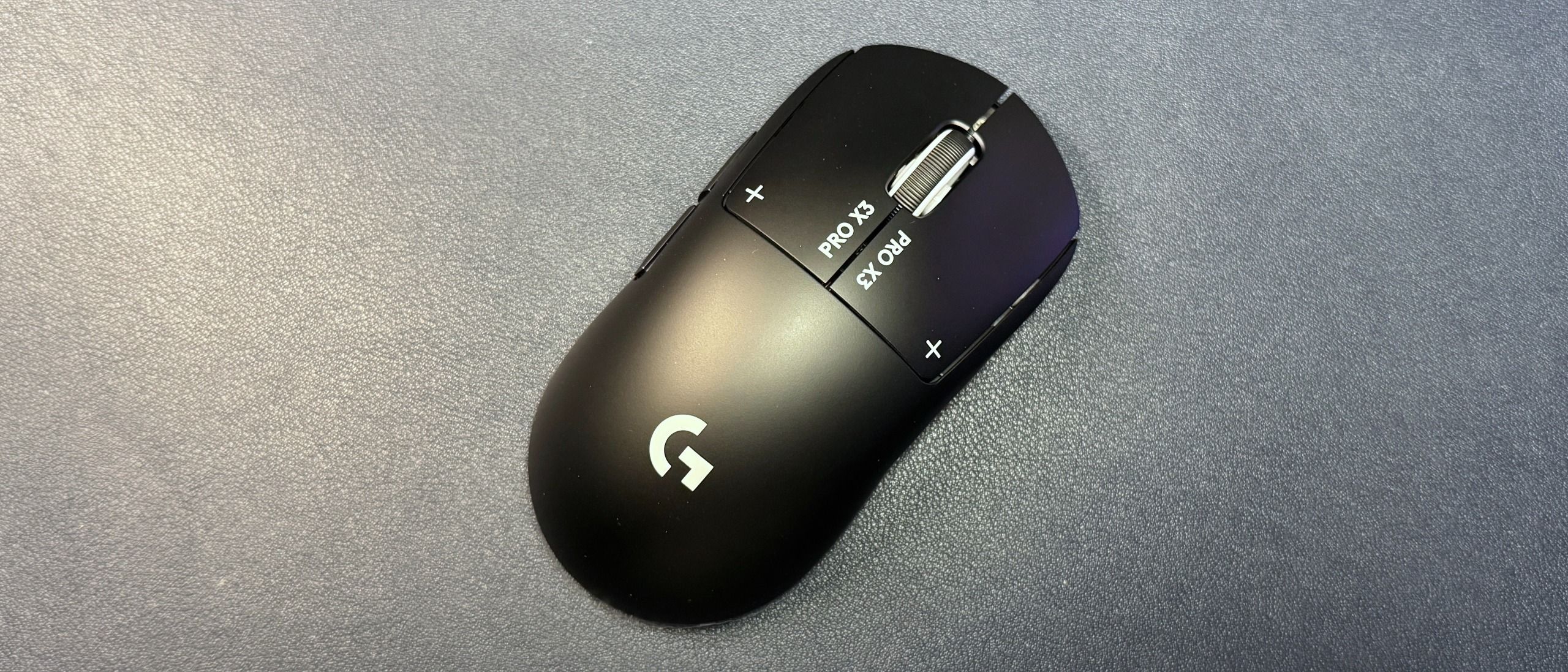
The G Pro X3 Superstrike features Logitech's Hero 2 optical sensor, which has a maximum resolution of 48,000 DPI and a maximum speed of 930 IPS, and can handle up to 90 G's of force. If those numbers seem different from the Hero 2 optical sensor in the X2 Superstrike, that's because they are — while both mice have the same sensor, apparently the new NxLOGI chipset in the X3 Superstrike unlocks the true potential of said sensor, and allows for higher resolution, speed, and acceleration. That said, it is a great sensor — accurate, consistent, and able to track on virtually any surface without skipping.
Like the X2 Superstrike, the X3 Superstrike features Logitech's Haptic Inductive Trigger System (HITS), which means there are no switches under the primary buttons — instead, there's a combo of haptic motors and inductive sensors that allow for adjustable actuation and create the illusion of a mouse click. This is the most intriguing part of the Superstrike line, since raising the actuation point genuinely does translate to faster, more responsive clicks.
The haptic click feedback is interesting. I found the feedback to be surprisingly convincing on the X2 Superstrike, even though it's still pretty obvious that it's not a "real" switch. The click feedback on the X3 Superstrike is still… fairly convincing, but it's definitely softer than the feedback on the original. You can still adjust the feedback level (five levels), but feedback just feels firmer on the original — I guess Logitech sacrificed some haptic power for efficiency, or something. The side buttons still have regular switches, and they're a little mushy but otherwise inoffensive. The scroll wheel has a very soft scroll and muted click, but at least it's not loud. In fact, this is probably the quietest mouse I've ever used — even with click strength set to the highest (5), it's barely audible.
In addition to adjustable actuation, the X3 Superstrike also allows for Rapid Trigger, which resets the mouse button's actuation as soon as your finger lifts, allowing for even faster clicks.
The G Pro X3 Superstrike is configurable via Logitech G Hub, which is the company's universal peripheral software. You can use G Hub to adjust the mouse's settings — DPI, DPI steps, and polling rate (both wired and wireless) — calibrate the mouse, and remap buttons (though you're probably not remapping a ton of buttons on a five-button mouse). You can also enable BHOP for the scroll wheel, which helps prevent accidental movement when you bump the scroll wheel.
(Image credit: Tom's Hardware) (Image credit: Tom's Hardware) (Image credit: Tom's Hardware) (Image credit: Tom's Hardware) (Image credit: Tom's Hardware) Image 1 of 5 View Original
And, of course, you can set up the HITS features in the HITS tab. These include adjustable actuation, Rapid Trigger, and click haptics, and each mouse button can be set independently. There's also a bunch of presets from professional competitive gamers, in case you're not sure where to start (you can also add your own custom presets to this list).
Logitech rates the battery life of the G Pro X3 Superstrike at 135 hours in constant motion, which is actually a pretty big improvement over the X2 Superstrike's 90-hour rating. This is over a 1,000 Hz polling rate, of course, and the number drops to under 40 hours with an 8,000 Hz polling rate (which is still not terrible, I suppose). Thankfully, the X3 Superstrike can get an 8,000 Hz polling rate over both its wired and wireless connections — the X2 Superstrike has an 8,000 Hz wireless polling rate but maxes out at 1,000 Hz when plugged in — so it won't be the battery life that does you in.
The G Pro X3 Superstrike isn't too different from the X2 Superstrike — but the difference in balance, at least, is absolutely noticeable. This doesn't make me think the X3 Superstrike is revolutionary, though it makes me think that Logitech should have waited and launched the Superstrike line with this mouse. The click haptics are weaker here, but the mouse is better overall. However, is it better enough to justify the $200 price? Probably not.
If you're at the top of your game and you're absolutely certain that the only thing holding you back is the minuscule latency from non-adjustable actuation, sure, get the X3 Superstrike. If you already have the G Pro X2 Superstrike , the upgrade probably isn't worth it — in the time it took you to get used to the click haptics, you probably also got used to the balance, and that's the only noticeable difference. And if you're just looking for a symmetrical, ultra-lightweight mouse, you can always pick up the G Pro X Superlight 2 , which can often be found for around $100.
Sarah Jacobsson Purewal Social Links Navigation Senior Editor, Peripherals Sarah Jacobsson Purewal is a senior editor at Tom's Hardware covering peripherals, software, and custom builds. You can find more of her work in PCWorld, Macworld, TechHive, CNET, Gizmodo, Tom's Guide, PC Gamer, Men's Health, Men's Fitness, SHAPE, Cosmopolitan, and just about everywhere else.
Lamarr the Strelok Great review as always but I agree 200 is too much for it. Reply
Key considerations
- Investor positioning can change fast
- Volatility remains possible near catalysts
- Macro rates and liquidity can dominate flows
Reference reading
- https://www.tomshardware.com/peripherals/gaming-mice/SPONSORED_LINK_URL
- https://www.tomshardware.com/peripherals/gaming-mice/logitech-g-pro-x3-superstrike-review#main
- https://futureplc.com/privacy-policy/
- Corsair has slashed $180 off its blistering MP700 SE Gen 5 SSD
- Combined OpenSSH and musl-libc flaws let anyone into Alpine Linux and other distros by typing anything over 256 characters as a password
- Nvidia can only fulfill 1% of China’s massive $70 billion GPU order for AI chips, report claims
- How Companies Are Using NVIDIA DSX to Break the Power Bottleneck
- Hackers target French blood service fridges following supermarket attacks
Informational only. No financial advice. Do your own research.