
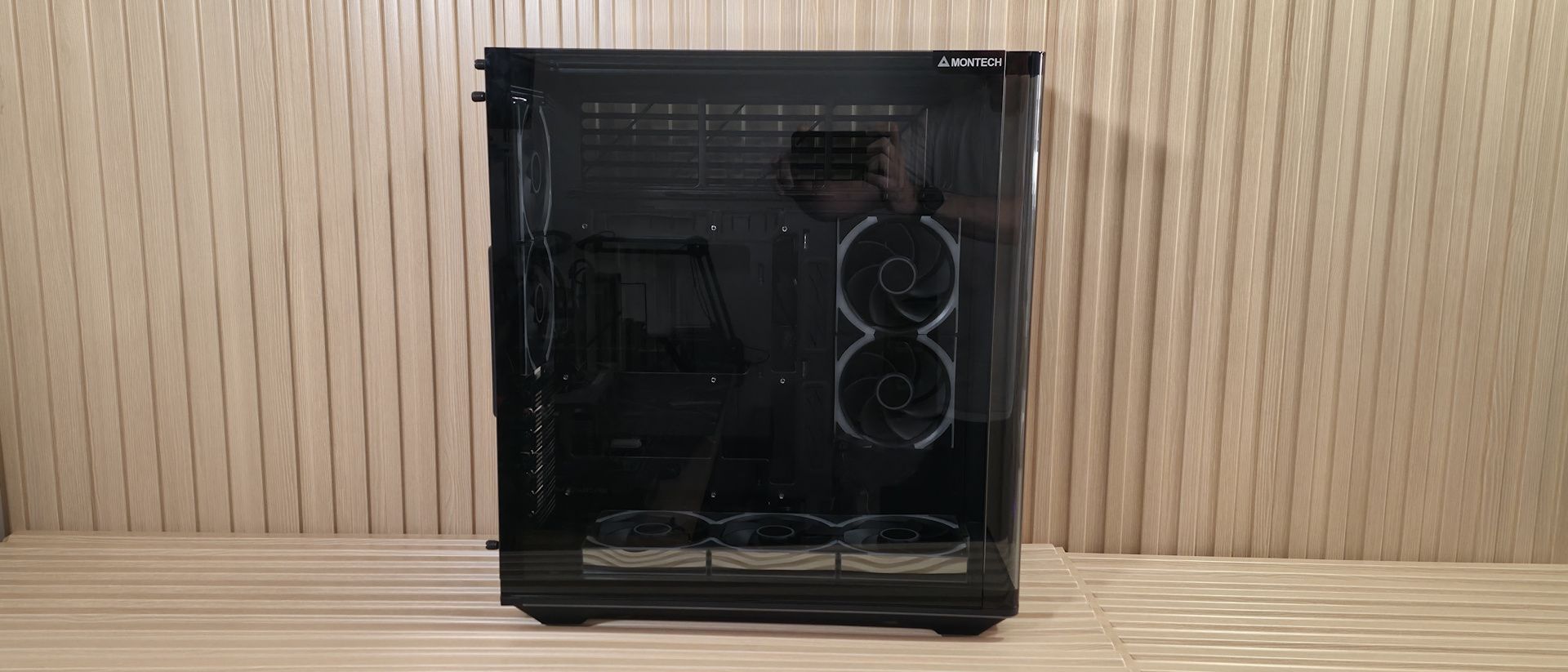
(Image credit: Future) (Image credit: Future) (Image credit: Future) Image 1 of 3 View Original
At the top, we get a better look at the third windowed panel, letting observers peer into the case from a different angle rather than straight on or from the front. We can also see the tiered top and part of the long RGB strip. Taking this panel off isn’t as simple as the rest. Yes, it’s also secured by two captive thumbscrews on the back, but to remove it, you’ll need to open the main window panel to expose a retaining screw, remove it, then loosen the back thumbscrews and slide it to the rear. After you remove the top glass, you can remove the upper and side retaining screws to take it out. When building, I didn’t find this necessary, but it’s good to know you can take it apart if needed.
Looking at the case from behind, one of the first things I noticed was the vertical PSU mounting location on the left. This space supports up to 220mm power supplies, which is all but the largest on the market. On the right, we see space for two 120mm fans, the motherboard I/O, and seven horizontal expansion slots. Unfortunately, Montech says the King 95 3D does not support vertical GPUs.
Underneath the case, there isn’t a lot going on. We get a better look at the four short rubber-bottom ‘feet’ and the removable dust filter. Montech put on its thinking cap and designed the dust filter to slide out from the front, so chances are you won’t have to move your heavy case to clean it.
Inside, the case uses a dual-chamber design, with the power supply and all wires hidden behind the motherboard tray. At the bottom, we see three Link Fan INF 120s (reverse blade) along with the mirror finish. The magnetically linked, daisy-chainable fans run up to 2,300 RPM (2,200 RPM on the reverse blade), pushing between 65-67 CFM with a maximum rating of 32dBA (29 dBA on the standard blade). A single Link Fan INF 120 costs $19.90, while a 3-pack (with Lumi Hub) is $64.90 . If you do the math for seven fans and the Lumi Hub, it’s cheaper to buy them with the case rather than separately.
When powered on, the mirrored sides become an infinity panel, and with all seven matching, it creates a consistent view across the build. The bottom fan bracket is adjustable, with three positions (8 degrees). We left it down during testing, but with it up, you can focus more air towards the GPU and show off whatever fans you put in the space.
The motherboard tray has plenty of cutouts to access the back of the motherboard for easy installation/removal of air coolers or AIO/custom water-cooling blocks. The case also supports rear-connect ecosystems, including Asus BTF, Gigabyte Stealth , and MSI Project Zero boards. Grommets surround the motherboard tray and are in ideal locations, but like most, they pull out easily when you try to route cables, especially those with larger connectors. I wish all case vendors would secure these better, since they're a pain to reinstall, especially when the case is full of cables. Up top, we can see the huge gap above the motherboard tray for more fans and radiators. The case cooled just fine with the seven included fans and our air cooler, though GPU temps ran a bit warmer in our noise-normalized testing. That top gap is begging to be filled with fans, even if only for aesthetics. If you plan to use an AIO cooler, this isn’t a problem, since the radiator/fans will fill the space.
(Image credit: Future) (Image credit: Future) (Image credit: Future) (Image credit: Future) (Image credit: Future) Image 1 of 5 View Original
From the front, you can see the two Link INF 120mm fans and, at the bottom, the tool-less, adjustable GPU support strut. The back has space to mount two 120mm fans or one 120mm radiator. You can also see the seven horizontal expansion slots held in by thumbnail screws.
Inside, the top of the case above the motherboard space fits up to three 120mm fans or a 360mm radiator. The space is offset back from the motherboard tray, which is a boon for cable management. Normally, there’s barely any room to route the EPS cables, but here there's plenty. Just note that if your build uses air cooling, you will need to fill that area with fans to make it look good. Otherwise, it’s just a blank open space above the motherboard.
(Image credit: Future) (Image credit: Future) (Image credit: Future) Image 1 of 3 View Original
On the rear side of the chassis, we get a good look at the space behind the motherboard tray and the fan baffles. There’s plenty of room to route cables, and Montech has multiple pre-installed Velcro straps for cable routing. Even with the power supply installed, there’s plenty of room underneath it to stash excess cables.
At the bottom, we see a simple ARGB hub that consolidates the three different ARGB cables from the fans into one header to control all of them. Montech also includes a magnetic Lumi fan/RGB hub (which supports up to 13 Link Fans total) with both the Pro and non-Pro variants. Oddly, it comes loose/uninstalled on the Pro, but installed on the non-Pro. The box in the lower-right holds one 3.5-inch HDD and a single 2.5-inch drive. The second 2.5-inch drive mounts in the other location at the bottom left, next to the side fans.
We do like the look of the King 95 3D Pro case in black, and I bet it looks great in white with an all-white build too. The curved glass and 3-panel panoramic interior views are great for anyone who’d like to show off their now-ridiculously expensive parts. The included Link Fan INF 120 fans work well and run relatively quietly. If there’s an aesthetic drawback, it's that I’m not a huge fan of all the RGB and infinity mirrors on the pre-installed fans. It’s a lot, and it makes me yearn for an option with preinstalled fans and no RGB. Of course, you can turn them off in the software, or buy the non-Pro and choose whichever fans fit your build.
Current page: Features and Specifications
Key considerations
- Investor positioning can change fast
- Volatility remains possible near catalysts
- Macro rates and liquidity can dominate flows
Reference reading
- https://www.tomshardware.com/pc-components/pc-cases/SPONSORED_LINK_URL
- https://www.tomshardware.com/pc-components/pc-cases/montech-king-95-3d-pro-case-review#main
- https://futureplc.com/privacy-policy/
- Things That Go Beep in the Night: Agentic AI Joins the Search for Extraterrestrial Signals
- Practice Makes Precise: At CoRL, NVIDIA and Partners Reveal How Robots Rehearse Delicate Work in Simulation
- Into the Omniverse: How Developers Turn Ideas Into Simulations With Frontier AI Agents
- Grab this GameSir Super Nova wireless controller at a record-low Amazon price, now under $40
- Ukrainian drone operations squeezed by fiber optic cable shortage triggered by AI data center buildouts
Informational only. No financial advice. Do your own research.