
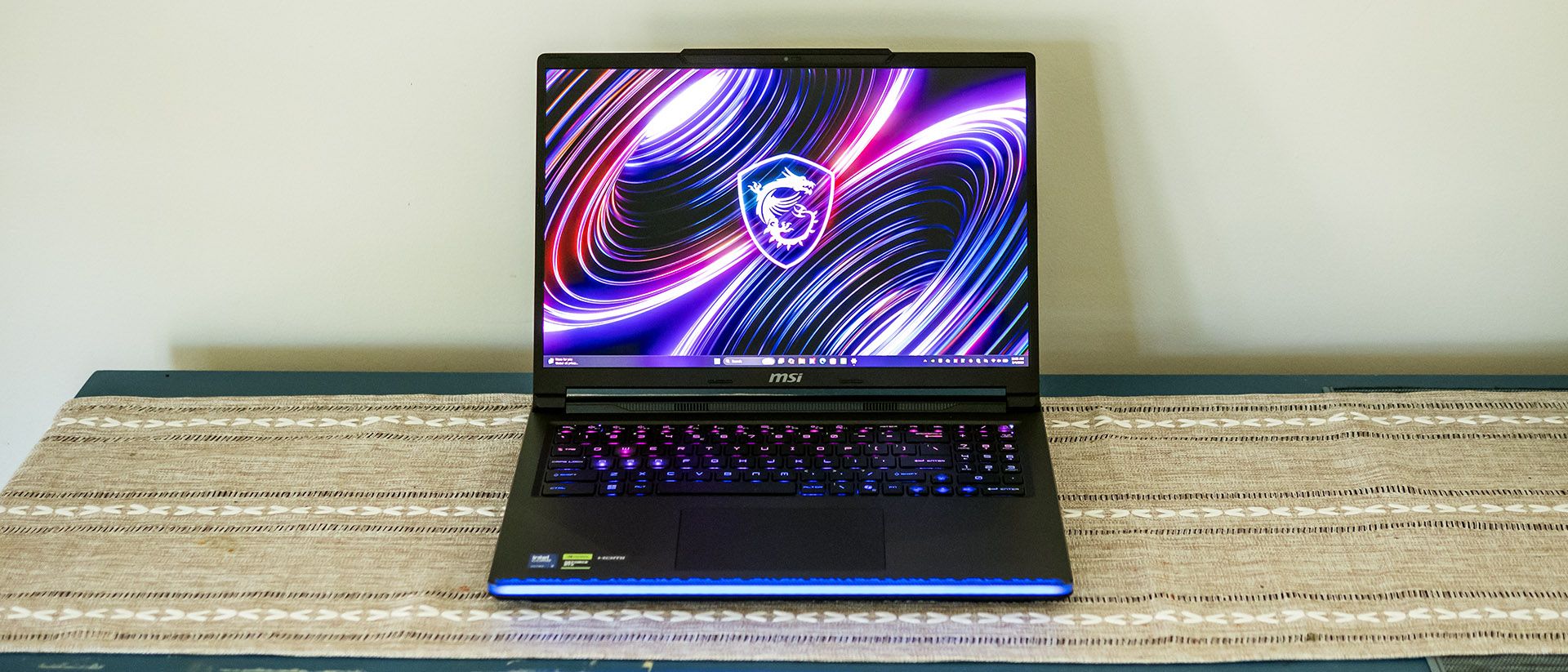
Playing F1 24 at 2560 x 1600 with Ultra High settings and DLSS disabled, I saw the game average in the mid to low 90s when monitoring frames per second. The Raider didn’t skip a beat.
The high-end gaming laptops in our comparison lineup include the Alienware 16 Area-51 (Core Ultra 9 290HX Plus, RTX 5080 175 W, $4,309), Asus’ ROG Strix Scar 16 (Core Ultra 9 275HX, RTX 5080 175 W, $3,299), and Razer’s last-gen Blade 18 (Core Ultra 9 275HX, RTX 5090 175 W, $5,199). All share the same class of CPU, with our MSI and the Alienware sporting the Arrow Lake Refresh chips, and all use an Nvidia RTX graphics card with a maximum graphics power rating of 175 W.
Our comparisons focus on FPS at 1920 x 1080, but we also included results at each laptop’s native resolution, which was 2560 x 1600 for all except the Razer’s 3840 x 2400.
(Image credit: Tom's Hardware) (Image credit: Tom's Hardware) (Image credit: Tom's Hardware) (Image credit: Tom's Hardware) (Image credit: Tom's Hardware) (Image credit: Tom's Hardware) On Shadow of the Tomb Raider at the Highest detail preset, the Raider’s 197 FPS at 1080p was second only to the Razer (213 FPS) and edged ahead of the Alienware (191 FPS). The Raider produced the best numbers at native resolution, with 134 FPS next to the Alienware’s 116 FPS and the Asus’ 112 FPS. These differences are slight but show that the RTX 5090, which is also present in the Razer, offers a touch more performance than the RTX 5080 found in the Alienware and Asus.
Running Cyberpunk 2077 at the Ray Tracing Ultra preset, the RTX 5090 laptops continued distinguishing themselves, with the Raider again topping the charts. Its 70 FPS was just behind the Razer (74 FPS) but well ahead of the Alienware (63 FPS) and Asus (61 FPS). It maintained that lead at native resolution, producing 42 FPS against Alienware’s 39 FPS and Asus’ 35 FPS.
Moving to Far Cry 6 at the game’s Ultra preset, these laptops produced mostly indistinguishable performance, though the Raider slightly edged ahead of the Alienware and Asus at 1080p.
The Raider continued its strong performance in Red Dead Redemption 2 at Medium settings, where its 130 FPS at 1080p outpaced the Alienware’s 123 FPS but was just shy of Razer’s 132 FPS. Meanwhile, it dominated native resolution, with 90 FPS against the 77 FPS each produced by Alienware and Asus.
Testing Borderlands 3 at the “Badass” preset, the Raider tied with Razer with 189 FPS for the highest 1080p number, clearly surpassing the Alienware (164 FPS) and Asus (156 FPS). This gap is wider than we saw in some of the other games.
MSI’s Raider delivers excellent gaming performance, landing neck-and-neck with the larger Blade 18. Its RTX 5090 delivers marginal but measurable performance advantages over Alienware’s RTX 5080 system, which runs at the same maximum graphics power. That said, the differences might not be noticeable to most gamers; MSI also offers this laptop with RTX 5080 for about $600 less. The RTX 5090’s other differentiator is its larger 24GB frame buffer versus the RTX 5080’s 16GB, though the latter is already more than enough for today’s games.
We stress test gaming laptops running 15 loops of the Metro Exodus stress test at RTX settings. During the test, the Raider averaged 142.3 FPS across all runs with almost no variance, starting the first loop at 143.5 FPS and finishing the final loop at 142.8 FPS. The Core Ultra 9 290HX Plus averaged 4.51 GHz on its P-cores and 2.59 GHz on its E-cores while the RTX 5090’s average boost clock was 1.99 GHz.
We evaluated the Raider with a Core Ultra 9 290HX Plus processor, 32GB of RAM, and a 1TB SSD. It’s notable MSI includes a PCIe 4.0 drive, not a PCIe 5.0 drive as we’d expect in a high-end gaming laptop. (One of its two M.2 slots supports PCIe 5.0 drives, MSI simply doesn’t equip it with a PCIe 5.0 drive.)
(Image credit: Tom's Hardware) (Image credit: Tom's Hardware) (Image credit: Tom's Hardware) In Geekbench 6, these laptops are essentially neck-and-neck, though the refreshed Core Ultra 9 290HX Plus chips in the Raider and Alienware perform marginally better than the Core Ultra 9 275HX in the others. The real-world differences between these chips will likely go unnoticed.
In our 25GB file transfer test, MSI’s Raider performed well below par, with 1,357.93 MBps against the next-fastest Asus, with 1,841.41 MBps, and nowhere near the Alienware’s 2,738.9 MBps.
The Raider bounced back in Handbrake, completing the test in the shortest time at 1 minute and 51 seconds. The Alienware was the next quickest at an even two minutes, with the Razer (2:07) and Asus (2:24) trailing.
The Raider’s 2560 x 1600 OLED display is one of its best features, offering a world-class picture for multimedia and everything else. Watching Blade Runner 2049 , I noticed subtle creases on K’s trench coat, mesmerizing colors on Joi’s holograph, and the intricate detail in Wallace’s eyes. I also admired the searing brightness of my lightsaber and the feel of total blackness in caves and unlit rooms in Star Wars Jedi: Fallen Order . The 240 Hz refresh rate translates to smooth scrolling and no frame tearing. For immersion in any kind of media, this screen is sure to please.
These laptops use different screen technologies – OLED for the MSI and Alienware and mini-LED for the Asus and Razer. OLED demonstrates better color coverage, with the Raider’s 86.1% higher than Asus’ 81.2% and Razer’s 80% but not quite matching the Alienware’s 93.7%. However, the Raider’s 456-nit peak brightness was much sunnier than the Alienware’s 369 nits and practically tied the Asus and Razer.
In our HDR testing, not shown in the charts, the Raider’s 40% average was 991 nits and 100% average was 600 nits.
MSI’s keyboard prioritizes gaming and makes some curious layout choices in the process. There’s no left Fn key, which has been moved next to the arrow keys. Oddly, another slash key is there, too. The MSI Center app allows toggling the Windows key and/or swapping it with the Fn key, but those use to left-handed Fn and Windows key shortcuts will need to adjust.
The arrow keys are full-size but the three-column number pad isn’t, which has a strange layout and tiny keys – it probably should have been left out in favor of dedicated macro or media control keys. Macros can still be configured in the SteelSeries GG app, but nothing beats dedicated keys.
Typing feel is quite satisfying, though, with a crisp keypress, just enough travel, and a rigid deck. I managed 119 words per minute with 99% accuracy in my usual MonkeyType run. A mechanical keyboard might further improve the typing experience; alas, MSI doesn’t offert one on this model, though Alienware does on its Aurora..
Keyboard backlighting is also more than bright enough and customizable in per-key RGB fashion, with patterns and layered effects using SteelSeries GG. In another gaming flourish, the WASD and arrow keys are transparent and appear extra bright.
MSI’s touchpad is also superb. Though it’s top-hinged rather than haptic, it clicks predictably and has plenty of surface area relative to the 16-inch display.
MSI’s built-in speakers satisfy casual listening. User-facing in the screen hinge, they project well even if the laptop isn’t on a solid surface. Bass doesn’t thump but is present, adding a sense of immersion in games and movies. The included Nahimic audio app provides equalizers that make the speakers sound much fuller than they would otherwise be, though beyond enabling the basic preset for Movies, Music, or Gaming, I didn’t hear a benefit to tweaking the other settings, such as bass and treble boost.
In Blade Runner 2049 , I could hear the subtle strain in Lieutenant Joshi’s voice as she was being interrogated and the delicate patter of rainfall on the city streets. The Movie equalizer proved useful here, though I disabled the volume leveling feature as it made quiet scenes too loud. I also appreciated the audio in Star Wars Jedi: Fallen Order , from the crunch of my footsteps over rocks to the piercing ignition of my lightsaber.
MSI simplified the Raider’s upgradeability by housing all common components under a dedicated upgrade panel, secured with two Philips-head screws.
Behind the panel are the two SODIMM slots and two M.2 2280 PCIe slots, making these upgrades simple.
Removing the entire bottom panel is necessary to access the 92 Whr battery and the M.2 2230 wireless card. After removing the Philips-head screws around the edges, all of which are the same length, I found there was one more in the center under the upgrade panel that was hard to spot. Finding a gap between the chassis halves where I could fit my trim removal tool proved challenging, but I was able to make one along the LED lightbar on the front edge. The panel popped free after I freed the clips along the edges.
Our battery test consists of web browsing, running OpenGL tests, and streaming videos with the screen at 150 nits while connected to Wi-Fi. The Raider distinguished itself with a commanding time of 8 hours and 34 minutes, over two hours more than the Asus (6:30) and totally outclassing the Alienware’s 3:33.
We measure gaming laptop surface temperatures while running the 15 loops of our Metro Exodus stress test. During the test, the Raider peaked at 87 degrees Fahrenheit between the keyboard G and H keys, 74 F on the touchpad, and 109 F on the underside towards the exhaust vents. Internally, the Core Ultra 9 290HX Plus ran at 75 degrees Celsius across all cores while the RTX 5090 averaged 72 C.
Fan noise is well-controlled on the Raider – while gaming, the laptop’s built-in speakers are able to overpower the fan noise, and the fans are hardly noticeable for everyday tasks.
Minimal software is included on the Raider. MSI Center provides hardware monitoring, support access, and settings: the Windows key can be toggled and/or swapped with the Fn key, and there’s a toggle for USB power share. The app also provides power profiles for Extreme Performance, Balanced, or Eco (Silent), and features a MUX switch for disabling the onboard graphics.
Tinkering with the keyboard and external lighting is done through the familiar SteelSeries GG app, which sees the Raider as a device. Preset lighting patterns and color themes are included, and the app provides in-depth settings for creating your own, including layered effects.
MSI backs the Raider with a one-year warranty.
Key considerations
- Investor positioning can change fast
- Volatility remains possible near catalysts
- Macro rates and liquidity can dominate flows
Reference reading
- https://www.tomshardware.com/laptops/gaming-laptops/SPONSORED_LINK_URL
- https://www.tomshardware.com/laptops/gaming-laptops/msi-raider-16-max-hx-review#main
- https://www.tomshardware.com
- China says 'world's first' offshore wind-powered underwater data center has entered full operation, houses 2,000 servers — 24 megawatt subsea AI facility uses o
- HyperX FlipCast Review: For the gamer-podcaster
- Grab this $8.97 TP-Link Ethernet Switch to ditch Wi-Fi lag and unlock 4K streaming and gaming at home — huge 47% discount for compact, fanless gigabit device wi
- College students drown out AI-praising commencement speeches with boos — 'deal with it' one speaker fires back as students heckle positive pitches for AI's role
- Grab this $8.97 TP-Link Ethernet Switch to ditch Wi-Fi lag and unlock 4K streaming and gaming at home — huge 47% discount for compact, fanless gigabit device wi
Informational only. No financial advice. Do your own research.