
(Image credit: Tom's Hardware) (Image credit: Tom's Hardware) Image 1 of 2 View Original
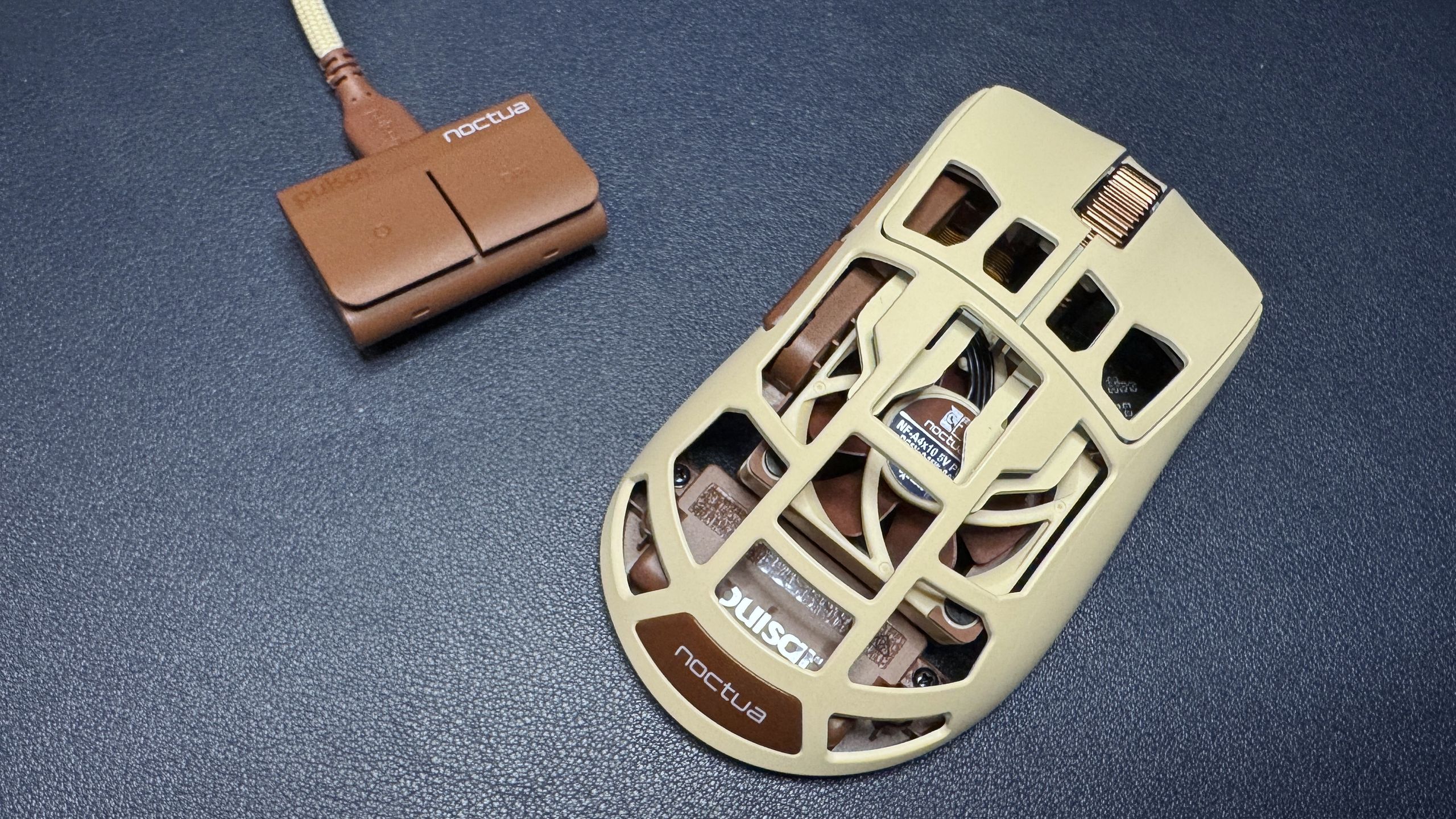
I'll admit I was a bit skeptical about the fan — I'm not really a person who suffers from sweaty palms while I'm gaming, however, so I'm aware I'm not the target audience. But as someone who is not the target audience, I have to say that the fan is actually pretty cool (pun intended). It's small, yes, but you can definitely feel it — and even though I don't sweat much, it still felt pretty good. The fan has four speeds, and the first two are practically silent. You can hear the two fastest speeds, but it's not particularly loud — you'll notice it, but those around you probably won't.
Activating the fan using the two side buttons and scroll wheel was easy enough, though the side buttons will activate when you press them, so it's not perfect. You can also turn on and adjust the fan speed in the software and/or you can program one of the buttons on the dongle to cycle through speeds.
If you do get sweaty palms while gaming, or you just happen to live and game in a hot environment, the fan in this mouse definitely works. It takes a toll on battery life, of course, but you can always plug it in. That said, that part of the mouse is practically non-existent, the holes are so big (it's even more full of holes than the Corsair Sabre v2 Pro Wireless MG ). The structure of the mouse honestly keeps your hand — or at least your palm — pretty cool, even without a fan.
The F01 Noctua Edition is largely controllable via the hardware, which is nice. The fan can be activated and adjusted by holding down the two side buttons and scrolling, and DPI can be cycled through using the DPI switch button on the bottom of the mouse or the DPI switch button on the wireless dongle. The dongle also has a function button that cycles through onboard profiles by default — so you will need to connect to Pulsar's web-based peripheral software, Bibimbap, if you want to take advantage of this.
(Image credit: Tom's Hardware) (Image credit: Tom's Hardware) (Image credit: Tom's Hardware) (Image credit: Tom's Hardware) (Image credit: Tom's Hardware) (Image credit: Tom's Hardware) Image 1 of 6 View Original
With Bibimbap — which you can connect to wirelessly — lets you remap keys (there are five programmable buttons, including the scroll wheel click) and has a built-in macro recorder. You can also adjust various settings, including DPI steps (up to 6), polling rate (ships with 1,000 Hz and goes up to 8,000 Hz), LOD or liftoff distance, and debounce time. You can also turn on the fan from this app, if you want. You can save up to five profiles directly on the mouse and cycle through them with the function button, or you can remap the function button to cycle through polling rate, LOD, debounce time, motion sync, turbo mode, and fan mode. That last one just does the same thing that holding down both mouse buttons and scrolling does, but it doesn't accidentally activate the side button functions.
The F01 Noctua Edition features two forms of connectivity: 2.4GHz wireless and wired (via USB-C). It doesn't have any RGB lighting, but it does have a built-in 40mm 5V PWM NF-A4x10 fan with four different speed settings. Oh, and an 8,000 Hz polling rate. Needless to say, its battery life varies quite a bit, depending on how you have it set up. Its built-in battery is 500mAh, which is… well, don't expect much when it comes to battery life. Based on my observations as I tested the mouse, I think you'll still be able to eke out a full day's worth of usage if you have the fan running at top speed, which is not a lot compared to most wireless mice, but not bad, considering.
The F01 Noctua Edition is a very well-built lightweight gaming mouse, but its main selling point is definitely the built-in fan. And the built-in fan works pretty well — I was definitely impressed, even if I don't see myself using it very often (or at all, really). But if you don't need a mouse with a built-in fan, it's hard to recommend the F01 Noctua Edition over just about any other lighter, more affordable mouse, including Pulsar's own fan-free Feinmann F01 . The Corsair Sabre v2 Pro Wireless , for example, weighs just 56g and has a shell full of holes, gets up to an 8,000 Hz polling rate and retails for $149.99.
Sarah Jacobsson Purewal is a senior editor at Tom's Hardware covering peripherals, software, and custom builds. You can find more of her work in PCWorld, Macworld, TechHive, CNET, Gizmodo, Tom's Guide, PC Gamer, Men's Health, Men's Fitness, SHAPE, Cosmopolitan, and just about everywhere else. ","collapsible":{"enabled":true,"maxHeight":250,"readMoreText":"Read more","readLessText":"Read less"}}), "https://slice.vanilla.futurecdn.net/13-4-25/js/authorBio.js"); } else { console.error('%c FTE ','background: #9306F9; color: #ffffff','no lazy slice hydration function available'); } Sarah Jacobsson Purewal Social Links Navigation Senior Editor, Peripherals Sarah Jacobsson Purewal is a senior editor at Tom's Hardware covering peripherals, software, and custom builds. You can find more of her work in PCWorld, Macworld, TechHive, CNET, Gizmodo, Tom's Guide, PC Gamer, Men's Health, Men's Fitness, SHAPE, Cosmopolitan, and just about everywhere else.
Key considerations
- Investor positioning can change fast
- Volatility remains possible near catalysts
- Macro rates and liquidity can dominate flows
Reference reading
- https://www.tomshardware.com/peripherals/gaming-mice/SPONSORED_LINK_URL
- https://www.tomshardware.com/peripherals/gaming-mice/pulsar-feinmann-f01-noctua-edition-review#main
- https://www.tomshardware.com/membership
- This week on Tom's Hardware Premium: August 8, 2026 — Inside China's lithography efforts, co-packaged optics get a spotlight, and Samsung debuts next-gen memory
- Sandisk Optimus GX 7100M 2TB SSD review: The best 2230 drive you can buy for the Steam Deck
- As AI Increases Demands on Memory, Storage Steps Up
- At AI Summit, South Korea Outlines Its AI Future With NVIDIA and Partners
- Pre-modded 22GB RTX 2080 Ti cards surface on eBay for $500 as VRAM-hungry local AI fans chase down every spare FLOP — Hong Kong-based seller offers AI-friendly
Informational only. No financial advice. Do your own research.