
The Basilisk V4 Pro sports Razer's latest optical sensor, which is the Focus Pro 50K Gen-3 optical sensor. It has a maximum resolution of 50,000 DPI and a maximum speed of 930 IPS, and it can handle up to 90 G's of force. This is the third Razer mouse to feature this sensor (others are the Viper V4 Pro and the Naga V3 Pro), and it's a solid sensor that works with Razer's dynamic sensitivity (the sensitivity can be set up to change based on how quickly you move your hand) and rotation tool in Synapse. It tracks well across just about every surface, including glass that's at least 4mm thick.
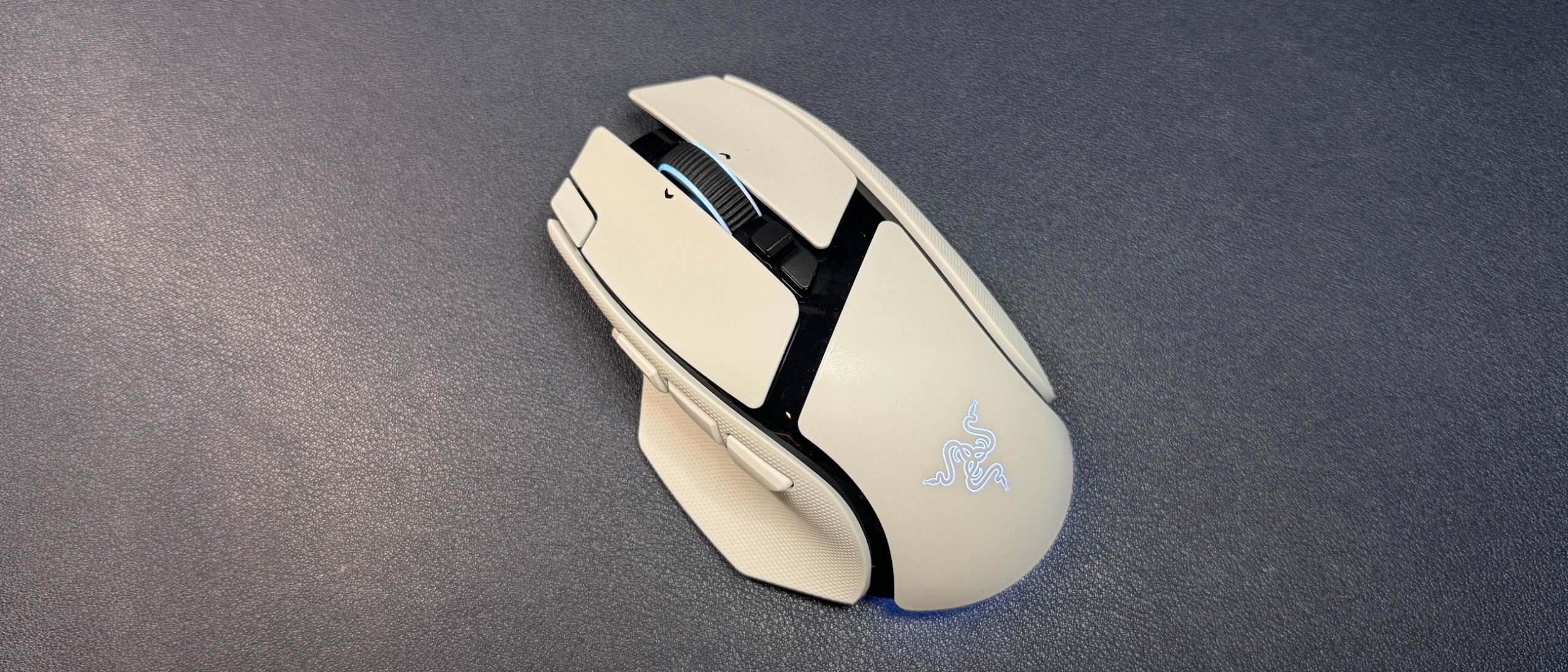
The Basilisk V4 Pro isn't an ultra-lightweight mouse, but its shape and grippiness mean it's pretty easy to pick up and move quickly if you're playing an FPS. The trigger button is right under your thumb, however, so you may accidentally trigger (haha) it if you have a tendency to pick up your mouse a lot. The Basilisk's shape isn't quite as natural-feeling as that of the DeathAdder V4 Pro, but it's a comfortable mouse for a variety of games — from multi-button-needing MMOs to competitive shooters (though, perhaps not for peak competition). While I still take issue with the placement of the new buttons, it is nice to have a few extra buttons without jumping straight to 19.
The Basilisk V4 Pro sports Razer's Gen-4 optical mouse switches, which are rated for over 100 million clicks. The switches have a nice, crisp sound that's not too loud (not as loud as Logitech's, anyway), though it's not a mouse for those trying to minimize mouse clickiness. The primary buttons have a solid, tactile feel, and I had no issues with misclicks or double-clicks while I was testing. While the tilt wheel's free-spin mode was too sensitive for me to get to work properly, I love the precision tactile mode — it blends speed and tactility perfectly.
The Basilisk V4 Pro is programmable with Razer Synapse 4 (not Razer's web-based version of Synapse). You can use Synapse to remap the mouse's 12 programmable buttons (14 programmable controls, if you include scroll up/down; the connection switch button on the bottom of the mouse is not programmable). Synapse has a variety of remap options, as well as a built-in macro recorder / editor. Synapse is also where you'll be able to customize the mouse further by tweaking things like the scroll wheel, DPI stages, and surface calibration. There's also a sensitivity matcher that will match the Basilisk V4 Pro's sensitivity to match that of your old mouse.
(Image credit: Tom's Hardware) (Image credit: Tom's Hardware) (Image credit: Tom's Hardware) (Image credit: Tom's Hardware) (Image credit: Tom's Hardware) (Image credit: Tom's Hardware) Image 1 of 6 View Original
You can also use Razer's Chroma Studio to customize the mouse's lighting and sync it with games and/or your other Razer peripherals. The Basilisk V4 Pro has seven RGB lighting zones: a five-zone underglow strip along the bottom curve of the mouse, as well as one in the scroll wheel and one in the logo on the palm rest. The lighting is bright and the underglow's five zones blend nicely — the underglow strip is tilted outward so it's pretty visible when the mouse is just sitting on your desk.
The Basilisk V4 Pro has three forms of connectivity: 2.4GHz wireless, Bluetooth, and wired (via USB-C), though it doesn't really come with a mouse-ready USB-C cable. Razer rates it at 200 hours of battery life over a 2.4GHz wireless connection with a 1,000 Hz polling rate, which is excellent. This number does drop to 54 hours at an 8,000 Hz polling rate, which is… still pretty good, to be honest.
The Basilisk V4 Pro launched alongside Razer's Mouse Dock V2 Pro, which is a wireless charging dock with built-in RGB lighting and an integrated 8,000 Hz wireless receiver. The Mouse Dock V2 Pro is sold separately for $70, and comes with a wireless charging puck that slots into the bottom of the mouse. It sits on your desk (it's small — 3.28 x 2.2 x 1.71 inches / 83.5 x 56 x 43.5mm) and serves as a magnetic dock and wireless receiver for your mouse. It has eight RGB lighting zones around the base, and it lights up to indicate battery level (flashes red when the battery is low). It's made for the Basilisk V4 Pro and V4 HyperSpeed, but it will also work with the Basilisk V3 Pro 35K , the Basilisk V3 Pro , the Cobra Pro , the Cobra HyperSpeed, the Naga V3 Pro, and the Naga V2 Pro (up to 8,000 Hz polling rate for all except the Naga V2 Pro).
The Basilisk V4 Pro is also compatible with Razer's HyperFlux V2 charging mouse pad , but you'll need to connect to your PC via the mouse's dongle for 8,000 Hz polling.
The Razer Basilisk V4 Pro is an expected update to the Basilisk V3 Pro / 35K. The bump in battery life, from 150 hours in the Basilisk V3 Pro 35K to 200 hours in the Basilisk V4 Pro, is very nice (and 54 hours with an 8,000 Hz polling rate isn't bad, either). While I didn't like the new buttons, I'm sure some people will (although I find it difficult to believe that every mouse and keyboard needs a dedicated AI prompt button), and the reduced weight feels good even if, at 100g, it's still nowhere near the ultra-lightweight category. The Basilisk V4 Pro is a great gaming mouse for gamers who want something a little more exciting and versatile than a DeathAdder V4 Pro , but not as button-heavy (or as heavy) as a Naga V3 Pro.
Sarah Jacobsson Purewal Social Links Navigation Senior Editor, Peripherals Sarah Jacobsson Purewal is a senior editor at Tom's Hardware covering peripherals, software, and custom builds. You can find more of her work in PCWorld, Macworld, TechHive, CNET, Gizmodo, Tom's Guide, PC Gamer, Men's Health, Men's Fitness, SHAPE, Cosmopolitan, and just about everywhere else.
Key considerations
- Investor positioning can change fast
- Volatility remains possible near catalysts
- Macro rates and liquidity can dominate flows
Reference reading
- https://www.tomshardware.com/peripherals/gaming-mice/SPONSORED_LINK_URL
- https://www.tomshardware.com/peripherals/gaming-mice/razer-basilisk-v4-pro-review#main
- https://futureplc.com/privacy-policy/
- Illegal Nvidia Blackwell Ultra B300 GPUs found inside state-owned China Telecom's network
- Rare archival footage tours the CompUSA NYC store in November 2000
- China can make advanced chips without EUV, but the bill keeps growing
- Save $238 on this 9800X3D combo deal with 32GB DDR5 that lets you start a 4K gaming PC build for just over $1,000
- YouTuber escapes the modern AI tech market by recreating his 1996 PC
Informational only. No financial advice. Do your own research.