
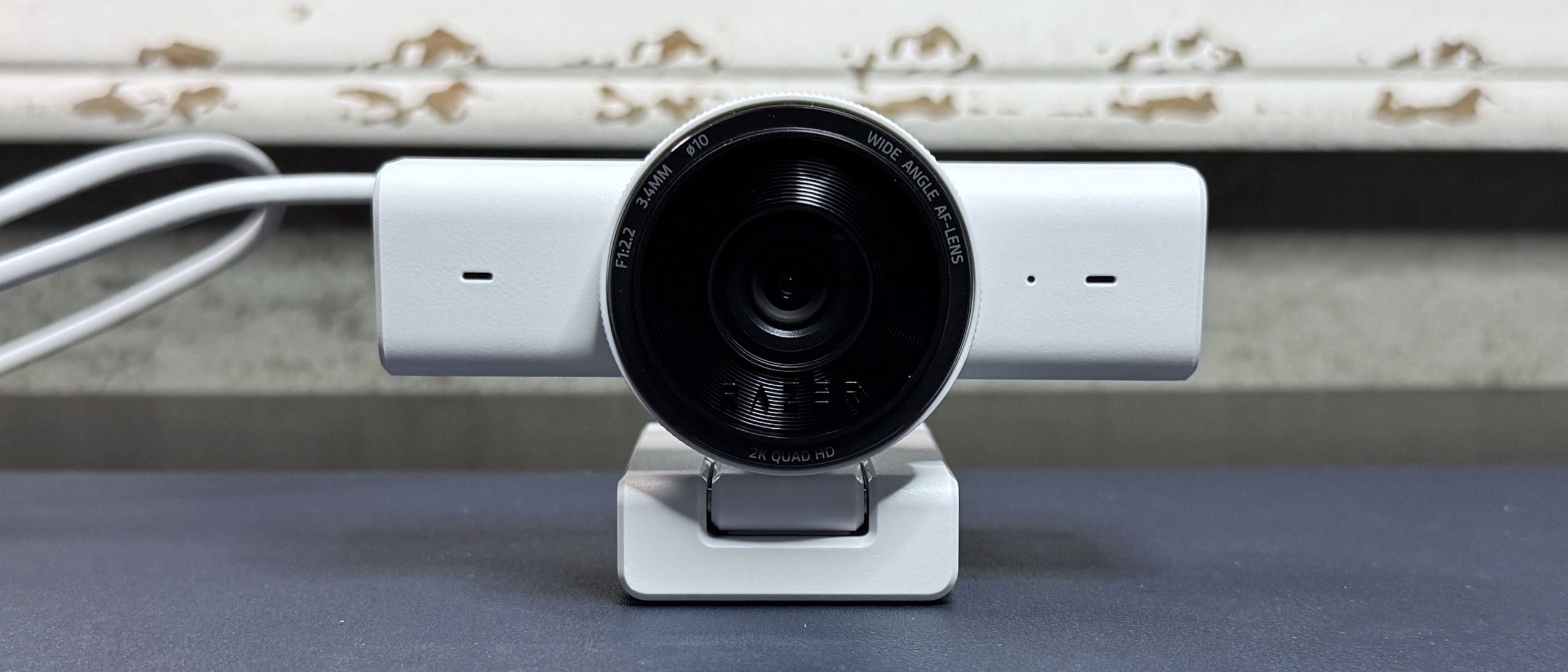
The Kiyo V2 X comes with its accessories permanently attached: a 5-foot (1.5m) rubber USB-A cable with a built-in cable tie, and an L-shaped monitor mount. The cable is fine, if a little stiff — but that's pretty typical of built-in webcam cables. It's a USB-A cable and it supports USB 2.0, which is a relief, as we've seen a couple of webcams recently that require USB 3.0 to even function (including the Kiyo V2, which needs a USB-C port).
The built-in monitor mount is a standard Razer-style L-shaped mount. It has a small lip at the front to secure the mount to your monitor, along with a rubber-coated "foot" that presses against the back of your monitor to keep the webcam in place. The mount allows you to swivel the camera (360 degrees) and tilt (slightly past 90 degrees), and has a 1/4-inch threaded tripod attachment point on the bottom, in case you want to put the Kiyo V2 X on a tripod.
Razer Kiyo V2 X (Image credit: Tom's Hardware) Dell Pro Webcam (WB5023) (Image credit: Future) Elgato MK.2 (Image credit: Tom's Hardware) The Kiyo V2 X performed fairly well in our well-lit test scenario. I wasn't blown away by the picture quality, detail-wise, even with the camera set to shoot in 1440p / 60 fps, but the webcam did a good job of balancing exposure quickly and auto-white-balancing to produce a realistic-looking and vibrant palette. I'd be pretty happy with this image for a plug-n-play product if I was meeting with my colleagues or friends over video chat. I think the lack of detail was mostly a function of the Kiyo V2 X's default software features/settings, as I found that turning off the 2D / 3D noise reduction in Synapse 4 and disabling auto-focus gave me much crisper pictures — at least while I was in the Synapse 4 software, anyway.
Razer Kiyo V2 X (Image credit: Tom's Hardware) Dell Pro Webcam (WB5023) (Image credit: Tom's Hardware) Elgato Facecam MK.2 (Image credit: Tom's Hardware) Razer's Kiyo line of webcams has always been pretty impressive when it comes to low-light scenarios, but the Kiyo V2 X didn't perform nearly as well as I hoped it would. It seemed to have trouble balancing exposure, oscillating between way too much and way too little several times until it landed on what was definitely way too little. It was very trigger-happy when it came to both the auto-focus and the auto-exposure — it couldn't seem to keep me in focus at all, even when there was a decent amount of light on my face. Also, any movement — or even no movement — seemed to kick the auto-focus into re-focusing, which resulted in me just… never being in focus.
The lack of detail in the well-lit scenario was definitely exacerbated by less-than-ideal lighting, so I went into Synapse 4 to see if there was something I was missing. Turning off 2D and 3D noise reduction did bring back some detail (it was smoothing over a lot of poorly-lit areas), but, naturally, introduced a lot of noise. But it was really the webcam's inability to stick to focusing on one area that made everything kind of fuzzy.
To test the webcam's performance in an over-exposed setting, I turned off the lighting in front of me, save for my primary 34" monitor. I left the overhead light and the lights behind me turned on. An overexposed lighting scenario is any lighting scenario in which there's a lot of light coming from behind you (e.g., with your back against a window), but I use this particular scenario as I think it's pretty realistic — how often are you really taking on-camera conference calls while sitting up against a window?
Razer Kiyo V2 X (Image credit: Tom's Hardware) Dell Pro Webcam (WB5023) (Image credit: Tom's Hardware) Elgato Facecam MK.2 (Image credit: Tom's Hardware) The Kiyo V2 X performed pretty poorly in this scenario, too. Not only was it unable to calibrate the light balance properly (resulting in a lot of blown out areas in the background), it also couldn't focus on me basically… at all. It did keep trying, however, which was frustrating, to say the least, especially as even the tiniest movement from me seemed to trigger it.
After many, many minutes of this constant auto-focus battle, it seemed to just give up, and stuck me with an extra-blurry image that focused on nothing. I tried to switch over to manual focus, which worked in Razer's Synapse 4 app… and only in Razer's Synapse 4 app. Switching to the Windows 11 camera app or Google Meet or Discord video chat caused the camera to switch back to auto-focus (or at least, that's what I think it did — either that, or manual focus isn't actually all that manual). I'm sure this could be fixed with a firmware update, but, well, Razer needs to make that firmware update.
1440p / 60 fps; 1080p / 60/30/24 fps; 720p / 60/30 fps
Key considerations
- Investor positioning can change fast
- Volatility remains possible near catalysts
- Macro rates and liquidity can dominate flows
Reference reading
- https://www.tomshardware.com/peripherals/webcams/SPONSORED_LINK_URL
- https://www.tomshardware.com/peripherals/webcams/razer-kiyo-v2-x-review#main
- https://www.tomshardware.com
- Dev releases ‘unblockable’ ASCII video stream software, stoking fears of unstoppable ads — delivers 360p video at 30 FPS and acts as a ‘bridge for AI’
- Nvidia raises RTX Pro 6000 Blackwell GPU pricing to $13,250 — 55% increase over MSRP in a year's time
- Hardcore SpongeBob speedrunners smudged Xbox optical disks with sweat and grease to exploit 'lag clip' trick — filthy smeared disks cut gameplay times in ultima
- Amazon says its data centers consume only 0.075% of the water Americans use for watering their lawns and gardens — company also boasts of its improvements in wa
- Dev releases ‘unblockable’ ASCII video stream software, stoking fears of unstoppable ads — delivers 360p video at 30 FPS and acts as a ‘bridge for AI’
Informational only. No financial advice. Do your own research.