
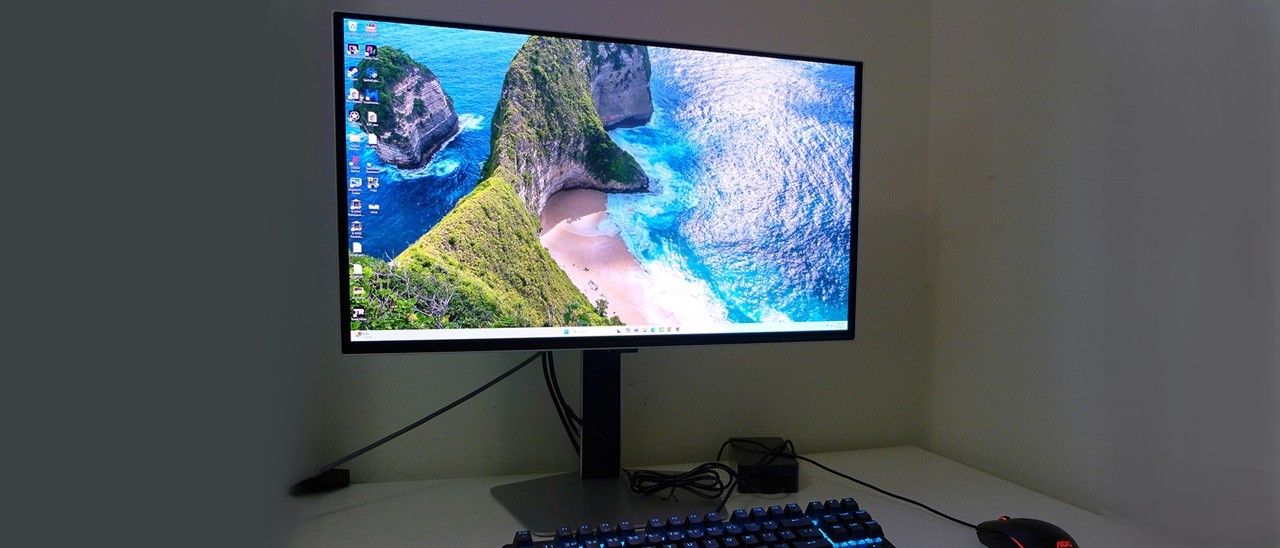
So, do you go with a jumbo extreme curved monitor like the S40FG75? Or would you rather enjoy the incredible performance and image quality of a smaller flat screen like the S27FG60? The price differences are small, but the physical aspects and user experience couldn’t be more diverse.
The S27FG60 is secured in crumbly foam and comes in a plain carton with no announcement of the exotic display lurking inside. The three main components snap together, no tools needed. There’s an external power supply with right-angle plugs, and you get DisplayPort, USB, and HDMI cables.
(Image credit: Samsung) (Image credit: Samsung) (Image credit: Samsung) (Image credit: Samsung) The S27FG60 presents a silver metal finish offset by the black screen and flush bezel. It’s narrow enough not to be noticed when the power is on. Only a tiny “Samsung” peeks out from underneath on a small protrusion. The panel’s metal backing curls around the front like an iPhone's border and lends a bit of posh to the aesthetic.
The stand is rooted with a heavy metal plate. The upright is solid with firm movements that include 2/25 degrees tilt, 30 degrees swivel and 4.7 inches of height. You also get a 90-degree portrait mode. The fulcrum is where you’ll find the LED light ring. It glows in every color and includes effects that you can dial up in the OSD. Samsung calls it Infinity Core.
Around back, you can see a large metal piece with a plastic insert at the bottom. It has a convenient input panel that faces backwards. On one side is the OSD joystick, followed by USB 3.2 ports, one up and two down, a 3.5mm headphone jack, two HDMI 2.1s and a DisplayPort 1.4. To manage the wiring, there’s a rubber band on the upright.
For tweakers, there are fixed color temps plus a single point white balance control. Five gamma presets and a color gamut selector round out the options. To get sRGB color for SDR content, choose Auto. To see the full 108% of DCI-P3 that the S27FG60 covers, choose Native.
To ensure long panel life, the S27FG60 has a graphene layer behind the OLED and a heat pipe design that keeps temps in check with no need for internal fans. The metal backing helps dissipate heat too. And you get logo dimming along with a panel refresh routine. I noted that the panel ran the refresh automatically when I turned it on for the first time. This ensures optimal field uniformity, which you’ll see later is exemplary.
The S27FG60 doesn’t require calibration in its default Eco picture mode, but I went for it anyway and saw a tiny improvement in color saturation. White balance is already visually perfect but a few tweaks of the RGB sliders make it even more perfect. I also darkened gamma by one click to deepen the image and make textures more tactile. My SDR settings are below.
For HDR signals, the S27FG60 switches itself automatically. You can still calibrate, but there’s no need. That opens up the variable brightness option, which Samsung confusingly calls Peak Brightness. Set this to High for excellent luminance tracking and color accuracy.
I’ve said many times that high refresh OLEDs are precise. When you turn and shoot, you are more likely to hit the target when playing on a 240 Hz or faster OLED. You’ll read my findings on just how quick the S27FG60 is on the next page, but numbers aside, it’s quick. It’s clear since I always play the same games when a monitor enhances my abilities. I move through levels faster and dispatch enemies more easily. The S27FG60 kept up with my every whim and almost anticipated my changes in direction. If you’re bent on competition, this is a serious weapon that professional and casual gamers alike will want for their toolkit.
Image quality was superb from the get-go. Though I always calibrate if the options are there, the S27FG60 doesn’t need any help to look amazing. Color is spot-on, and the only tweak I felt I needed was to reduce gamma one click for SDR content. This added in a bit of texture and saturated color a tad more. It’s subtle but worth doing.
For work tasks, the S27FG60 serves perfectly as a tool for spreadsheets, word processing and web browsing. The image is not fatiguing at all. I noted that variable brightness, called Peak Brightness here, was not available for SDR content but was turned on effectively in HDR mode. For productivity, this is fine, but I would have liked the option to vary the peak white levels for video. I noted that setting Color Space to Auto in SDR mode rendered a perfect sRGB gamut, which was handy for Photoshop and other graphics tasks.
The S27FG60’s build quality is premium all the way with a look and feel befitting its flagship status and price tag. I appreciated the USB ports and back-facing inputs. There were no internal speakers to judge but a pair of cans plugged into the 3.5mm headphone jack provided decent audio .
Takeaway: The S27FG60 looks amazing even when turned off and delivers an image you’ll become addicted to. It isn’t much different than any other premium OLED in that regard but when you throw in its speedy, responsive and precise gaming performance, it’s a monitor with few equals. You can save $100 and get a 40-inch curved ultra-wide but then you’d give up that stunning image and super-fast frame rate.
Current page: Features and Specifications
Key considerations
- Investor positioning can change fast
- Volatility remains possible near catalysts
- Macro rates and liquidity can dominate flows
Reference reading
- https://www.tomshardware.com/monitors/gaming-monitors/SPONSORED_LINK_URL
- https://www.tomshardware.com/monitors/gaming-monitors/samsung-odyssey-oled-g6-s27fg60-27-inch-500-hz-qd-oled-gaming-monitor-review#main
- https://www.tomshardware.com
- Now Generally Available, NVIDIA RTX PRO 5000 72GB Blackwell GPU Expands Memory Options for Desktop Agentic AI
- Researchers discover that some biodegradable electronics produce microplastics as they degrade — the investigated material is commonly used in medical research
- NVIDIA Awards up to $60,000 Research Fellowships to PhD Students
- Nvidia GeForce RTX 5090 power wire reportedly caught fire despite using the original cable — CPU cooler's tubing was also caught in the blaze
- ChatGPT could prioritize sponsored content as part of ad strategy — sponsored content could allegedly be given preferential treatment in LLM’s responses, OpenAI
Informational only. No financial advice. Do your own research.